





rizzyc
Members
-
Joined
-
Last visited
-
Thanks, I rebuild my data disk last night. It took about 8 hours and everything went smoothly! It was almost too easy! This is kinda why I love unraid actually was experimenting with truenas and it was a pain to even get plex working properly.
-
So parity seems to be fine, how do I go about adding my actual drive to the array? I can just select it and start the array? I was worried if I just start it like this the parity would get messed up trying sync with the disk I accidentally formatted.
-
tower-diagnostics-20240210-0954.zip
-
Oh yes, I was able to bring it up and it looks like it says its emulating the data disk and I was able to see some of my files.
-
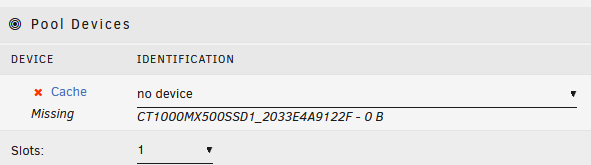
Yeah, I only had one parity and one data disk. The only other device had was a cache drive? Do I have to have this connected as well?
-
Here are the diagnostics (without starting the array) tower-diagnostics-20240210-0841.zip
-
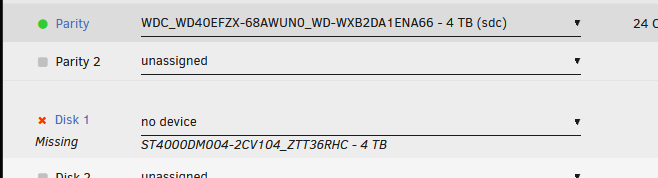
When I unselect the data drive (that I messed up) I have selected my parity drive but it doesn't let me start unless I do it in Maintenance mode and select both checkboxes.

-
When you say disconnected, you mean like physically disconnected from the motherboard? Or just not selected before starting array. I did at one point only have the parity hard drive connected and unraid does say it's in good health. But without the data hard disk in, I think it wouldn't let me start the array and I was also afraid of messing up so I have not yet tried to start the array.
-
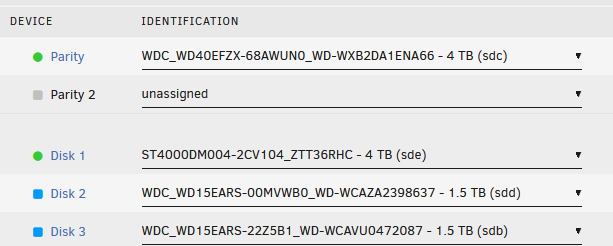
I moved my unraid to a new machine and then I accidentally formatted my actual data drive in windows... I now have my unraid server back up, but i want to make sure it rebuilds my data drive (disk 1) using parity since i'm sure i messed up the disk my formatting it in windows. I don't want to start my array cuz i'm afraid that i will lose my data... What is the correct way to go about this and also is there a way for me to explore the contents of the hard drive without starting the array. (Disk 2 and Disk 3) are just older hd's I found lying around so will add them to the array as well.
-
Thanks for your help, I did end up moving my Unraid USB to a less power hungry machine and copying over the config file and making it bootable worked!
-
Yeah, it boots fine with new super.dat. I had one 4tb parity and one 4tb hd so that is correct. Also had one cache drive
-
Not sure if this helps, I wasn't able to read the file. super.dat
-
I tried copying over just super.dat and overwriting that file from the freshly created USB but it just gets stuck again like it did before
-
So I backed up my USB and flashed a fresh unraid using the unraid USB creator. Then I copied the config folder over to the USB stick and I was getting the exact same error. So I reflashed it using the creator and told it to boot to Gui and the screen eventually turned blank. I was able to login from my phone but I didn't want to start the raid since I don't remember which drive was parity and it says it will wipe the drive when I start thr array and also the it won't let me activate it since it says the USB is key is in use. Im hoping there is a way I can restore at least my drive config even if I have to reinstall all the docker apps.
-
I ran the checkdisk utility in windows 11 but I don't think it found any errors. Booted up and still shows the same screen. I also see the machine in my router list but can't access it



