





Thomasg1977
Members
-
Joined
-
Last visited
-
Ok, dann Danke für die Info. Ich dachte es wäre möglich über Terminalbefehle oder so - also, wieder was gelernt 🙂
-
Hallo, gibt es eine Möglichkeit, manuell einen Docker Update durchzuführen? Speziell möchte ich die Trilium Notes App 0.46.7 auf die aktuelle Version 0.52.3 bekommen; irgendwie geht das aber nicht. Über die App "Auto Update Applications" findet er keine Aktualisierung ;( geht das irgendwie manuell? VG Thomas
-
Hallo, ich hätte da mal wieder eine Frage 🙂 Ich hatte gestern das Problem bei LuckyBackup, dass plötzlich meine einwandfrei, bisher laufenden Aufträge plötzlich nicht mehr rund liefen. Ich hatte plötzlich Fehlermeldungen in LuckyBackup - Ordner wäre leer und auch ein write Problem, obwohl meine Netzwerkverbindungen alle 100% okay waren und die Ordner eben nicht leer. Ich weiß noch, dass Luckybackup wohl ein Dockerupdate gemacht hatte, ich habe das auch so bei Docker Auto Update Einstellungen eingestellt (Alle Docker Anwendungen aktualisieren). Nachdem ich mir nicht erklären konnte, wo der Fehler lag, habe ich LuckyBackup beendet und neugestartet, dann ging es problemlos. Meine Frage ist jetzt, sollte ich lieber nach einem Updates nochmal von Hand beenden und wieder Neustarten? Oder lieber die automatischen Aktualisierungen generell, manuell durchführen? Gerade bei LuckyBackup möchte ich, dass es einfach im Hintergrund seinen Dienst tut und ich bin gerade überfragt, was nach einem Update besser ist ...
-
Ok, gut zu wissen. Vielleicht lag es auch daran, dass ich das System dermassen verwirrt habe. Erst ein defektes Motherboard - mal ging es und mal nicht... Dann nur eine Festplatte vorher als Unraid System; herumgetestet.... Umbau - neues Motherboard... erste Platte, lief soweit, Community Apps etc. installiert, neue und 2 Festplatte eingebaut aus einem Synology System ... War nicht zu mounten und musste formatiert werden, irgendwie herumgespielt mit dem Dateisystem .... Array an, aus, an, .... etc. Neustart etc. Letzlich bekomme ich jedes System hin 🙂 Wie gesagt, jetzt läuft es problemlos 🙂 Nochmals Danke!
-
"Bei dir stimmt was nicht" naja, an manchen Tagen ist das schon mal 🙂 Das Problem hat sich gelöst und ich hatte eigentlich den Beitrag auch gelöscht... Ich hatte im neuen System eine alte Festplatte (da waren noch Reste von einer anderen UnRaid-Installation). Jedenfalls hat es dann irgendwie geklappt, nachdem ich den Dockerdienst nochmal deaktiviert und aktiviert hatte und irgendwo hatte ich auch was mit dem Datenträger gemacht - nur wo - keine Ahnung mehr, irgendwas mit screap scrab. Dann nach einem Neustart war alles okay. Das System läuft jetzt super ... Jetzt müssen nur noch nervige Festplatten entkoppelt werden und leise Gehäuselüfter ins System ... Danke für die Rückmeldung und noch einen schönen Tag 🙂
-
Hallo, ich habe gerade an einem neuen PC Unraid aufgesetzt, nach einem ersten Start und installieren der Community Plugins, erhalte ich die Meldung "Docker Dienst konnte nicht gestartet werden", wenn ich Apps installieren möchte, steht dort folgendes "Docker Service nicht aktiviert - Es sind nur Plugins zum Installieren oder Verwalten verfügbar" ? Wo kann ich diesen Docker Dienst aktivieren? Unter Einstellungen - Docker - habe ich schon deaktiviert und wieder aktiviert, jedoch ohne Erfolg. Einen Neustart habe ich ebenso gemacht.
-
AAAaaaa.... neee alles gut, ist da 🙈 Der Browser war zu schmal eingestellt ... DANKE!!!
-
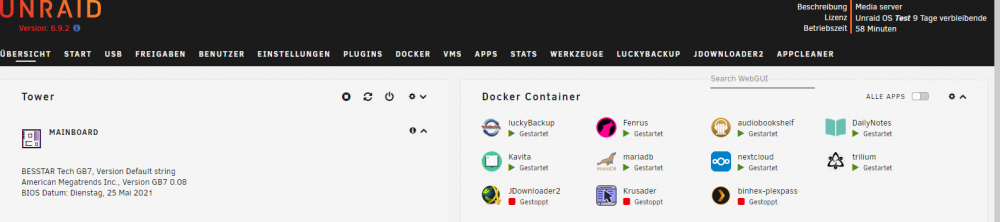
Ok, Danke... jetzt wo ich das sehe, habe ich da zuviel herumgespielt .... die Anzeige ist bei mir anders 🙈 Ich geh mal auf die Suche 🙂
-
Wo genau kann ich das denn eingeben? Ich finde irgendwie kein Terminal Nein, ich nutze keine Stromspar-Mechanismen...
-
Ok, erstmal Danke für die Info. Die Syslog sind aber immer nur ab dem Moment des Neustarts vom System oder gibt es noch irgendwo Zugriff auf ältere Logs? Ist ja echt ärgerlich, dass ich meine externe Festplatte nicht immer dranhängen lassen kann. Oder hilft vielleicht täglich ein Script ausführen unmount - mount? Keine Ahnung 😭 Unraid immer wieder Neustarten macht so keinen Spaß. Also bleibt nur die Überlegung auf die externe Festplatte komplett verzichten, wenn es so unrund läuft Schade ...
-
Naja, aushängen klappt ja jetzt nach einem Neustart. Das Grundproblem war, dass ich ursprünglich meine externe Festplatte im Netzwerk nicht mehr nutzen konnte. In Unraid war hinter der Festplatte dann ein Icon - so ein Kreis, durchgekreuzt und grau ... Nach einem Neustart war die Platte wieder normal ansprechbar im Netzwerk. Ich wechselte das USB Kabel und hoffte, dass hier das Problem lag. Lag natürlich nicht daran - wäre ja zu einfach dann gestern, war die externe Platte komplett raus ... keine Anzeige mehr unter "Unassigned Device". Nach Neustart wieder alles normal. Ich ziehe die Festplatte auch nie ab, liegt alles weit entfernt im Regal an meinem MiniPC.... An Prozessen im Netzwerk habe ich Luckybackup jede Nacht laufen... Hier werden von meiner eingebauten SSD alle wichtigen Ordner gesichert. Luckybackup greift also auf die interne SSD zu und auf die externe Festplatte jede Nacht. Des Weiteren ist im Netzwerk auch noch ein MacMini als PlexServer aktiv. Die Filme usw. laufen alle über den MacMini, angeschlossen mit externen Festplatten+Hub - alles tadellos seit Jahren. Der MacMini fährt täglich um 10:00 hoch und Nachts wieder runter. Über den MacMini greife ich auf das interne SSD Laufwerk vom Unraid System zu, hier liegen meine ganzen Fotos, die ich in Plex sehe. *ICH WEIß, ALLES ETWAS Konfus, aber für mich macht es Sinn 🙂 ............denke ich ...... hoffe ich vielleicht sollte ich über die Struktur nochmal nachdenken? Den PlexServer hätte ich auch gerne am Unraid System, dass ist aber nur ein MiniPC und ich will da nicht mit HUB+externe Festplatte arbeiten (läuft alles 1a am Mac). Außerdem lauft noch Kavita (Ebook Server) und Audiobookshelf (Server für Audiomaterial) diese holen ihre Daten von der internen SSD, die ebook und audio Dateien werden ebenso von Luckybackup jede Nacht gesichert ... Ohje, dass klingt KOnFusssssssssssssssss ...
-
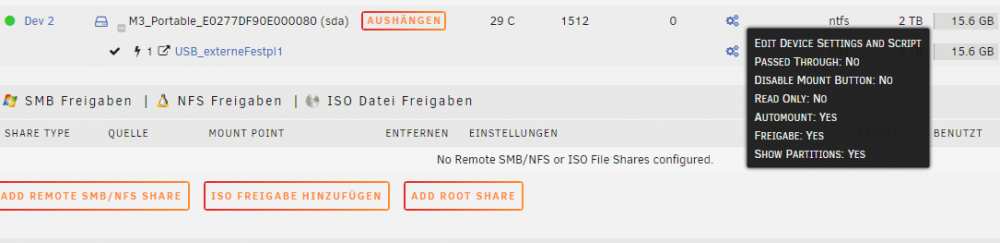
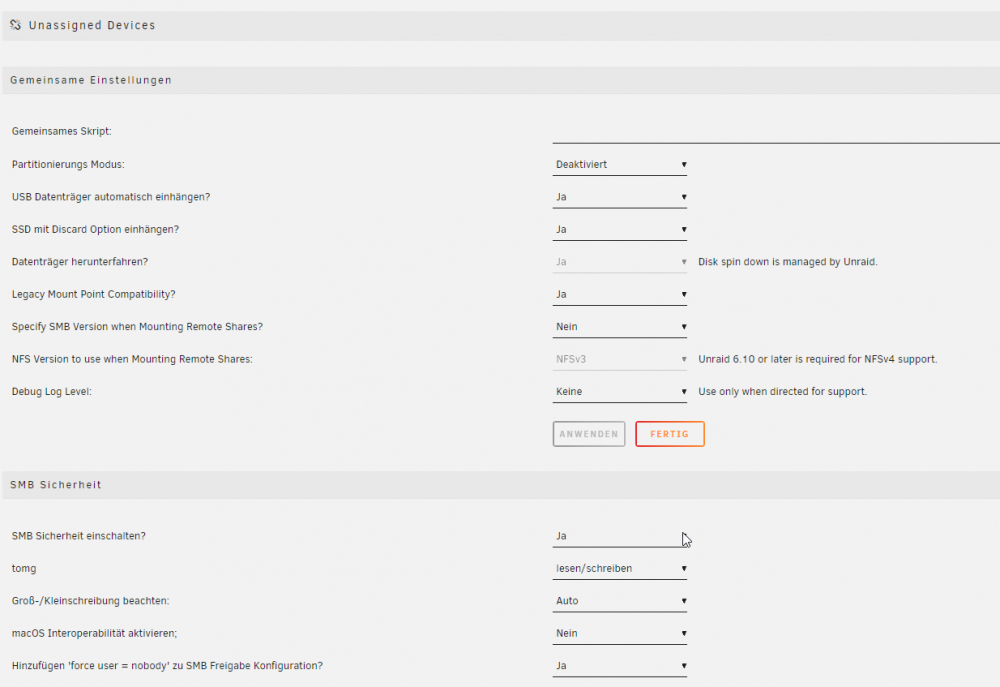
Hi, erstmal Danke für die Rückmeldung. Bezüglich des "Passed" lag es wohl daran, dass ich an den Einstellungen herumgespielt habe, nachdem die Festplatte weg war. Ich hatte dort auf "Passed Through" auf on gestellt 🙈. Aber wie gesagt, dass Problem ist, dass die Platte komplett raus war ... 0 Anzeige. Könnte es evtl. sein, dass irgendwas mit den Netzwerkprotokollen nicht so 100% in Ordnung ist, ich nutze für mein Netzwerk PC und Mac? @alturismo Wo genau bekomme ich die logs her? Meinst Du vielleicht bei Diagnose? Unter System Protokoll sind nur die von heute Und beim Laufwerk direkt das Datenträger Protokoll ebenso ----- Hier noch meine unassigned Devices Einstellungen
-
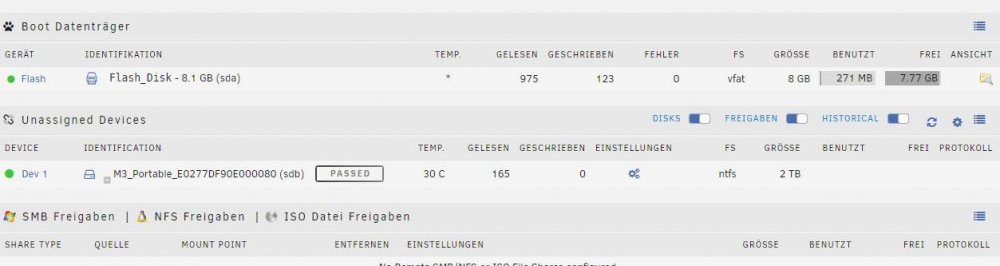
Hallo, leider muss ich hier nochmal schreiben Gestern hatte ich das gleiche Problem, wie oben beschrieben. Daraufhin habe ich das USB Kabel der externen, angeschlossenen Festplatte getauscht. Gerade sehe ich, dass das Laufwerk nun komplett weg war, aus der Anzeige bei Unassigned Devices war es raus. Nach einem Neustart habe ich nun die Anzeige "PASSED" und im Netzwerk ist kein Zugriff möglich! Was kann ich tun? Wie bekomme ich raus, wo der Fehler sein könnte? Kann doch nicht sein, dass die Festplatte ständig rausgeschmissen wird
-
Ok, dann macht das auch Sinn ... Irgendwie war ich so leicht verwirrt... dachte irgendwie durchreichen ginge ... aber war wohl was anderes, was ich da gehört hab... Danke!
-
Hallo, ich stehe gerade auf dem Schlauch und hoffe, mich kann jemand aufklären. Ich habe gerade die NVidia Treiber entdeckt und frage mich gerade, ob es Sinn macht, diese Treiber über meinem Hauptrechner (der eine NVidia Grafikkarte hat) für Unraid zu installieren. Mein kleiner MiniPC, auf dem Unraid läuft hat keine NVidia Grafikkarte, sondern nur der PC, auf dem ich auf Unraid zugreife... Kann mich bitte jemand aufklären? Macht es Sinn, diese zu installieren?



