





infinisean
Members
-
Joined
-
Last visited
Everything posted by infinisean
-
Yea, the "no trim on array SSDs" thing is.... not ideal. but it's not really worth debating since they will likely never implement that for what they see as a very minor percentage of their user base who stands to benefit from it. Plenty of other places / features that would be higher on the priority list to try and get implemented. I do still have one open issue from another topic, if you could possibly help with that.... I have a drive that unraid said was "missing" from the array.... but it is still accessible and functioning (mount, read, etc.) just fine. Yet no matter what I do, I can't get that drive to show up in the drop-down menu when assigning drives to slots..... so I can't use it. How can I reset what unraid is "seeing" that it believes that drive is not a valid potential drive to add? I have no idea how to reset or override that "decision" or even where to look.
-
Out of curiosity, what would the downside to using an SSD for parity be (or is it still a valid concern) if the array is just going to be used as a media file storage location.... i.e. write once, read many.... for many very large files..... so not re-writing data (almost ever), just streaming writes, once, then streaming (one) read at a time when watching a movie... I don't see the downside to an SSD in that scenario, do you? That said, now that I understand the limitation, I will just swap the SSD for a platter drive for parity, since it doesn't really matter (for the same reasons). But I have to say, this is nother situation that would be super easy to actually notify the user with some useful debug/failure messages (about the different partitioning approach from one drive type to another), which would prevent frustration on my end and unnecessary support tickets on your end where you have to repeatedly answer the same question over and over. Why do they seem so opposed to useful debug info to help the users troubleshoot on their own??
-
Gladly (see attached)... however, it seems to me like all the info needed to confirm this parity drive is, indeed, at least the same size or bigger than any other drive in the array.... and I don't mean this sarcastically, I genuinely want to know if you expect you will find some additional / contradictory information in the troubleshooting capture compared to what I included in my screenshots above, I genuinely want to know so I know where to look for all the relevant information needed when I run into a problem in the future. Just based on the screenshots I put in my first post (which shows all 5 array drives and the parity drive are identical, both in byte and sector count), based on that as a premis, this drive should be eligible to fill the parity drive role, correct? I just want to make sure I understand how this should be working and that it's not something simple that I overlooked / misunderstood. Thanks unraid-vm-diagnostics-20260122-2336.zip
-
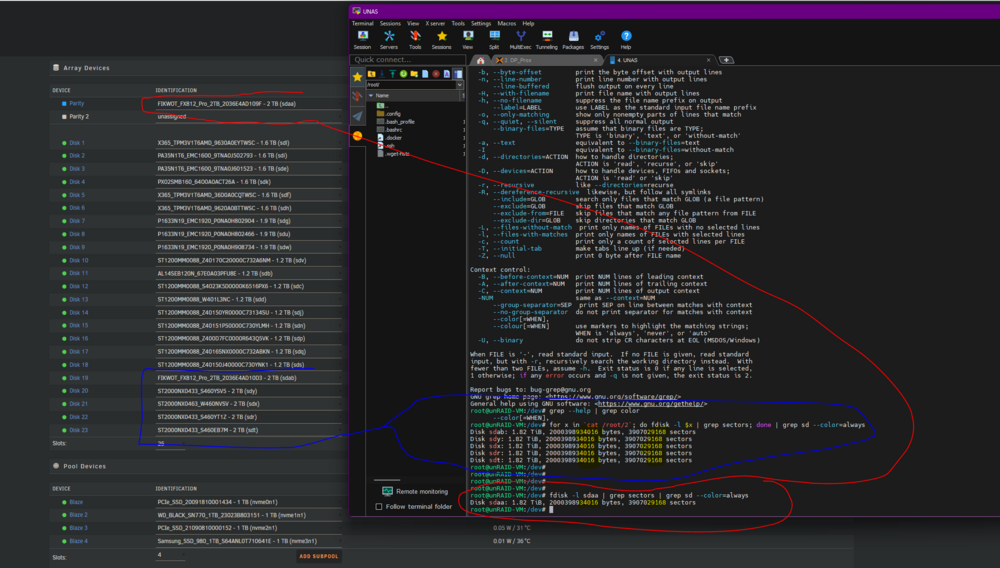
I have an array with a max disk size of 2 TB... 5 disks are the exact same size (identical bytes and sectors). I saved one of those drives (same size) to use as a parity disk.... but it is giving me an error saying it is "Stopped. Disk in parity slot is not biggest.".... anyone know why this would be? Array disks: root@unRAID-VM:/dev# for x in cat /root/2; do fdisk -l $x | grep sectors; done Disk sdab: 1.82 TiB, 2000398934016 bytes, 3907029168 sectors Disk sdy: 1.82 TiB, 2000398934016 bytes, 3907029168 sectors Disk sdx: 1.82 TiB, 2000398934016 bytes, 3907029168 sectors Disk sdr: 1.82 TiB, 2000398934016 bytes, 3907029168 sectors Disk sdt: 1.82 TiB, 2000398934016 bytes, 3907029168 sectors New Parity Disk (failing): root@unRAID-VM:/dev# fdisk -l sdaa | grep sectors Disk sdaa: 1.82 TiB, 2000398934016 bytes, 3907029168 sectors
-
GitHubunraid_tools/multipath_check.py at main · infinisean/unra...Contribute to infinisean/unraid_tools development by creating an account on GitHub.140 lines, I stand corrected.
-
They wouldn't need hardware to reproduce.... I just laid out exactly how to do it in like 120 lines of code. 1. Loop through all /dev/sdXXX (alpha only, no partitions) and get the device identifier string for each one. 2. loop through the list of identifiers and search for all labels that have each one.... now you have a list of identifiers with their corresponding labels (paths). Any IDs that have more than one, treat with caution / warnings. I'd be happy to beta test for them with the actual hardware, if they want. or provide them the simple check script I wrote, that they can use as a starting point. Hell, it would be very simple to actually put safeguards in place to where the user would not even be able to make this kind of mistake if they tried. i.e. once labelA (tied to ID-X) is put in-use, make it impossible to configure anything with labelB (tied to the same ID-X) and voila.... no more cat-tastrophies.
-
Just so you can see what I'm talking about.... I just wrote a quick python script to identify disks which have a second label (path) and this is what my system's drive layout looks like: ================================================================================ DISK IDENTIFIERS: ================================================================================ ID: 091984A5-894A-4149-8C76-EB76D0307C05 /dev/sdf ID: 0x02f9b43f /dev/sda ID: 0x2606f38e /dev/sdar /dev/sdx ID: 0x31fa891f /dev/sdd ID: 0x4799d707 /dev/sdat /dev/sdz ID: 0x4db6dd20 /dev/sdac /dev/sdi ID: 0x5bb3e942 /dev/sdah /dev/sdn ID: 0x6db3ca47 /dev/sdaq /dev/sdw ID: 0x7d892521 /dev/sdas /dev/sdy ID: 0x8e56b73a /dev/sdak /dev/sdq ID: 0x9c919155 /dev/sdab /dev/sdav ID: 0xa1f333fa /dev/sdaa /dev/sdau ID: 0xa9ca1b56 /dev/sdaw ID: 0xbae43e04 /dev/sdaj /dev/sdp ID: 0xbe66a7e1 /dev/sdad /dev/sdj ID: 0xc525762d /dev/sdae /dev/sdk ID: 0xc75a5444 /dev/sdaf /dev/sdl ID: 0xccd7694d /dev/sdal /dev/sdr ID: 0xd016fa22 /dev/sdao /dev/sdu ID: 0xd0a13972 /dev/sdc ID: 0xdba59f85 /dev/sdax ID: 167DDCDA-18F3-456D-B654-4D319BEF5BB1 /dev/sde ID: 5C11EE0D-8018-4099-8281-50E24D051BE1 /dev/sdan /dev/sdt ID: 682700EB-7283-4A63-BAF2-14FFFA71559E /dev/sdba /dev/sdbb ID: 74B85AF7-2A28-4CC5-AEA5-91AD7D348BE1 /dev/sdap /dev/sdv ID: 8ADB5984-A77A-4408-9E98-82BC327883E4 /dev/sdai /dev/sdo ID: 8ED2AB6D-FA1C-4224-B6A5-6D927EA2F312 /dev/sdh ID: 9D72CD99-EC5E-4B58-8C5F-C4E1213C4FB0 /dev/sdag /dev/sdm ID: 9F199BA4-EA66-4023-8F4F-99CCCAD38434 /dev/sday /dev/sdaz ID: D3752B9F-BBEB-4544-89C9-EA6932B4C3D8 /dev/sdam /dev/sds ID: DC74CB27-230D-496A-9491-8FF2FE77D840 /dev/sdg ID: EEB8A91D-1C8C-415A-BC19-2A3413A6B5D4 /dev/sdb I wrote that in 5 minutes, which is about how much effort it would take for UNRAID to identify this kind of scenario and warn against the potential danger of treating a secondary drive label/path as if it were another, unused drive.
-
A simple warning telling me "Hey, you are trying to configure /dev/sdXX, but that is the secondary path for an existing drive, /dev/sdYY" would have been more than enough to stop me dead in my tracks before shooting myself in the foot.
-
I didn't say multipath not working caused data loss.... I said it led me to make a catastrophic mistake, which did involve (re)assigning/configuring a device I did not realize was already in use, since I was working with, what I now know was the second drive label that pointed to a drive that was already active. it was my mistake and I don't deny that.... but like I said, knowing a specific type of hardware configuration** can lead to a confusing / non-obvious, yet dangerous situation where drives have more than one label.... is likely going to cause this kind of issue for more and more people..... so a simple warning (at least) would go a long way toward preventing the kind of easy-to-make mistake that just cost me a drive full of data. ** (especially one that will get more and more common, with the falling prices of older, enterprise gear hitting the secondary market)
-
To be clear, my frustration is not aimed at you.... thank you for providing the info I needed. I just wish it had been posted along the way by the folks making money from this software, as that would have saved me from making a catastrophic mistake....
-
Wow... you're kidding. That is extremely disappointing. Not that multipath is not fully supported.... but that THIS is how I had to find out, which is too little, too late, unfortunately. wow. I can almost understand the argument if the developers did not want to invest the time and effort to FULLY support linux-multipath, even though it would not be too hard to implement (Yes, I am a developer too, so I have an idea what it would take) and despite the fact that it would be a huge boon to redundancy / reliability for your customers.... (which I would think would be fairly high priority since the product is for STORING DATA....) almost.... because it is a "new feature" and would "take effort to develope and thoroughly test and not benefit a huge percentage of the existing users", etc.... I get the argument against full support. I don't like or agree with it, but I understand it.... But to be aware of this type of hardware configuration, and the confusing and dangerous situation this type of setup causes for the end users.... and to knowingly ignore the high probability for catastrophic data loss is just wrong. It would take an absolutely minimal amount of effort to simply identify this hardware configuration, when encountered, and then either: A. put in some SIMPLE safety measures to prevent the highly-likely situation that would ultimately result in lost data or (if that miniscule amount of work is too much to ask....then) B. AT THE VERY LEAST WARN THE USER of the situation so they can avoid making the type of mistakes that WILL result in catastrophic data loss. Put another way, this (multipath, and how UNRAID handles it, or doesn't, I should say) is not "an unsupported feature" ... it is POTENTIAL LANDMINE FOR USERS' DATA and the argument is, what.... putting up a "don't play in the minefield, no lifeguard on duty!" SIGN is too much to expect??? I am completely shocked by this.... and extremely disappointed. I can say, for absolute certainty, this is worth (at the absolute minimum) a big, glaring WARNING to the end-user about the potential for data loss with this kind of setup, and UNRAIDs complete lack of support for it (or even the most basic safety measures) since I literally just blew away a full drive worth of data before realizing something was wrong with the sandbox I was playing in. A sign warning of the potential danger I was walking into sure would have been nice a few hours ago.
-
unraid-vm-diagnostics-20260120-0758.zip
-
Can anyone help me understand why an array might think a disk is "missing", when it is most certainly not? i.e. I can mount the partition of the "missing" disk and see all the files.... but I can't re-add the disk to the array because it does not show up in the "add disk" dropdown after creating a "new config". I think it likely has something to do with the unassigned devices plugin*, but I even removed that completely and still don't have the option to re-add my disk to the array because it never shows up in that dropdown as eligible to add. Is there some easy way to get a disk that unraid thinks is ineligible to be added to the array for some reason to be eligible again? I was messing with this plugin because it seems like all of my drives have been duplicated for some reason, likely to do with the UUIDs changing (SAS drives...). In short, I have drives with two drive labels i.e. /dev/sdk and /dev/sdae for example, both point to the same physical drive. I verified this by mounting one, touching a new file, unmounting it, mounting the other and voila.... magically the file exists on both. This seems like a bug or, at least, terrible design to be able to create such a dangerous state..... anyone else seen this behavior?
-
One scenario (which is more and more likely / feasible / cost-effective these days) where multi-threaded write-operations to the Array would indeed yield a *very large* performance increase, is where you have a ton of slow platter drives (I use a bunch of 2 TB, 5400 RPM laptop drives for very low power use, as streaming a media file is a sequental read and does not need high spindle RPM), and one or two very fast SSD / PCIE drives for parity. I have two 4 TB PCIE drives as my parity drives, so I can upgrade my platters to 4 TB eventually and not have to replace my parity drives. Those PCI drives can do 5GB / sec each, easily, and millions of IO/s (which means they will never, ever be the bottleneck, even with 22 spindle operations going in parallel). So there is already a use case (mine) and with the falling price/GB of SSD / PCIe drives, it seems like this would be a more and more attractive option for unraid users If only we had a multithreaded write capable array.... Since the answer to this question (from what I've seem) has typically been "it won't gain anything due to the parity drive bottleneck...", and that is demonstrably not true, anymore... Is there any other reason why this feature couldn't be added? Or has this use-case already come to your attention and it is already being worked on? (this would be amazing news for quite a few of us, I imagine). To put it another way, from the company's perspective... The old adage "Big / Fast / Cheap... pick two" can effectively be retired with the (fairly cheap) hardware combination I mentioned above, combined with Unraid's efficient parity application.... all that is missing is the multi-thread-write ability. Since the company would have to invest a fairly minor amount of time/effort to make the Array write operations multi-thread capable, and that would *significantly* raise the performance ceiling that has traditionally been the __single__biggest__drawback__ of Unraid, compared to other NAS implementations.... Why aren't they falling all over themselves to get his feature implemented? It seems obvious (to me, anyway) that the almost *certain* increase in adoption and corresponding sales revenue (from removing the one metric that keeps unraid from being a contender against other NAS options, in many cases) makes this the easiest cost v. benefit analysis in the history of ever ever... But maybe I'm missing something obvious... who knows. I am curious to find out though. Thanks! -Sean
-
That would be a reasonable assumption, but it's not the case here. I know because I can reproduce the issue easily... i.e. stopping all I/O completely. shutting down docker, and confirming nothing is being written (both on the main tab and using the CLI "iostat -k1") Zero I/O happening.... Then, start a samba file transfer from a another machine on my LAN with 10g of bandwidth available between that host and my unraid server(s) (this happens on more than one now)... and immediately see the drive 1 start showing I/O under these conditions: The array is set to "Most Free" or "High Water" Split set to "any folder as needed" (originally I had it split on the top 3 dirs due to the way my media is organized, but it behaves the same with both options) All disks are allowed, none excluded Disk1 is nearly full Other disks have much more free space. Under those conditions, I can't understand why it would continue to write to a disk which is nearly full when there are plenty of other available disks. Am I missing something obvious, or would I be correct in my assumption that something is not right if the nearly-full disk is being written to (consistently) under the above conditions?
-
I installed your plugin and tried a basic configuration. I have 9 btrfs-formatted SSDs mounted and when I run the mergerfs command to create the "pool", it appears to run and exit without error (code 0)... however the new mountpoint does not show up in "df -h", nor can I "cd" to the directory or "ls" it.... when I run umount, it also exits without error, like it correctly unmounted the new mountpoint, and if I re-run umount, it will error saying "not mounted" (as it should). So it appears as though something is either wrong with the options I am using to create the new mount, or there is a bug somewhere. I also tried using fstab and also directly on the command line, both with the same effect. # Disk mounts /dev/sdm1 1.5T 1.5T 30G 99% /mnt/netapp/disk1 /dev/sdo1 1.5T 1.5T 50G 97% /mnt/netapp/disk2 /dev/sdn1 1.5T 1.5T 22G 99% /mnt/netapp/disk3 /dev/sdv1 1.8T 3.8M 1.8T 1% /mnt/netapp/disk4 /dev/sdt1 1.8T 3.8M 1.8T 1% /mnt/netapp/disk5 /dev/sdp1 1.8T 135G 1.7T 8% /mnt/netapp/disk6 /dev/sdl1 1.8T 1.8T 44G 98% /mnt/netapp/disk7 /dev/sdr1 3.5T 3.8M 3.5T 1% /mnt/netapp/disk8 /dev/sds1 1.5T 3.8M 1.5T 1% /mnt/netapp/disk9 /dev/sdu1 3.5T 3.8M 3.5T 1% /mnt/netapp/parity1 (planning to use this with snapraid, once mergerfs is working) # The mergerfs command I used: root@UNAS:/# mergerfs -o allow_other,use_ino,cache.files=partial,dropcacheonclose=true,category.create=mfs,minfreespace=10G,fsname=mergerfs /mnt/appdata/disk* /pool/ root@UNAS:/# ls /pool /bin/ls: cannot access '/pool': No such file or directory root@UNAS:/# umount /pool root@UNAS:/# Any help you can provide would be greatly appreciated. Thanks!
-
Hello all, I'm running ver. 6.12.6 and I just made a stupid, distracted mistake. I'm looking for advice how to proceed from here. I was trying to move about 1 TB of media files off an NVME cache drive to my array, when I ran the cmd mv /mnt/cache/data/media/movies/* /mnt/user/data/media/movies Yes, I am fully aware I am an idiot and where I went wrong. Please, hold the lectures as I am just looking for how to move forward from here. Yes, I know the first thing everyone will say is "restore from backups", however, while I DO have *most* of my data backed up, I do not have *ALL* of it backed up (long story, again, no lectures please...) and the array is about 16 TB. So, restoring entirely from backups is not possible (and would take approximately six lifetimes to complete, if it were). I'll restore what I need to (and what is possible to) from backups, but I am trying to minimize that process and retain as much of the original (uncorrupted) media files as possible. My questions are: 1. What should I do from here? (I did immediately stop docker / VMs and unmount the array, so as to avoid writing any more data and compounding the problem further)... I think the next step is to scan the filesystem(s) to see what is corrupted/missing... but 2. Should I do it against the individual disks while unmounted? mount the array in maint. mode and run that way? (Note: The individual disks are XFS formatted, and the cache drive is BTRFS) What is the best way to determine exactly which files have been corrupted, if any, and how best to minimize further damage? Lastly, I do not believe the files that were in the cache drive had files with the same names on the array... so, is it possible nothing was corrupted when I ran the (very, very stupid) command that I ran? Could they, along with the rest of my files, still be intact, somehow? (I realize this is a long-shot, but one can hope, right?) Any assistance/advice will be greatly appreciated. Thank you!
-
I am having this issue as well on 6.12.6 And yes, I have run memtest. all 256 GB of ECC memory tests just fine. In my case, the losf "fault" immediately precedes my 10 NIC loosing link temporarily, which kills all my transfers, so this is causing me a tremendous amount of grief. Can we please get some kind of official attention on this? (more than another canned "have you run memtest?" response, please) It is affecting far too many people across too many versions and for far too long to be any one person's issue... there is clearly a problem here that needs to be addressed.
-
I have tried everything I can think of to avoid adding more data to my Disk1 but nothing works. I tried with it as the lone "exclude" disk, I tried with all disks except 1 as "included", and I tried both together which is redundant and should not be necessary... and every combination of fill-up method, but in every scenario, disk1 still gets all new writes to the point it fills up, even when I have 8 other disks with plenty of space free. Is there anything I've not covered that would explain why Disk1 keeps getting ALL the damn writes, when it shouldn't? The other drives work fine..... I can manually copy to them, the "unbalanced" app works fine to redistribute data, etc... it's just that the "new" data sent to the /mnt/user/data share does not obey the rules I configure to prefer the other disks under any circumstances. Any suggestions would be greatly appreciated. Thanks!
-
I did, and that didn't help... but I did figure out the cause, or at least part of it. One of my disks filled up at one point, and after that the bytes counters stopped working. Redistributing some data so that disk was no longer full didn't fix the counters, but after the next reboot (once the disk was no longer full), they started working again. So it seems like it might be some corner-case bug that is only triggered when an individual disk fills up. While that did solve the mystery of the non-functional byte counters, it exposed a different mystery... why that disk filled up to begin with. I have tried everything I can think of to avoid adding more data to my Disk1 but nothing works. I tried with it as the lone "exclude" disk, I tried with all disks except 1 as "included", and I tried both together which is redundant and should not be necessary... and every combination of fill-up method, but in every scenario, disk1 still gets all new writes to the point it fills up, even when I have 8 other disks with plenty of space free. Is there anything I've not covered that would explain why Disk1 keeps getting ALL the damn writes, when it shouldn't? The other drives work fine..... I can manually copy to them, the "unbalanced" app works fine to redistribute data, etc... it's just that the "new" data sent to the /mnt/user/data share does not obey the rules I configure to prefer the other disks under any circumstances. Any suggestions would be greatly appreciated. Thanks!
-
They are Input/outputs per second (IOPs), and I’m talking like 2k iops per second / 3-400 MB/sec, so not negligible at all.
-
Hi All, I've been using Unraid for a few years now and love it. Fairly familiar with all of its features, so this issue is a major headscratcher. First, I'll say I have two unraid servers, both running 6.12.6. Primary server does NOT have this issue, secondary does and I can't figure out why... On the "Main" tab, if I am in the "Reads/Writes (IO/s)" mode for the disk counters, they increment as expected while any disk operations are ongoing. When I click to change to "bytes" mode, all disks remain at 0 Bytes/sec, forever, while the same operations are running. I can switch back and forth, in real time white xfers are running, one mode works and one shows constant zero. I can't think of a reason for this behavior, nor can I find a setting that affects the counters and I've been trying for a while. - I've stopped/started the array, rebooted, etc. No change. - The array is started and has no errors, parity is valid (one disk) - Docker running or not (no difference) - If I log into the server via SSH or the terminal through the WebUI and run "iostak -k 1", I see the disk reads/writes in bytes per second, just as I would expect, so the data is clearly accessible, it is just not making it to the WebUI for some reason. Has anyone else seen this? I'm hoping it's something simple I am overlooking, but I can't imagine what it could be at this point. Any assistance would be greatly appreciated. Thanks!

