





santinilor
Members
-
Joined
-
Last visited
-
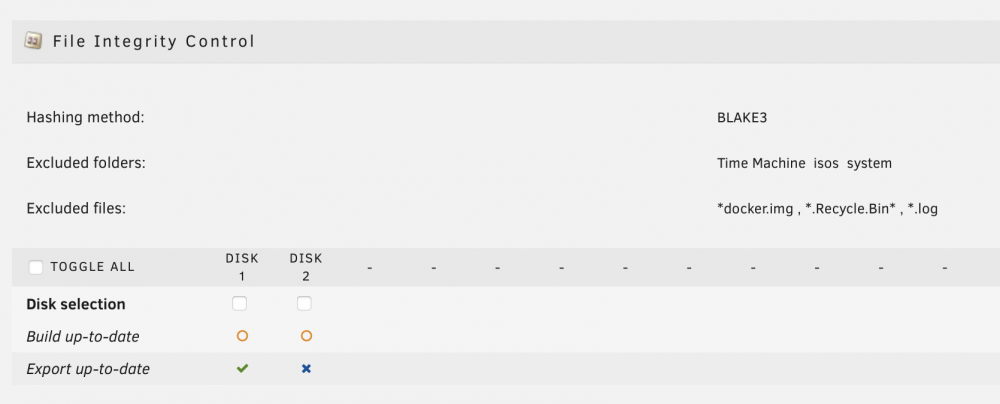
Hi, I've installed the File Integrity plugin and successfully run the first build. I activated the option "Automatically protect new and modified files" but it appears to me that new hashes aren't created automatically. I tried to add a test file to an user share and still, after a couple of days, if I check the exported file (after a new export) the test file hash doesn't appear to be present. Furthermore on the File Integrity control page the disk with the file shows an orange circle near "build up to date". If a do a manual build the circle disappears and the new file hash is created but the whole point of this plugin for me is to automatically protect new files and not have to build it manually each time. Hope someone can help me. Here I attach the diagnostic file jarvis-diagnostics-20220614-1033.zip
-
You say the discriminating factor between him and me is he's using linux and I'm trying windows? However I suppose my unraid experience was going too smoothly until now... 🙄😂
-
Ok thanks... I think I'll stick with the Windows 10 vm for the time being and follow future updates. Thank you very much for your time and your patience
-
So I can only wait and see if there will be any update?
-
Ok thank you. For now I'm pursuing the "setup-via-rdp way" and I'll see if I make any progress. I must say that this last part with UTP got a bit over my head... it's far more complex than I expected it to be. I'll see what I can do. I do really appreciate, however, your help and all the time you've put into this thread.
-
Ok I'll try this
-
I tried to use the "simple" rom and the same crash/reboot problem occurred. So you're telling me that another solution may be UPT but for that I need an additional GPU? Regarding gvt-g I already stumbled upon it while researching for this topic but is it possible to have HDMI output with it? Fortunately at least windows 10 works with the SEABios so I will be using that...
-
Here's the new diagnostic and the syslog jarvis-diagnostics-20220530-1423.zip
-
So if I try to modify the "Windows 11 ovmf q35" to use i440fx the vm gives me back this error XML error: The device at PCI address 0000:00:03.3 cannot be plugged into the PCI controller with index='0'. It requires a controller that accepts a pcie-root-port. I tried modifying an existing vm I had which used i440fx and the entire server crashed and rebooted (I tried two times, both times a crash). Here's the xml file <?xml version='1.0' encoding='UTF-8'?> <domain type='kvm'> <name>Windows 11 ovmf</name> <uuid>cec42a70-1808-056b-87d4-84ab2c171d86</uuid> <metadata> <vmtemplate xmlns="unraid" name="Windows 11" icon="windows11.png" os="windowstpm"/> </metadata> <memory unit='KiB'>5242880</memory> <currentMemory unit='KiB'>5242880</currentMemory> <memoryBacking> <nosharepages/> </memoryBacking> <vcpu placement='static'>8</vcpu> <cputune> <vcpupin vcpu='0' cpuset='2'/> <vcpupin vcpu='1' cpuset='8'/> <vcpupin vcpu='2' cpuset='3'/> <vcpupin vcpu='3' cpuset='9'/> <vcpupin vcpu='4' cpuset='4'/> <vcpupin vcpu='5' cpuset='10'/> <vcpupin vcpu='6' cpuset='5'/> <vcpupin vcpu='7' cpuset='11'/> </cputune> <os> <type arch='x86_64' machine='pc-i440fx-6.2'>hvm</type> <loader readonly='yes' type='pflash'>/usr/share/qemu/ovmf-x64/OVMF_CODE-pure-efi-tpm.fd</loader> <nvram>/etc/libvirt/qemu/nvram/cec42a70-1808-056b-87d4-84ab2c171d86_VARS-pure-efi-tpm.fd</nvram> </os> <features> <acpi/> <apic/> <hyperv mode='custom'> <relaxed state='on'/> <vapic state='on'/> <spinlocks state='on' retries='8191'/> <vendor_id state='on' value='none'/> </hyperv> </features> <cpu mode='host-passthrough' check='none' migratable='on'> <topology sockets='1' dies='1' cores='4' threads='2'/> <cache mode='passthrough'/> </cpu> <clock offset='localtime'> <timer name='hypervclock' present='yes'/> <timer name='hpet' present='no'/> </clock> <on_poweroff>destroy</on_poweroff> <on_reboot>restart</on_reboot> <on_crash>restart</on_crash> <devices> <emulator>/usr/local/sbin/qemu</emulator> <disk type='file' device='disk'> <driver name='qemu' type='raw' cache='writeback'/> <source file='/mnt/user/domains/Windows 11 ovmf/vdisk1.img'/> <target dev='hdc' bus='virtio'/> <boot order='1'/> <address type='pci' domain='0x0000' bus='0x00' slot='0x04' function='0x0'/> </disk> <disk type='file' device='cdrom'> <driver name='qemu' type='raw'/> <source file='/mnt/user/isos/Win11_EnglishInternational_x64v1.iso'/> <target dev='hda' bus='ide'/> <readonly/> <boot order='2'/> <address type='drive' controller='0' bus='0' target='0' unit='0'/> </disk> <disk type='file' device='cdrom'> <driver name='qemu' type='raw'/> <source file='/mnt/user/isos/virtio-win-0.1.217-1.iso'/> <target dev='hdb' bus='ide'/> <readonly/> <address type='drive' controller='0' bus='0' target='0' unit='1'/> </disk> <controller type='pci' index='0' model='pci-root'/> <controller type='ide' index='0'> <address type='pci' domain='0x0000' bus='0x00' slot='0x01' function='0x1'/> </controller> <controller type='virtio-serial' index='0'> <address type='pci' domain='0x0000' bus='0x00' slot='0x05' function='0x0'/> </controller> <controller type='usb' index='0' model='ich9-ehci1'> <address type='pci' domain='0x0000' bus='0x00' slot='0x07' function='0x7'/> </controller> <controller type='usb' index='0' model='ich9-uhci1'> <master startport='0'/> <address type='pci' domain='0x0000' bus='0x00' slot='0x07' function='0x0' multifunction='on'/> </controller> <controller type='usb' index='0' model='ich9-uhci2'> <master startport='2'/> <address type='pci' domain='0x0000' bus='0x00' slot='0x07' function='0x1'/> </controller> <controller type='usb' index='0' model='ich9-uhci3'> <master startport='4'/> <address type='pci' domain='0x0000' bus='0x00' slot='0x07' function='0x2'/> </controller> <interface type='bridge'> <mac address='52:54:00:e5:ff:f1'/> <source bridge='br0'/> <model type='virtio-net'/> <address type='pci' domain='0x0000' bus='0x00' slot='0x03' function='0x0'/> </interface> <serial type='pty'> <target type='isa-serial' port='0'> <model name='isa-serial'/> </target> </serial> <console type='pty'> <target type='serial' port='0'/> </console> <channel type='unix'> <target type='virtio' name='org.qemu.guest_agent.0'/> <address type='virtio-serial' controller='0' bus='0' port='1'/> </channel> <input type='tablet' bus='usb'> <address type='usb' bus='0' port='3'/> </input> <input type='mouse' bus='ps2'/> <input type='keyboard' bus='ps2'/> <tpm model='tpm-tis'> <backend type='emulator' version='2.0' persistent_state='yes'/> </tpm> <audio id='1' type='none'/> <hostdev mode='subsystem' type='pci' managed='yes'> <driver name='vfio'/> <source> <address domain='0x0000' bus='0x00' slot='0x02' function='0x0'/> </source> <rom file='/mnt/user/isos/vbios/i915ovmf.rom'/> <address type='pci' domain='0x0000' bus='0x00' slot='0x02' function='0x0'/> </hostdev> <hostdev mode='subsystem' type='pci' managed='yes'> <driver name='vfio'/> <source> <address domain='0x0000' bus='0x00' slot='0x1f' function='0x3'/> </source> <address type='pci' domain='0x0000' bus='0x00' slot='0x06' function='0x0'/> </hostdev> <hostdev mode='subsystem' type='usb' managed='no'> <source> <vendor id='0x046d'/> <product id='0xc05a'/> </source> <address type='usb' bus='0' port='1'/> </hostdev> <hostdev mode='subsystem' type='usb' managed='no'> <source> <vendor id='0x05ac'/> <product id='0x0267'/> </source> <address type='usb' bus='0' port='2'/> </hostdev> <memballoon model='none'/> </devices> </domain> I created a new vm with i440fx and the server crashed again. I must say this crash thing is new....but I wouldn't really consider it an upgrade..🙄 Then I tried adding the motherboard sound chip and the server didn't crash but became unreachable on the network forcing me to restart it This project is becoming an emotional rollercoast.. jarvis-diagnostics-20220530-1353.zip
-
Unfortunately it seems the prayers weren't enough..🙄😂 No display output and this error message appeared on the vm log qemu-system-x86_64: -device vfio-pci,host=0000:00:02.0,id=hostdev0,bus=pcie.0,addr=0x2,romfile=/mnt/cache/isos/vbios/i915ovmf.rom: IGD device 0000:00:02.0 cannot support legacy mode due to existing devices at address 1f.0 Here's the updated diagnostic file jarvis-diagnostics-20220530-1311.zip
-
Ok here's the diagnostic file. In the meanwhile I'm trying to setup a new vm with q35 and looking online for my igpu bios jarvis-diagnostics-20220530-1229.zip
-
What do you mean? How can I do that? Ok I'm gonna give it a try right now I'll keep you updated, and thank you for your time
-
Hey thank you for your time. 1) SpaceInvader talks about "How to convert GPU to work with EFI for OVMF compatibility" in this video at the minute 11:06. He actually never talks about IGPUs but since the "symptoms" were the same as in my system I figured it could be related (The best way to install and setup a windows 10 vm Part 2 Hardware Passthrough) 2) I actually found out that error 43 in my system is solved by increasing the vm memory and for this reason I've decided to purchase more ram for my system 3) Researching online I've found a bunch of parameters people suggested to add to the syslinux configuration: kernel /bzimage append video=efifb:off,vesafb:off modprobe.blacklist=i2c_i801,i2c_smbus,snd_hda_intel,snd_hda_codec_hdmi,i915,drm,drm_kms_helper,i2c_algo_bit,i915.alpha_support=1 initrd=/bzroot I see that between them there is the video=efifb:off parameter too so I guess ogpu shouldn't be used by efifb (? I'm very new to all of this so my guesses are pretty much garbage..) 4) I've booted unraid in legacy but that didn't change anything 5) I already was using my bios dump but I tried running spaceinvader script again and the script gives me back this message: Okay dumping vbios file named intel-igpu2.rom to the location /mnt/user/isos/vbios/ /mnt/user/isos/vbios/intel-igpu2.rom is less than 70kb This seems small but maybe its correct. Please try it. All done ! I tried using the new dumped vbios but no luck with that either. 6) I tried setting "PCIe ACS override" to multi-function but no display output with this setting either. Now I do think unraid is already using the IGPU because prior to the vm launch the display is showing unraid related log messages but when I start the vm It goes to "no input signal". This is the xml file of my windows 11 vm with OVMF that I'm trying to use. While for windows 10 increasing ram did solve the error 43, for this windows 11 vm doesn't seem to work. It could be that it needs more than 5 gb but I can't allocate more memory without the vm crashing. <?xml version='1.0' encoding='UTF-8'?> <domain type='kvm'> <name>Windows 11 ovmf</name> <uuid>cec42a70-1808-056b-87d4-84ab2c171d86</uuid> <metadata> <vmtemplate xmlns="unraid" name="Windows 11" icon="windows11.png" os="windowstpm"/> </metadata> <memory unit='KiB'>5242880</memory> <currentMemory unit='KiB'>5242880</currentMemory> <memoryBacking> <nosharepages/> </memoryBacking> <vcpu placement='static'>8</vcpu> <cputune> <vcpupin vcpu='0' cpuset='2'/> <vcpupin vcpu='1' cpuset='8'/> <vcpupin vcpu='2' cpuset='3'/> <vcpupin vcpu='3' cpuset='9'/> <vcpupin vcpu='4' cpuset='4'/> <vcpupin vcpu='5' cpuset='10'/> <vcpupin vcpu='6' cpuset='5'/> <vcpupin vcpu='7' cpuset='11'/> </cputune> <os> <type arch='x86_64' machine='pc-i440fx-6.2'>hvm</type> <loader readonly='yes' type='pflash'>/usr/share/qemu/ovmf-x64/OVMF_CODE-pure-efi-tpm.fd</loader> <nvram>/etc/libvirt/qemu/nvram/cec42a70-1808-056b-87d4-84ab2c171d86_VARS-pure-efi-tpm.fd</nvram> </os> <features> <acpi/> <apic/> <hyperv mode='custom'> <relaxed state='on'/> <vapic state='on'/> <spinlocks state='on' retries='8191'/> <vendor_id state='on' value='none'/> </hyperv> </features> <cpu mode='host-passthrough' check='none' migratable='on'> <topology sockets='1' dies='1' cores='4' threads='2'/> <cache mode='passthrough'/> </cpu> <clock offset='localtime'> <timer name='hypervclock' present='yes'/> <timer name='hpet' present='no'/> </clock> <on_poweroff>destroy</on_poweroff> <on_reboot>restart</on_reboot> <on_crash>restart</on_crash> <devices> <emulator>/usr/local/sbin/qemu</emulator> <disk type='file' device='disk'> <driver name='qemu' type='raw' cache='writeback'/> <source file='/mnt/user/domains/Windows 11 ovmf/vdisk1.img'/> <target dev='hdc' bus='virtio'/> <boot order='1'/> <address type='pci' domain='0x0000' bus='0x00' slot='0x06' function='0x0'/> </disk> <disk type='file' device='cdrom'> <driver name='qemu' type='raw'/> <source file='/mnt/user/isos/Win11_EnglishInternational_x64v1.iso'/> <target dev='hda' bus='ide'/> <readonly/> <boot order='2'/> <address type='drive' controller='0' bus='0' target='0' unit='0'/> </disk> <disk type='file' device='cdrom'> <driver name='qemu' type='raw'/> <source file='/mnt/user/isos/virtio-win-0.1.217-1.iso'/> <target dev='hdb' bus='ide'/> <readonly/> <address type='drive' controller='0' bus='0' target='0' unit='1'/> </disk> <controller type='usb' index='0' model='ich9-ehci1'> <address type='pci' domain='0x0000' bus='0x00' slot='0x07' function='0x7'/> </controller> <controller type='usb' index='0' model='ich9-uhci1'> <master startport='0'/> <address type='pci' domain='0x0000' bus='0x00' slot='0x07' function='0x0' multifunction='on'/> </controller> <controller type='usb' index='0' model='ich9-uhci2'> <master startport='2'/> <address type='pci' domain='0x0000' bus='0x00' slot='0x07' function='0x1'/> </controller> <controller type='usb' index='0' model='ich9-uhci3'> <master startport='4'/> <address type='pci' domain='0x0000' bus='0x00' slot='0x07' function='0x2'/> </controller> <controller type='pci' index='0' model='pci-root'/> <controller type='ide' index='0'> <address type='pci' domain='0x0000' bus='0x00' slot='0x01' function='0x1'/> </controller> <controller type='virtio-serial' index='0'> <address type='pci' domain='0x0000' bus='0x00' slot='0x05' function='0x0'/> </controller> <interface type='bridge'> <mac address='52:54:00:e5:ff:f1'/> <source bridge='br0'/> <model type='virtio-net'/> <address type='pci' domain='0x0000' bus='0x00' slot='0x04' function='0x0'/> </interface> <serial type='pty'> <target type='isa-serial' port='0'> <model name='isa-serial'/> </target> </serial> <console type='pty'> <target type='serial' port='0'/> </console> <channel type='unix'> <target type='virtio' name='org.qemu.guest_agent.0'/> <address type='virtio-serial' controller='0' bus='0' port='1'/> </channel> <input type='tablet' bus='usb'> <address type='usb' bus='0' port='3'/> </input> <input type='mouse' bus='ps2'/> <input type='keyboard' bus='ps2'/> <tpm model='tpm-tis'> <backend type='emulator' version='2.0' persistent_state='yes'/> </tpm> <graphics type='vnc' port='-1' autoport='yes' websocket='-1' listen='0.0.0.0' keymap='en-us'> <listen type='address' address='0.0.0.0'/> </graphics> <audio id='1' type='none'/> <video> <model type='qxl' ram='65536' vram='65536' vgamem='16384' heads='1' primary='yes'/> <address type='pci' domain='0x0000' bus='0x00' slot='0x03' function='0x0'/> </video> <hostdev mode='subsystem' type='pci' managed='yes'> <driver name='vfio'/> <source> <address domain='0x0000' bus='0x00' slot='0x02' function='0x0'/> </source> <rom file='/mnt/user/isos/vbios/intel-igpu2.rom'/> <address type='pci' domain='0x0000' bus='0x00' slot='0x02' function='0x0'/> </hostdev> <hostdev mode='subsystem' type='pci' managed='yes'> <driver name='vfio'/> <source> <address domain='0x0000' bus='0x00' slot='0x1f' function='0x3'/> </source> <address type='pci' domain='0x0000' bus='0x00' slot='0x08' function='0x0'/> </hostdev> <hostdev mode='subsystem' type='usb' managed='no'> <source> <vendor id='0x046d'/> <product id='0xc05a'/> </source> <address type='usb' bus='0' port='1'/> </hostdev> <hostdev mode='subsystem' type='usb' managed='no'> <source> <vendor id='0x05ac'/> <product id='0x0267'/> </source> <address type='usb' bus='0' port='2'/> </hostdev> <memballoon model='none'/> </devices> </domain> I hope all of this makes sense and I'm sorry if I've not been clear.
-
So I finally got the display working by changing the bios from OVMF to SaBios. This unfortunately means that I can't install Windows 11 because of the missing TPM support of the BIOS (from what I've understand). However, despite I would prefer to use Windows 11, is not a major problem for me and hence I installed Windows 10. Now I got Windows 10 working but the IGPU still gives me Error 43 in the device manager and the screen quality is very poor. I tried installing the Intel drivers but that didn't improve the situation. Tried adding this following lines to the XML file as I read in another thread but no success with that either. <hyperv> <relaxed state='on'/> <vapic state='on'/> <spinlocks state='on' retries='8191'/> <vpindex state='on'/> <synic state='on'/> <stimer state='on'/> <reset state='on'/> <vendor_id state='on' value='1234567890ab'/> <frequencies state='on'/> </hyperv> I followed this guide of Spaceinvader which between the other things suggested to use SeaBios. The best way to install and setup a windows 10 vm Part 2 Hardware Passthrough Now he goes on explaining how to use a non EFI compatible GPU with OVMF but the sites where he pulls down the BIOS doesn't have one for the Intel UHD 630; I imagine this bios trick is only for external GPUS? Is there any way to make this work with the OVMF bios (and maybe solve the error 43 and the poor image quality)?
-
Hi, thank you for the answer. Is this one the video you're talking about? https://www.youtube.com/watch?v=miYUGWq6l24&pp=ugMICgJpdBABGAE%3D Regarding the sound card I am indeed passing it through, but the error still shows up... however I didn't really understand the IOMMU grouping well, so if you have any resource I could look into I would appreciate it.

