






Everything posted by Lazaros Chalkidis
-
Hey @Pepeb007xx . Sorry about that! The issue was caused by a function that was modifying parent DOM elements outside of the plugin scope, which broke the dashboard layout. A hotfix (v2026.04.01a) has been released. Please update to the latest version and the problem should be resolved. Thanks for reporting it!
-
AI isn’t a quality signal. It’s just another tool. As someone who’s been writing code long before AI-assisted development, I’ve seen this exact discussion come up many times over the years just with different tools each time. We’ve gone through code generators, heavy Stack Overflow copy/paste, frameworks that hide complexity, boilerplate scaffolding tools, even entire plugin ecosystems where people shipped code they didn’t fully understand. None of that guaranteed quality and neither does avoiding those tools. It’s the same thing with AI. A developer who doesn’t understand what they’re shipping will produce fragile software whether they used AI or not. And someone who does understand their code can use AI to move faster without sacrificing quality. So the things that actually matter haven’t changed: understanding the code, taking ownership, supporting what you ship, and building experience over time. Not the tools. Labeling projects based on “AI involvement” risks creating a false sense of confidence. A “none” label doesn’t mean the code is good or safe, and a “primary” label doesn’t automatically make it bad. By that same logic, we might as well start adding badges for which editor or tools were used whether something was written in Notepad, Visual Studio, or anything else. But we’ve never treated those as indicators of quality, because they aren’t. They’re just tools.If the goal is to help users make better decisions, track record is a much stronger signal: how long someone has been active how they respond to issues how often they ship updates whether they show up when things break That’s the kind of context that actually tells you what to expect. At the end of the day, tools don’t ship software. Developers do.
-
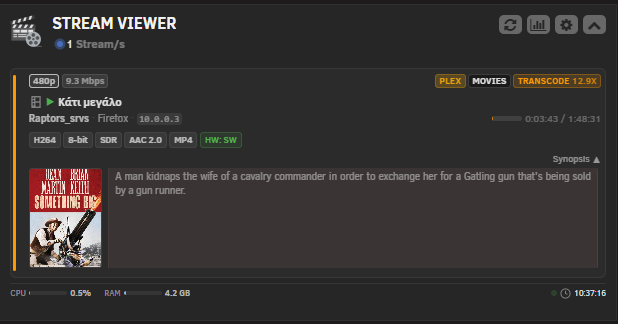
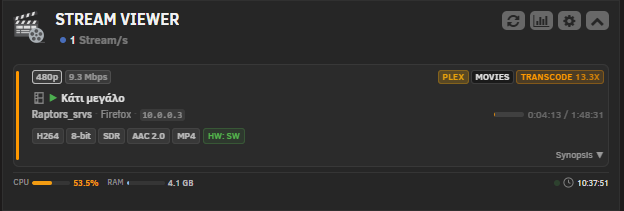
Update v2026.04.01 Widget Codecs displayed as a standalone row below User/Device/IP instead of a collapsible section Synopsis moved below codecs, arrow direction corrected (down when collapsed, up when open) Simplified synopsis toggle header, removed background bar Fixed horizontal scrolling on mobile devices with JS overflow containment Progress bar, server badge and transcode badge now shrink properly on small screens CPU and RAM labels visible again in the footer on mobile Settings Removed "Technical details default state" option Toggle switches resized to match LogsViewer (23x13px) Statistics Removed Beta label from page title Alerts tab renamed to Insights with new icon
-
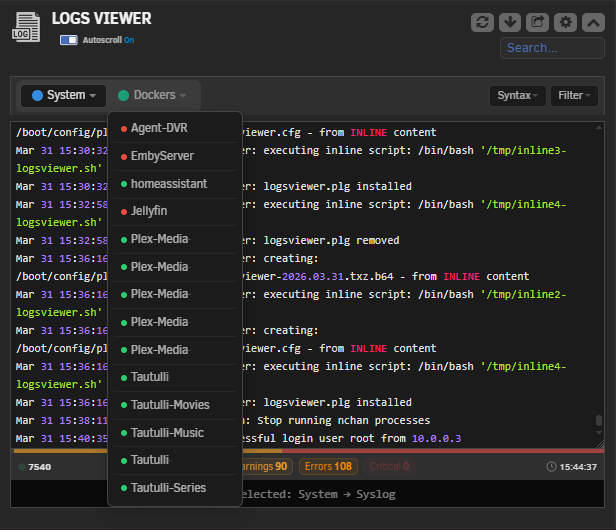
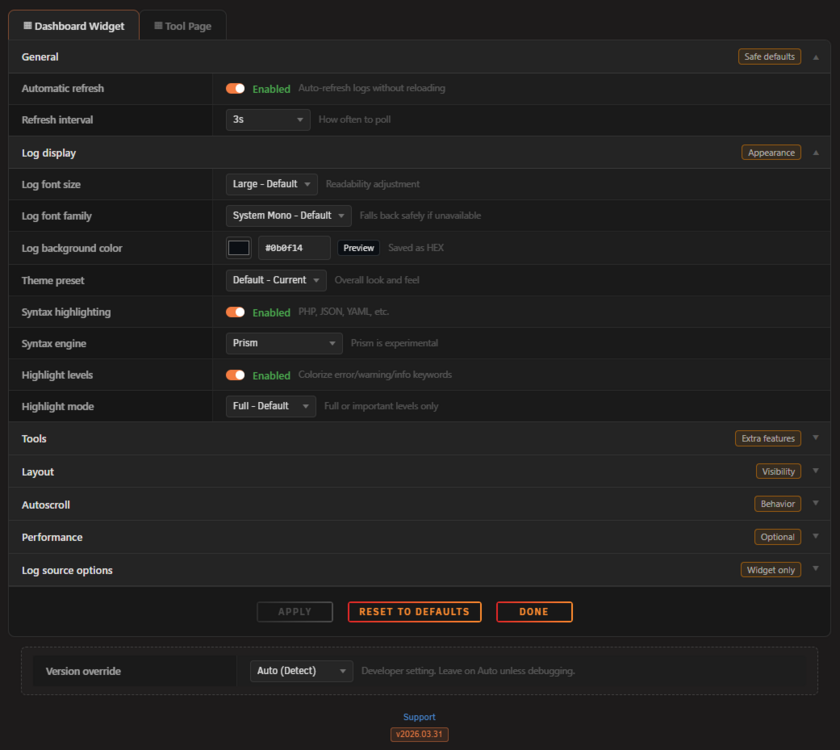
Update pushed today (2026.03.31). Here's what changed: The widget footer got a full redesign. There's now a proportion strip at the top of the footer that shows the ratio of info / warning / error / critical lines as a color bar. Severity badges are clickable and work as quick filters. Docker and VM dropdowns show green / red dots for running / stopped state. Timestamp switched to 24-hour with an SVG clock icon. Responsive layout is in. Five breakpoints from 1024px down to 360px. Header stacks on tablets, footer collapses on phones, tool page goes full width on small screens. Tested on all four Unraid themes (Black, Gray, Azure, White) and fixed all the hardcoded colors that were breaking on light themes. Performance side: auto-refresh now polls only the log you're viewing instead of every enabled source. A content hash mechanism skips the full payload when nothing changed, so idle traffic is close to zero. Level highlighting went from twelve regex passes to one. Syntax libraries are bundled locally now, no more CDN calls. Security got a pass too. The HTML sanitizer is stricter, all settings fields have whitelist validators, INI writes strip control characters, VM log paths are checked with realpath, and security headers are on all API responses. A bunch of fixes as well: syntax dropdown working on 7.2+, double-encoded entities in highlighted output, the diagonal hover artifact on buttons, critical badge not highlighting when selected, and login toast bleeding between dashboard and tool page. Full changelog in the first post and on GitHub. Let me know if you run into anything. Screenshots:
-
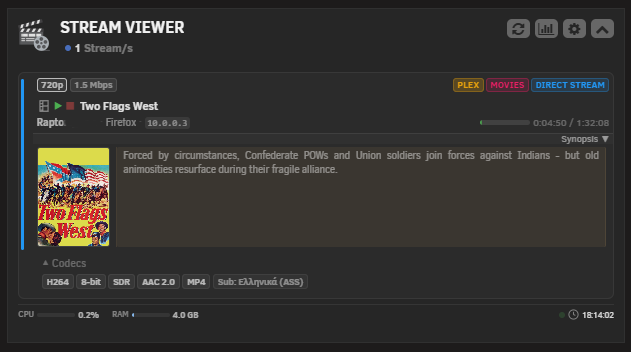
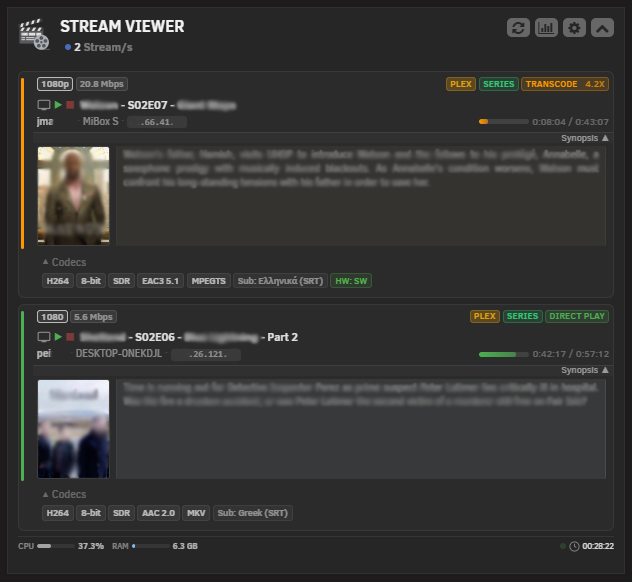
In a future update, I will add 2 or 3 different themes in the widget settings. One of them will display only the codecs without the collapsible section.
-
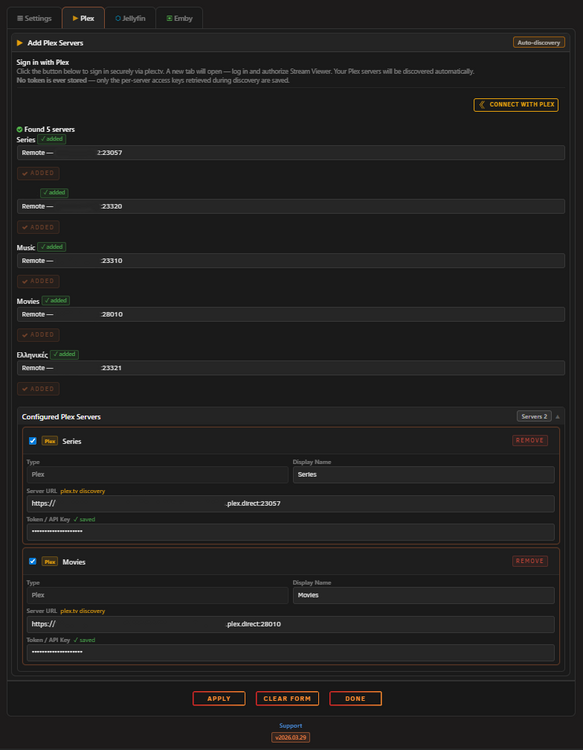
Two plex containers, one for Movies and the other for Series :)
-
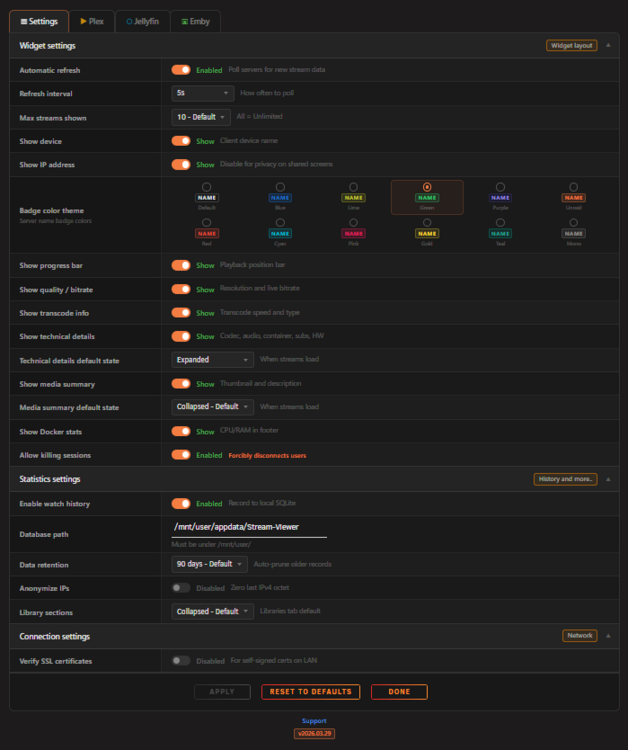
Version 2026.03.30 is out! This release brings a full Settings page redesign and a bunch of visual improvements to the widget. What's new: The Settings page got a complete visual overhaul. Table-cell layout with a fixed label column, zebra striping, toggle switches instead of dropdowns for on/off settings, and collapsible sections with pill tags. Every field now has a short description so you know exactly what each setting does. Badge Color Theme is a new option that lets you pick from 12 color themes for the server name badge in the widget. Default, Blue, Lime, Green, Purple, Unraid, Red, Cyan, Pink, Gold, Teal and Mono. Media type icons got replaced with custom SVG icons (filmstrip for movies, TV screen for series, music note for audio, picture frame for photos). These render consistently across all browsers unlike the old Font Awesome icons. The Synopsis section now extracts the dominant color from the cover art and applies it as a subtle tinted background with matching colored dividers. Small detail but it looks really nice. Refresh Interval is now a select dropdown with fixed options (5s to 300s) instead of a free text input. Media Summary has its own show/hide toggle and default state setting. Bug fixes: Browser password save prompt no longer pops up when clicking Apply or the Credits OK button. Play icon is green again (it accidentally turned white in a previous update). Synopsis arrows now point the correct direction. Under the hood: SQL injection fix in the schema version writer (now uses prepared statements). Docker cache writes are now atomic with LOCK_EX to prevent race conditions on concurrent requests. The plugin icon also got a small refresh with Plex, Jellyfin and Emby colored bars. Full changelog is on GitHub as always. Let me know if you run into any issues!
-
Hello @NachoServer, thanks for the kind words, really appreciate it! Yes, the server name badge color was changed intentionally in this update. It used to match the server type color (orange for Plex, blue for Jellyfin, green for Emby) but it was visually competing with the server type badge (PLEX/JELLYFIN/EMBY) next to it. The grey keeps it neutral so the important badges (server type, play type) stand out more clearly. In the next update I'll add an option to set a custom color for each server name badge so you can style it however you like.
-
Hey, @Pepeb007xx, that looks like the old widget version (the STOP button should no longer have the square icon in this update). Your browser is likely serving cached JS and CSS files from the previous version. Try a hard refresh: Ctrl+F5 or Cmd+Shift+R (1-2 times). A server reboot clears server side cache but the browser keeps its own cache until you force it to reload.
-
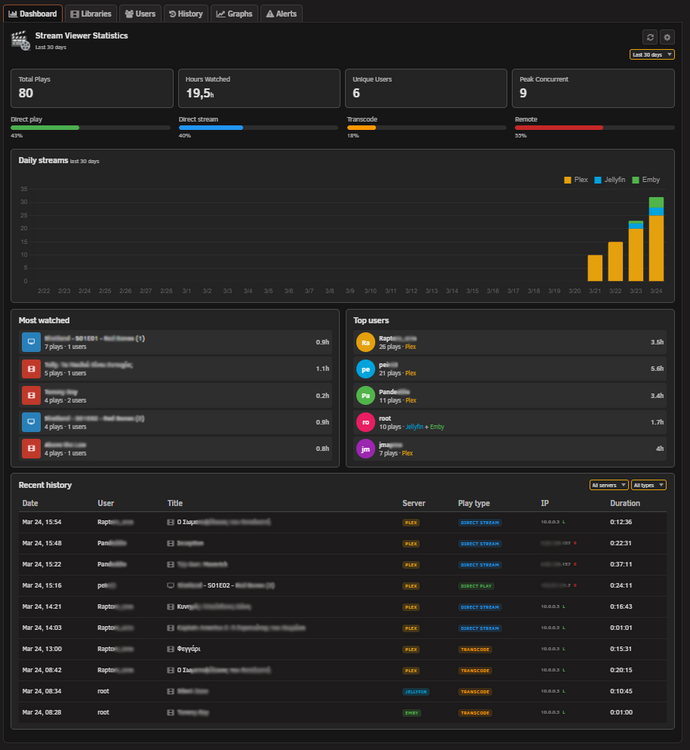
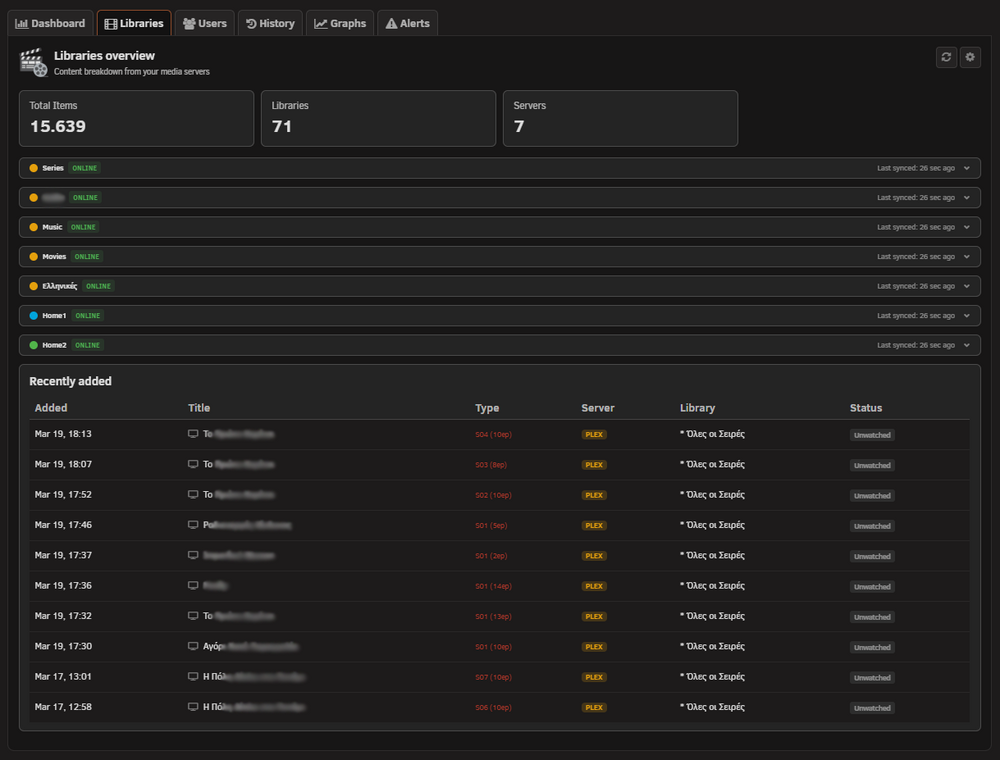
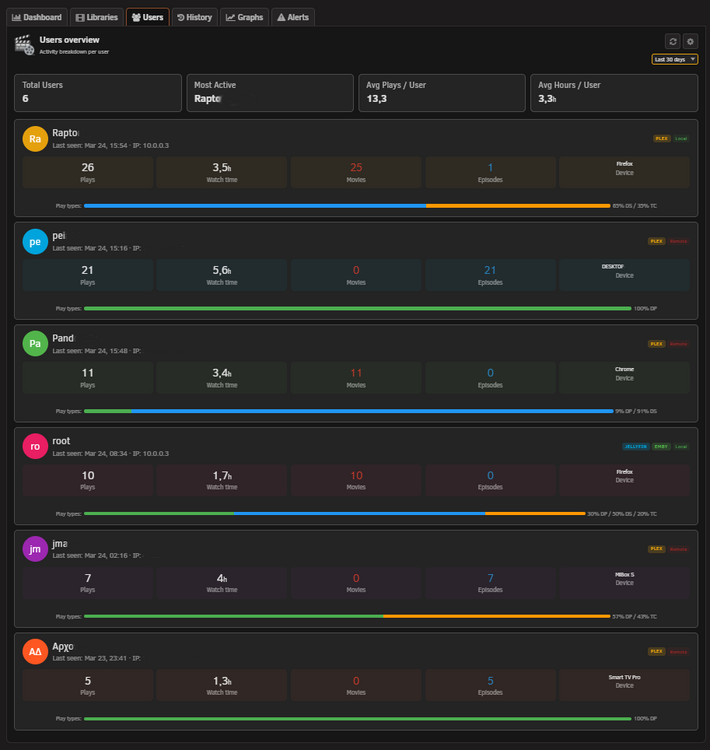
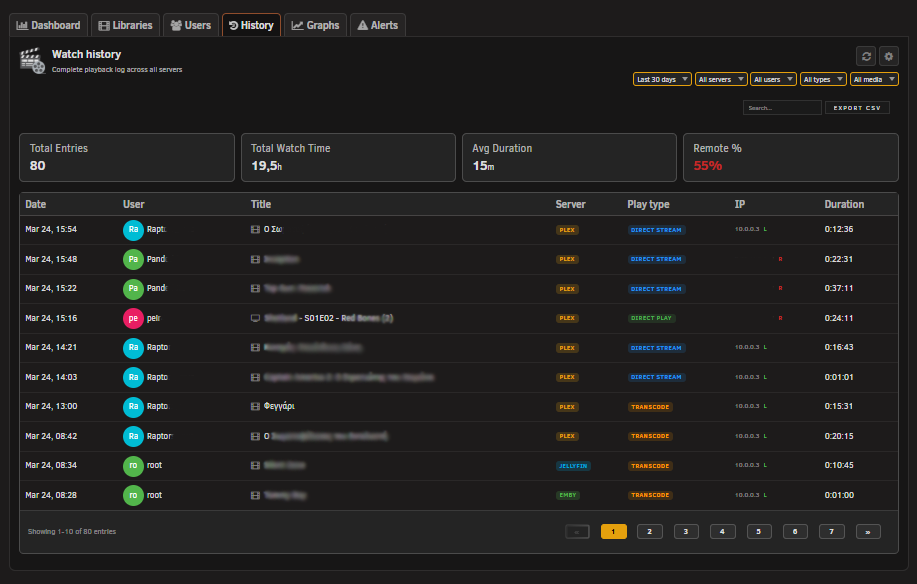
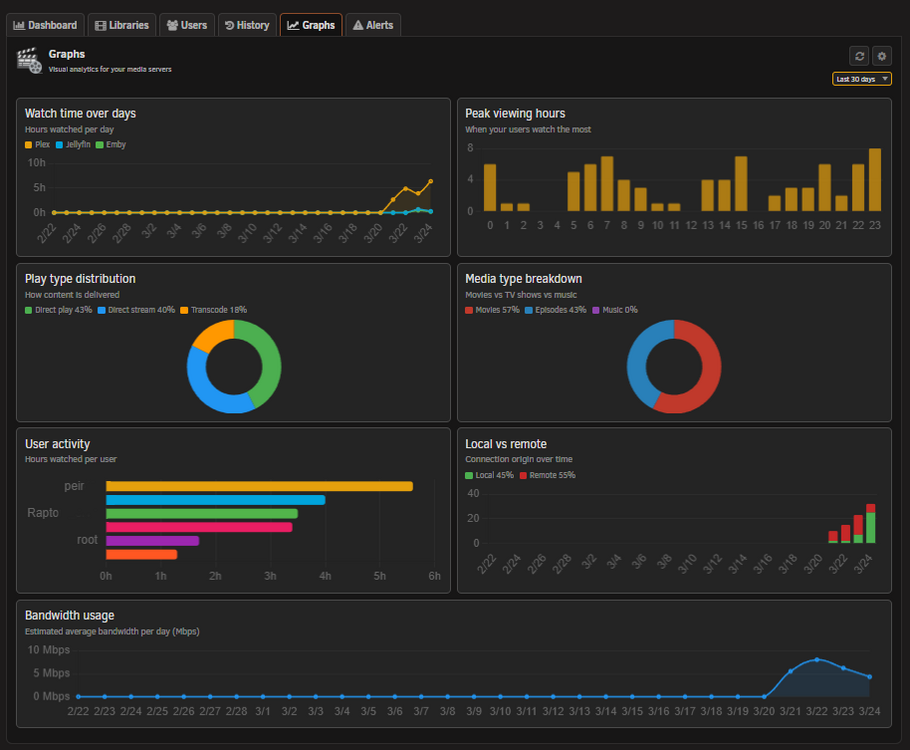
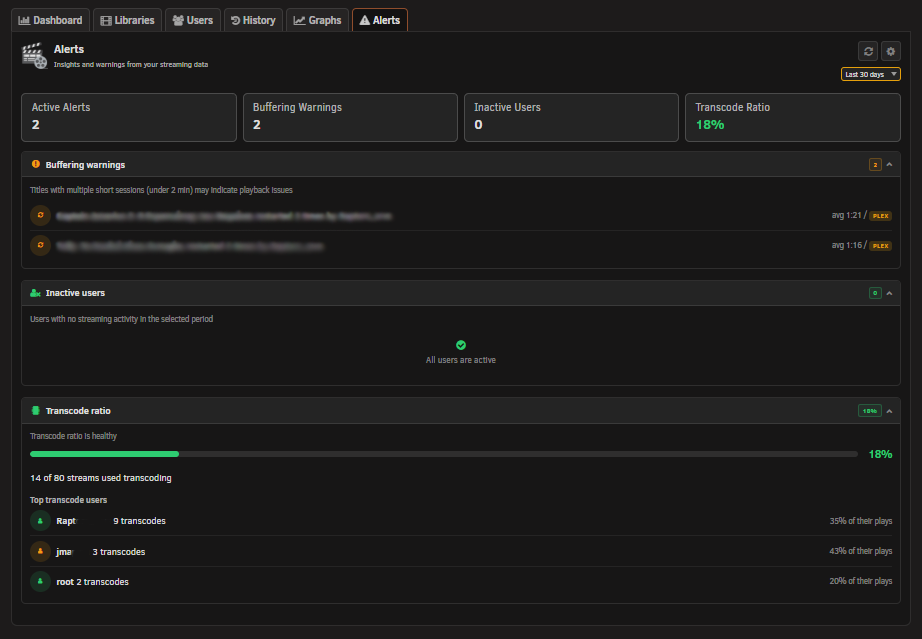
Hey everyone, New update is out with some big additions. v2026.03.25 The main highlight is the new Statistics Tool page (Beta). It tracks your watch history and gives you a full breakdown of activity across all your servers. You get a Dashboard with most watched titles and top users, a Libraries tab showing your content and recently added items, a Users tab with per-user stats and play type distribution, a History tab with search, filters and CSV export, and a Graphs tab with daily streams and watch time charts. Everything is stored locally in a SQLite database with configurable retention, no external services involved. On the widget side, you now get Docker CPU and RAM usage per container, a transcode speed badge on active transcodes, and a collapsible Technical Details row showing codec, audio, container and transcode info per stream. Bug fixes include the widget freeze that some of you reported after about an hour of use (turned out to be a token expiry issue), Jellyfin/Emby API corrections, and stream duration being cut off in the widget. The settings page has been reorganized into three sections (Widget Settings, Connections Servers, Statistics Settings) to keep things cleaner as more options get added. Statistics is in Beta so if you run into anything weird, let me know here or on GitHub. Watch history starts recording after the update, so give it a few days to build up data. Feedback and suggestions always welcome! Statistics Screenshots:
-
Hey @Pepeb007xx, you're right, I can reproduce it. The time display gets cut off on narrower screens, especially with series that have longer titles. Fix is ready and will be in the next update. Thanks for catching it!
-
Hello @Pepeb007xx, thanks for the kind words! Regarding the second stream not showing: I've tested with 2-3 simultaneous streams and it works fine with default settings. A few things to check: Make sure both streams are actually active at the same time in your Plex dashboard Check Settings → Dashboard Widget → Display → "Max streams" is set to 10 (default) If the second stream is on a different Plex server, make sure that server is also added and enabled in Settings If it still doesn't work, can you open your Plex dashboard and confirm both streams show as active there at the same time? A screenshot would help. Regarding your feature requests: unfortunately I can't use the Plex, Jellyfin, or Emby logos as they are registered trademarks. That's why the plugin uses colored text badges instead. Changing the server name color and other settings is something I can consider for a future update.
-
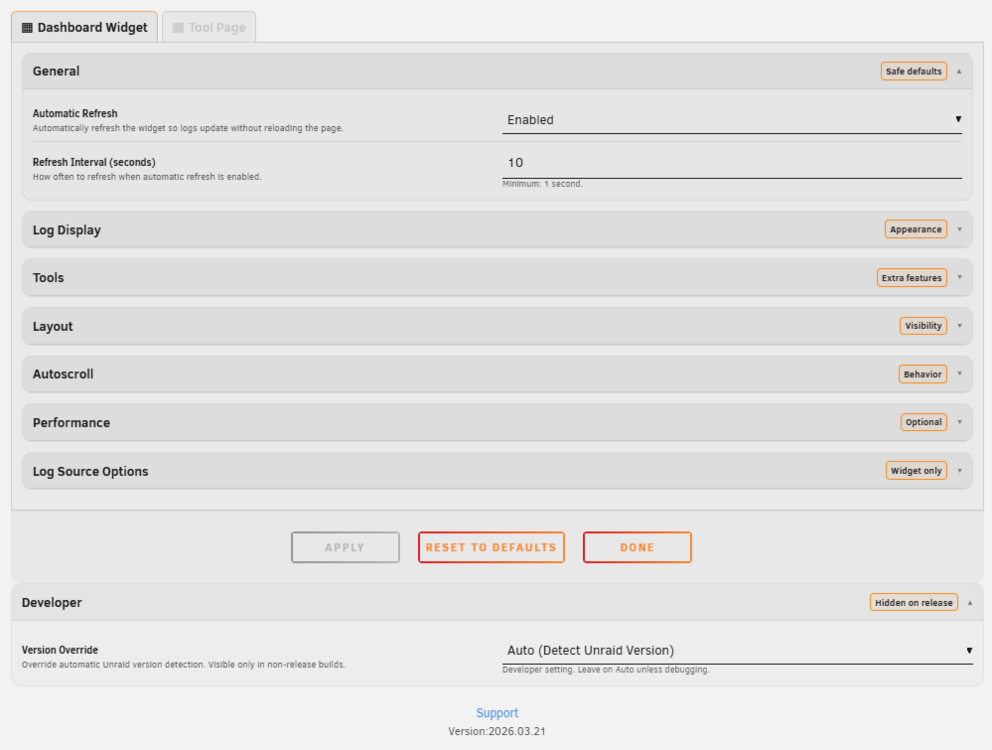
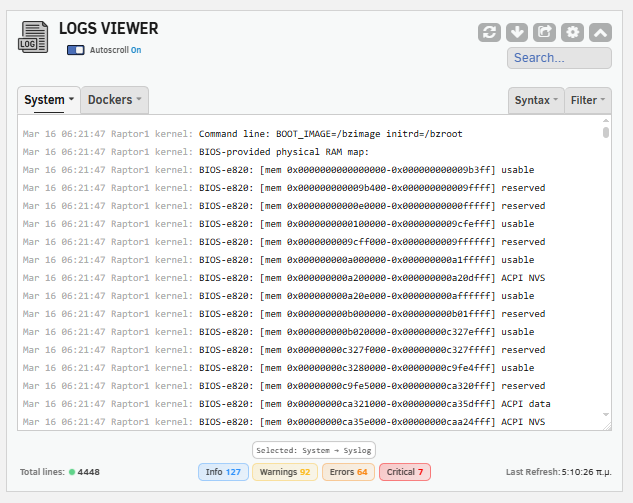
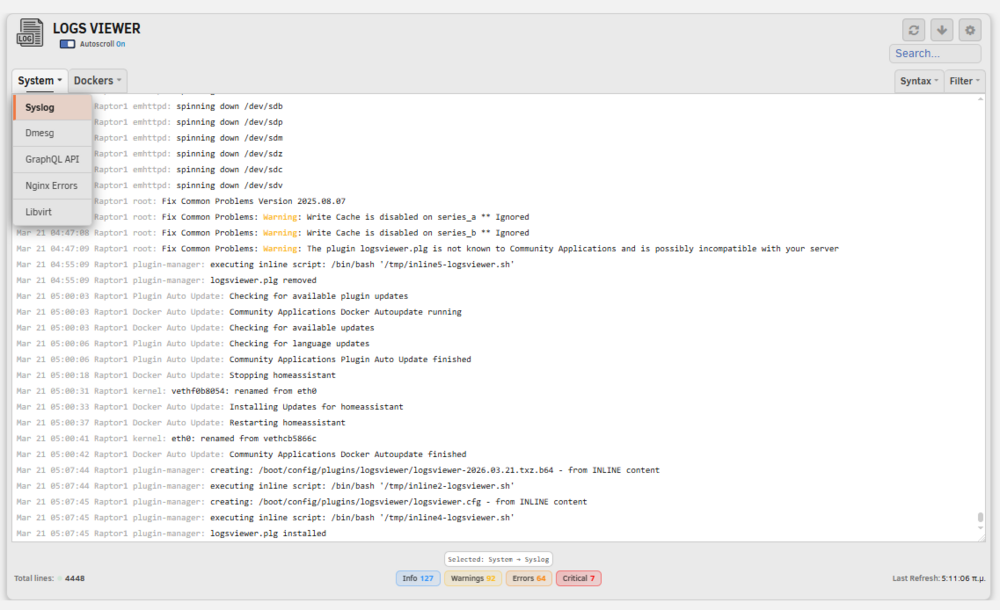
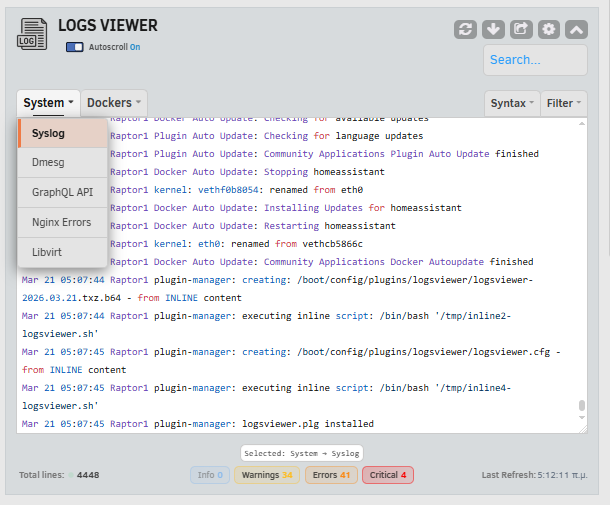
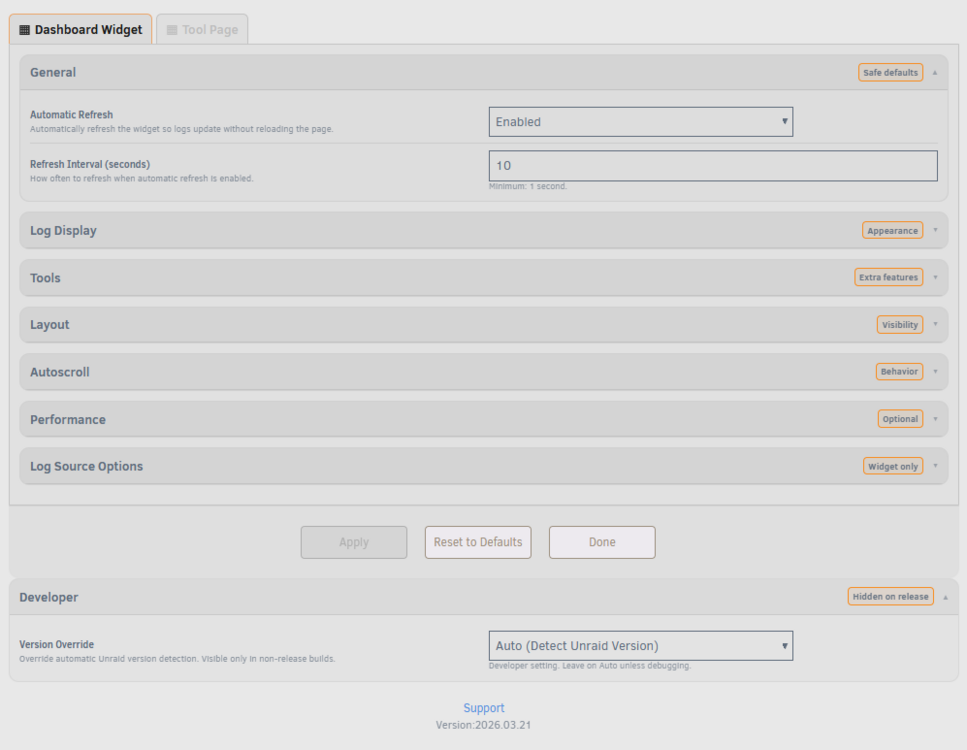
Hey everyone, just pushed v2026.03.21 with some important updates. Full Theme Support Logs Viewer now works properly with Unraid's Dark / White / Gray and Azure themes. All UI elements adapt automatically: tabs, search box, badges, dropdowns, autoscroll toggle, syntax / filter controls, and the settings page. The plugin detects your theme from dynamix.cfg on page load, with a JS luminance check as fallback. Syntax highlighting also picks the right stylesheet (light or dark) depending on your theme. Theme presets (Terminal, Dim, Contrast) now have light-palette equivalents, and the color picker / Reset to Defaults behave correctly in both modes. Security Improvements Tightened up input handling and output sanitization across the board. Log content now goes through an additional filtering step before being displayed, settings values are properly escaped when saved to the config file, and several settings fields now have strict validation before they're written to disk. Nothing was actively exploitable, but these changes add extra layers of protection. Other Changes Prism syntax engine is no longer marked as Beta. The performance guards have been stable for a while now so it didn't make sense to keep the label. Let me know if you run into any issues, especially with the light theme.
-
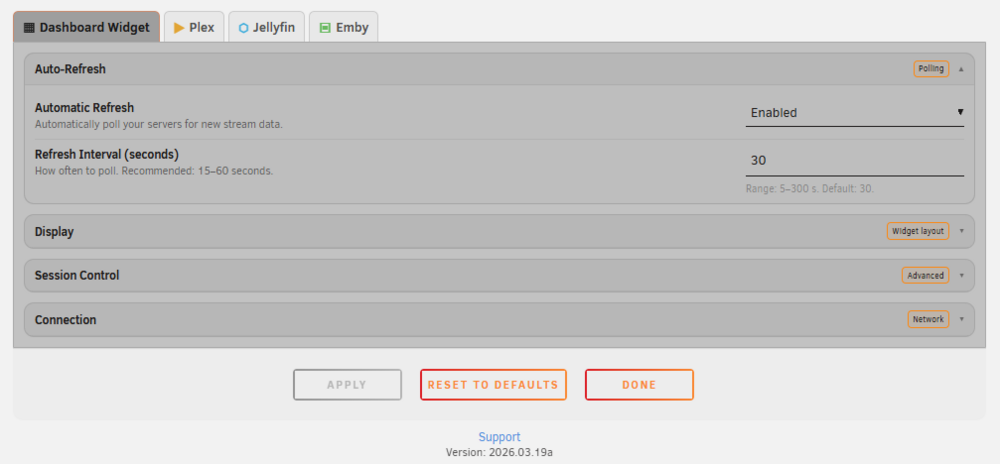
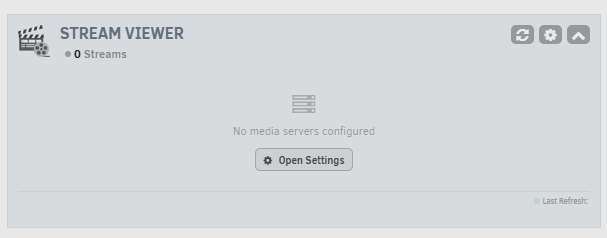
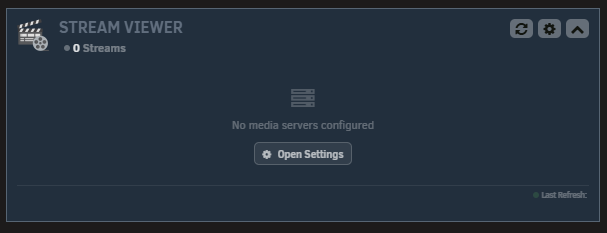
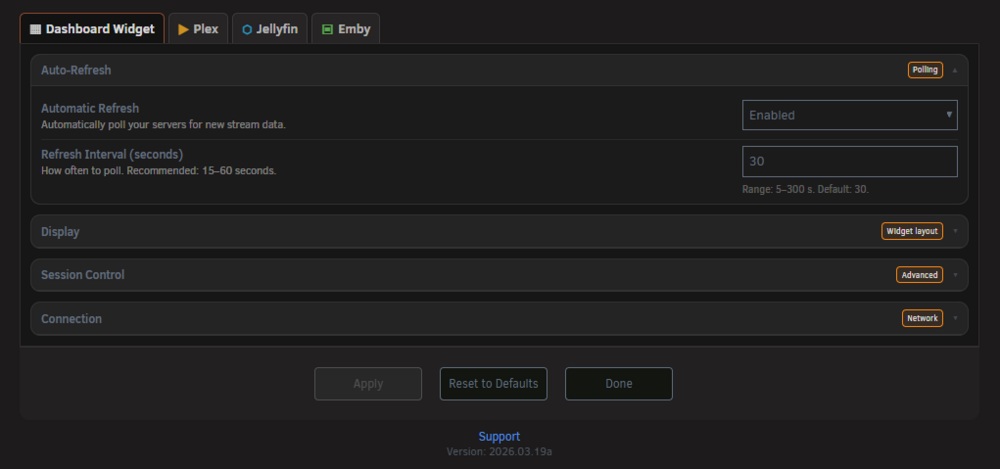
v2026.03.19a is out! For those of you using the White - Gray - Azure Unraid theme, the widget and settings page now fully adapt to your theme. No more invisible text or washed out buttons. Also in this update: Smart rediscover: the plugin now retries 3 times before triggering URL rediscovery, and respects your URL type (local stays local, remote stays remote). No more switching from local to remote after a server restart. Jellyfin / Emby Docker auto discovery: if your local container changes IP, the plugin can now detect the new IP automatically via Docker Engine API. Thanks to the users who reported this!
-
Hi @Bren8, thanks for reporting this. I found the bug. The auto rediscover logic that kicks in after a connection failure was sorting connections with remote URLs first instead of local. So after a container restart, it would overwrite your local URL with the remote one. Fix is ready and will be in the next update.
-
Hello @Cino, thanks for pointing this out. Right now the plugin uses its own dark styled framework, so it does not automatically inherit the Unraid system theme. What I can do, however, is add proper light theme support in the CSS so it remains fully readable when the default White theme is used. Making my plugins compatible with the White GUI as well is already in my immediate plans, so this is something I’ll be working on soon. Thanks again for the feedback and for bringing it up.
-
Coming soon: Stream Viewer Statistics page I'm working on a new Tool page for Stream Viewer that will track and display viewing statistics across all your Plex, Jellyfin, and Emby servers. Think Tautulli, but built natively into Unraid and supporting all three platforms. Here's an early look at the design: Planned features: Total plays, watch hours, unique users, peak concurrent streams Daily/weekly/monthly stream charts per server Direct Play vs Direct Stream vs Transcode ratio Most watched media and top users Full watch history with search, filters, and pagination Configurable data retention CSV export All data is stored locally on your server (SQLite in appdata), nothing leaves your network. Expecting to ship this by end of March. Stay tuned!
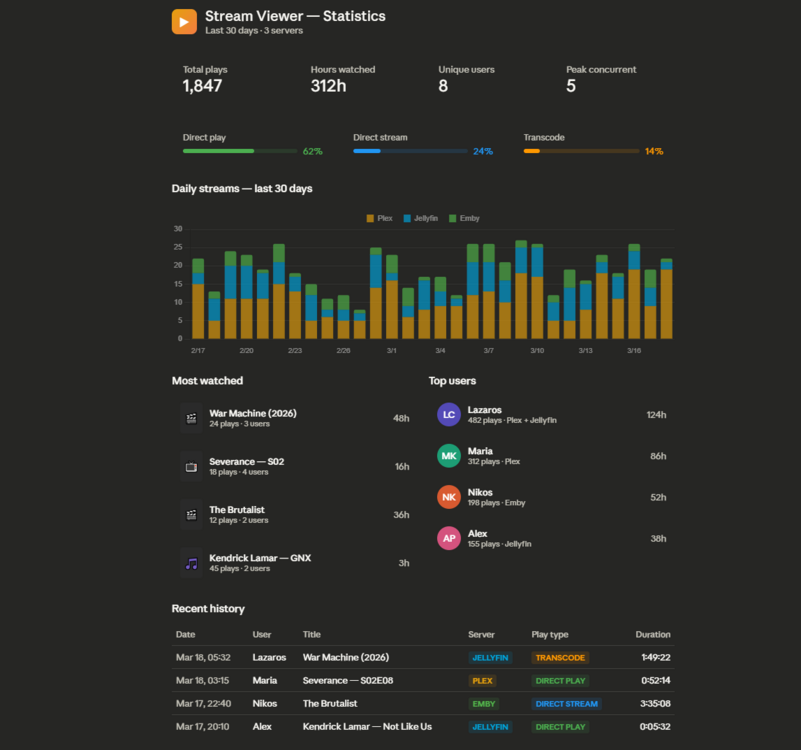
-
Stream Viewer v2026.03.18 Big update for Emby and Jellyfin users: Emby Add Server: fixed, was silently failing. Thanks to the user who reported this! Emby Kill Session: fixed, was returning HTTP errors due to incorrect request format API key validation: Test Connection now actually validates your API key for both Jellyfin and Emby, not just server reachability Play type detection: Jellyfin/Emby now correctly shows Direct Play, Direct Stream, and Transcode. Was stuck on Direct Stream due to a wrong API field name New feature: Technical Details row. Each stream now has a collapsible "Details" section showing: Video/audio codecs and channels (e.g. H264, EAC3 5.1) Audio spatial format (Dolby Atmos) Container format (MKV, MP4) Active subtitles HW acceleration type (NVENC, VAAPI, or SW) Transcode reasons and buffer % Also, transcode speed (e.g. 8.2x) is now visible inside the TRANSCODE badge for Plex streams, with live updates. All toggleable from Settings → Dashboard Widget → Display. Full changelog in the first post. Update via Community Applications as usual.
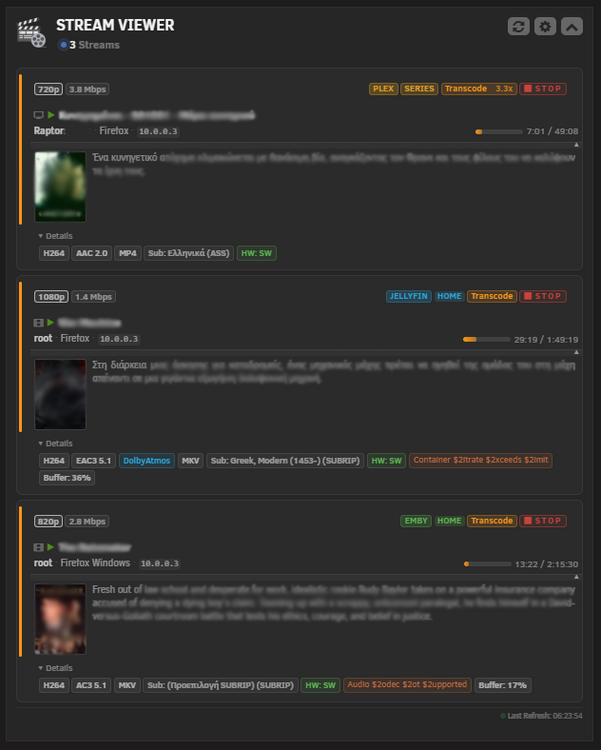
-
Thanx @darkdiablo for the report and the video showing the issue in Emby. Other users have also pointed this out above. Within the next few hours, I will upload a new update that fixes the problem.
-
@ricostuart thanks for confirming! That matches exactly what I found. Fix is ready, expecting to push an update later today.
-
Hi, @Vaichi, thanks for reporting this, you're right, there's a bug in the Add Server function for Emby. I've identified it and the fix will be ready in the next update. Quick question since I don't have an Emby server to test with, does Test Connection work fine for you (shows Connected or an error), and it's only the Add Server button that does nothing? That would help me confirm the exact behavior!
-
v2026.03.17 is now available This update brings several bug fixes. Bug fixes: • Widget no longer stops after ~1 hour: The CSRF token now auto refreshes when it expires. Previously the widget would silently stop polling. • Reset to Defaults: now works independently per tab Resetting Tool settings no longer affects Dashboard settings and vice versa. • Syntax selection preserved: Resetting one tab no longer clears the syntax choice on the other. • Single quotes: in logs now display correctly. • Cache directory permissions: corrected (0777 → 0755). Removed: • "Refresh only when scripts are running" option has been removed, it was ineffective for system logs and caused confusion. Update via Community Applications or download from GitHub. Feedback welcome!
-
Stream Viewer v2026.03.17 is out! This update fixes the Jellyfin issues several of you reported adding/testing a Jellyfin server no longer fails with "Please select a server type", and quality info (1080p etc.) now shows correctly in the widget. Emby Test Connection freezing is also fixed. Other highlights: Parallel fetching: if you have multiple servers, sessions are now fetched simultaneously instead of one by one. Much faster. SSL toggle: new option under Settings → Dashboard Widget → Connection to verify TLS certificates. Off by default (self-signed certs are fine), connections to plex.tv always verify. Network hints: if your media server runs on a custom Docker network (ipvlan / macvlan) and the connection fails, the plugin now tells you exactly what to enable. Reset/Clear Form: the Reset button now works on all tabs. Full changelog in the first post. Update via Community Applications as usual. Thanks to everyone who reported the Jellyfin issue much appreciated!
-
Hello @Liviu and @Xceed, thanks for the reports. I've identified the root cause. The Jellyfin "Add Server" and "Test Connection" functions were referencing a form element that doesn't exist in the UI, so the server type was always coming back empty hence the "Please select a server type" error regardless of what you entered. Emby wasn't affected because it handles the type differently. I have the fix ready and will push an update today. Stay tuned, sorry for the inconvenience!
-
v2026.03.16 is now available This update focuses entirely on performance and stability, addressing the browser freezing reports some of you experienced during auto-refresh. What's fixed: • Browser freezing on refresh: The widget now detects when log content hasn't changed and skips the entire render cycle. This was the main cause of the 3-5 second freezes reported. • Docker logs load faster: Multiple container logs are now fetched in parallel instead of one-by-one. • Reduced server load during polling: Unnecessary duplicate requests have been eliminated. • Faster line counting: Large log files are now counted using native system tools instead of PHP loops. • Improved caching: Server-side response cache is now more effective at absorbing rapid requests. • Google Fonts no longer block page load: Custom fonts now load asynchronously. • Mobile detection fix: Servers with low-core CPUs (Celeron, J-series, i3) were incorrectly treated as mobile devices, limiting syntax highlighting budgets. • Minor cosmetic fix: Single quotes in log output now display correctly. No settings changes needed, everything is automatic. Fully backward compatible. As always, feedback is welcome. If you were experiencing the freezing issue, please let me know if this update resolves it for you.






