The Gleamer
Members
-
Joined
-
Last visited
Everything posted by The Gleamer
-
OK thanks again for your help, I'll replace and rebuild.
-
OK thanks for your help. Diagnostics attached. tower-diagnostics-20240110-2213.zip
-
Hi everyone, would appreciate some advice on this please. On my server dashboard in the array section it says "array has 1 SMART error" and an amber thumbs down against disk 2. On the main tab, there are no errors showing against disk 2. When I click into disk 2, on the identity tab it says "SMART overall health: passed", but after running a self test, the self test tab shows "last SMART test result: completed: read failure." This is also shown in the SMART report which I've attached. I'm not sure how to interpret this - should I be replacing this disk straight away? tower-smart-20240110-1707.zip
-
OK thanks, here's the log. supervisord.log
-
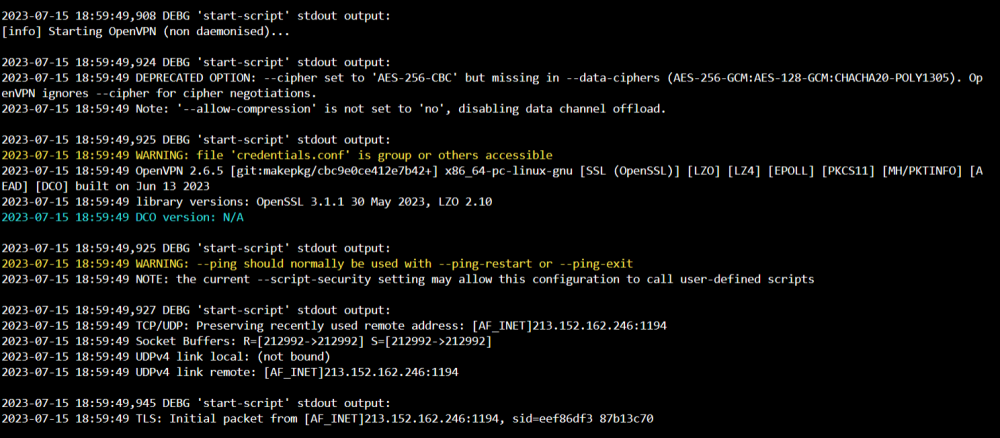
Hi All, I've been using delugevpn for a long time now without issue and it's a great app. Suddenly though when I try and open the webUI all I get is "unable to connect". I've done a bit of searching around and tried a few things, but haven't been able to get it working again. I am a bit of a novice user, so would appreciate it if someone can point me in the right direction. I have noticed in the log a couple of errors - one relating to the credentials.conf file and one relating to ping. I have tried changing the .ovpn file which was one suggestion and has worked previously when I had issues, but this time to no avail.
-
OK thanks for having a look. I think I'll go for the safety first approach and swap the drive out.
-
Ah OK, I haven't been running the server 24/7. I fired it up and ran a parity check and smart test on disk 1, and attached new diagnostics below. Hopefully this will reveal more. tower-smart-20230316-0646.zip tower-diagnostics-20230316-0647.zip
-
Would appreciate some advice on this please. Disk 1 has started showing read errors, so I'm assuming I need to swap the drive out. Am I safe to follow the procedure for replacing a data drive, or are there other things I should be checking/looking out for beforehand? I'm still fairly new to unRAID so would really appreciate some guidance. tower-diagnostics-20230313-0648.zip tower-smart-20230313-0646.zip
-
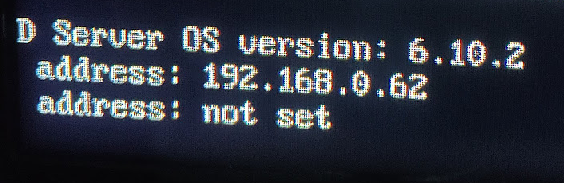
Yes, it's working again now! I don't really understand why though? The server has always had a static IP address of 192.168.0.62 but after the update to 6.10.2 I couldn't reach this. After one of the reboots I tried I noticed that it was saying 192.168.0.32 (as in your comments) but I couldn't reach this either. I've now connected to 192.168.0.62 on my phone and laptop as I normaly would. Do you think deleting the network.cfg file fixed the issue, or was it something else? I am a newcomer to unraid and would like to learn more, but to be honest at the moment I'm just happy it's up and running again, so many thanks for your help!
-
Wasn't sure what you meant by renaming, but read that you could delete network.cfg so that it created a new version. Tried this but it made no difference, and when I've checked now it hasn't recreated network.cfg. New diagnostics file attached. tower-diagnostics-20220603-1402.zip
-
OK thanks, diagnostics file attached. tower-diagnostics-20220603-1036.zip
-
Having similar issues after updating to 6.10.2. Found the VT-d setting in BIOS and disabled it, and tried the blank tg3.conf but neither worked. Also tried going back to 6.10.1, but whatever I do it just gets stuck at this point. Am I missing something? Newcomer to unraid and not sure where to go from here.