





Haube
Members
-
Joined
-
Last visited
-
Thank you very much! i will come back if i struggle again :D let me send you a crate 🍻
-
So new Cache Pool, disks showed up with blue square in the ui. started the array. It mounted! now i use the mover to evac the cache then normal procedure replace hardware and copy stuff back on the then again new cache no errors so far, but the attachment for good messure BlackTower_Device.pdf blacktower-diagnostics-20250521-1929.zip
-
root@BlackTower:~# btrfs fi show Label: none uuid: 6ed8cfb5-61dd-4db6-9a32-55d4e169ee8c Total devices 1 FS bytes used 1.27TiB devid 1 size 2.73TiB used 1.44TiB path /dev/sdf1 Label: none uuid: fe408483-8259-407e-a89e-b3518a13f241 Total devices 2 FS bytes used 482.56GiB devid 1 size 931.51GiB used 791.01GiB path /dev/nvme0n1p1 devid 2 size 931.51GiB used 791.00GiB path /dev/nvme1n1p1 Label: none uuid: 87508b77-65ba-4e84-9b71-2ae2a567ff60 Total devices 1 FS bytes used 2.24TiB devid 1 size 2.73TiB used 2.33TiB path /dev/sdd1 Label: none uuid: e64e5b29-4c3b-4a93-a188-26bbc8d5b41d Total devices 1 FS bytes used 1.87TiB devid 1 size 10.91TiB used 1.88TiB path /dev/sdb1 Label: none uuid: b68bfcc1-11d1-45a1-a153-c462376b088d Total devices 1 FS bytes used 2.36TiB devid 1 size 2.73TiB used 2.42TiB path /dev/sdg1 Label: none uuid: 72a72712-4984-40b1-9936-44966d88a39e Total devices 1 FS bytes used 144.00KiB devid 1 size 2.73TiB used 3.01GiB path /dev/sdc1 root@BlackTower:~# the previous *** Some devices missing is gone. also the webui shows now(array is still stopped):
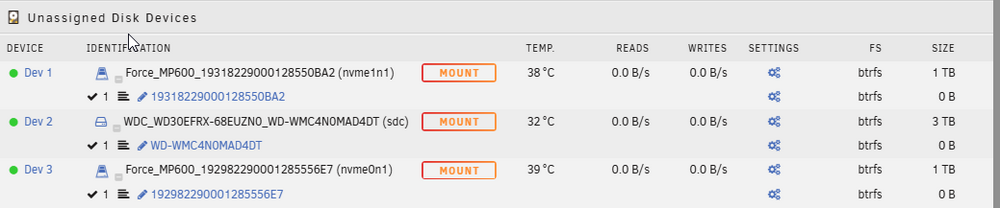
-
>>> 64 Created a new DOS (MBR) disklabel with disk identifier 0xf08c845d. Created a new partition 1 of type 'Linux' and of size 931.5 GiB. Partition #1 contains a btrfs signature. Do you want to remove the signature? [Y]es/[N]o:
-
root@BlackTower:~# sfdisk /dev/nvme1n1 Welcome to sfdisk (util-linux 2.41). Changes will remain in memory only, until you decide to write them. Be careful before using the write command. Checking that no-one is using this disk right now ... OK Disk /dev/nvme1n1: 931.51 GiB, 1000204886016 bytes, 1953525168 sectors Disk model: Force MP600 Units: sectors of 1 * 512 = 512 bytes Sector size (logical/physical): 512 bytes / 512 bytes I/O size (minimum/optimal): 512 bytes / 512 bytes sfdisk is going to create a new 'dos' disk label. Use 'label: <name>' before you define a first partition to override the default. Type 'help' to get more information. >>> 2048 Created a new DOS (MBR) disklabel with disk identifier 0x5966587d. Created a new partition 1 of type 'Linux' and of size 931.5 GiB. /dev/nvme1n1p1 : 2048 1953525167 (931.5G) Linux /dev/nvme1n1p2:
-
do i need to mount both drives in tandem or would a single drive (nvme1) be mountable by it's own in theoy? i am thinking about following steps: remove both nvme and add the 2 new ones create the cache drive pool and copy back the backup data to the cache. activate docker and vm and see if everything is running (optional) see if i can salvage data by installing nvme1 in another box and try to rescue the data (if thats possible, never had to deal with btrfs in raid1) So i want to make sure i am not missing an easy command or unraid quirk to restore the drive (partition) back to working raid1 pool with data for the backup in running array as that would give me the most relyable results right?
-
It was around 600 gb, i have a copy from nvme0 but i am unsure about the quality of the backup as there were so many "critical medium error" in the log. I have no idea how to check the integrity of the files. I would feel better if i get a copy of the data from nvme1 for that reason. I would also like to learn what went wrong, why did the partition disapear i.e.
-
root@BlackTower:~# btrfs fi show Couldn't read tree root Label: none uuid: 6ed8cfb5-61dd-4db6-9a32-55d4e169ee8c Total devices 1 FS bytes used 1.27TiB devid 1 size 2.73TiB used 1.44TiB path /dev/sdf1 Label: none uuid: fe408483-8259-407e-a89e-b3518a13f241 Total devices 2 FS bytes used 482.56GiB devid 1 size 931.51GiB used 791.01GiB path /dev/nvme0n1p1 *** Some devices missing Label: none uuid: 87508b77-65ba-4e84-9b71-2ae2a567ff60 Total devices 1 FS bytes used 2.24TiB devid 1 size 2.73TiB used 2.33TiB path /dev/sdd1 Label: none uuid: e64e5b29-4c3b-4a93-a188-26bbc8d5b41d Total devices 1 FS bytes used 1.87TiB devid 1 size 10.91TiB used 1.88TiB path /dev/sdb1 Label: none uuid: b68bfcc1-11d1-45a1-a153-c462376b088d Total devices 1 FS bytes used 2.36TiB devid 1 size 2.73TiB used 2.42TiB path /dev/sdg1 Label: none uuid: 72a72712-4984-40b1-9936-44966d88a39e Total devices 1 FS bytes used 144.00KiB devid 1 size 2.73TiB used 3.01GiB path /dev/sdc1 root@BlackTower:~# blacktower-diagnostics-20250521-1630_after_boot_array_stopped.zip
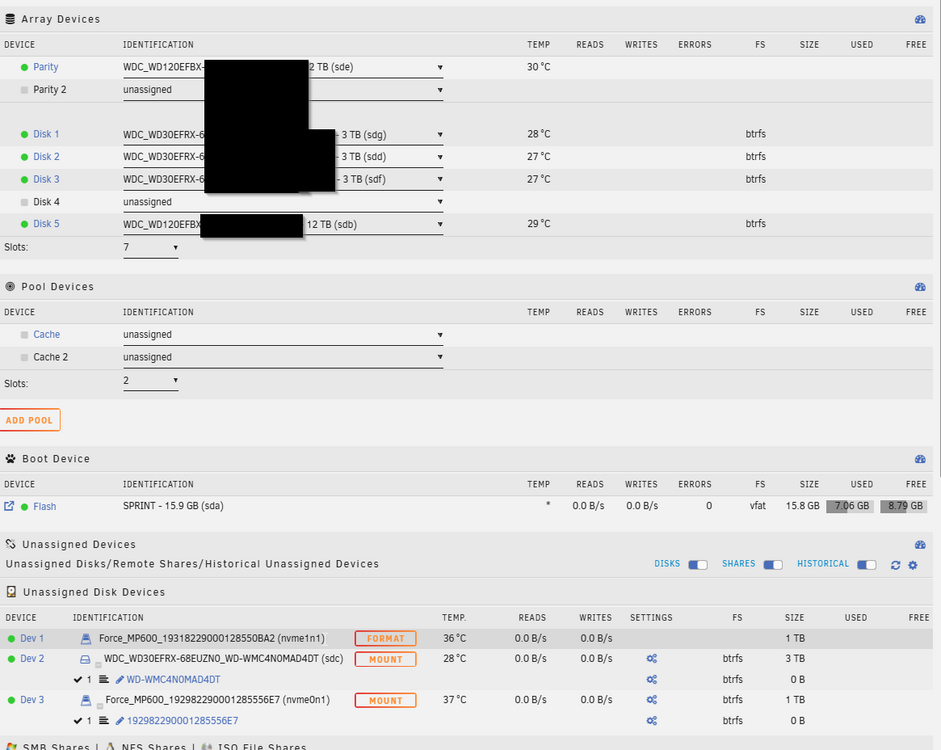
-
Hello everyone, tldr: former btrfs raid 1 pool cache drives started failing nvme0 had read errors in the past and i don't trust my backup i could to last night from that drive via Unassigned Devices Copy function into the Array nvme1 partition disappeard after i could mount it with unassigned devices once and can't be mounted anymore after i started the array. currently i have no cache pool both nvme are unassigned i am running (acutually it is turned of for the moment while i wait for advise) Unraid 7.1.2 2 btrfs nvme in raid1 in the pool some metal hdd in the array aswell. I use Docker and VM images which are on the cache pool. i noticed occasional errors from nvme0 in the line of with varing sector numbers Kernel: critical medium error, dev nvme0n1, sector 520617864 op 0x0:(READ) flags 0x0 phys_seg 1 prio class 2` this is going on for a while, i never saw nvme1 cause any error messages. Checking the Smart Attributes i saw that both nvme have around - Power on hours 49,146 (5y, 7m, 8d, 18h) - Data units written 1,584,109,035 [811 TB] so i figured it's time for a renewel i read the FAQ about switching a pool drive. i planned to do the following turn of the array power off the box switch drive nvme0 with a new one power on, click the new drive in the position of the missing pool entry, wait for sync to finish do the same with the other drive. What really happend: after turning the system back on i tried to put the new nvme into cache1 position and unraid told me that the drive size of the new ssd is to small. the original ones are 2* Corsair mp600 1TB from when it came out oct 2019. the replacements are 2* Corsair mp600 pro xt 1TB Guess the new one falls a few bit short i then wanted to backup the data from the cache, and start with a fresh cache pool from scratch, copy back the files so i switched back to old (failing) nvme0 i bootet up when i put the old former drive in the pool position 1 i got the notice in red, that when i start the array all data will be formattet and lost on the cache pool drives. that scared me. i then left the cache drives unassigned and checked if i could access the data of the drive via unassigned plugin which was promising i was able to mount nvme1 and saw that the data was accessable, but i had no disk mounted to copy it i unmounted nvme1 i turned of Docker and VM support in the settings.(referring to the FAQ) i started the array i tried top mount nvme1 which wasn't available anymore as an option in the Main overvriew the mount button was grayed out. as a fallback i then mounted nvme0 and used the unassigned Disk Plugin to copy all contents to a backup share in the array. that took a while in the log were many more of the dooming failed to read sector messages. But it seems that all files are copied. but i have no real idea about the integrity. as far as i can see copy ran without errors Whats next: Should i assume that copy from failing nvme0 worked and read errors were corrected? in the device manager i don't even see the partition on nvme1 anymore are the metadata/partition table affected? put in the new ssd's and copy everything to the new pool and hope for the best? i wanted to backup from nvme1 because i never saw errors from that drive, but i don't get a mount option after the last reboot i am thinking about doing ddrescue image from nvme1 with another computer while i rely on the backuped data i have i attach one syslog from this morning, showing an attempt to dd if=/dev/nvme1 of=/dev/sdh sdh was a nvme via usb controller i tried to image nvme1 onto. but that faild with read write errors. not sure if it was the controller or nvme1 also failing now. SMART ATTRIBUTES NVME0 # Attribute Name Flag Value Worst Threshold Type Updated Failed Raw Value - Critical warning 0x00 - Temperature 40 Celsius - Available spare 100% - Available spare threshold 5% - Percentage used 100% - Data units read 38,400,185 [19.6 TB] - Data units written 1,584,109,035 [811 TB] - Host read commands 235,481,675 - Host write commands 13,878,566,452 - Controller busy time 27,425 - Power cycles 45 - Power on hours 49,146 (5y, 7m, 8d, 18h) - Unsafe shutdowns 21 - Media and data integrity errors 0 - Error information log entries 70,513 - Warning comp. temperature time 0 - Critical comp. temperature time 0 - SSD endurance remaining 0 % SMART ATTRIBUTES NVME1 Attribute Name Flag Value Worst Threshold Type Updated Failed Raw Value - Critical warning 0x00 - Temperature 42 Celsius - Available spare 100% - Available spare threshold 5% - Percentage used 100% - Data units read 37,915,086 [19.4 TB] - Data units written 1,576,965,705 [807 TB] - Host read commands 231,056,110 - Host write commands 13,980,886,139 - Controller busy time 28,103 - Power cycles 45 - Power on hours 49,145 (5y, 7m, 8d, 17h) - Unsafe shutdowns 21 - Media and data integrity errors 332 - Error information log entries 12,865 - Warning comp. temperature time 0 - Critical comp. temperature time 0 - SSD endurance remaining 0 % syslog.txt
-
Thanks for the quick help, that solved it.
-
Hello community, i had a failing drive of my 5* 3TB. (Unraid OS Plus, Version: 6.11.5) Emptied it and took it out of the array. Ordered 2* 12TB. Added the first 12 TB as new Parity in Parity slot 2. (moved away from the guide here to avoid 2 days of down time at that day) Had it running till it synced up. Removed the 3 TB disk from Parity Slot 1 Added the old Parity Disk as Data Disk 3 All Synced up and Running with the Disk in Parity Slot 2 Next: i want to add the second 12 TB as Data Disk, setting slots form 6 to 7 and select the new disk for slot 7 i can't start the array as it wants me to add a passphrase for encryption (i have no encryption setup) is it possible to add the disc without encryption? Next 2: i want to move the Parity Disk from slot 2 to slot 1 Does it have negative side effects only having parity slot 2 and slot 1 empty? Trying to move the disk to slot 1 i get: "Too many wrong and/or missing disks!" Screenshot Question 1 Adding a Datadrive requieres Encryption: Screenshot 2: Trying to switch Parity to Slot 1.
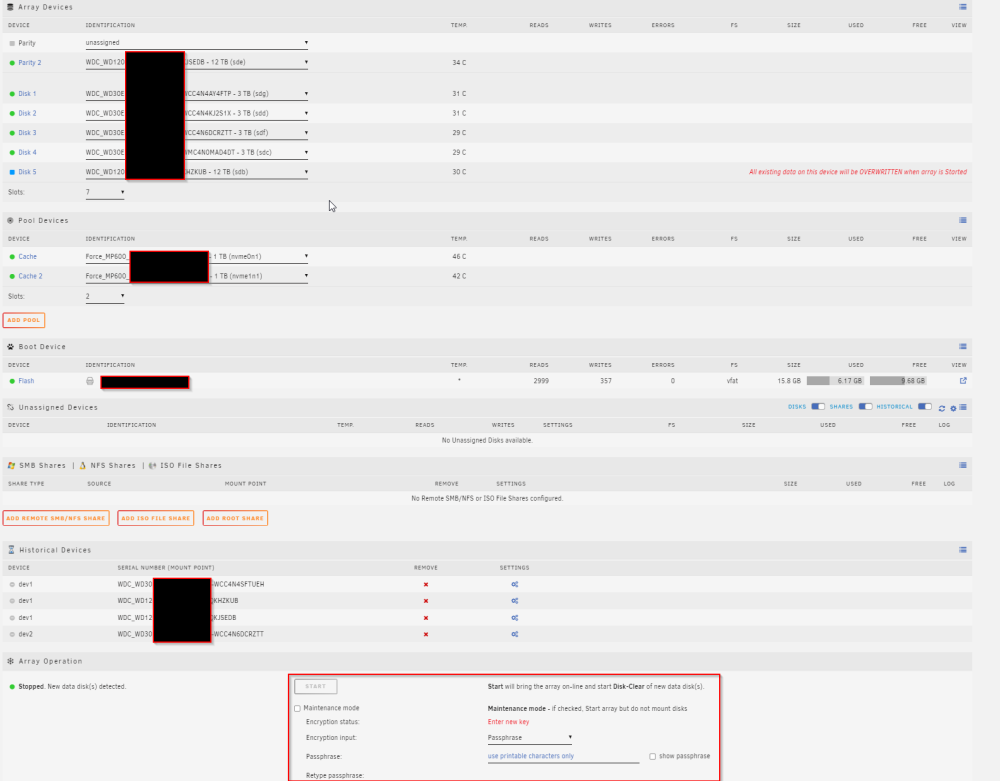
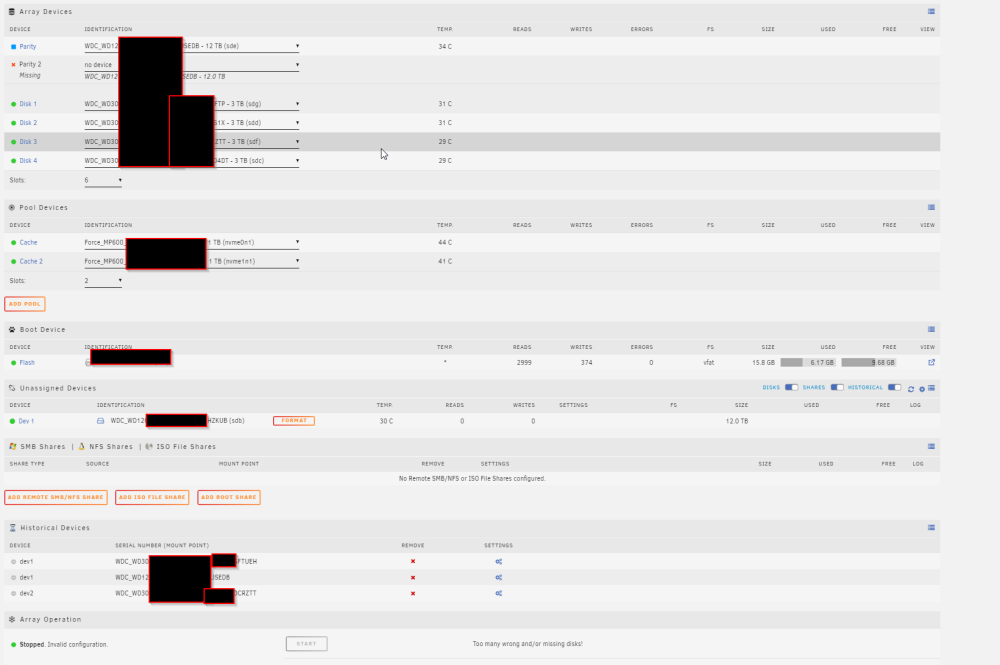
-
Hi, i just got the Valheim+ running again. I was still affected by the old world not being picked up and a new World was generated since. In the start-server.sh i noticed following block, which causes the old "worlds" folder to be moved inside the worlds_local as a subfolder "worlds_local/worlds/". so to fix it you would like to do moving the contents from the original worlds instead of the directory and if the server was already started once with that shell script: The worlds folders should be empty then and can be delted. All contents should be inside worlds_local directly without subdirectories. Thx for your work and i hope you keep it supported, it's the first time i had todo something manually!



