meep
Members
-
Joined
-
Last visited
-
I thought I'd document a solution to a GPU passthrough problem that took quite a bit of fault-finding to track down. Unraid 7.3.1, Threadripper 3960X and RTX 3090 passed through to Windows 11. The VM would boot normally, NVIDIA drivers worked, desktop/video playback was stable, but putting the GPU under significant 3D load caused an immediate black screen. VFIO would then report Bad address and D3/power/reset errors, and sometimes the host needed a full power cycle before the GPU could be used again. The key errors in the Unraid VM/kernel logs were vfio_container_dma_map(...) = -14 (Bad address), often followed by Unable to power on device, stuck in D3 and eventually kvm run failed Bad address. I ruled out Windows, drivers, VM RAM/hugepages, storage, PCIe Gen4 and eventually the GPU/PSU/slot itself by booting Windows bare-metal and successfully stress-testing the same 3090 at 100% load. The actual problem turned out to be QEMU placing the GPU's BAR memory at an address outside the usable physical/IOMMU address range of this system. The Threadripper reports a 43-bit physical address width, while QEMU had placed the RTX 3090 BAR1 at a much higher address. The fix was simply to limit the VM's physical address width to 43 bits in its libvirt CPU configuration. QEMU then relocated the GPU BAR into the appropriate address range. After that, the exact benchmark that previously crashed almost immediately completed at 100% GPU utilisation, the VFIO/kernel logs remained clean, and subsequent VM shutdown/restart and GPU reassignment also worked normally. I've written up the troubleshooting, relevant log messages, the XML change and links to similar QEMU/VFIO reports here: Full write-up: GPU Passthrough Crashes on Unraid – QEMU, IOMMU and Physical Address Width Hopefully this saves someone else a few hours of chasing what initially looks very much like a GPU reset, power or PCIe stability problem.
-
I recently spent some time improving the responsiveness of a Windows 11 VM on Unraid (Threadripper + RTX 3090 passthrough). The VM was usable but always felt slightly sluggish since a recent system transplant to a Threadripper 3960X based system., especially around UI responsiveness and window load times. After working through it properly, a few key changes made a noticeable difference: Main steps: Cleaned up CPU pinning (contiguous cores, proper SMT pairing, avoided CPU 0) Ensured CPU isolation (isolcpus) aligned with pinned cores Enabled hugepages and attached them in VM XML Disabled VBS fully (this was the biggest improvement) Tidied Hyper-V settings in XML (relaxed, vapic, spinlocks, vendor_id) Confirmed GPU was using MSI interrupt mode Verified CPU scaling was set to performance The biggest single gain came from disabling VBS. Everything else contributed incrementally. The VM is now noticeably more responsive, though still not quite bare metal. Next step for me is fixing NUMA exposure in BIOS, which should close that gap further. I’ve written up the full process with details here: One Box To Rule Them All: Improving Windows 11 VM Performance on Unraid (Threadripper) Hopefully useful to someone else running a similar setup.
-
72 hours with no sleeps. Considered fixed. Likely cause was a failing USB boot drive.
-
So I have an update; Came to my desk this morning and my server was still chugging away, not asleep. I checked the system log and it's clean as a whistle. While I don't have a definitive action I took to effect this change, I did encounter a significant problem since I last posted that's more than likely related if not the root cause: a failing boot thumb drive. Through the various restarts I conducted yesterday to check BIOS settings etc., I started experiencing GUI lockups of increasing rapidity a couple of minutes after restart. Checking the logs, I noticed reports of USB access issues leading to errors with device SDA, my boot drive. I tried swapping it around between ports, changing between efi and non efi boot etc., to no avail. I bit the bullet and transferred to a new boot drive (my 4th in 16 years, not bad going). Boot up was noticeably snappier and the USB errors stopped immediately. It looks like my USB boot drive had been on its way out. I was possibly missing the errors as they were getting lost in log spamming from another failing unassigned device in my older system, and I'd implemented a user script to clear syslogs overnight to prevent the system crashing from full logs. I'm not sure how the failing USB caused the system to go to sleep overnight, and maybe its unrelated. I'll keep everything as is for a few days for observation before I attempt an upgrade to 7.1.x. As this system has had a complete heart & lung transplant (MB, CPU, RAM, GPU, Case, Cooling, Some drive swaps) I would expect little niggles here and there so will remain on high alert. Fingers crossed. Thanks for all the input.
-
Yes indeed. It's conveniently placed but there's nothing brushing against it. I just checked and a short press of the power button will cause a full shutdown. (Spacebar will not reactivate it, so it's not asleep like the overnight issue I'm experiencing). I'll have another look through Bios now that I'm restarting to see if I've missed anything, otherwise will let it do its thing overnight tonight with full logs in place and see what's what tomorrow.
-
No pets, it's in my office. Though I will check what happens on a short power button press to see if that replicates the status I find the system in. Thanks
-
Will check power contacts for sure, though the system has logged the same entry at 4.40 for the past 2 nights, then nothing more I til I wake it up, so unlikely to be a freak contact. Won't rule it out though.
-
I'll see what happens tonight. I had a script that deleted system logs overnight as they were filling up on my old server and causing it to crash. I've disabled that script as the logging issue is no longer happening on this newer machine. So tomorrow I hope to at least have more logs of what's happening on the build up to the sleep event.
-
Yes, very sure. Fans switch off, server cannot be reached on network but a tap of the spacebar brings it back to life.
-
No, not installed and never previously installed. I was thinking of installing it and setting it to 'never sleep', if that's even a thing, but thought I'd ask first.
-
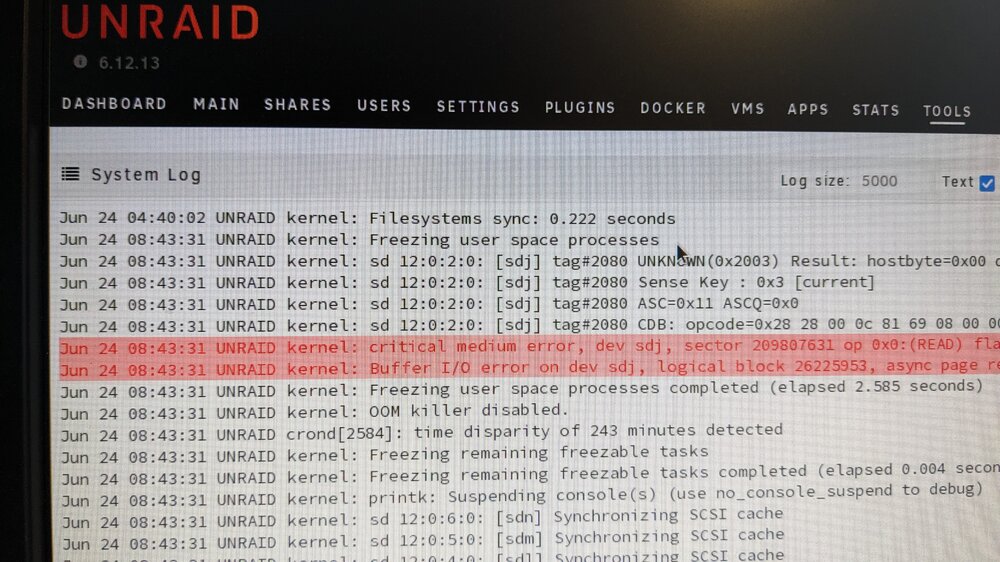
Hi folks Looking for pointers on this I 've just upgraded my unraid system from a threadeipper 2950 to a 3960X on a ROG Zenith II Extreme Alpha motherboard. No changes to drives or USB boot stick. Everything went very smoothly and all services and functionality is as before. However, I've noticed that my system is now going into sleep mode overnight. Whenever I get to my desk in the morning, it's sleeping. A tap on the keyboard will wake it up. I'd prefer to not have the system sleeping as it runs some home automation VMs and Dockers. Here's the log after I wake it up; Last action was at 4.40am, until I woke it around 8.43. I had a good look around the MB bios but don't see anything obvious in any power settings. I don't have anything sleep related in my unraid setup either. Any tips on where to look? I'm still on 6.12.13. I'd panned to update to current after this hardware change, but would like to get this issue solved before doing so. Thanks for looking.
-
@HHUBS I don't believe an isolated CPU can be utilised by the OS. The help on CPU Isolation settings says the following; CPU isolation allows the user to specify CPU cores that are to be explicitly reserved for assignment (to VMs or Docker containers). This is incredibly important for gaming VMs to run smoothly because even if you manually pin your Docker containers to not overlap with your gaming VM, the host OS can still utilize those same cores as the guest VM needs for things like returning responses for the webGUI, running a parity check, btrfs operations, etc. That would indicate to me that an isolated core is reserved exclusively, and not used by OS. It's typically recommenced that you never isolate, assign or pin CPU 0 as this is favoured by unRaid for OS specific tasks and processing. If you have CPU 0 pinned or assigned to Docker or VMs, that might contribute to your 100% usage issue? As always, I could be wrong, and other more knowledgeable may row in.
-
I use HDBaseT to run displays and peripherals from a VM on my unRaid server to a desk in a different building. I write a bit about it here; https://mediaserver8.blogspot.com/2019/07/routing-vms-anywhere.html I'm currently pushing a single display 1920x1080 @ 60Hz, and you'd need one transmitter / receiver per display. Not sure if they hit 144HZ, but you could check specs on AV Access devices, or similar technology. Mine runs across about 60M of Cat6A cable and is very stable.
-
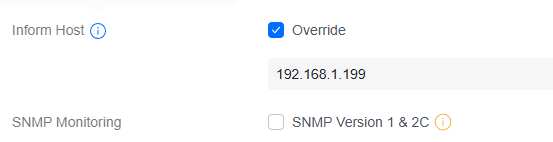
Ah, something that must not have come through when I migrated, or perhaps something new. Is this what you refer to? So maybe my Switch Ultra could have worked after all?
-
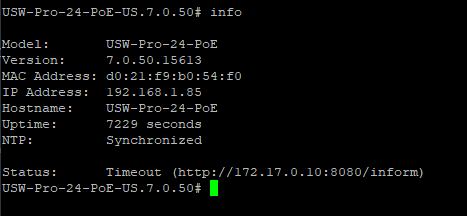
The device shows as adopting; Then goes offline for a moment; Then repeats on a loop. On the first try, my logs show success; But the adopting / offline loop just keeps going. Docker Inspect shows the docker IP to be 172.17.0.10 When I had the Ultra, I couldn't SSH into it (not supported), but your post just reminded me this was a switch with SSH supported; I did a set inform to the IP of my unraid server, et voila, it worked! Though that brings up my next question....... Whenever I have occasion to stop and restart this docker, my USG-Pro-4 'forgets' its inform UL and I need to log in to the device UI and reset it. I suspect I'm going to have the same issue with this switch. Any thoughts on that?