





john_smith
Members
-
Joined
-
Last visited
Everything posted by john_smith
-
that makes sense, thanks. if you don't mind my asking, why don't you use SpaceInvader's script? also, what's recommended to keep and not keep datasets for? I assume it'd be useful to convert certain folders to datasets for folders like appdata since they are containers, but what about folders like domains or system?
-
i didn't consider that formatting my cache as ZFS wouldn't automatically create a dataset for at least for the top level as a whole. Do datasets need to be created manually for, or what's the process for working with them?
-
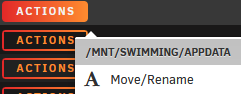
a bit new to ZFS here, I recently formatted my pool to ZFS and using mirror with two 1TB nvmes, but when i click actions using this plugin, the only option i see is to move/rename, nothing about snapshots. Am i missing a setting somewhere?
-
ok, trying to log into postgres now but it doesn't seem to be working? (page loads, but incorrect password or username) am i missing a link i need to be making first? i'm using the username and password that i used to set up the postgres15 container
-
fair enough - it turns out my issue was actually just a general misunderstanding of how tailscale works. My setup was up and running correctly turns out, but i did not understand how to access the resource i wanted to access. thanks for the reply
-
I'm new to using these kind of containers and trying to get firefly iii (and later data importer) installed, but having an issue with the DB not existing. If this is anything like TeslaMate which also uses postgres, then i assume i might need to give the container permission to create the database, right? though i tried a similar command to the one i used for when i did that install to no avail. I'm also assuming it's not an issue to use the same postgres instance (host & port) and the associated DB username and password i had already used for my TeslaMate container. here's the error regardless in case my assumption is wrong: Unfortunately, this error was not recoverable :(. Firefly III broke. The error is: Could not poll the database: SQLSTATE[08006] [7] FATAL: database "fireflyiii" does not exist (Connection: pgsql, SQL: select "id", "name", "data" from "configuration" where "name" = is_demo_site and "configuration"."deleted_at" is null limit 1) This error occured in file /var/www/html/app/Support/FireflyConfig.php on line 65 with code 0.
-
so i configured this plugin and confirmed green on host and client after setup, but i can't actually seem to be able to access any of my local resources remotely as i would expect to be able to do via the tailscale VPN. am i missing something in the settings?
-
couple of questions on the steps why would you not use a password in the primitive ftpd settings? wouldn't this be more secure? tbh i am not sure what the public key authentication option does, are we using the same keyfile from unraid as a file for authentication elsewhere? i thought we were literally putting the file in the phone and using SFTP to sync it each time are the below steps still necessary if also doing the additional optional steps with p7zip?
-
i kind of gave up on encryption to be honest, but today after updating OS from 6.12.4 to 6.12.6, i tried encryption again (small disk) and it succeeded on the first try. nothing really changed other than OS update and a few docker/plugin updates.
-
Looks like they never figured it out on that thread either
-
i'm reading the log now and seeing something in red I don't recall seeing before: Dec 4 12:20:04 HTPC emhttpd: /mnt/disk1 mount error: Volume not encrypted
-
just finished moving everything over and tried to encrypt the smaller disk - also fails in identical fashioon
-
i'll try this and report back
-
I could move everything to my new large drive and try that one first, then I would subsequently want to move the files back to the small old drive in order to try encrypting the large empty drive again. Is there something that would change from doing that with regards to encrypting the large new disk?
-
I have not, this would be the first time I tried to reboot as well during one of my attempts yes
-
here are the logs:
-
thanks for the quick reply. i did start it back up after changing the disk type, that's when i was presented with the format option near the bottom of the page. from there: I check the checkbox, and and select OK on the popup I select Format, the page reloads "Started, formatting..." shows up for a few seconds The page reloads again, The disk shows up as unmounted and unencrypted, with the test to the right showing: "Unmountable: Volume not encrypted", remaining with the XFS file system
-
i know this is a topic that may have been solved, so let me know if i should post as a new thread
-
posting here since it seems to be the most recent post on the topic - i also tried following the space invader one video, and have tried a handful of other things as well since i'm having trouble (including referencing the simpler steps on https://docs.unraid.net/unraid-os/manual/security/data-encryption/ However, I'm still having trouble encrypting a new 20TB disk i'm trying to add. these are the steps i'm following: Go to the Main tab. Stop the array. Select the drive. In File system type change the file system to the encrypted type that you want. Select Apply to commit the change. Select Done to return to the Main tab. The drive now shows as unmountable and the option to format unmountable drives is present. I check the checkbox, and and select OK on the popup I select Format, the page reloads "Started, formatting..." shows up for a few seconds The page reloads again, the disk remains unmounted and unencrypted, showing: "Unmountable: Volume not encrypted" and remains with the XFS file system am i missing something?

