





john_smith
Members
-
Joined
-
Last visited
Everything posted by john_smith
-
saw some of these new ones and wanted to try them out, but for some reason getting Upload error Internal Error 500 when i try to upload a banner, anyone else getting this?
-
just installed it again and was able to configure it correctly this time. i'm already done with this migration so i don't have much use for it right now, but it will be useful in the future i'm sure
-
glad to hear it worked for you. My .bck backup file was over 500MB, but if you got it figured out via PGAdmin4 that's great, sounds easier. I had tried using PGAdmin a while ago but couldn't get it to work, though that was when i first set up teslamate, maybe i should give it another shot.
-
exactly, i didn't delete any docker containers in my whole process because of this, configuration/databases lives in appdata folders for grafana, teslamate, and postgres
-
Hey @brent3000 as i understand it, this is the process essentially from start to finish on unraid: # stop teslamate + teslamate-grafana + teslamate-abrp (if you use it) # on postgres v15 container -> console pg_dump -U DBUSERNAME -h IPADDRESS -p 5432 -f /var/lib/postgresql/data/teslamate.bck postgres # this creates the file /mnt/user/appdata/postgres15 # copy the backup file to /mnt/user/appdata/postgres17 # stop postgres v15 container # start postgres v17 container # start adminer -> via webgui create database there named "teslamate" # start teslamate container to initialize database # stop teslamate container # on postgres v17 container -> console: # Drop existing data and reinitialize, to do this: psql -U DBUSERNAME -d teslamate DROP SCHEMA public CASCADE CREATE SCHEMA public CREATE EXTENSION cube WITH SCHEMA public CREATE EXTENSION earthdistance WITH SCHEMA public # then restore your previously backed up data: psql -U DBUSERNAME -h IPADDRESS -p 5432 -d teslamate < /var/lib/postgresql/data/teslamate.bck # start teslamate, verify it works as expected # finally, go to /mnt/user/appdata/teslamate/grafana and delete all folders/contents # since deleting appdata/grafana contents will delete previously configured password, # reconfigure teslamate-grafana user/pass (Default user/pass is admin/admin) # start teslamate-grafana, verify it works as expected # start teslamate-abrp (if you use it) FYI i'm still not sure why I had to delete appdata/grafana to get it to work correctly, but it worked for me. Here's an additional note from the CA store on permissions for teslamate-grafana in case this happens for you, I ran this preemptively just in case but i don't think it should apply:
-
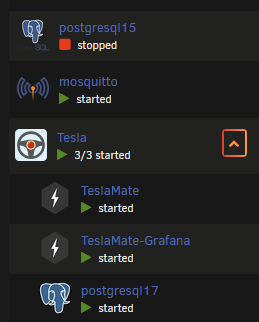
@bmartino1 once again thank you, I can't say this enough. You've helped me think through how this works and examine what may have been missing, and based on what you said I found the issue was twofold. First off, for context, the teslamate install on unraid is made of of 4 containers: MQTT TeslaMate TeslaMate-Grafana PostgreSQL What you said helped me re-asses that I should check configuration for each, not just postgresql 17/15 container. So my issues were: TeslaMate-Grafana container was not pointing to right database name I had renamed database from default name "postgres" to new name "teslamate" to be more specific this is changed in the container config, click container then edit this is purely user error and likely wouldn't happen to others TeslaMate-Grafana appdata, which is points to appdata/TeslaMate/grafana had issues I'm not sure exactly what, but assuming that my data was safe in the database, I deleted this appdata folder and reconfigured grafana this fixed my issue and may also happen to others
-
I just went ahead to further eliminate variables, and restored my database again from scratch from v15 to v17, this time making sure to even use a .bck file and avoid the -fc argument on backup, yielding a much larger backup file of 657MB, and using all the commands from the instructions, and restoring using pgsql command instead of pg_restore i ended up using the following commands this time instead: # postgres v15 container pg_dump -U DBUSERNAME -h IPADDRESS -p 5432 -f /var/lib/postgresql/data/teslamate.bck postgres # start teslamate container to initialize database, then stop container # postgres v17 container # Drop existing data and reinitialize psql -U DBUSERNAME -d teslamate DROP SCHEMA public CASCADE CREATE SCHEMA public CREATE EXTENSION cube WITH SCHEMA public CREATE EXTENSION earthdistance WITH SCHEMA public psql -U DBUSERNAME -h IPADDRESS -p 5432 -d teslamate < /var/lib/postgresql/data/teslamate.bck however, i am still getting no data showing in grafana, so i'm still where i started unfortunately
-
@bmartino1 I see what you mean now, it looks like they changed the database schema and extensions and wrote a script for for people to use during the upgrade, so i assume everyone who upgraded the normal way also broke their database. how fun These changes below are what I didn't do when i simply restored the database directly: # Stop the teslamate container to avoid write conflicts docker compose stop teslamate # Drop existing data and reinitialize (Don't forget to replace first teslamate if using different TM_DB_USER) docker compose exec -T database psql -U teslamate teslamate << . DROP SCHEMA public CASCADE; CREATE SCHEMA public; CREATE EXTENSION cube WITH SCHEMA public; CREATE EXTENSION earthdistance WITH SCHEMA public; . # Restore docker compose exec -T database psql -U teslamate -d teslamate < teslamate.bck # Restart the teslamate container docker compose start teslamate So now I know what the issue is, thanks for your help with this! Next I just need to see if it's possible to fix this after the fact or if i need to drop the database and make these changes before restoring it again. I may ask them again on github. Quick question for you about unraid <> docker interaction, if i wanted to enter commands like the ones above (such as "DROP SCHEMA public CASCADE;"), would i do that directly into postgres 17 container, or with docker command ahead of it, or is it the same thing?
-
can you tell me a bit more about make but not save changes? The specific command i ran to restore my database was the following (and nothing else), so let me know if im missing something: pg_restore -U DBUSERNAME -h IPADDRESS -p PORT -d DBNAME /var/lib/postgresql/data/teslamate.dump
-
@bmartino1 I actually tried posting on the teslamate github first since I thought they could help having found some of those links you posted myself, but my issue was closed almost immediately before anyone else could answer: https://github.com/teslamate-org/teslamate/discussions/4743 . that's why i came here to ask instead. Reading a reddit comment from the thread you just linked for example: Thanks for that, i did it! A little more information, login with ssh to your Synology and check your teslamate database docker name with docker ps. The name was TeslaMate-DB. Make a sql backup: docker exec -t TeslaMate-DB pg_dump -U teslamate teslamate > teslamate_backup_$(date +%F_%H-%M-%S).sql Remove docker container en manual delete all the files on the drive: docker rm TeslaMate-DB Update the stack with postgress:17 Copy the database: docker cp teslamate_backup_2025-04-29_09-13-32.sql TeslaMate-DB:/tmp/teslamate_backup.sql Login to postgres: docker exec -it TeslaMate-DB psql -U teslamate postgres Drop db: DROP DATABASE teslamate; Create db: CREATE DATABASE teslamate; Restore backup: docker exec -i TeslaMate-DB psql -U teslamate -d teslamate -f /tmp/teslamate_backup.sql Restart, everything works. Thanks for all the tips here :) this seems pretty similar to what i did, except the database creation i did via adminer, and the new database creation i did via installing a new docker for postgresql 17
-
@bmartino1 thanks for your reply. i'm aware postgresql doesn't support tag updates, so perhaps my wording wasn't clear. I've updated my post to reflect this. I "upgraded" by installing the new postgresql 17 container, and using the commands i posted between the two different containers, so i believe i did this correctly, but i'm having issues after the fact. do you have any idea what might be causing these, or perhaps a way to check if the migrated db was correctly migrated?
-
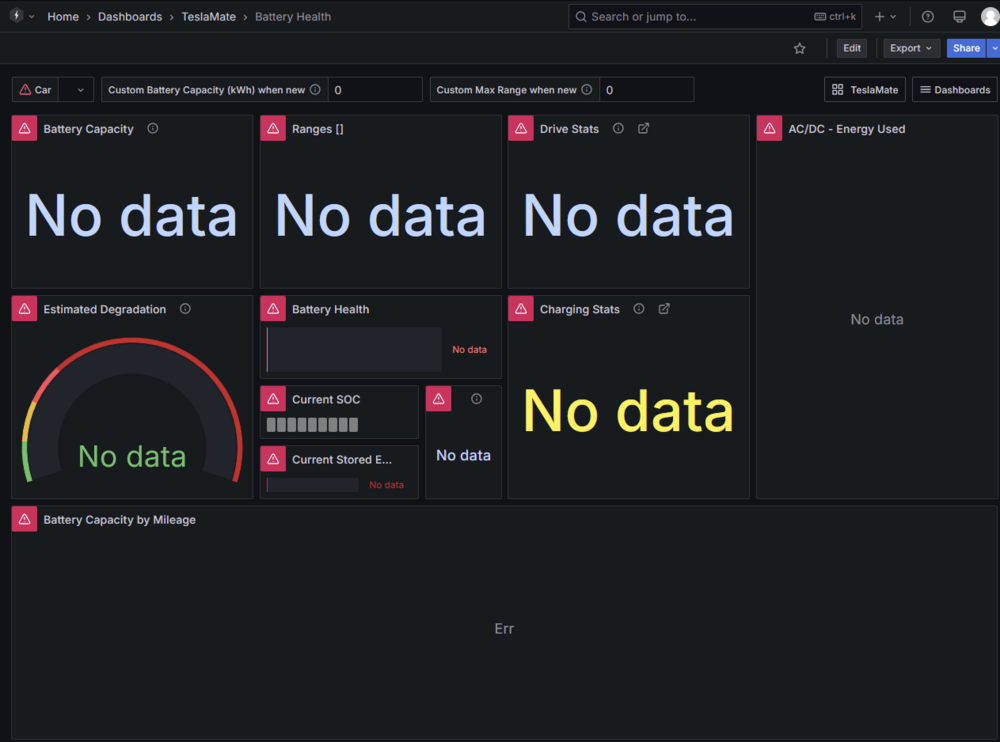
Teslamate recently made a breaking change requiring postgresql 16+ and when I tried upgrading from v15 to v17, i ran into some issues, i installed postgresql 17 container via CA store, and "upgraded" from 15 to 17 using the commands below, referencing this process for immich and this video by the same author. both specific to unraid (but for earlier postgres versions) (on postgresql 15 container, click console) pg_dump -U DBUSERNAME -h IPADDRESS -p PORT -fc -f /var/lib/postgresql/data/teslamate.dump DBNAME (on postgresql 17 container, click console) pg_restore -U DBUSERNAME -h IPADDRESS -p PORT -d DBNAME /var/lib/postgresql/data/teslamate.dump I also have integration via MQTT on Home Assistant, and can see certain data that way, and teslamate webgui also seems to be loading fine. However, when trying to access any dashboards via grafana, several errors show up in the postgres logs around "invalid input syntax for type json" and also "syntax error at or near "AND"" errors" I've attached what the log of the postgresql 17 container looks like when accessing grafana dashboards (uploading as text to avoid posting extremely long comment) For reference, I tried asking on the Teslamate github, but they closed my post since they don't support this way of upgrading postgresql (and install via unraid i guess?) postgres17_log.txt
-
Hi, i am interested in zoneminder (currently on frigate but having a lot of stability problems). Does zoneminder support coral TPU? I saw some posts about it in this thread, but the latest is from 2021. asking since i don't have a gpu in my server, only an intel iGPU.
-
I saw, and got it!
-
Is this on the CA store yet? The creator said his request to add it has been there for months now, but I didn't see the the app there as of yesterday
-
why is balanced unavailable in my config? i have a 9th gen intel i7
-
i did have an issue with 2 cores maxing out with no VMs running or dockers causing it (and causing transcoding to fail), and restarting NUT seemed to fix it, which is why i think i need to take this endless logging more seriously. do you think this fix would address the issue i had?
-
I was having some issues with NUT that in the logs recommended enabling pollonly in upsconf but having done that now I'm seeing tons of "nut_libusb_get_report: Input/Output Error" messages in the log, and sometimes "nut_libusb_get_string: Pipe error", is this normal? for reference, i have a CyberPower-1350VA UPS tried taking off the pollonly in upsconf, and now i'm seeing the same errors from before, which is the same error but with the additional suggestion to enable the pollonly flag Mar 15 11:27:06 HTPC usbhid-ups[512654]: nut_libusb_get_report: Input/Output Error Mar 15 11:27:08 HTPC usbhid-ups[512654]: #012Reconnecting. If you saw "nut_libusb_get_interrupt: Input/Output Error" or similar message in the log above, try setting "pollonly" flag in "ups.conf" options section for this driver! any suggestions?
-
i recall now that i had an issue with my usb drive getting corrupted before and i did use unraid cloud, though it didn't seem like it had all the same files my (corrupted) flash drive had for some reason. is there any documentation on what unraid cloud saves vs what it doesn't? i also worry a bit since i know those backups are unencrypted in the cloud, right?
-
I've got the white lexar card reader that some have said works, so if i ever have an issue i'll switch to that + an endurance microsd card, but until then i think i'll wait it out since i'm not sure i want to deal with having to transition. What happens when the license check fails due to a usb drive issue? what's the recovery process like? assuming i have backups of the usb drive to my array via appdata backups. though i'm wondering if there's a way to set up those backups to go elsewhere so that they're accessible easily outside unraid... found an easy way to sync my backup regularly off my server using syncthing, so that's good
-
is there any plan in the future to support appdata backups via ZFS dataset snapshots automation at all? it would be pretty cool now that Unraid 7 supports ZFS more natively in the stable release. Though I know for containers like Plex where there's a lot of cache/metadata to exclude, you wouldn't want to do this, for others it might be useful
-
I'm realizing I may have done something wrong when migrating my pool from XFS to ZFS, since I see in the documentation that "Top-level user shares in a ZFS pool are created as datasets instead of ordinary directories.", and when I just created a test share in this pool, it was automatically created as a dataset. However, all the shares i currently have in this pool are directories, not datasets. I believe this might be because of the way I migrated my data over from my old pool using copy,to keep old data safe and backed up in old unmounted cache drive while testing ZFS), rather than using mover, which I assume would have correctly created datasets when moving shares over. I'm curious to try moving a share back and forth from my array to see if this places the data as a dataset rather than a directory. That being said, would this be effectively the same as hitting the "convert to dataset" operation? EDIT: move share out of pool and trying to move back was unsuccessful, ended up having to manually create dataset with matching name in order to move data back. tested convert data set on another share and it was much more straightforward. leaving the system and appdata containers for last since those are the highest impact.
-
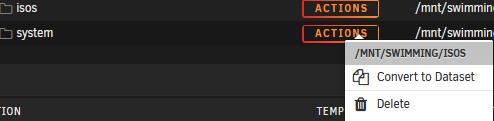
Thank you! I saw that option but I thought it was only necessary for deleting already existing datasets. Now that I have enabled it, I see the previously missing "convert to dataset" option:
-
see, that's what's weird, i don't see those options, only move/rename. I noticed your folders are blue though, while mine are gray. is your root folder above those (rclone in your example), also a dataset? is that what i'm missing?


-
what's the process to convert a directory into a dataset? is it simply to hit "Create Dataset" and input the exact name of the directory? i don't see details on this on the first post, only notes about what the process entails on the back end while it's happening.



