





john_smith
Members
-
Joined
-
Last visited
Everything posted by john_smith
-
does healarr support self-hosted ntfy notifications ?
-
I did some testing before shutdown and in my case it looks like its the /mnt/user directory for me show up as a loop in the syslog: root: rmdir: failed to remove '/mnt/user': Device or resource busy after unmounting it directly (umount -l /mnt/user), the loop blocking stop of the array ended and it stopped
-
How did you determine it was that specific folder? I'm curious to find which is the issue for mine, as I'm also using zfs
-
I've discovered i have the same issue over the past few updates, since i never reboot otherwise and haven't had any other issues. The last 2 updates I've stopped all VMs and docker containers fully, spun down disks, and then rebooted and both times it still get stuck on the same spot and then kills it and calls it an "unclean shutdown" and finds no array errors (since nothing was running or being written to the array). Reading this thread, I'm still not clear what the issue is though. @sasbro97 did you ever figure it out or did it resolve itself when the cloud folder in your case was moved/deleted?
-
back with another comment - i don't think a diag report is needed here as this is more aesthetic on the new feature the new privacy toggle is a great idea and i love it - that being said, it's a bit useless in its current iteration for two reasons: visual obfuscation is easy to deconstruct, even just visually if you know what icons look like, but moreso with an actual tool IPs are not obfuscated. Only ports should be visible ideally, or perhaps add the option to select what we want blocked: container IPs local IPs ports
-
@XCrownedClownsX FYI just tested this again, on both firefox and edge incognito, same issue persists. here's the support bundle.FolderView Plus Support Bundle-2026-04-06T19-19-17+00-00.json
-
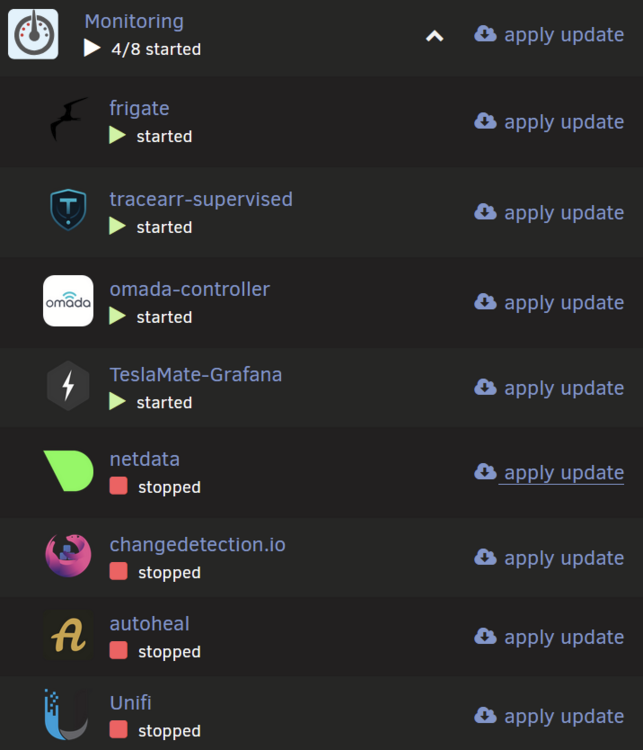
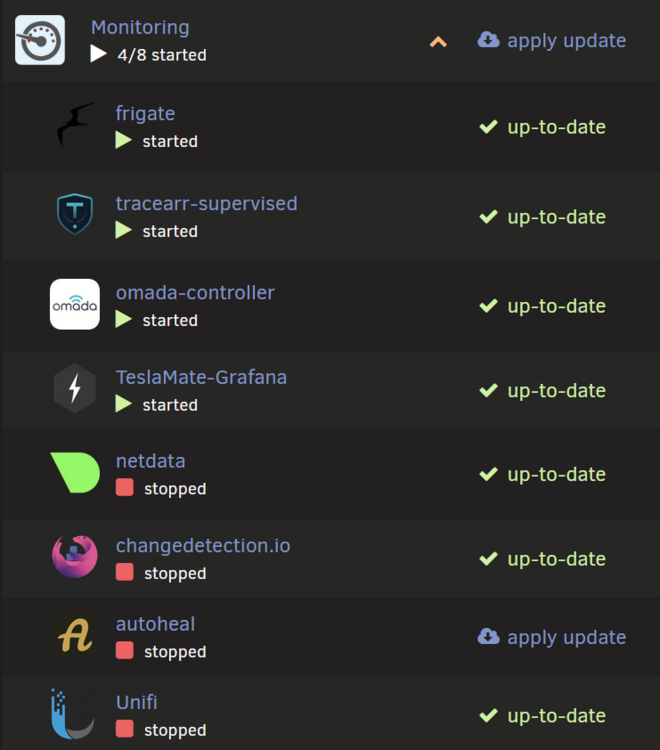
FYI, at least part of the issue I mentioned recently is still present as of the current version. When the docker tab is loaded with a folder that has at least 1 container with an update minimized, and that folder is expanded, all of the container in the folder show the "apply update" update button. Loaded minimized: Expanded: Refreshing the already expanded folder, you can see this does not happen if the page is loaded with the folder already expanded:

-
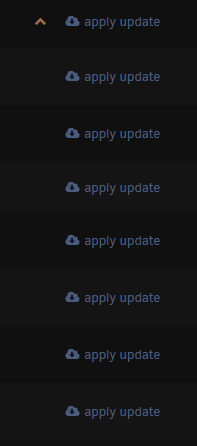
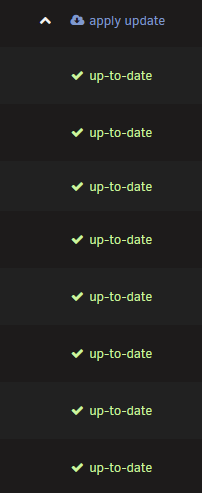
there seems to be a bug with how the "apply update" button is showing up, both visually and in function (pressing it), on the current version. When a folder is expanded for a folder that has at least 1 update pending, it shows ALL containers have an update pending. Only 3 had updates pending. I only wanted to update one, and i clicked apply update for the specific one - however, the button is actually just mirroring the folder-wide apply update, and went ahead and started updating ALL CONTAINERS in the folder (all 3 in this case). After the updates were applied, the folder-wide "apply update" still did not go away either This is not what i would expect, both visually and functionally
-
does this support autoheal?
-
@SpaceInvaderOne i looked at a similar plug-in to yours (a version more complex than I'd prefer tbh), and noticed during attempted setup that of my disks happens to not use the same encryption key for some reason as the others. I assume this is why your plugin didn't work for me out of the box, but I'm not sure why i have no issues with manual decryption. Have you run into this issue? How would I fix this to be able to use your plugin?
-
anyone have one of the other repos installed as well to facilitate import of data? or otherwise some other way of syncing? wondering how to do this part now that i have the container installed
-
If they're harmless, why are the messages coming up?
-
discovered this just now, can someone elaborate the difference between using just this and appdata backup plugin? i already have duplicati setup, but wondering what this adds
-
Recently replaced my Coral A+E m.2 TPU with a Hailo-8L B+M m.2 TPU, which has made Frigate stable, with the TPU itself never going offline in the weeks since. However, today I noticed the following error keeps popping up associated with the kernel, such that when it does it happens numerous times that day, but then it won't happen for at least a week or so. Is this a concern? Log excerpt here
-
I had reseated it a few times, and never saw the temps go anywhere near even throttling. I don't know whether it was a power issue under load, something buggy with the kernel/driver/apex, or a PCIe conflict/instability, but tbh it sounded like more than one of these, and I was a bit tired of troubleshooting this. Given all i've read about the issues with coral A+E key TPUs causing issues on desktop motherboards' m.2 slot meant for wifi chips (here and elsewhere) I ended up replacing my coral M.2 A+E key TPU with a Hailo-8L M.2 B+M key TPU. It's only been a few weeks but haven't had any issues since.
-
I do have the latest BIOS actually, forgot to mention this in my troubleshooting steps. I did this after the first step actually. I am wondering if it's related to load, but why would it fail catastrophically? shouldn't it just throttle and then take longer to detect? i will look into this
-
Reaching out for help here as I've done research elsewhere and tried optimizing a handful of different things both in hardware and software but still having the same issue with the coral TPU going offline making Frigate stop working (even though the container doesn't crash). This has started happening more frequently recently, on the order of multiple times a week, escalating today where it happened post reboot within 30 minutes. How can i correctly troubleshoot this to figure out what to do to fix it? System info: intel i7-9700K processor (w/ quicksync) ASRock Z390 Pro4 ATX LGA1151 Motherboard 2x M.2 key M slot + 1x M.2 Key E slot 32 GB RAM (4x8GB) Google Coral TPU Accelerator, M.2 (A/E Key) 1 HDD for frigate storage in pool (no parity) some dashcam footage is also synced to this drive 2 nvme for zfs cache (mirrored) Cameras: 7x 1080p wyze v3 (thingino fw) 2x 2K tapo c120 1x 2K reolink wifi doorbell 1x 4K reolink POE Here are some of the steps i've taken thus far: confirmed all streams are using sub stream for detect, and main stream only for record/audio moved 1 nvme ssd from M.2 key M slot to PCIe slot via M.2 to PCIe adapter previously when coral tpu offline issue occurred, reboot would cause second nvme ssd to become unavailable - only solution was full shutdown. Making this change mitigated this, allowing normal reboot to bring coral tpu back online. optimized Frigate container Extra Parameters: --shm-size=4G --mount type=tmpfs,target=/tmp/cache,tmpfs-size=1000000000 --restart unless-stopped --log-opt max-size=10m --log-opt max-file=3 --memory=16G --memory-swap=16G optimized Extra Parameters on one other high RAM use container: --memory=12G --memory-swap=12G installed Netdata container not sure what to look for yet EDIT: given all i've read about the issues with coral A+E key TPUs causing issues on desktop motherboards' m.2 slot meant for wifi chips, I ended up replacing my coral M.2 A+E key TPU with a Hailo-8L M.2 B+M key TPU. It's only been a few weeks but haven't had any issues since.
-
After testing a few times, i'm still unable to get this plugin to work unfortunately myself. Let me know how i can help troubleshoot, as I'd be interested in helping getting it to work and using it myself.
-
have this question myself, is it possible to save the generated key somehow to start the array if it is stopped after the auto-start happens? or does the user's previous key still work in addition to the key generated by this plugin since they're in different slots?
-
thanks for the context. can i ask why you recommend against using it? how exactly does it operate? I already use the plugin for my whole system, but want to use funnel for just a specific container within that.
-
i see, so if this thread isn't for support for the tailscale implementation as it applies to containers, where would that be? i don't see a separate support thread for that, and installing the tailscale plugin is what enables that functionality if i'm not mistaken
-
perhaps i didn't word my question well. If I'm using the "use tailscale" option in containers, and I want to use a CLI command to configure the tailscale rather than the gui, is this possible somehow? asking since via the CLI, setting up the funnel was successful, but via the gui it was not
-
to add to this, does anyone know if there's a way to use the tailscale plugin to just send a command via CLI? asking since this would allow me to use this as a workaround since Funnel doesn't work via the plugin for a container, but works via the console for that container with Serve enabled
-
checking my microSD reader today via the unRAID USB creator tool, it looks like it has a generic GUID so it's blacklisted, even though it's one of the ones that should have a unique one: Lexar LRWM03U-7000 Rev A G Looks like I will try one of the other ones mentioned on this thread instead.
-
Anyone have any issues using the tailscale plugin to enable Funnel for a specific container? for some reason i can't get it to work, having tried a variety of different parameters in different places. I searched this thread, didn't see any others with this specific issue. Confirmed it's not account settings elsewhere, since if i set it to Serve and go to the console for the container itself, Funnel works via CLI Can anyone share their configuration perhaps? I assume i must be missing something simple


