Conson Droppa
Members
-
Joined
-
Last visited
Everything posted by Conson Droppa
-
Can someone elaborate on the docker safe new permissions. I understand it's purpose, I need info on getting my server to utilize it. Is it a script file replacement or a checkbox/drop down option? I've been poking around and having trouble finding some info. Or a link to a thread about it would be great. Thanks. Sent from my iPhone using Tapatalk
-
Hi newoski, You need to select which shares/folders you want to move. Move your mouse over the unRAID Shares Explorer at the bottom, it will display the red add button next to a folder. Choose the ones you want, then you should be good to go. Right, that makes sense, but it's only showing Shares. It's not showing individual Disks. My goal is to move all the contents from Disk# to the rest of the Array Choose the shares as said, then the Home tab will work at the top for disk selection. That's how mine worked. Sent from my iPhone using Tapatalk
-
I've apparently interpreted it wrong but I've always looked at sudo as the big godfather boss. Kind of like I'm in charge, "SUPER USER DO what I say. Pie Yow!" No matter what it will execute said command. Only in Louisiana. Sent from my LG-D852 using Tapatalk My last name is Meaux like in my ID. It's funny how people will pronounce Geaux Tigers or Geaux Saints or the last name Boudreaux and Breaux but they see my last name and its Mee-Ox or May-Eww. My wife and I are just known as Moe and Lil-Moe. Sent from my iPhone using Tapatalk
-
Y'all is a staple in south Louisiana. "Not a Linux guy" LOL Whatever you tag yourself as you are a great contributor to this community. CA has made my confusion and self guessing practically disappear. Contributions I have used from you and CHBMB, trurl, gfjardim, speeding_ant, lsio have made my server what it is today. A piece of electronics I can't go without. Keep as many updates coming as you can. I'll give you only up to 25zz though. Sent from my iPhone using Tapatalk
-
You may be right although I've had some minecraft files that were stubborn and I needed sudo to run the nano command to edit config files in minecraft server and owncloud. Maybe it's the nano command or maybe it's my setup. As long as it works and I don't have to bother y'all. I'll pay closer attention next time or try without it. Sent from my iPhone using Tapatalk
-
Just had the same scenario... I ssh or telnet to the app data backup directory and use sudo rm -rf foldername FYI foldername is case sensitive and pay attention to what you're doing. It is irreversible and very powerful when accompanied with sudo. Sent from my iPhone using Tapatalk Thanks. Actually, I didn't have to use sudo. Just logged in as root (telnet) and ran- rm -rf /mnt/diskX/path/to/folder X=disk number Was gonna say sudo is probably not needed but it is in some cases so if I'm confident I'm running the command in the right spot I include it so I don't have to run the command again with it. I'm not a guru by any means but I get by pretty well. There may be a way to tell if you're in a directory where it is needed. I just don't know. Sent from my iPhone using Tapatalk
-
Just had the same scenario... I ssh or telnet to the app data backup directory and use sudo rm -rf foldername FYI foldername is case sensitive and pay attention to what you're doing. It is irreversible and very powerful when accompanied with sudo. Sent from my iPhone using Tapatalk
-
Can someone shine some kind of definition on an "exit 23" error. I'm on the road at the moment, I just got my results email from unbalance and that was the message. I'll post a log if needed in a bit. Sent from my iPhone using Tapatalk
-
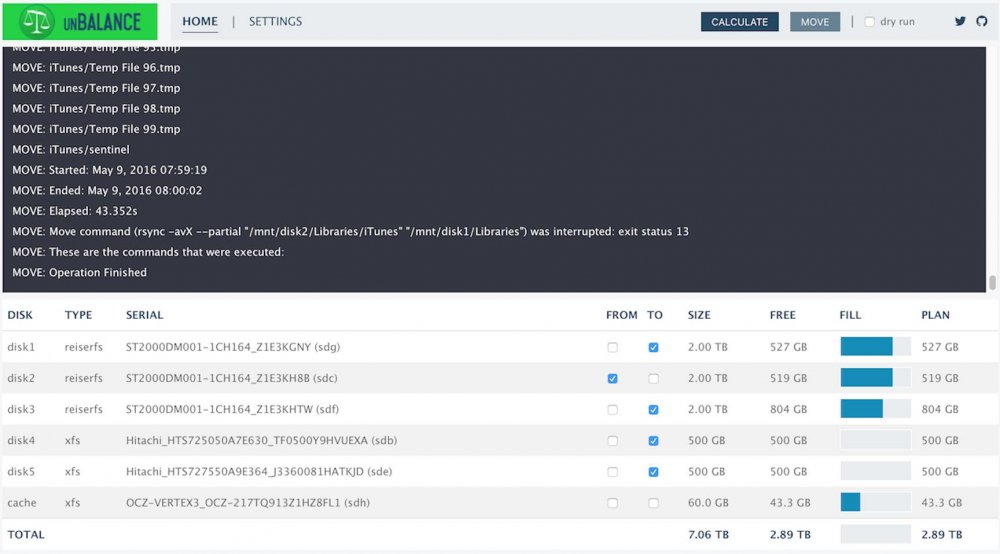
Can someone explain why this happens every time I invoke a move. See attachment. It calculates and does a dry run happily.
-
I hope you don't mean your unraid server is available directly on the internet? There are lots of threads here talking about how that is a bad idea. Regarding Plex specifically, for initial setup Plex requires that you access the Plex server using: http://ipaddress:32400/web from a computer that is on the same subnet as the Plex server. Once the server has been setup you should be able to manage it from any ip address. Also see: https://support.plex.tv/hc/en-us/articles/204604227-Why-can-t-the-Plex-app-find-or-connect-to-my-Plex-Media-Server- Thanks for the quick reply. They were always on the same subnet. My router groups my DHCP and Static IP's on the same subnet. But that didn't help. I was always able to hit the GUI but I was never able to see the Server settings page. I went and temporarily changed this unRaid box over to a DHCP IP and then was able to enable "Remote Access" on the Plex side. I then moved back over to one of my static IP's and can still edit my server via LAN and WAN. Your suggestion made my brain think outside the box for a work around. Thanks again! I also appreciate the security concern. This box is firewalled/proxied/and has VPN. There is nothing tied to me personally anyway on my Plex box.
-
Plex Setup with a Public Static Ip Address I recently did some server cleaning and decided to start my Docker from scratch. My Plex install had been working fine for years with out any issues. Recently I added Static Ip addresses to my ISP account and my unRaid server is on one of said Static IP's. Even when I switched my array from a LAN IP to a WAN IP, Plex continued to work flawlessly. Locally and Remotely. However, once I deleted my install and reinstalled it, the Plex web GUI no longer sees my Plex server. I can successfully log on to "http://url.com:32400/web" and log into my plexpass account. I can also see other friends Plex Servers. Just not mine. I am assuming that remote access is not enabled and because of my public static IP my server is basically "remote" 100% of the time. If I stop the Docker container, I can no longer access the web GUI, so that part is working. Also all the correct ports are forwarded. Thanks for any help!
-
Yeah pretty much that scenario. Once I clear this 2TB and format it, I'll have enough room to relocate my other 2-2TB drives' data. I'll look into those tonight. Thanks!!
-
Great thread! Sorry for people having problems but they help everyone else tremendously. I am trying to migrate 800GB from a 2TB drive to 2-500GB drives. For XFS formatting purposes. What does the rsync command for that look like? Tried unBalance which I assume does this in the background if you select the correct checkboxes but it hangs up on a couple files.