Conson Droppa
Members
-
Joined
-
Last visited
Everything posted by Conson Droppa
-
Same here, any fix you found yet?
-
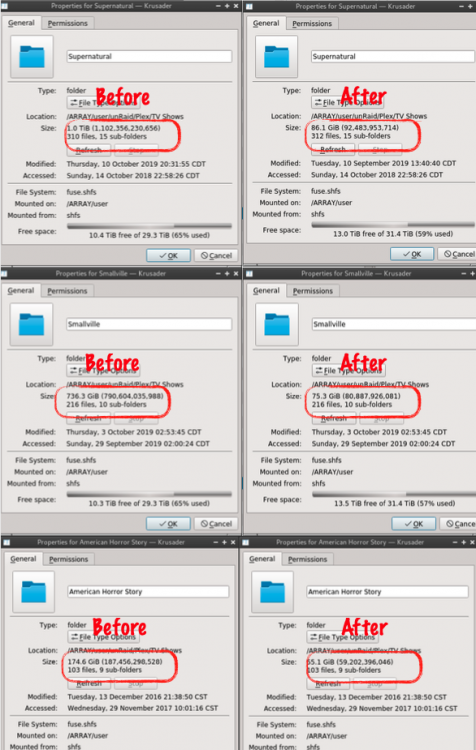
I cannot thank you enough. This docker is so much cheaper than hard drives. I posted my Before and After of a few TV Show directories. This is insane. I was nervous that I was seeing things, but I checked and the quality and audio is still all there. Unbelievable. I already had HEVC of some episodes so some directories were't as much improvement. But some were tremendous. I also want to give a nod to Nvidia GPU support. I won't ask for an ETA, but I am very interested in that being supported. Just throwing my vote in the bucket for a feature request. You need to convert this from beta to GM so you can ethically accept donations. If not, I am sending something your way wether you like it or not. LOL.
-
I converted the folder for 2 TV shows without any issue. About 600 episodes. I then pointed to one of my movie folders and I had some failures right of the bat and every so often after that. I turned on debugging and the only error I was getting on my failures is something about Height and resolution. What we be a course of action for those issues. Get a different copy of that file or just know that unManic won't tough that one? x265 [error]: Picture height must be an integer multiple of the specified chroma subsampling [libx265 @ 0x558295526880] Cannot open libx265 encoder. Error initializing output stream 0:1 -- Error while opening encoder for output stream #0:1 - maybe incorrect parameters such as bit_rate, rate, width or height Conversion failed!
-
I may have interpreted that wrong but the whole reason for Nextcloud is to add folders and files to it. Use the desktop app to sync and drop that “Phone Photos” folder in your Nextcloud directory. Put desktop app on other computers and sync that folder. You can connect to desktop app with local LAN IP. You will just have a red X on your connection when not at home. Sent from my iPhone using Tapatalk
-
Even though not related, I love how ironically this is the last comment now. Sent from my iPhone using Tapatalk
-
Default? I never whitelisted it. No CA problems here. Sent from my iPhone using Tapatalk
-
This my setup. I just have three libraries. Feel free to make more if you need. You also need to verify each libraries path in the plex GUI. Sent from my iPhone using Tapatalk
-
Sadly, I had to end up dumping my appdata folder and starting fresh with the nico640 docker. Worked fine for a few days, then log size and update issues persisted.
-
Same here, my docker size was creeping about 1 % every 2 days. I just upgraded UNMS to 0.14 and instantly got a notification that Docker size returned to normal. See my previous post.
-
I replaced "oznu/unms" on the edit screen with "Nico640/docker-unms:latest" and I am running clean on 0.14.
-
Happy Birthday!! Been rockin’ my first license since 2013 but used it for a few years prior when up to 3 drives were free. What started off as an array thrown together with scavenged parts has turned into my additional children that don’t speak. They just sit in the corner and hum.
-
+1 for Paperless
-
I use the Dynamic Black theme and with the new UI I needed a darker banner. With the Lime-Tach banner off it was white. I made a few rectangles in Figma for anyone to use. I did these very quickly and didn't go around grabbing colors with a dropper. Feel free to change them to your needs. They are currently 1000x100 but I believe any size solid color PNG would work as it appears to be responsive. The Figma Link is below if you want the SVG file to change the color. . https://www.figma.com/file/d4cfMpc8CaHzznZF4oYTn0eZ/Untitled The darkest one works the best as is.



-
Thought everyone used it. A whole lot easier than cranking up terminal to telnet or ssh. https://lime-technology.com/forums/topic/56382-plugin-ca-config-editor/ Sent from my iPhone using Tapatalk
-
Thanks for the help. I was reading about the masquerade feature after I played around with the ports. I will try that. I do have static IP’s which are assigned to sub domains so I will add it in. I used the config file editor plugin to edit the files. Which seems to work great and the changes seem to hold. I went back and checked with TextWrangler to make sure. I’ll post my findings or resolutions for anyone in the future. Sent from my iPhone using Tapatalk
-
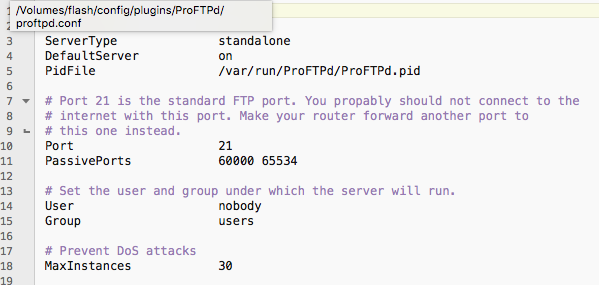
So after researching through the readme I went in my router and opened port range 60000-65534 and pointed that to my server. I then added the following to the proftpd.conf file: PassivePorts 60000 65534 Still have successful LAN and no WAN access. Does that line of text go anywhere special in the conf file. I also can't add anything in the Edit .conf file section of the plugin settings page. With the plugin stopped and/or started. Should I be able to?
-
Sorry if this a redundant question, I skimmed through the thread and searched a bit but couldn't find a similar issue with a resolution. I have been having this plugin installed but I am having a slight issue. I currently have ProFTPd-2018.02.05.1 running and I am on OS 6.5.1. I have created a user and placed "ftpuser" in the description. (minus the quotes). I also opened up port 21 in my router for testing purposes. Will change ports once this is working. I can connect fine when I am on my LAN via 192.168.x.x, but have never been successful via WAN. I sometimes get the username and password dialog box but after hitting enter I get nothing. I have tried the Transmit iOS app and various other browsers ftp clients with no luck. The transmit app works fine on LAN. I feel there is one small piece of the puzzle I am missing. Thanks in advanced.
-
Can someone tell me why do I get this email now daily. This post may not belong here but it has CA in the path. Thought I would start here. Sent from my iPhone using Tapatalk
-
Hi rmeaux, Do you get any warnings when running calculate (especially on the unRaid/Videos folder) ? Is unBALANCE the only app/plugin writing to disks ? Maybe you have couchpotato, mover, nzbget, etc running in the background ? Other than that, maybe a double check on the health of the source disk ? Well the only errors it had after calculate was a few folders didn't have the user as drwxr..... but it was not the Videos folder. Ran new permissions again. No plugins or dockers running. All shares Were unmounted on clients and my main iTunes app is closed. I ended up manually moving the files and folders from disk2 to disk3. I did find after I moved the files and went back to start deleting the source files i had a few files that had a "~" in the file name and it was kicking back an unable to delete error due to filenames length too long. I removed the tilde and was able to delete it. I wish I would have ran unbalance again to see if it would have performed after the filenames change before deleting them. Is a tilde something that would have suspended move? Also, is there a way to balance the array after I get everything to XFS? I know this was asked before somewhere but I can't find it. I only get search results back on unbalance topics. Having disk color coded red and orange bothers me. Thanks. Sent from my iPhone using Tapatalk
-
Well I finally had room to perform some data moves. But I keep getting this error kick out. I have ran New Permissions a few times also. Can someone shed some light on what I can try or what the problem could be. It is preventing me from completely emptying a drive. I: 2016/12/17 08:00:11 core.go:808: unRaid/Videos/Picture 040.mpg I: 2016/12/17 08:00:11 core.go:808: unRaid/Videos/Picture 065.mpg I: 2016/12/17 08:00:12 core.go:808: unRaid/Videos/Picture 068.mpg I: 2016/12/17 08:00:14 core.go:808: unRaid/Videos/Picture 071.mpg I: 2016/12/17 08:00:15 core.go:808: unRaid/Videos/STUDIO_STUDIOARCH_7194612318.mp4 I: 2016/12/17 08:00:15 core.go:808: unRaid/Videos/STUDIO_TOWEROFTERRORBRIDE_7193594537.mp4 I: 2016/12/17 08:00:15 core.go:808: unRaid/Videos/STUDIO_TOWEROFTERRORBRIDE_7193690113.mp4 I: 2016/12/17 08:00:16 core.go:808: unRaid/Videos/clip-2009-09-05 12;03;38.mov I: 2016/12/17 08:00:17 core.go:808: unRaid/Videos/clip-2009-09-05 12;13;10.mov I: 2016/12/17 08:00:27 core.go:808: I: 2016/12/17 08:00:27 core.go:808: sent 83,777,541,532 bytes received 18,228 bytes 39,903,576.93 bytes/sec I: 2016/12/17 08:00:27 core.go:808: total size is 83,757,031,044 speedup is 1.00 W: 2016/12/17 08:00:27 shell.go:105: moveProgress: waitError: exit status 23 W: 2016/12/17 08:00:27 core.go:819: Move command (rsync -avRX --partial "unRaid/Videos" "/mnt/disk5/") was interrupted: exit status 23 : Partial transfer due to error I: 2016/12/17 08:00:27 unraid.go:391: Unraid Box Condition: &{NumDisks:6 NumProtected:0 Synced:2016-12-08 17:10:14 -0600 CST SyncErrs:0 Resync:0 ResyncPos:0 State:STARTED Size:7059818254336 Free:3208549273600 NewFree:3208549273600} I: 2016/12/17 08:00:27 unraid.go:392: Unraid Box SourceDiskName: I: 2016/12/17 08:00:27 unraid.go:393: Unraid Box BytesToMove: 0 I: 2016/12/17 08:00:27 unraid.go:404: Id(1); Name(disk1); Path(/mnt/disk1); Device(sdg); Type(Data); FsType(reiserfs); Free(233.6G); NewFree(233.6G); Size(1.8T); Serial(ST2000DM001-1CH164_Z1E3KGNY); Status(DISK_OK); Bin(<nil>) I: 2016/12/17 08:00:27 unraid.go:404: Id(2); Name(disk2); Path(/mnt/disk2); Device(sdc); Type(Data); FsType(reiserfs); Free(1.7T); NewFree(1.7T); Size(1.8T); Serial(ST2000DM001-1CH164_Z1E3KH8B); Status(DISK_OK); Bin(<nil>) I: 2016/12/17 08:00:27 unraid.go:404: Id(3); Name(disk3); Path(/mnt/disk3); Device(sdf); Type(Data); FsType(xfs); Free(232.1G); NewFree(232.1G); Size(1.8T); Serial(ST2000DM001-1CH164_Z1E3KHTW); Status(DISK_OK); Bin(<nil>) I: 2016/12/17 08:00:27 unraid.go:404: Id(4); Name(disk4); Path(/mnt/disk4); Device(sdb); Type(Data); FsType(xfs); Free(465.5G); NewFree(465.5G); Size(465.5G); Serial(Hitachi_HTS725050A7E630_TF0500Y9HVUEXA); Status(DISK_OK); Bin(<nil>) I: 2016/12/17 08:00:27 unraid.go:404: Id(5); Name(disk5); Path(/mnt/disk5); Device(sde); Type(Data); FsType(xfs); Free(306.6G); NewFree(306.6G); Size(465.5G); Serial(Hitachi_HTS727550A9E364_J3360081HATKJD); Status(DISK_OK); Bin(<nil>) I: 2016/12/17 08:00:27 unraid.go:404: Id(30); Name(cache); Path(/mnt/cache); Device(sdh); Type(Cache); FsType(xfs); Free(24.4G); NewFree(24.4G); Size(55.9G); Serial(OCZ-VERTEX3_OCZ-217TQ913Z1HZ8FL1); Status(DISK_OK); Bin(<nil>) I: 2016/12/17 08:00:29 core.go:921: unBALANCE - MOVE operation INTERRUPTED I: 2016/12/17 08:00:29 core.go:922: Started: Dec 17, 2016 07:25:27 Ended: Dec 17, 2016 08:00:27 Elapsed: 34m59.15s Move command (rsync -avRX --partial "unRaid/Videos" "/mnt/disk5/") was interrupted: exit status 23 : Partial transfer due to error These are the commands that were executed:
-
From the little bit I know, I assume if you have a "Open WebGUI" button, you're using the Docker and not the plug-in. I use the plug-in version and always just manually went to "ipaddress:6237" when needing to use unBalance" I believe the plug-in version was recommended a few months back for permission and disk access reasons. However, for the particular question you asked, I don't know the answer to that. Sent from my iPhone using Tapatalk
-
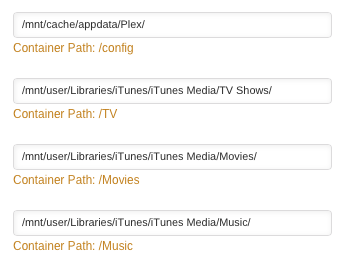
In my situation my whole home/family environment is Apple/Mac/Apple TV/iPad/iPhone/Airports, so I use iTunes extensively for organization and device syncing and home sharing to bedrooms. I use Plex for those spur of the moment Movie or TV shows I want to see and I don't have it synced to my device on hand. And also for Mom and Dad to watch from their Roku at their house. I explain this first because I just point my folder mappings to the individual folders in my iTunes Media folder. They are sort of pre-organized for me to begin wth. You can see in the photo I attached. It may look slightly different if you are still on 6.1.X, photo is from 6.2, but its the same setup basically. Just make up some container paths (/TV - /HomeMovies - /Concerts - /Documentaries) and point to where that data is going to be or currently stored. Then once that's done, in Plex, you can create a library for each container path you created. So when you create a Plex library called TV Shows you can point it to the container path /TV or whatever you created. If your folder setup is not based on iTunes as mine are, just organize them how you already do, and point to those folders.
-
Wow, I feel so stupid, I've used that method before. I knew I posted that question to soon. It was right in front of me.
-
I have always went to the CA page via the CA icon on the plugins page. I now get the settings page. What methods do others use to get to CA? Or has a link broken/changed?
-
Can someone elaborate on the docker safe new permissions. I understand it's purpose, I need info on getting my server to utilize it. Is it a script file replacement or a checkbox/drop down option? I've been poking around and having trouble finding some info. Or a link to a thread about it would be great. Thanks. Sent from my iPhone using Tapatalk If you have the fix permissions plugin installed, it should appear under Tools, in the main unRAID webui. It explains what it does there I'll put $1000 down that the keys icon was not there 2 days ago. I hovered over every inch of the GUI. Sent from my iPhone using Tapatalk