





Bob_C
Members
-
Joined
-
Last visited
Everything posted by Bob_C
-
Green - active. But I'm sure I have seen it spun down (grey) and the same message issued. Could be wrong so I will double check. Scheduled tasks in the evening only about midnight or early morning. I have already moved everything off the drive and removed from shares etc. It is completely empty. Each and every share is set to exclude the drive. Short of physically removing it, not sure what else I could do to isolate it from the rest of the system. I see that in the syslog that S3 plugin reports both includes and excludes on the disks. Aug 26 16:28:11 NAS s3_sleep: ---------------------------------------------- Aug 26 16:28:11 NAS s3_sleep: included disks=sdb sdc sdd sde sdf sdg sdh Aug 26 16:28:11 NAS s3_sleep: excluded disks=sda Aug 26 16:28:11 NAS s3_sleep: ---------------------------------------------- It would be good to move the sdb from included to excluded just for testing! EDIT: If I power all the drives down, the parity and disk 1 spin up almost immediately and then S3 Sleep reports activity on the disk 1. Which is fair enough! With disk 3 spun down (grey on the main sheet) it is not seen with any activity. What I did notice in the Syslog however was that when I do not monitor disk activity, and the disks are 'green' on the sheet, the SYSLOG for S3 Plugin reports: Aug 26 20:34:42 NAS s3_sleep: included disks=sdb sdc sdd sde sdf sdg sdh Aug 26 20:34:42 NAS s3_sleep: excluded disks=sda Aug 26 20:34:42 NAS s3_sleep: ---------------------------------------------- Aug 26 20:34:42 NAS s3_sleep: s3_sleep process ID 14830 started, To terminate it, type: s3_sleep -q Aug 26 20:34:42 NAS s3_sleep: All monitored HDDs are spun down so either the system is erroneously reporting all drives are spun down when they are not, or the plugin throws out that message when monitor disk activity is set to No, irrespective of whether the disks are spun down or not. Something is definitely amiss with this disk monitoring. I came across a post from a couple of years ago implying that HDPARM was not reliable in some instances. Perhaps the same might be true of my MB set up - Asrock Z68 Extreme4 Gen3 running an Intel 2500K which has a mix of the Intel SATA ports and Marvel. Dunno, Beginning to grasp at straws now!
-
Semantics and grammar aside, how does one determine what that 'something' is? Without understanding the cause there is no remedy. Perhaps it's more of a general Unraid question than it is of the plugin itself. All I know is that I have removed as many potential causes that my limited knowledge will allow and then reviewed the SYSLOG when the plugin is in debug mode. I even moved all data off the drive and removed it from shares and any potential docker involvement. And yet still there is a message of activity on SDB. Is there any temporary way to exclude this drive to see if the problem resolves itself or the issue just moves to another disk?
-
Had done. Made no difference. S3 Sleep thinks there is activity on one specific drive which is not in any share or any docker. I don't have any VMs. Even disabled Cached directories.
-
Anyone? Seems a bit quiet in here this week! Is everyone on summer hols?!!!
-
I tried that and no go. That said, toggling the setting (with a Start array inbetween) resulted in TeraCopy not being able to copy as I mentioned above. Am i right to say that changing the Enhanced macOS Interoperability from yes to no will result in the exisiting shares not working?
-
The option is to 'hide' dot files and it's set to No.
-
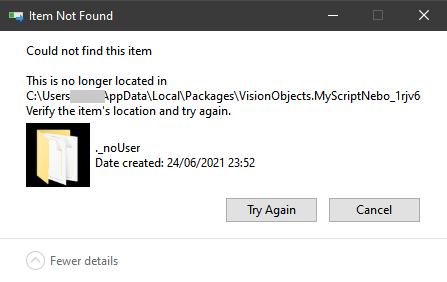
I think the nugget in that article was that many OS's will hide files/folders that begin with '.' . I think in my case the _ is irrelevant because I think my windows backup program attempts to create a folder beginning with a '.', succeeds then it is auto hidden by the Unraid OS and windows cannot find it to then copy the contents of the directory. Hence the windows error message. As a test, I removed the _ from the ._noUser folder name and windows still threw up the same error I described in my OP. So I put it back. But then I thought, what if I manually created the .noUser folder directly in the folder on Unraid using WinSCP. Sure enough the folder was shown as a hidden folder in the Ui. But when I manually copied using Explorer on WIndows to the share, it reported the same error and would not copy. Now here's something really strange........ I did the same copy but using TeraCopy and this time TeraCopy wrote all the files in the windows ._noUser folder to the same hidden directory name on Unraid and then threw up the same error message once it had copied. I know it had copied because I looked at the files via WinSCP. Deffo an issue with dot files/folders from windows to the SMB share.
-
No MacOS.
-
Any ideas anyone? Thanks.
-
S3 Sleep Plugin Problem with Disk Activity Issue: S3 debug shows it monitors disk activity on disk sdb and resets the timer meaning the NAS never goes to sleep. Solution investigation so far: 1. Ensured 'Wait for Array inactivity' was set to Yes, exclude cache, and monitoring was set to Counters only. Result: "s3_sleep: Disk activity on going: sdb" "s3_sleep: Disk activity detected. Reset timers." 2. Stopped all dockers, disabled the Cached Directories Plugin. Result: "s3_sleep: Disk activity on going: sdb" "s3_sleep: Disk activity detected. Reset timers." 3. sdb is my 'Disk 3' in the array and only had a small number of directories and ripped DVD iso's used by Emby Server (docker now stopped). So I ran an unbalance on Disk 3 and moved all to Disk 4. Result: "s3_sleep: Disk activity on going: sdb" "s3_sleep: Disk activity detected. Reset timers." 4. Amended each and every share to exclude Disk 3 and deleted the remnant empty directory on Disk 3 (from the ISOs). Rebooted. Stopped all dockers. Result: "s3_sleep: Disk activity on going: sdb" "s3_sleep: Disk activity detected. Reset timers." 5. Ran inotifywait -r -m /mnt/disk3 and it showed screen after screen of this: "/mnt/disk3/ OPEN,ISDIR /mnt/disk3/ ACCESS,ISDIR /mnt/disk3/ CLOSE_NOWRITE,CLOSE,ISDIR " As far as I can tell, Disk3 should not have any activity that should trigger the S3 plugin to think there is. Disk3 is specifically excluded in all shares and yet S3 Sleep will not put the NAS to sleep because it detects activity on disk3. The Syslog shows this detection happening every minute. Diagnostics attached. What is going on and how can it be solved? Thanks. EDIT: I also disabled the Dynamix Autofan plugin too because it appeared to get drive temps and I thought that may have been the cause. But no! nas-diagnostics-20220823-0923(s3 sleep issue).zip
-
Diagnostics attached. Funnily enough I created this because I have something reading a disk every minute and I had stopped all dockers and disabled the Cached Directories plugin. It's stopping the S3 sleep working! The disk in question (sdb) only has a few ripped isos which is included in an Emby library. But with all dockers stopped I can't figure out what would be doing this. Anyway, probably a problem for another thread! For now the ._noUser folder is more pressing. Thanks, nas-diagnostics-20220822-2146.zip
-
No. !
-
I've done a few tests on this to make sure I wasn't bumping up against an extra long file path, but it doesn't appear to be the case. There is an App which I use which stores its syncing details (for use with an iPad) in my c:\users\name\appdata folder. Part of the path on my PC includes a folder name ' ._noUser' It appears that a folder name beginning with ._ on Unraid is a special folder and does not appear in the share when navigating the tree structure. If I manually copy the folder in Windows explorer and try to paste it into any share on Unraid windows reports it 'could not find this item'. This means that my file backup program is unable to backup the 3GB of files within the ._noUser folder to Unraid. As a test I renamed the folder 'Test' and it copied fine. In explorer whilst in the share folder I can see the test folder. If I change this name or add a new folder which starts with ._ the folder disappears off explorer. Even if I view hidden and system files, the folder does not exist as far as windows is concerned and the backup program cannot create a directory with a name starting with ._ How do I get around this? Thanks
-
Ok, thanks. It's still a bit counter-intuitive for my grey matter! But I suppose it's possible for a CPU not to be overclocked and for Intel speedstep not to be in use and therefore the CPU may be 'running' at 'full speed' but doing no 'work' per se. Looks like I would need a bit more info about IO wait and 'utilisation' as it looks more involved than I imagined! Ta.
-
Does that impact the actual % number? If CoreFreq reports that max 3.7Ghz is reached whilst watching it for a few minutes, and never hits 4.5 that it is capable of, then I would not expect the dashboard to be reporting anything over ~80% let alone 100% Example:
-
Hi, I have an overclocked 2500k which can boost to 4.5Ghz (base is 3.3GHz). Using the CoreFreq plugin and using the inbuilt 'Atomic Burn' tool to stress the CPU, the plugin reports that all 4 cores do indeed ramp up to 4.5 under fullload. At this level the CPU reaches a maximum and stable 60 degrees. Currently I am running 2 x Preclear processes and a move 7TB of files from a USB drive to the array, and running a few dockers including Duplicacy uploading to the cloud. WHilst all this going on CoreFreq graph shows occasioanlly the CPU cores hitting 3.3 Ghz and occasionally 3.7Ghz, but nowhere near 4.5Ghz that it can ramp up to. The Dashboard is reporting 100% on cores when hitting loads. Given that my CPU temp is a steady 38 and occasional 40 degrees, I suspect the % load is incorrect. What determines the % utilisation and load of the CPU/cores used in the dashboard? Any any way to get it to reflect load as a % of the overclocked speed of 4.5Ghz? Thanks
-
Makes sense. Thanks.
-
Hi. First post. Unraid virgin. Please be gentle.......!! I am a 'home' enthusiast with enough knowledge and skill to be dangerous! Have licensed Unraid for a basic setup. I have re-purposed an old PC running a 2500K with 16GB memory, 1Gb NIC, 8 x SATA onboard (4 x 3Gb/s and 4 x 6Gb/s) . The case is a large Akasa in which there are 9 x 3.5 drive bays in which I have added 3 x 8TB Ironwolf drives and 2 x 256GB Samsung Pro SSD's as cache. Running of a USB 2.0 Sandisk Cruzer disk (following recommendations I found in here). Admission: Never really got on with 'Linux' before (attention span of a gnat!) so I was determined to persevere with the initial 'trail' of Unraid to see if I could set it up asa media server - SONARR, RADARR, SABNZBD, EMBY. So I made a few mistakes along the way with not understanding fully cache setup, 'MOVE' etc. Nothing major, but it resulted in one or two amber triangles on the shares as files got let behind on different disks/caches as I did different set ups. So........ Although there is still much to get to grips with, I set up two cache pools with a drive in each (and attached to the 6Gb SATA ports) because there will be nothing on the cache that I could not get back to if a cache failed. I am not planning on running VM's. Now that I have everything set up and running OK (in my mind), I found that the normal read/write to/from the array is well over 200 MB/s. When the parity check run it often starts up at about 270MB/s and stays well above 200 for the complete check. Now given the purpose of the Unraid for media duties, and given that my network is a 1Gb home LAN, the array speed is far faster than the LAN speed and my LAN saturates before the array runs out of steam. Hence my question- if the array outperforms my LAN, and given my use-case, is there any need for a cache at all?
