





Bob_C
Members
-
Joined
-
Last visited
Everything posted by Bob_C
-
I thought that was the case. Thanks for confirming. Looks like I will have to use an additional license slot for a new internal boot - I don't want to split up my 4 drive ZFS cache pool just to avoid adding a drive to my license usage. It would have been nice if the size of the boot pool was less than 16GB or 32GB, that it wouldn't contribute to the overall drive count!
-
@itimpi Supplemental question if I may! I have a 4 x drive ZFS Cache (Raid 10). Providing I move stuff off the Cache before hand, how would I make use of this current cache pool to implement an internal boot and use remaining space as a cache pool? Or is that not possible either?
-
Ok. Thanks for the very quick reply. Will need a plan B!!
-
If I add a new 8TB drive to the server, can I use it as a boot drive and then use any remaining data partition to add into the array? Or is data partition for use outside the array?
-
I am sooo impatient to be able to boot from a spare NVMe in a PCie slot so that I can ditch the USB boot drive and pass through my one and only XHCi controller to my VMs when needed. Have had a number of issues with interrupts with different devices when passed through individually, noticeaby a Webcam which has both Video and Sound devices and I still have intermittent problems with Teams! All things being equal, when would the R.C. version likely be ready for consumption?
-
Glad it helped you!
-
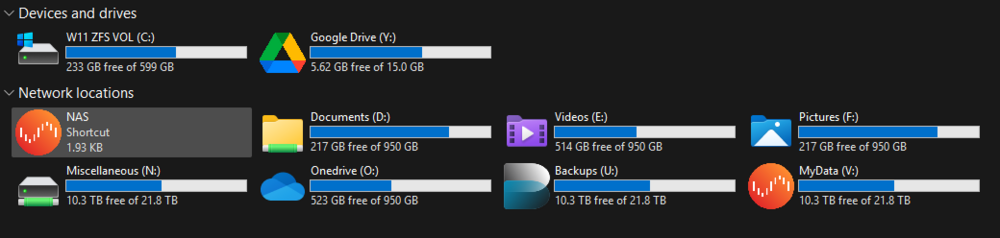
I found that exporting some of my Unraid ZFS datasets via SMB resulted in Windows Explorer reporting the capacity of the underlying storage pool instead of the quota configured on the dataset in which the share was looking. For example, a dataset with a quota of 1 TB may appear in Windows as having 8 TB or more available, depending on the size of the ZFS pool. While ZFS still correctly enforces the quota, the misleading capacity shown in Windows can be confusing to some user.s This behaviour occurs because Samba normally determines disk capacity using filesystem statistics from the underlying storage layer. When accessing data through the Unraid /mnt/user FUSE share, those statistics reflect the pool or backing filesystem rather than any dataset quota if one was in place within a share. The steps below hopefully show how I configured Samba (with ChatGPT assistance) to report the correct quota and available space for each ZFS dataset. This shows the use of using Samba’s dfree command feature and a helper script that queries ZFS directly when a Samba client requests the info. The solution works for datasets stored: on a single disk ZFS dataset on a multi-disk ZFS pool (mirror, RAIDZ, etc.) provided the SMB path maps to one dataset with a defined quota. Note: Although I was able to debug a number of potential edge-case uses, I am not a coder and have relied on ChatGPT to generate the necessary scripts! As a result please do not rely on me to provide any 'support' if your use case is outside the limits of the testing I did! Tested EnvironmentThis configuration was tested on: Unraid with ZFS datasets SMB exports via /mnt/user Windows SMB clients but the approach should work with any SMB client (Windows, macOS, Linux). Use CasesThis is particularly useful for setups such as: per-user storage quotas OneDrive / cloud-sync mirrors project-based storage limits media or archive shares with defined quotas where you want users to see the actual space available to them, not the capacity of the underlying storage pool. When This Fix AppliesThis solution works when the SMB path corresponds to a single ZFS dataset with its own quota, regardless of how many disks are in the pool. Examples where this works: Dataset on a single disk: (note in my use case, disk5 was a ZFS disk in the array, and I created a nested dataset /onedrive/Pictures /mnt/disk5/onedrive/PicturesDataset in a multi-disk ZFS pool: /mnt/zfs_cache/onedrive/PicturesEven if the pool itself consists of multiple disks (mirror, RAIDZ, etc.), the dataset still has: one mountpoint one quota which can be reported correctly. When This Does NOT ApplyThis method does not apply to normal Unraid shares (mnt/user/....) spanning multiple disks, for example: /mnt/disk1/media /mnt/disk2/media /mnt/disk3/mediaIn this case: there is no single dataset there is no single quota the correct behaviour is to report the combined capacity The helper script automatically falls back to default behaviour in these situations. Why This HappensSamba normally determines disk space using filesystem statistics (statfs). Because Unraid shares are accessed through the FUSE layer: /mnt/user/Samba sees the underlying storage pool, not the dataset quota. How the Fix WorksSamba provides a configuration option called: dfree commandThis allows Samba to call a helper script instead of querying the filesystem directly. The helper script (below): determines which ZFS dataset the SMB path belongs to reads the dataset's quota and available space returns those values to Samba SMB clients then display/use these 'corrected' values for the dataset quotas. Architecture OverviewTypical path flow: Windows / SMB Client │ ▼ Samba │ ▼ Unraid Share /mnt/user/ (mapped path) │ ▼ ZFS Dataset │ ▼ ZFS Pool │ ▼ Physical DisksExample: \\NAS\onedrive\Pictures │ ▼ /mnt/user/onedrive/Pictures │ ▼ /mnt/disk5/onedrive/Pictures │ ▼ disk5/onedrive/PicturesStep 1 – Create the 'Helper' ScriptNote. To allow this script to be persitant across reboots, you need to create a script on the USB /boot drive initially. Create: /boot/config/custom/samba_dfree_zfs.shExample script: #!/usr/bin/bash # Samba dfree helper for ZFS dataset quotas on Unraid # Returns: "<total_1K_blocks> <free_1K_blocks>" set -u PATH_IN="${1:-.}" CACHE_FILE="/run/samba_dfree_zfs_mounts.cache" CACHE_TTL=10 get_mounts() { local now mtime age now=$(date +%s) if [ -r "$CACHE_FILE" ]; then mtime=$(stat -c %Y "$CACHE_FILE" 2>/dev/null || echo 0) age=$(( now - mtime )) if [ "$age" -lt "$CACHE_TTL" ]; then cat "$CACHE_FILE" return 0 fi fi zfs list -H -t filesystem -o name,mountpoint 2>/dev/null > "${CACHE_FILE}.tmp" || true mv -f "${CACHE_FILE}.tmp" "$CACHE_FILE" 2>/dev/null || true cat "$CACHE_FILE" 2>/dev/null || true } df_fallback() { local line total avail line="$(df -P "${PATH_IN}" 2>/dev/null | tail -n 1 | tr -s ' ')" total="$(printf '%s\n' "$line" | cut -d' ' -f2)" avail="$(printf '%s\n' "$line" | cut -d' ' -f4)" if [ -n "${total:-}" ] && [ -n "${avail:-}" ]; then printf '%s %s\n' "$total" "$avail" return 0 fi printf '0 0\n' return 0 } if PATH_ABS="$(cd "$PATH_IN" 2>/dev/null && pwd -P)"; then : else PATH_ABS="$PATH_IN" fi if [[ "$PATH_ABS" != /* ]]; then PATH_ABS="/mnt/user/onedrive/$PATH_ABS" fi BEST_DS="" BEST_MP="" BEST_LEN=0 SUFFIX="${PATH_ABS#*/mnt/user}" while IFS=$'\t' read -r ds mp; do [ -n "${mp:-}" ] || continue [ "$mp" = "-" ] && continue case "$mp" in *"$SUFFIX") len=${#mp} if [ "$len" -gt "$BEST_LEN" ]; then BEST_LEN="$len" BEST_DS="$ds" BEST_MP="$mp" fi ;; esac done < <(get_mounts) if [ -z "$BEST_DS" ] && [[ "$PATH_ABS" == /mnt/user/* ]]; then REL="${PATH_ABS#/mnt/user/}" for d in /mnt/disk* /mnt/cache /mnt/*; do [ -d "$d" ] || continue if [ -e "$d/$REL" ]; then PATH_ABS="$d/$REL" break fi done BEST_LEN=0 while IFS=$'\t' read -r ds mp; do [ -n "${mp:-}" ] || continue [ "$mp" = "-" ] && continue case "$PATH_ABS" in "$mp"/*|"$mp") len=${#mp} if [ "$len" -gt "$BEST_LEN" ]; then BEST_LEN="$len" BEST_DS="$ds" fi ;; esac done < <(get_mounts) fi [ -n "$BEST_DS" ] || df_fallback QUOTA_B="$(zfs get -Hp -o value quota "$BEST_DS" 2>/dev/null || true)" if ! printf '%s' "$QUOTA_B" | grep -Eq '^[0-9]+$'; then QUOTA_B=0 fi if [ "$QUOTA_B" -eq 0 ]; then QUOTA_B="$(zfs get -Hp -o value refquota "$BEST_DS" 2>/dev/null || true)" if ! printf '%s' "$QUOTA_B" | grep -Eq '^[0-9]+$'; then QUOTA_B=0 fi fi [ "$QUOTA_B" -gt 0 ] || df_fallback AVAIL_B="$(zfs get -Hp -o value available "$BEST_DS" 2>/dev/null || true)" if ! printf '%s' "$AVAIL_B" | grep -Eq '^[0-9]+$'; then df_fallback fi TOTAL_K=$(( QUOTA_B / 1024 )) AVAIL_K=$(( AVAIL_B / 1024 )) [ "$AVAIL_K" -lt 0 ] && AVAIL_K=0 printf '%s %s\n' "$TOTAL_K" "$AVAIL_K" exit 0Note: The /boot drive is FAT32, so no chmod is required there. Step 2 – Configure SambaGo to: Settings → SMB → SMB ExtrasAdd: dfree command = /usr/local/sbin/samba_dfree_zfs.sh⚠ Important SMB configuration can only be modified when the array is stopped. Procedure: Stop the array Add the SMB Extras entry Start the array again Step 3 – Ensure the Script Exists After BootBecause Unraid runs from RAM, /usr/local is recreated on every boot. Create a UserScript which runs on Array Start. Example: #!/bin/bash SRC="/boot/config/custom/samba_dfree_zfs.sh" DST="/usr/local/sbin/samba_dfree_zfs.sh" mkdir -p /usr/local/sbin cp "$SRC" "$DST" chmod 755 "$DST" sleep 10 # Initial seeding/warm-up of values for the datasets/paths to be queried. # not entirely necessary, but belt and braces! for d in Pictures Videos Documents; do "$DST" "$d" >/dev/null 2>&1 done /etc/rc.d/rc.samba restartThe warm-up calls ensure the helper script cache is populated before Samba handles client requests. Note on Dataset Root PermissionsIf the dataset root is exported via SMB, ensure it allows write access. Example: chmod 775 /mnt/disk5/onedrive/PicturesOtherwise Windows clients may be unable to create folders at the root of the share. End Result in Windows! Uploading Attachment... Note that each 'mapped drive' relates to either the root directory in a dataset or a path within the dataset (the Helper script will determine the dataset quota to apply based on path and mount point). I found it worked for my set up! YMMV!!!
-
T'would have been easier for yourself and me if you had just ignored my misplaced question elsewhere instead of bemoaning that fact and sending me 3 PMs in a matter of minutes. FGS man, grow up - I inadvertently posted a question in the wrong thread. Hardly the crime of the century is it? That's a rhetorical question BTW - no need to reply. I won't see it. I'm adding you to my blocklist.
-
Upvote for this. Was pulling my hair out. My issue was the DMA error spawning whilst the VM was running and this induced unpredictable shutdowns. Intel 14700K GTX1080TI Passthrough
-
Using MS Edge and on my Galaxy S22. Not urgent, just not working as other elements on the Main tab. - ZFS Master panel - when swiping left / right the whole screen scrolls instead of just the specific ZFS Master panel/pane like the other panes above and below it when scrolling/swiping left/right.
-
Thanks for the quick feedback. What are the implications for doing this? I just read this on the docs: "If you are using Docker data-root=directory on a ZFS volume, we recommend that you navigate to Settings → Docker and switch the Docker storage driver to overlay2, then delete the directory contents and let Docker re-download the image layers. The legacy native setting causes significant stability issues on ZFS volumes." Not sure I want to go to an image if it has stability issues? Or have I read that wrong?
-
I recently built a new server and part of that was using 4 new 2TB NVMe drives to use in a Mirror/Raid 10 cache setup in zfs. It is sweet! I have exclusive share set on and the likes of appdata, system, domains, have been happily using this for a few months or so now. These shares (and the folders under appdata) each have individual datasets within the main zfs_cache. root@NAS:~# ls -ld /mnt/user/system readlink /mnt/user/system lrwxrwxrwx 17 root root 20 Nov 4 14:41 /mnt/user/system -> ../zfs_cache/system/ ../zfs_cache/system I tried to install a new docker/app "webgrabplus" and it appears there is a non-unicode character in a filename which by all accounts installs fine on a non-zfs setup, but on mine it would not install. I created an issue on Github thinking it was an error in the docker build. That post is here. Someone kindly posted a screenshot of the app installing OK on their Unraid system without ZFS. Having also read this post it appears, perhaps, that the extraction process fails with a ZFS locale / overlay2 unpack issue inside the docker layer itself which is on the exclusive 'system' share. As a result the error below occurs and the container fails to install at all. "Error: failed to register layer: open /defaults/ini/siteini.pack/International/sat.tv.channels.13?E-Arabesque.xml: invalid or incomplete multibyte or wide character" The '?' in 13?E is a ° degree symbol. What is a solution to this edge case I have?!! nas-diagnostics-20251107-1305.zip
-
I am having an issue just getting this to install. See my logged issue on github here. It seems as though with my setup at least, that the docker (overlay2 + ZFS, UTF-8-strict) just throws up its hands at the character set in /defaults/ini/siteini.pack/International/sat.tv.channels.13�E-Arabesque.xml That "�" is the degree (angle/temperature) sign. Any way to find a workaround to this so I can install the docker?
-
Thanks @ich777 — understood. The extra firmware copies were only part of the troubleshooting process; they’re indeed cleared on reboot and, as you say, already included in the LibreELEC bundle. The main issue turned out not to be missing firmware at all but the rtl2832_sdr module loading alongside the proper Sony + SiLabs path on the Astrometa stick. Once that SDR module was blacklisted and the legacy >700 MHz muxes removed, the tuner initialised cleanly and every current local transmitter mux locked with Scan Status = OK in Tvheadend. So we’re now 100 % operational using your stock LibreELEC drivers. Appreciate the confirmation and all your ongoing work on this plugin!
-
Thanks again for the quick feedback earlier. After your reply, I worked through a few cleanup and verification steps — here’s what was done and the outcome: Removed all custom build scripts Deleted the old user-script that tried to rebuild DVB drivers in a Docker container. Confirmed I’m running stock LibreELEC DVB driver package from your plugin only. Checked system config (go file, modules, etc.) Commented out aggressive USB/XHCI wake-disable lines to prevent interference. Ensured no custom /etc/modprobe.d/astrometa.conf entries remained. Left autosuspend disabled (good for DVB stability). Blacklisted conflicting SDR module Added /boot/config/modprobe.d/blacklist-rtl2832sdr.conf to stop rtl2832_sdr loading, which was hijacking the stick’s SDR interface. This allowed the proper Sony + SiLabs tuner path to initialise cleanly. Installed Silicon Labs tuner firmware Placed dvb-tuner-si2157-a30-01.fw, dvb-tuner-si2158-a20-01.fw, and dvb-demod-si2168-b40-01.fw in /lib/firmware. Rebooted and verified the Sony CXD2837ER frontend attaches correctly (even if Si2157 doesn’t print verbose logs). Updated to current muxes Removed legacy >700 MHz frequencies. Added valid local muxes (538 / 554 / 562 / 578 / 586 / 602 MHz). Result All muxes lock with Scan Status = OK and show the expected service counts in Tvheadend. DVB-T and DVB-T2 both functioning normally. Streams play perfectly; EPG data populating via OTA grabber. Everything’s now stable and working 100 %. 👍
-
Hi, Thanks. Sorry about lack of diagnostics. I only installed the DVB plugin the other day for the first time (but didn't get 'round to installing any drivers) and then upgraded to Unraid to 7.2.0. today. I then tried to install the LibreELEC drivers, rebooted and nothing was detected. root@NAS:~# modinfo cxd2841er | grep filename filename: /lib/modules/6.12.54-Unraid/kernel/drivers/media/dvb-frontends/cxd2841er.ko.xz Diagnostics attached. nas-diagnostics-20251030-2254.zip
-
I’ve just updated to Unraid 7.2.0 (kernel 6.12.54-Unraid) and noticed that the latest DVB Driver bundle on GitHub is still for 6.8.12-Unraid. I'd like to install the DVB drivers for my old Astrometa DVB-T2 USB stick, but at the moment there’s no matching LibreELEC or TBS build for this new kernel. Although I read the recompile has been automated, could you please confirm if a 6.12.54-Unraid DVB driver package is planned or already in progress? Many thanks for maintaining this plugin — it’s hugely appreciated!
-
It improved the situation but not entirely. Coincidentally I booted to my baremetal W11 on NVMe and although I had no previous issues using the Kodak Webcam, in this instance I opened Teams and the Mic disappeared for a moment (Mic disconnected message) and then reappeared a few moments later on its own. Beginning to suspect it may be a webcam quirk and although a baremetal W11 might be able to cope with it, even with udev rules, it looks like perhaps QEMU struggles with it in passthrough. For now I have resorted to using a Ugreen USB audio adapter and connecting a wireless mic on the 3.5mm jack. That appears to work well on the same backplate connection. So it does look more like a hardware issue with the vid and audio devices being in the same unit and not quite keeping it together.
-
Thanks for that. I will give it a go. If it works, I'll find some superglue to put my hair back in place!
-
Can I suggest you try ChatGPT as I had a similar issue and it helped me sort out the correct files for using TPM so I could install Windows 11 fine?
-
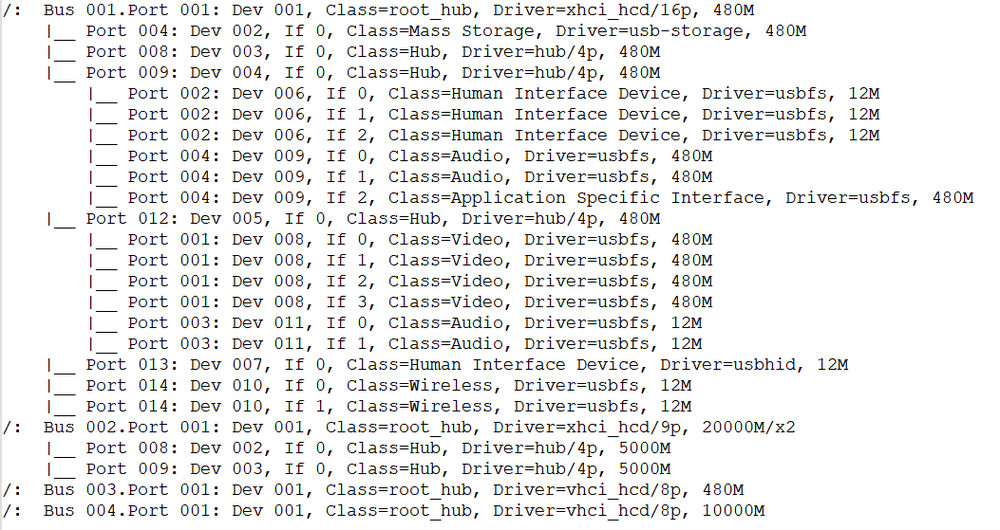
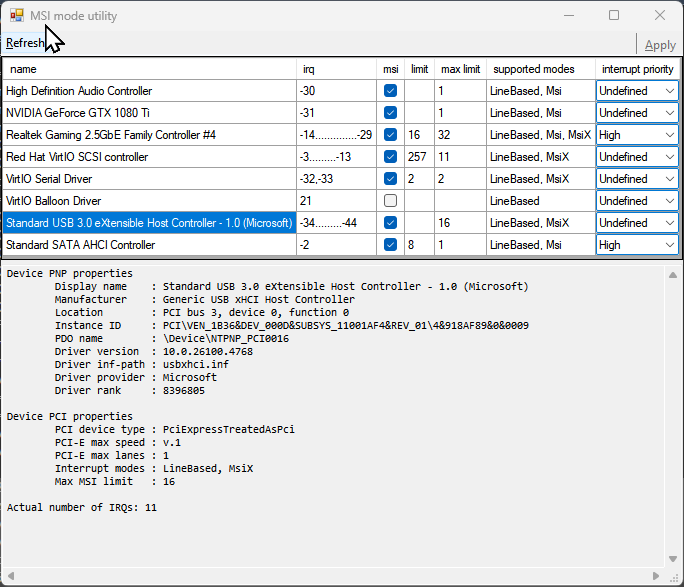
Hi all — I’ve been digging into a repeatable issue where my webcam’s built-in microphone drops out completely in a Windows 11 VM. Everything works perfectly until I join a live Teams meeting — at that moment, the mic instantly disconnects and Teams reports “microphone not connected.” The webcam itself (video) stays active. This is 100% reproducible. Note: I have used ChatGPT to help me summarise the steps I have gone through, but this has taken many days of messing about with LatencyMon, MSI_Util_v3, XML editing and even buying a USB 2.0 backplate to hang off the USB 2.0 spare header. Needless to say , booting baremetal with W11, the Webcam and Mic work flawlessly. SystemUnraid: 7.1.4 Motherboard: ASRock Z790 Steel Legend WiFi (single xHCI controller) CPU: i7-14700K GPU passthrough: NVIDIA GTX 1080 Ti (MSI mode) VM: Windows 11, VirtIO SCSI + Balloon (MSI-X) USB Controller: Intel Raptor Lake XHCI (8086:7a60) Audio / USB Devices: Kodak Access Webcam (video + mic, UVC composite) XMOS USB Audio 2.0 DAC Ugreen USB Audio dongle (added later for testing) BehaviourTeams “Test Call” → ✅ works fine (both mic + video) Join external meeting → 🎤 mic immediately disappears (“unavailable”) Mic re-appears only after VM reboot. LatencyMon shows DPC latency spike in ntoskrnl.exe right when the dropout occurs. WhatsApp Desktop shows the same pattern. Steps TakenEnabled MSI interrupts for GPU and all VirtIO drivers. Ensured power management was off for usb devices Tried both exclusive and non-exclusive modes for the mic in the windows sound settings Increased VM memory from 16 → 32 GB; disabled Windows memory compression. Confirmed VirtIO SCSI + Balloon using MSI-X. Removed static USB <address> assignments in XML to allow dynamic enumeration: <hostdev type='usb' managed='yes'> <source><vendor id='0x0c45'/><product id='0x6366'/></source> </hostdev> Investigated USB topology with lsusb -t: Initially webcam + DAC were on the same ASMedia 2074 hub → one transaction translator. Added a USB 2.0 backplate connected to motherboard header USB_1_2. After reboot, webcam and DAC now appear on separate branches of the Intel xHCI root hub. LatencyMon greatly improved, system smooth, but dropout still happens on Teams join. Current SetupWebcam and XMOS DAC now isolated under different branches (lsusb confirms separate 480M/12M paths). Using XMOS DAC for output and webcam mic for input. Planning to test with Ugreen USB Audio dongle + wireless mic to separate audio path fully - but would prefer to keep the single Kodak webcam with Mic. Are there known issues or tuning parameters for UVC composite audio endpoints (isochronous USB Audio + Video) under vfio passthrough on Intel xHCI controllers? The webcam mic works for local audio tests but always fails on real Teams meetings. Any QEMU 8.x or kernel 6.x parameters (e.g. qemu:commandline tweaks, usb-native options, etc.) recommended to improve isochronous timing stability in such cases? Referencelspci | grep usb → Intel 8086:7a60 (xhci_hcd) lsusb → Kodak video 0x0c45:0x6366 + audio 0x8087:0x1041 Bus 001 Device 001: ID 1d6b:0002 Linux Foundation 2.0 root hub Bus 001 Device 002: ID 0781:5567 SanDisk Corp. Cruzer Blade Bus 001 Device 003: ID 174c:2074 ASMedia Technology Inc. ASM1074 High-Speed hub Bus 001 Device 004: ID 174c:2074 ASMedia Technology Inc. ASM1074 High-Speed hub Bus 001 Device 005: ID 1a86:8091 QinHeng Electronics USB HUB Bus 001 Device 006: ID 1b1c:1ba4 Corsair CORSAIR K55 RGB PRO Gaming Keyboard Bus 001 Device 007: ID 26ce:01a2 ASRock LED Controller Bus 001 Device 008: ID 0c45:6366 Microdia Webcam Vitade AF Bus 001 Device 009: ID 20b1:30c8 XMOS Ltd USB Audio 2.0 Bus 001 Device 010: ID 8087:0032 Intel Corp. AX210 Bluetooth Bus 001 Device 011: ID 8087:1041 Intel Corp. KODAK Access Webcam Bus 002 Device 001: ID 1d6b:0003 Linux Foundation 3.0 root hub Bus 002 Device 002: ID 174c:3074 ASMedia Technology Inc. ASM1074 SuperSpeed hub Bus 002 Device 003: ID 174c:3074 ASMedia Technology Inc. ASM1074 SuperSpeed hub Bus 003 Device 001: ID 1d6b:0002 Linux Foundation 2.0 root hub Bus 004 Device 001: ID 1d6b:0003 Linux Foundation 3.0 root hub lsusb -t Note. There appeared a similar issue a while ago. https://forums.unraid.net/topic/123447-intermittent-usb-mic-cut-out-pcie-usb-controller-passthrough/ But no apparent resolution, however, it does appear I have the same core symptom pattern: USB audio (often part of a composite UVC device) works fine for casual use or short tests, but under real-time streaming load (Teams, Zoom, Discord, etc.) the isochronous audio endpoint flakes out, and it happens even on dedicated PCIe USB cards when passed through to a VM. That reinforces a theory that this isn’t bandwidth or hub-power related — it’s a timing and host-controller emulation problem in how VFIO hands isochronous transfers off to the guest. It’s probably tied to: how QEMU’s xHCI emulation (and vfio mapping) handles “microframe” timing, or how Windows’s UVC driver reacts when a few milliseconds of sync data are lost. The fact that mine behaves perfectly until a Teams meeting join event (which kicks off full-duplex A/V) and then immediately drops the mic fits that exactly. Thanks in advance — I’ve tried to rule out everything from topology to interrupt latency, but this still feels like a composite-device timing issue specific to passthrough. nas-diagnostics-20251021-2339.zip
-
📝 Issue SummaryI’ve hit a reproducible issue in Unraid 7.1.4 where a ZFS mirror degrades only after starting a VM. The culprit appears to be a Phison E16 NVMe (Sabrent Rocket 4.0 1TB) controller that is bound to vfio-pci but is still partially claimed by the kernel/ZFS. Key points: The drive is not part of my intended ZFS pool. I bound it in vfio-pci.cfg and added it to syslinux.cfg via vfio-pci.ids=1987:5016. lspci -k shows it bound to vfio-pci. Despite this, /dev/nvme2n1p1 appears in my ZFS cache pool mirror, and errors are logged when the VM starts I/O. If I remove the card physically, the issue disappears. This looks like a race condition where the nvme driver claims the device before vfio, leaving ZFS to auto-import it. 🔍 Evidence (diagnostics captured)Boot (before VM start) - zpool status: all members ONLINE, no errors. lspci: 09:00.0 (Phison E16) bound to vfio-pci. lsblk: no /dev/nvme2n1 visible. Diagnostics file: NAS-diagnostics-2025-10-01-preVM.zip After starting VM (“Office”) The VM is a Windows 11 booting from a ZVOL on the cache pool Within seconds of VM start, zpool status shows: nvme2n1p1 ONLINE 2 2 0→ read/write errors logged. Pool still ONLINE, apps unaffected, but this is silent corruption risk. Diagnostics file: NAS-diagnostics-2025-10-01-postVM.zip Reproducibility 100% reproducible: every time VM is started, ZFS pool logs errors on the vfio-pci-bound Phison device. With card removed: never happens. With card present but no VM activity: pool remains clean. Why this mattersThis is not a failing device — it’s a working NVMe that I keep as a fallback baremetal boot disk. ZFS should never claim it once bound to vfio-pci, but right now Unraid’s device claim order allows ZFS to import it and mark the pool degraded. This is potentially very dangerous, because ZFS silently rewires mirrors with a passthrough device, then throws checksum/I/O errors under load. Can Unraid adjust the vfio/nvme claim order so vfio binding prevents block device nodes from being created? Or provide a supported mechanism to blacklist an NVMe device from ZFS import, while keeping it physically installed for passthrough/baremetal use? NAS-diagnostics-2025-10-01-preVM.zip.zip NAS-diagnostics-2025-10-01-postVM.zip.zip
-
Not sure whether over these 60 pages this request has been made before, but is there any way for the SMART tab in the disklocation screen to indicate whether any smart errors have have changed since the SMART tab was last visited? And/or send a notification if there has been a change? Thanks
-
Bug Report: Duplicate remote syslog messages when S3 Sleep plugin debug mode is set to Syslog Environment Unraid OS 7.1.4 (NAS: 10.1.1.17) Dynamix S3 Sleep plugin v3.0.11 Syslog forwarding enabled (remote syslog-ng server on Alpine Linux, UDP 514) Issue When the S3 Sleep plugin’s Debug Mode is set to Syslog, every debug message is emitted twice to the syslog stream. On the local Unraid syslog (/var/log/syslog), messages appear only once. On the remote syslog server, tcpdump confirms that two identical UDP packets are sent for each event. Example (tcpdump from the remote server, capturing from NAS): 10:57:08.124480 10.1.1.17.46104 > 10.1.1.12.514: SYSLOG Msg: Sep 7 10:57:08 NAS s3_sleep: Disk activity on going: sdc 10:57:08.124483 10.1.1.17.50879 > 10.1.1.12.514: SYSLOG Msg: Sep 7 10:57:08 NAS s3_sleep: Disk activity on going: sdc 10:57:08.125477 10.1.1.17.46104 > 10.1.1.12.514: SYSLOG Msg: Sep 7 10:57:08 NAS s3_sleep: Disk activity detected. Reset timers. 10:57:08.125496 10.1.1.17.50879 > 10.1.1.12.514: SYSLOG Msg: Sep 7 10:57:08 NAS s3_sleep: Disk activity detected. Reset timers. That results in duplicate lines being written to the remote syslog-ng log files and any downstream viewers (Frontail, etc). Steps to reproduce Enable Dynamix S3 Sleep plugin. Set Enable DEBUG mode: → Syslog. Configure Unraid → Settings → Syslog Server → enable forwarding to a remote server (default port 514). Observe via tcpdump on the remote server: tcpdump -n -i any host <NAS-IP> and udp port 514 -vvv Each S3 Sleep debug message is transmitted twice. Expected Each debug message should be sent only once. Actual Each debug message is sent twice when “Debug Mode = Syslog.” Notes / Workarounds Setting Debug Mode to Console avoids the duplication (but then you lose visibility in central syslog). Forwarding Unraid’s main syslog to a different port 1514 (Settings → Syslog Server → Remote) does not duplicate messages. The duplication appears to come from how the plugin itself calls logger/syslog. A possible cause: the plugin might be writing directly to syslog and also to stdout/stderr which gets captured by syslog, resulting in two emits.
-
[SOLVED] I managed in the end to resolve all the issues. TLDR: Had to fully remove the old Wireguard Tunnel by (a) deleing the tunnel in /Settings/VPN Manager, then (b) delete an empty <peers> folder sat under /boot/config/wireguard. A reboot then seemed to allow all dockers to be accessed as normal (using the bridge network).



