





Bob_C
Members
-
Joined
-
Last visited
Everything posted by Bob_C
-
Hi. I am not sure how and why I have ended in this pickle, but perhaps something to do with some recent testing in which I moved appdata off my main_cache pool (2 x 250Gb SSDs in Raid 1), as well as domain and system shares (using mover and Unbalance plugin). As far as I recall the dockers were still operational at this point, although some troubleshooting since the problem arose suggested some of the dockers' parameters were still pointing to main_cache for the appdata. But more about that below. In the array of 5+1 8TB disks, I had a drive #5 which had minimal data on it (~500GB) and I used unbalnce to move all that onto the other disks because then I used SpaceInvaferOne's YT tutorial on how to change a disk in the array from XFS to ZFS. This went without a hitch and I tried a few test scripts to mount ZVOLs instead on dataset for a potential server upgrade and a move to a new MB with a superfast cache drive with nvmes. TBH the ZFS seemed to work ok. I had had no need for any docker use since I've been busy this last week on other around-the-house-projects. So that's the background to this current ongoing issue. When trying to connect to a docker (any docker as it turned out) I could not connect to any of them. Connection refused. Sounded like a config / network issue and as I had not changed any settings just moving stuff around, I looked at some of my dockers, SABNABD being one, and saw the Network type was set to None. It (and a couple of others) used a custom WG VPN connection but when I tried to change the network type back to the WG0 network, it was not in the drop down. Only the usual plus a custom - br0 home which I did not recognise or recall. It may have been there previously but I don't know. So I deleted the Wireguard tunnel WG0 in the VPN settings, rebooted the server and tried setting the Network Type to 'bridge' as an initial fall back. So after changing the docker(s) to Bridge, I could not connect to any of the dockers even though they were 'running'. At one point the docker service wouldn't start at all. Considering I also move the docker image file with Mover/Unbalanced, I decided to recreate this and so stopped the docker, deleted the file, and let the dockers rebuild themselves. It was at this point I noticed some of the templates were referring to the now removed and not working main_cache pool so I pointed them at the right mnt/user share, and selected bridge as the network type. After all the dockers were reinstalled and 'running' I could not access the GUIs. I thought it may be a browser cache issue, but no. I could not access the dockers at all. Now I am getting concerned. I wondered whether my testing of the ZFS disk in the array might have influenced this (I don't know why it should), so last night I did a reverse of SpaceInvaderOne's tutorial and reverted the ZFS back to XFS. Interestingly, on the XFS to ZFS conversion, the format bit was very quick, just a few minutes. But reverted back, the format process seems to have invoked a full disk rebuild and the disk is shown as emulated as the process is still running and still 7 hours to go, I thought that would have been the same time as the XFS > ZFS format, but apparently not. I had seen elsewhere that sometimes forcing a change on the network type or custom network can reset things. So I manaully recreated the WGO network in VPN manager but that would not show up in the docker Network Type. So I tried a different 'change', I stopped the docker service (VM already stopped) and I changed the name on the network from 'Home' to NAS and saved it. I restarted the docker service and now the docker won't start at all. I am now totally screwed with no docker service and a disk being rebuilt for which there was no data anyway after the erase before format. If the disk wasn't being rebuilt (I can see the writes to the disk in the MAIN tab) I would be rebooting the server and seeing if that would sort it. But I suspect there is something more critical at play here. To that end, my diagnostics file attached. Can any please help me get out of this situation? Thanks, nas-diagnostics-20250717-0841.zip
-
@JorgeB It's a coincidence that I came across this thread exactly two years after your post above! Is 'correcting' the issue you describe a case of deleting the vfio-pci.cfg and letting it be re-created on boot, or are you suggesting the file be edited to reflect the pci slots and physical cards?
-
Thanks for the info. I had the same issue this month as I only run integrity check every three months.... disabled file integrity check (even though it was set to 'not start' if parity was operating), and my avg read speed has gone up from 20MB/s to about 200 MB/s. Win!
-
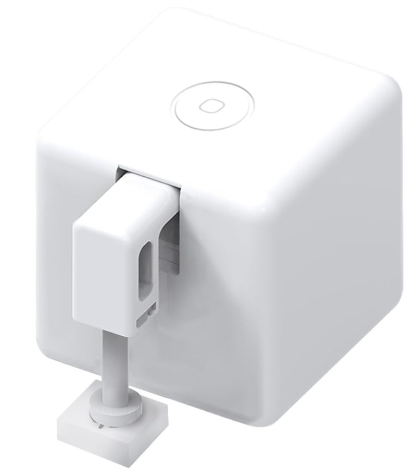
.... or one of these fingerbot thingys. ...... 😄 That would bring the server out of S3 sleep!
-
Thanks for the thorough explanation. #1 Will look into that. I've just recently implemented a GL-iNET router which is based on Openwrt, so there may be some mileage in your suggestion. But there's something at the back of my mind that it cannot forward a Multicast and that is a challenge across subnets. I could be wrong on that though! #2 Already have that in place #3 Already doing that as my lack-of-wol-from-S3-sleep 'workaround' using a Meross Energy Monitor plug thingy! Works fine but needs Unraid to be powered off, not Sleep. #4 The router can send out WOL packets, but I can't find a way to trigger that like I can using a URL via virtualsmarthome.xyz linked through Alexa. This approach means that Unraid can be woken by anyone from anywhere with the right URL! It's a cool way to automate remotely! Thanks.
-
I've recently moved my IOT devices to an isolated subnet on a WiFi SSID which is different to the subnet on the Unraid. As a result I can no longer wake Unraid form its S3 Sleep state as the IOT devices are not on the same subnet and Alexa / https://www.virtualsmarthome.xyz/url_routine_trigger/ / WOL Skill can no longer nudge the Server with a WOL packet! As a result I have had to change the S3 Sleep plugin from sleep to shutdown and to use a smart plug to turn the power off to the server after shutdown and then to 'wake' it up by putting power on. But the boot up is obviously not as quick as resuming from sleep. I was wondering if there was an Unraid equivalent of Windows 'hibernate' to shutdown the server for a faster startup. Perhaps! It's not critical, but it just piqued my curiosity!
-
Hi. When I look at the Emby Server Dashboard, there is a message: Emby Server 4.8.9.0 is Available for Emby NAS Please shutdown Emby Server and install the latest version. The Docker tab shows the Server is up to date, and a 'force update' does not pull anything down. Is this a spurious message or what do I need to do to update the the latest version? (The docker's 'Repository' is set at emby/embyserver:latest Thanks.
-
As I only run a full parity check once a quarter, I am not sure when this issue may have arisen since the last check I did. I do not have the Parity Check Tuning plugin so expect the check to take about 12 hours on a 40TB system (5 x 8TB disks incl parity). No Smart errors on any disks. It's housed in an unheated cool area and whilst parity runs, no disk temp goes bout 46C with most of the time the disks operate about 40C. I set the job running and it ran for about 2.5 hours with no issues at which time I logged off the UI to go to bed. Looking at the previous log, it appears the system may have just shutdown even though the S3 sleep plugin is set to monitor for parity check. Have attached my diagnostics file if that helps to figure out what is going on! Thanks nas-diagnostics-20240401-1044.zip
-
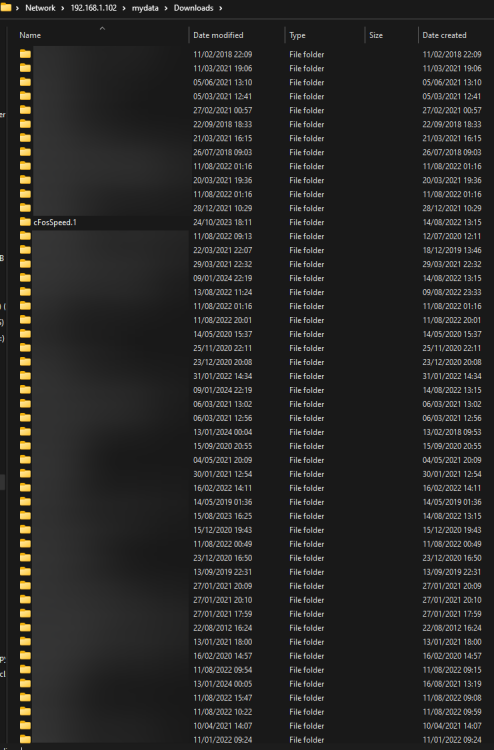
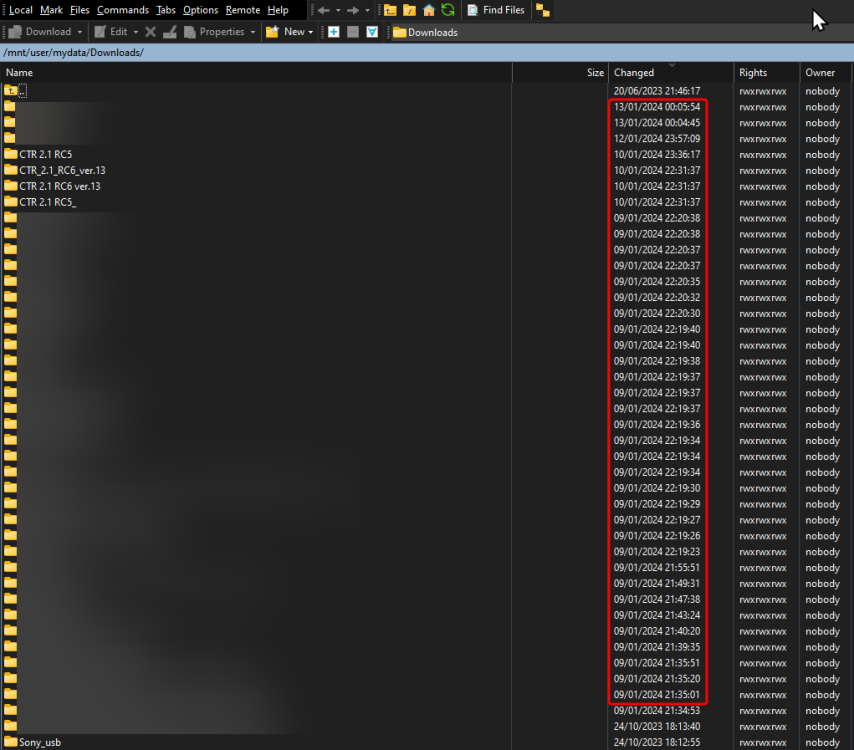
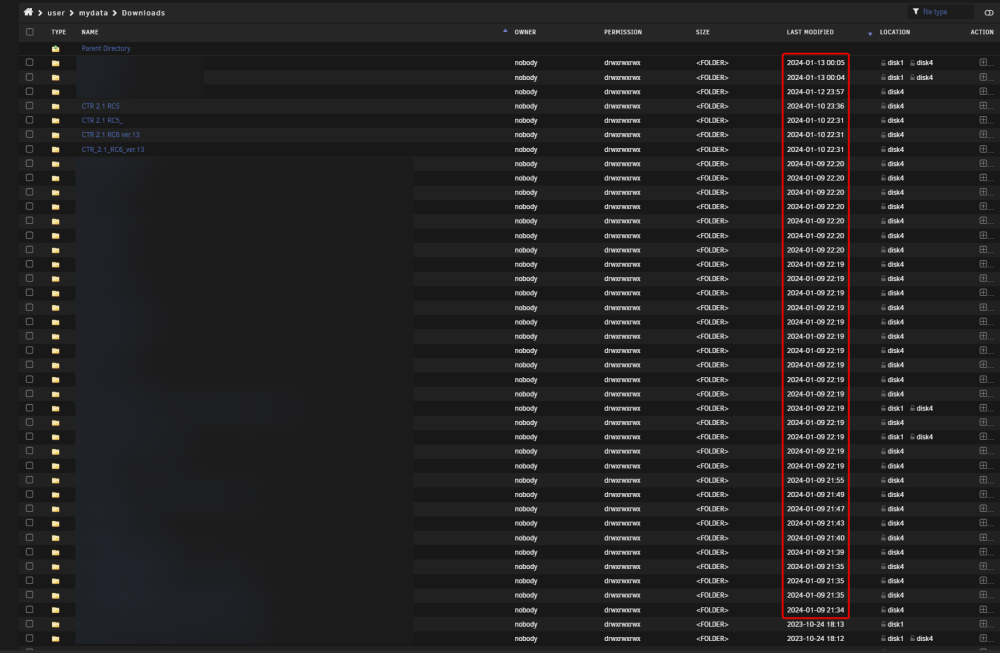
On the 9th January I manually copied a number of directories from my W11 desktop PC to a 'mydata' share on Unraid - about 47GB. These folders show up in the Unraid WEB GUI as well as via SSH (WinSCP) when on the PC. But if I use Explorer on W11 these later directories do not show up. I have rerun permissions and made sure the copied directories have the same permissions as those directories that I can see in Explorer but no joy. The share was a private share but I have since change it to a public share and I still get the same issue. I tried clearing the Net cache on the PC but that didn't help. As far as I know I have not changed anything on my PC or unraid. I also upgraded to 6.12.6 to see if that resolved it. But no. The images below (redacted) show all the files on the GUI, WINSCP and my Explorer (from where I copied the directories originally), but you'll see that when I open //192.168.1.102/mydata/downloads directory over the network, there are a bunch of 'C' directories missing. The only one my PC can see on the share is the cFosSpeed.1 directory. And yet on the GUI (as an example) the 'CTR' directories are there (with others as well). I cannot get my PC to see the directories I copied to the Unraid Server late on the 9th Jan (and any subsequent directories). I am stumped. Any ideas how to resolve this irksome feature? nas-diagnostics-20240113-2251.zip
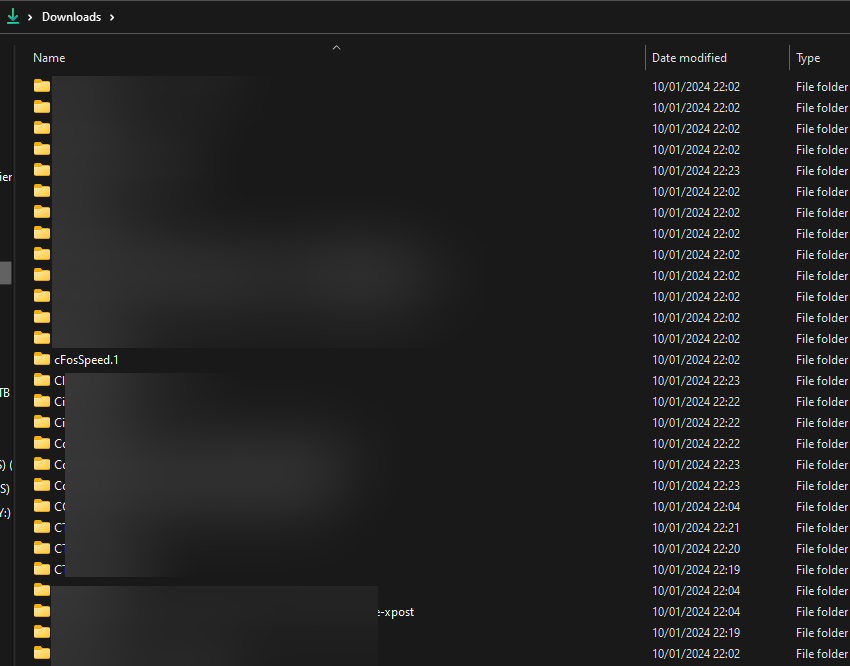
-
It is a pity then that on installing this plugin and using the same settings as the old CA plugin, that the new plugin's retention policy then deleted a load of my older backups that I would have kept separate if I had known that non-compatible directories would be deleted.. Why not just have a prompt to keep old backups before the install date?
-
I would very much like to install this plugin for Jellyfin: https://github.com/ilarramendi/BetterCovers but I am struggling to figure out how to install the docker for this as it's not in the Unraid Apps repository. Any help or pointers would be appreciated! Thank you!
-
Is there any of the dev team looking at fixing the S3 Sleep problem where if the default SSH port is changed from 22, the plugin does not recognise a remote connection on another port and will shut Unraid down whilst still connected? Thanks.
-
Except it is no longer valid from the link. https://unraid.net/forum/index.php?topic=36543.0
-
After a reboot, problem returns.
-
Is there no interest in getting this issue resolved to allow S3 to 'see' when there is an external connection on a port other than 22? EDIT: I edited the s3_sleep script in /usr/local/emhttp/plugins/dynamix.s3.sleep/scripts Line 314. Change (22|23) to add the port I want to monitor. i.e. (22|23|XXXXX) Works as expected now. EDIT #2: Looks like that file gets replaced with the original on reboot. How do I make this change permanent?
-
UPDATE: Since upgrading to 6.11.5 the issue has resolved. PC goes to sleep as it used to. So some bug fix has alos cured the S3 issue. YAY!
-
Can anyone else confirm this issue? Reverting the port back to 22 does result in S3 not shutting down when I am loggd in via WinSCP. I changed 22 to a 5 digit port number and S3 does not appear to check this port.
-
-
Since the upgrade to 6.11.1 I am experiencing the exact same issue. Was there a solution to this?
-
Although I have asked the question in the Dynamix thread, I tried this command line to sleep Unraid. echo -n mem > /sys/power/state After a short while this message appears. write error: Device or resource busy Does this point to an issue other then the S3 plugin?
-
-
Dynamix S3 Plugin - Activity Monitor not working for ports other than 22 I recently changed the unraid default SSH port from 22 to a higher port for security reasons. Since doing that, if I am logged in to unraid via SSH, the S3 plugin does not find any active connection and executes a shutdown. Changing default port back to 22 and it works again.
-
Prior to updating to 6.11.1 from 6.10.9 (? not sure if that was it or not, but it was the latest prior to 6.11.1) S3 plugin worked fine and I had no issues with it. Since the update, the NAS does go into sleep mode but immediately re-awakes. I have shutdown, unplugged power and rebooted but the same issue. A cursory look at Syslog seems to show this error after sleep and before re-awake... NAS kernel: Freezing of tasks failed after 20.005 seconds (1 tasks refusing to freeze, wq_busy=0): Any idea how to keep my server sleeping? Thanks EDIT: Out of interest I changed S3 to do a Shutdown instead of sleep - it worked fine. Sleep will not work however. Even if pressing sleep off the Main Tab. nas-diagnostics-20221012-1309.zip
-
A small 'bug' on a page element...... There is an image missing to delete a schedule. "src="/plugins/dynamix.docker.manager/images/remove.png"" Was getting messages in Syslog.
-
1. It's green. 2. Only scheduled tasks are Move once per day at 13:00PM and a backup at 04:00AM 3. Have already moved all content off disk (Unbalance) and then removed any reference in any share. The drive should be well and truly not used/accessed. And yet I get messages to say it's preventing sleep and timers reset.


