cobolstinks
Members
-
Joined
-
Last visited
Everything posted by cobolstinks
-
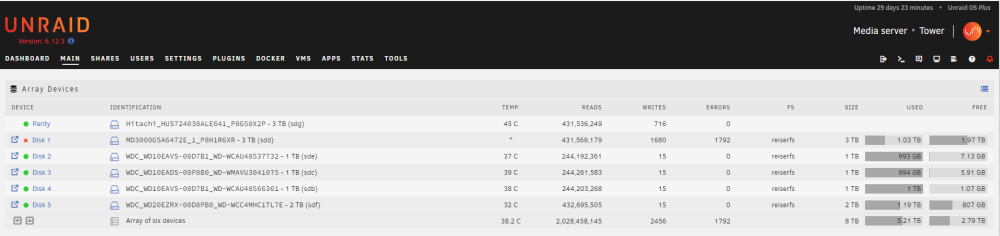
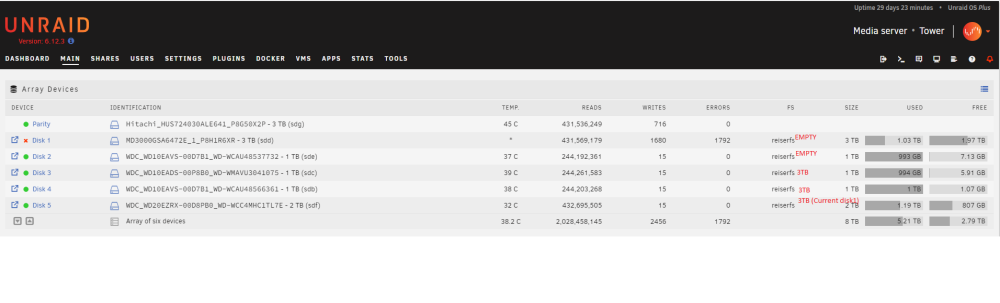
Hello, My server was running a parity check last night and I got a disk error. Disk1 has errored on me before and I've replaced it with the current disk which continued to have intermittent failures (it's been disabled due to errors it seems like once every couple of months and failed about 2 to 3 times now on the replaced disk.). I know I need to update my hardware a bit (CPU/Mobo/Ram) because what I'm running is ancient but I have a couple of questions about my current situation. 1. Is it ok to rebuild onto disk1 based on the attached logs? 2. Since I've replaced the sata connection on disk 1 and replaced the drive itself I wonder if it's not an issue with that port failing on my mobo. If this is the case I realize the long term fix would be to replace cpu/mobo/ram, but in preperation for that I wonder if it's a good idea to consolidate disks to the point of not needing to use the sata port that disk1 is connected to? as you can see I have several 1TB drives I could roll up into 3TB drives and reduce the total number of connected drives so that when I replace the mobo I don't have to carry over as many drives and I can have an extra sata port to switch disks to a newer FS. Something like this: Or I could update the parity to a 4TB disk and then buy another 4TB data disk. Thanks for the help, it's pretty remarkable I've been running this machine for over 13 years now with little issues/maintenance until now. tower-diagnostics-20230815-0836.zip
-
Ok yeap maybe I'll go Intel if it's more simple and stable. I was looking at ryzen because of a deal on amazon prime day but I didn't pull the trigger and I'll look at intel combos. I have a Full ATX case but it's also seen better days and I would replace it as well when I upgrade.
-
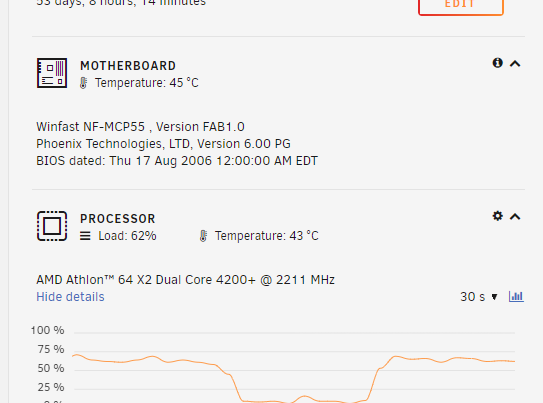
Hi I'm looking at upgrading my old server's mobo/cpu/ram and I'm reading up on ryzen vs intel cpus. I only use Unraid as a NAS to serve content to KODI machines. I'm upgrading from this: To maybe this cpu and mobo. CPU: https://www.amazon.com/gp/product/B09VCJ171S/ref=ewc_pr_img_3?smid=ATVPDKIKX0DER&psc=1 MOBO: https://www.amazon.com/gp/product/B0BHCL4YVS/ref=ewc_pr_img_4?smid=ATVPDKIKX0DER&psc=1 I have 6 total drives in my array (1 parity 5 data). It's been awhile since I built my current machine would this combo work decent for unraid? I read something about disabling c-states in the bios if running VMs, I don't plan on running any VMs. Anything else problematic with this? It has 6 sata ports on the mobo how would you recommend expanding that by one or two ports (maybe to add second parity and cache disk).
-
I started the array and have begun reb uilding disk1 onto itself. I can check if AHCI is an option in my mobo settings. Yes I'm aware that my CMOS battery is dead, every time i loose power I have to reset the boot priority. I should just replace the battery. I do not user VMs or Docker I only use this machine as a NAS. I do not have a spare disk. tower-diagnostics-20230524-1314.zip
-
Thank you for the help. I believe I attached the diagnostics zip file to my post along with the SMART test results, unless I'm posting the wrong diagnostics. I hear you on the bad connections, I guess I'm not sure how to proceed here. I can rebuild again on disk1, but if it fails again I'm not sure how to fix this long term. I've replaced the sata cable and the disk is 3-4 old replacing what I thought was a previous disk failure. So as far as hardware that leaves the disk and the sata port itself... right? I don't have any spare sata ports on my mobo. So if this isn't the disk but rather the port, I'm looking at a mobo/cpu/ram upgrade or maybe a PCI sata card, right?
-
Ok I ended up replacing the sata cable and rebuilt the disk onto itself. It was fine for a few weeks and now I'm back to a disabled disk1 . I've attached the smart test. This disk is only about 3 - 4 months old. Did i get a bad replacement disk or is an issue with my sata controller? Its a really old machine, wondering If I should replace the mobo/cpu/ram. tower-diagnostics-20230524-0834.zip tower-smart-20230524-0831.zip
-
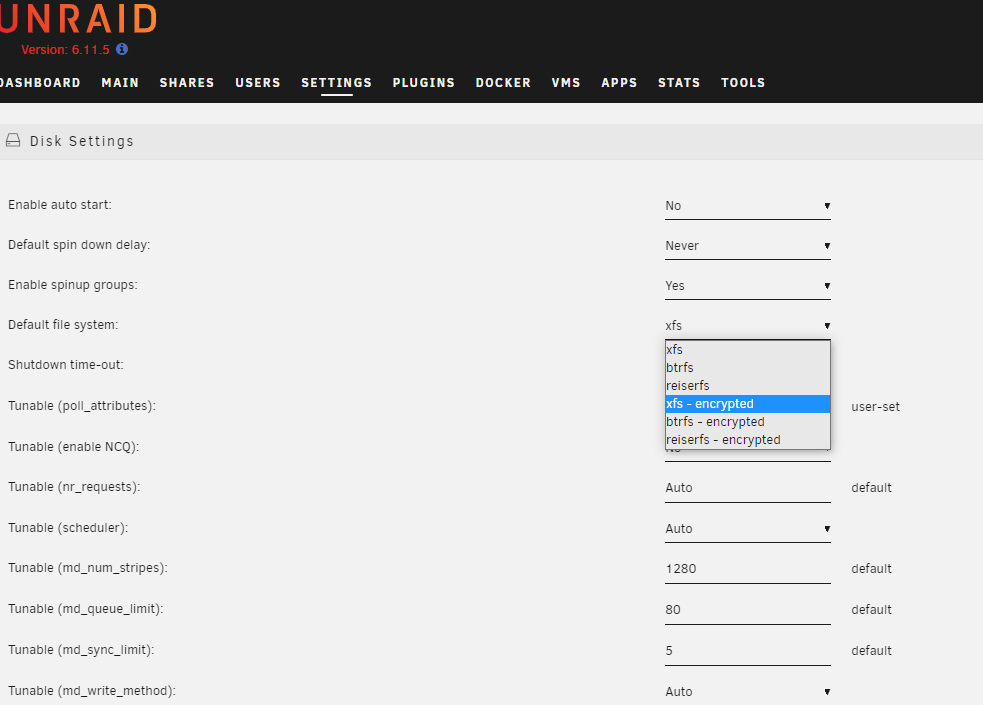
when you say convert to xfs is there where I would do that?
-
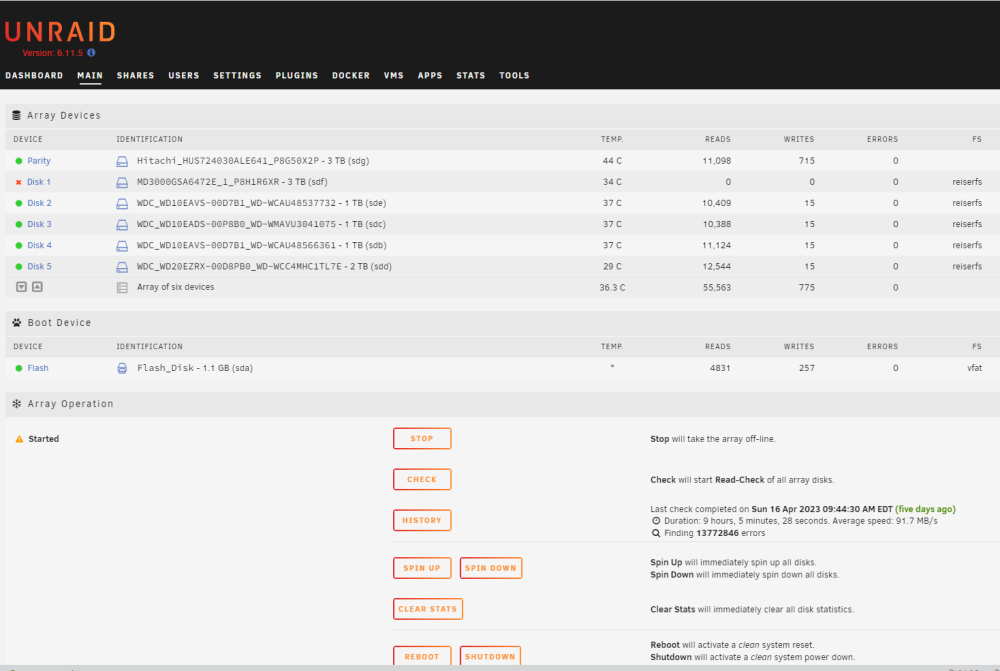
tower-diagnostics-20230421-1411.zip It looks like it's mounting but i still see it as disabled.
-
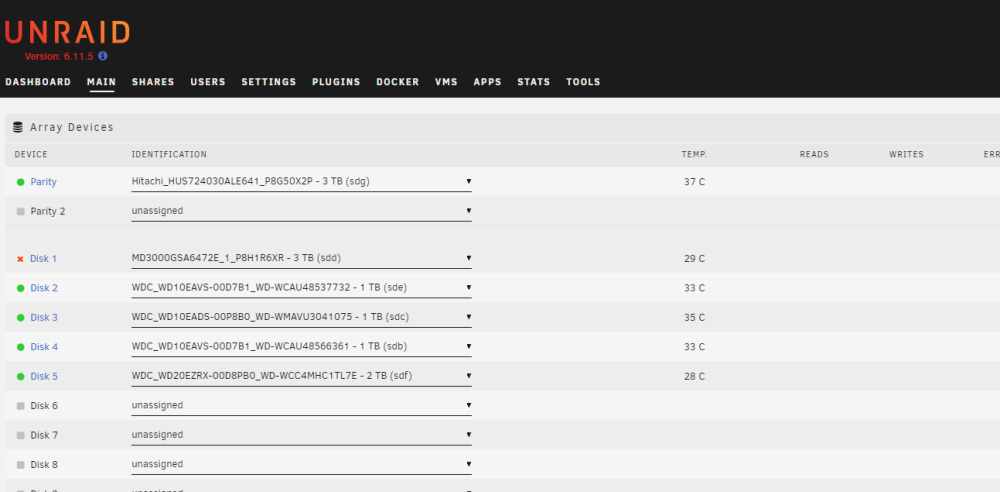
I powered down the server rebooted it and now I can see both the disks in the main tab. I ran a SMART test on disk 1 last night. It came back clean 0 errors. I attached the diagnostics zip to this post. Am I safe to re enable Disk 1? How do you do that, I'm stuggling to find the "enable" button in the Disk menu. tower-diagnostics-20230421-0859.zip
-
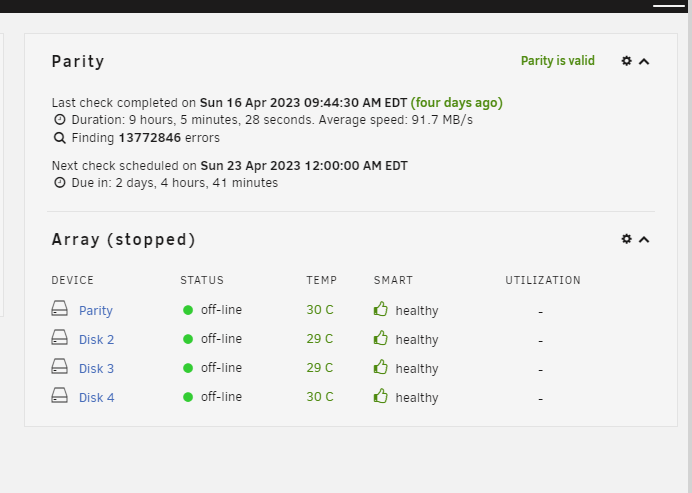
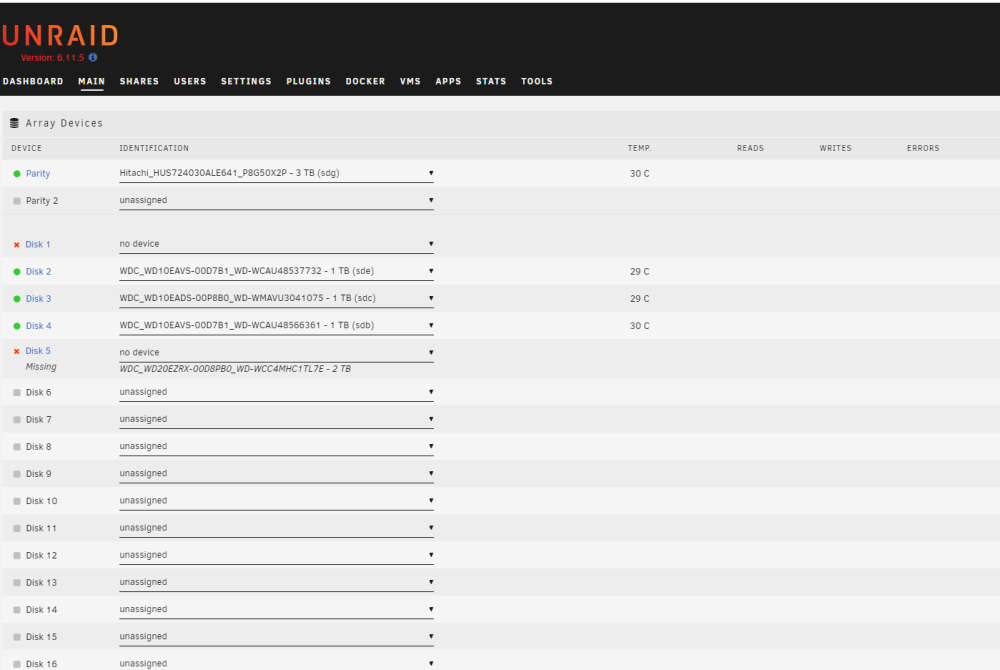
I got this email a couple of days ago and I'm just getting around to looking into it. Event: Unraid Disk 1 error Subject: Alert [TOWER] - Disk 1 in error state (disk dsbl) Description: MD3000GSA6472E_1_P8H1R6XR (sdd) Importance: alert When I web into the server I see this: The problem is disks 1 and 5 are gone... When I click on the main tab I see this: When I download the syslog I get an empty zip file. How do I proceed? Did I just have a double disk failure? I replaced Disk 1 about a month ago, if that matters.
-
Ok I'll buy a new disk and rebuild to that if it's safer. No there was no power cycle in-between reports. I just never clicked the upgrade array buttons to go to 6.11.5, I will when I get the array healthy again. It looks like today the server started a read check. It's going to take another 8 hours to complete but found 0 errors so far. I'm not familiar with a read check but it looks like disk1 is still disabled. I did not take any actions on the server to start rebuilding the disk or start / stop the array or anything. Thanks!
-
Hello, I've been using my old server for over 10 years got my first alert email tonight about a disabled disk. I just want to make sure it's just a bad disk and not that it's time to build out a new system entirely. I haven't had to replace anything in the last 10 years of ownership. I have upgraded the system to unraid 6.11.1. Attached are output of the diagnostic logs and smart out put for disk1 which is now disabled. Is there a way to confirm that it's simply the disk and not the sata port? I don't have any extra ports on my mobo. Thanks! tower-diagnostics-20230211-2229.zip tower-smart-20230211-2127.zip
-
Ok looks like its an AM2 socket so I think this should work: https://www.amazon.com/RIIEYOCA-Cooler-Bracketv-Bracket-Screws/dp/B09LQKTZFR/ref=sr_1_14?crid=2MWUZWEW2F2FY&keywords=AM2%2Bcpu%2Bcooler%2Band%2Bbracket&qid=1665336671&s=electronics&sprefix=am2%2Bcpu%2Bcooler%2Band%2Bbracket%2Celectronics%2C117&sr=1-14&th=1 I wonder if my old cooler wont just work with this bracket... Ill have to research how to best remove the old thermal paste before putting some fresh stuff on. Thanks all.
-
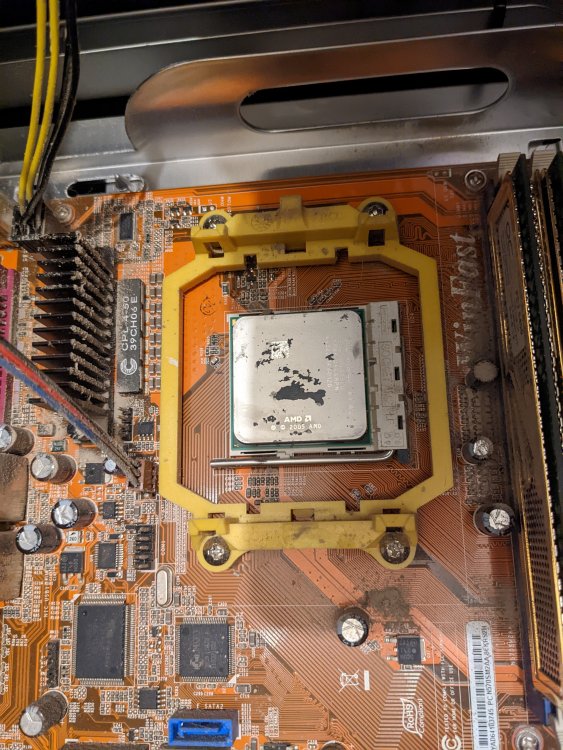
Hello, the family and I moved from MN to FL last year and it looks like somewhere along the road we cracked the motherboard's CPU mounting bracket. I've never broke one of these things, is this something that i can just replace the mounting bracket and apply some fresh thermal paste and move on, or does this mean I need to look at a new Mobo/CPU combo? I didn't notice this damage last night when I booted it and started a party check. When I woke up it was shut down and wouldn't boot into unraid. It might be hard to see but there is a part of the yellow bracket missing in the lower picture. Without that part the cpu cooler isn't held flush against the cpu. Is the yellow bracket something that can be replaced by itself or is it best to just get a new mobo/cpu. Thanks