





tcshavasu
Members
-
Joined
-
Last visited
Everything posted by tcshavasu
-
I'm using Rustdesk-AiO with Unraid Docker. I'm now getting could not verify end to end encryption since the client update a couple of months ago... will you be updating the server version to be compatable with new client versions?
-
Sorry, quick qusetion. Will this allow control of USG devices? or is it only for AP's & Switches? Thanks
-
Thanks, I have seen in my research that the ASM controler I install recently are the cause of some issues. I have ordered the LSI Logic Controller Card LSI00301 SAS 9207-8i 8Port Internal SAS/SATA 6Gb/s to replace it. Hopefully with better results. Thanks
-
Thanks for getting the array online again... unfortunatly the system crashed/froze during parity check. This time Disk 7 was lost and when attempting to re-add it, It came up as Unmountable: Unsupported or no file system. I tried running the repair in Maintenance mode and it said couldn't find primary block and attempted to find secondary. After leaving it overnite to check, at some point the system froze again and required a hard shut down. I believe the problem may stem from a bad SATA controler since the drive issues seem random occuring on different drives. I included the diag from before starting the array and after. I have paused the data rebuild so it won't crash again and can ues the array for today. Thanks again... tower-diagnostics-20240708-0738.zip tower-diagnostics-20240708-0747.zip
-
Ok, all the disks (except Disk2) are back and populated with the correct data. For now I don't need disk 2 in the array since I had already moved everything off of it before I tried to replace it. I'm attaching the Diag lotower-diagnostics-20240703-1349.zipg. Thanks for the assist.
-
Thanks for the quick reply, I will try this later today and post the update since I need the array online while working.
-
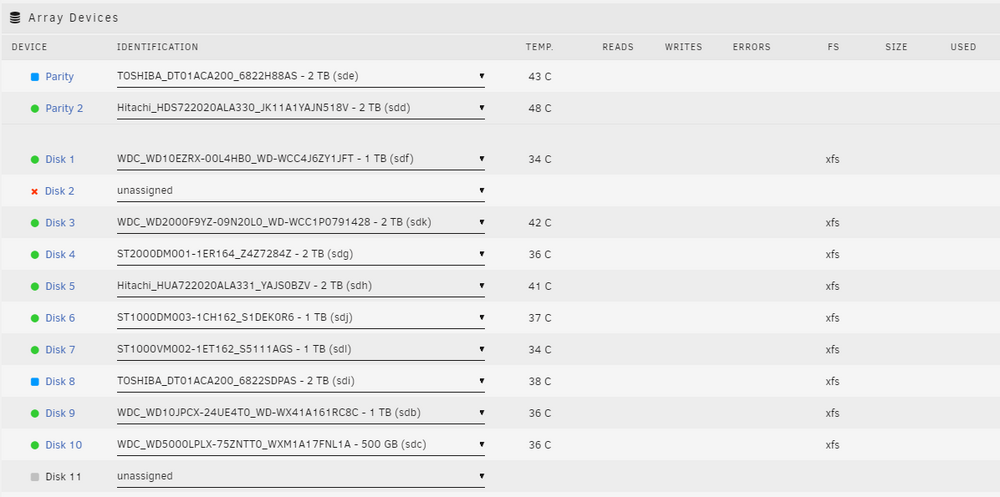
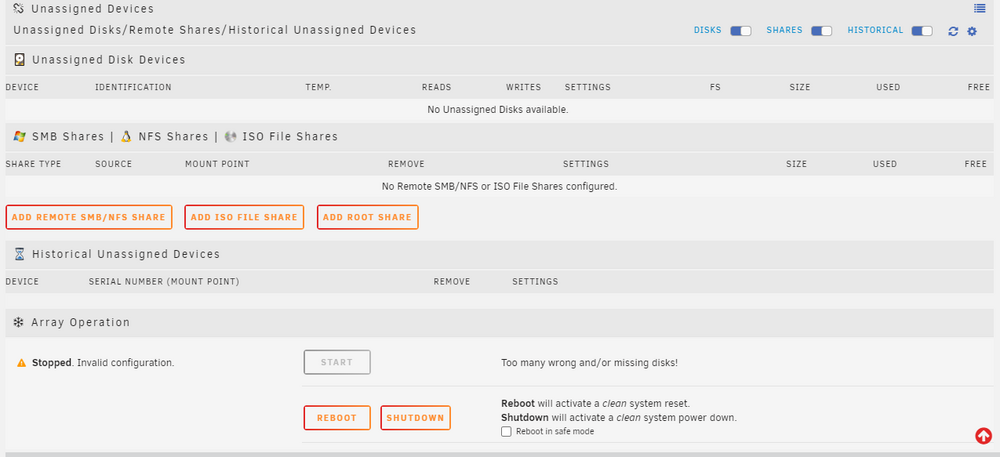
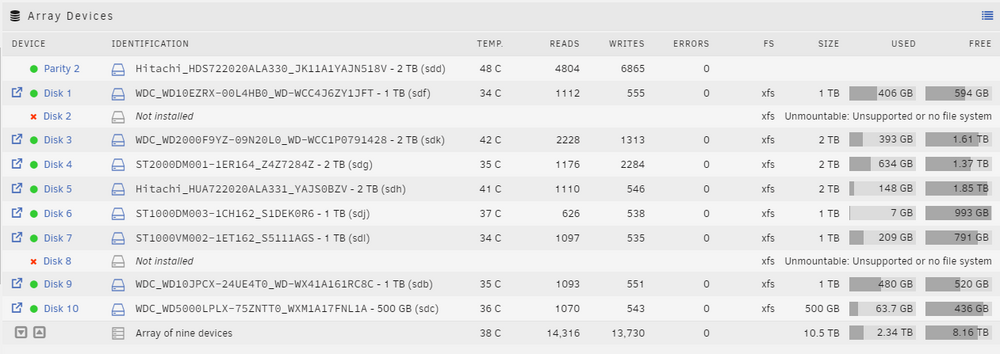
While rebuilding a bad disk (Disk2) the system froze and I had to do a hard shutdown. I disconnected the new disk for disk 2 assignment. After rebooting 1 parity drive and 1 Array disk were not mounted and were in unassigned disks. I stopped the array and tried to assign to the proper devices and am unable to start the array. (Screenshot attached) I'm including the diagnostic log... If I reset them back to not installed I can start the array. I am thinking at this point I need to use New Config and remove the lost disks? Any help will be appreciated.tower-diagnostics-20240703-1022.zip
-
Ok, found how to change UUID and everything is good... thanks for the info.
-
Log states: Jul 26 12:51:49 Tower unassigned.devices: Adding disk '/dev/sdl1'... Jul 26 12:51:49 Tower unassigned.devices: Mount drive command: /sbin/mount -t xfs -o rw,noatime,nodiratime '/dev/sdl1' '/mnt/disks/ST500DM002-1BD142_Z6E6JHFC' Jul 26 12:51:49 Tower kernel: XFS (sdl1): Filesystem has duplicate UUID af97fc56-3528-4125-b30b-215ec979551b - can't mount Jul 26 12:51:49 Tower unassigned.devices: Mount of '/dev/sdl1' failed. Error message: mount: /mnt/disks/ST500DM002-1BD142_Z6E6JHFC: wrong fs type, bad option, bad superblock on /dev/sdl1, missing codepage or helper program, or other error. I'm guessing it's the duplicate UUID? Can I clear that and see the files that were on it? If so, how do I clear it safely? I just need to copy the files off the old disk to the array.
-
Hi, New to this topic and not sure what I need to do to post my problem. I have been upgrading my unraid machine and swapped out smaller drives to larger ones. At sometime during the swapping I have lost files, entire directory's. I connected one of the old replaced drives and it shows in UD but will not let me mount it.



