





djgrazzy
Members
-
Joined
-
Last visited
-
I have a new unraid 7.0.0-beta.2 test server. VM Backup plugin installs ok but doesn't seem to save any settings when you click apply and then come back into VM backup plugin settings? Anyone else playing with UR7 yet and experience this?
-
Same issue for me "plugin: not installing older version" on a second testing server. Its offline a lot of the time (waiting for v6.13/7) and doesn't have auto updates for docker or plugins setup like my production server. I went to the plugins page and found the "Unraid Connect" plugin needed an update. Once complete the update worked as normal. You may need to "Check for updates" from the plugin page to get any updates to show up.
-
I can't comment on the snapshots sorry. You mentioned you have appdata backup plugin backups as well, can you try those?
-
I don't believe so no. It appears to be a permissions issue. This command should show your current permissions (where 'mariadb' is your mapped volume name) ls -la /mnt/user/appdata/mariadb and should result in something like this ............................................................................................................ # ls -la /mnt/user/appdata/mariadb/ total 0 drwxr-xr-x 1 root root 20 Mar 9 2023 ./ drwxrwxrwx 1 nobody users 1194 Feb 13 21:47 ../ drwxr-xr-x 1 nobody users 0 Mar 9 2023 config/ drwxr-xr-x 1 nobody users 676 Feb 28 05:13 data/ ............................................................................................................ and can then be fixed with something like this. someone pls correct me if I'm wrong. chmod -R 777 /mnt/user/appdata/mariadb
-
Modify the Repository to something like this. mariadb:11.4.1-rc
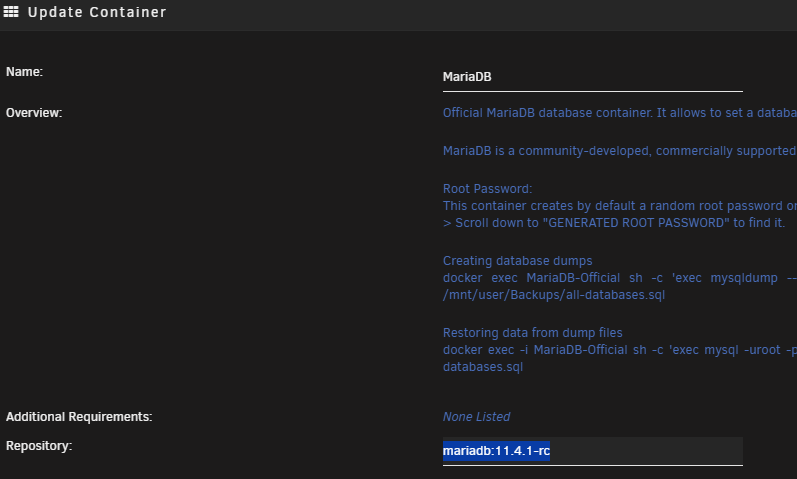
-
It appears the Template "WebUI" has the container port set to 5000:5000 when in fact the container listens on port 8000 so if your using a custom docker network just set your app to use 8000 or remove the WebUI: port and recreate as 5000:8000.



