





Lectoid
Members
-
Joined
-
Last visited
-
I just set up rclone and am using it to sync offsite. I noticed that it's reading data from the drives, but they're not showing as active. My cache drives are active, but all the data I am syncing is on the array. Edit to add: Every time I've ever browsed my files on the array, it's spun on the drive. I just noticed it's not doing that now. Not thinking it's an rclone issue, but I just started using when I noticed the drives not active, so assumed it was related.

-
Did you ever come up with a solution for this? I'm looking to do the same thing.
-
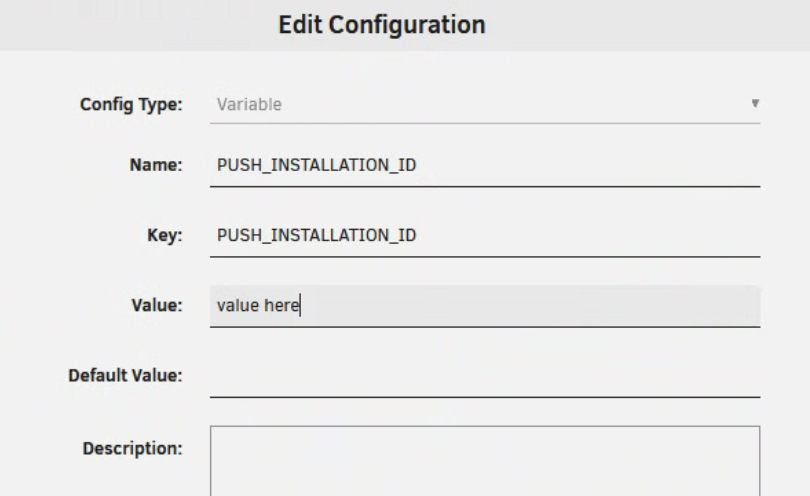
You have to add them as variables. Go in to your vaultwarden docker settings and at the bottom, click "Add another path, port, variable..." Fill out the fields like below. Repeat again for the "PUSH_INSTALLATION_KEY". Once you've done that, click apply which will restart the docker, you should see these two new fields in the logs it spits out while restarting. Then from what I've read, you'll need to delete the bitwarden app on your mobile device and re-install it and log in. You'll know the settings are in there when you can go to your vaultwarden admin page, settings, read-only config and see those two fields now have those values in them.
-
Thank you for this. I wasn't putting the information in the Key field and didn't know what else to do. I don't dabble much in the configs of the docker variables.
-
Hey Frank, my docker permissions are set like in the first link, 99, 100, and 000. The issue is it's not consistent. For example yesterday I had five folders sync down to my unRAID, two of the folders had write permission, the other three did not.
-
I'm having this same issue, but it's not every file every time. I have pretty much the same set up as you, but just one folder. For example last night, I had four files sync down to my unRAID box, but only one of them gave me the file permission error. The other three I could move fine. Had this issue yesterday, and a week or so ago. I've been running this same syncthing config for at least a year with no changes and never had this issue until recently.
-
Hello. I updated the server a few days ago by stopping it and starting it. Seemed to be fine at first, but realized my .json file was reset. Server name and password were reset. Fixed that and joined the game and all my progress was gone. Fortunately I had just started so maybe a few hours lost, but I'm worried this could happen again. I have backups enabled, but I have no idea how to restore. Are there instructions for that?
-
Can't get RCON to connect to my Rust server. I installed the rust docker and left everything default. Added the game parameters to enable rcon web, set the password, and also put the rcon port there just incase (default is 28017, so I left it at that). I installed Rust Admin, and also the rcon thing from the apps store. They both seem to time out when trying to connect. Docker is set to bridge mode. I tried br0 and gave it a static IP, no change. I can connect to the server from the game and play, so I know it's online. I searched in this forum for this issue, but not seen anything that matched my issue.
-
That worked, thank you. Never had to do that before. I have two unRAID servers and the other one updated just fine.
-
I was on 6.12.8, and I can't update to 6.12.10. I was able to update to 6.12.9 however. When I try to update to .10, the pop-up screen shows: plugin: installing: unRAIDServer.plg Executing hook script: pre_plugin_checks plugin: downloading: unRAIDServer.plg ... done plugin: not installing older version Executing hook script: post_plugin_checks I have tried changing my DNS to 1.1.1.1/8.8.8.8. I saw someone had a similar issue with downloading plugins.
-
In LuckyBackup, I changed the user to "root" instead of the "backupadmin" account I had made. Everything is working now, backups, and schedule.
-
I started over, even deleted and cleaned the docker up. Set it back up following the instructions from here https://unraid.net/blog/unraid-server-backups-with-luckybackup I'm still getting prompted for a password when I run the backup. Nothing I type in seems to matter.
-
Yea, if I run it manually, it works fine. I've added/removed files in one of my backed up folders to verify that. The drives on my destination unRAID aren't even spinning up from idle. Hmm... I just ran it manually and now it's prompting for a password. Maybe I should start over.
-
Hey ich, I did read that and set the console check box. Just to be clear, in the main page information window of lucky backup, when it runs via cron, should you see any indication of that? I've been looking there, but also using a few test files on my source that are not showing up on the destination.
-
Can anyone help me with LuckyBackup's scheduling? I set up the scheduler, but it never runs. I can run the backup manually and it works fine. I set the schedule to run and then verify it viewing the crontab.

