



Skip to content
View in the app

A better way to browse. Learn more.

Unraid

A full-screen app on your home screen with push notifications, badges and more.

To install this app on iOS and iPadOS
  1. Tap the Share icon in Safari
  2. Scroll the menu and tap Add to Home Screen.
  3. Tap Add in the top-right corner.
To install this app on Android
  1. Tap the 3-dot menu (⋮) in the top-right corner of the browser.
  2. Tap Add to Home screen or Install app.
  3. Confirm by tapping Install.

Andrew Young

Members
  • Joined

  • Last visited

  1. cool - for reference here is the setting I changed: however your device manager is already showing USB 3.0 devices (mine were showing as USB 2.0 as your picture led me to investigate) There is some old discussion on reddit about Oculus link not connecting at the right speed here that might be worth a read
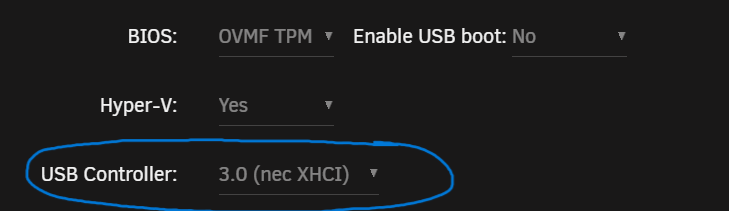
  2. yes - but just cracked the issue for me, the USB controller settings for the VM defaulted to USB2 controller (not USB3). I've changed it and I'm up to 100MB/s now.
  3. In A Win11 VM - I'm only seeing 10MB/s transfers from an unraid share -> USB 3.0 attached USB hard drive. Wondering if this is a similar issue?
  4. try switching to advanced view and changing this as well as the port mapping:

Account

Navigation

Search

Search

Configure browser push notifications

Chrome (Android)
  1. Tap the lock icon next to the address bar.
  2. Tap Permissions → Notifications.
  3. Adjust your preference.
Chrome (Desktop)
  1. Click the padlock icon in the address bar.
  2. Select Site settings.
  3. Find Notifications and adjust your preference.
