





The Transplant
Members
-
Joined
-
Last visited
Everything posted by The Transplant
-
Thanks - that did work. Definitely not an experience I would want to repeat. The reason I had to do this in the first place is because 1 of my 2 cache drives failed. I replaced it but I am still in the process of moving data off the second cache drive onto the new replacement, and then the plan is to mirror this drive to avoid issues like this. This is another daunting task - nothing seems to work as planned. If you feel inclined to take a look - here is the link to that thread. Thanks!
-
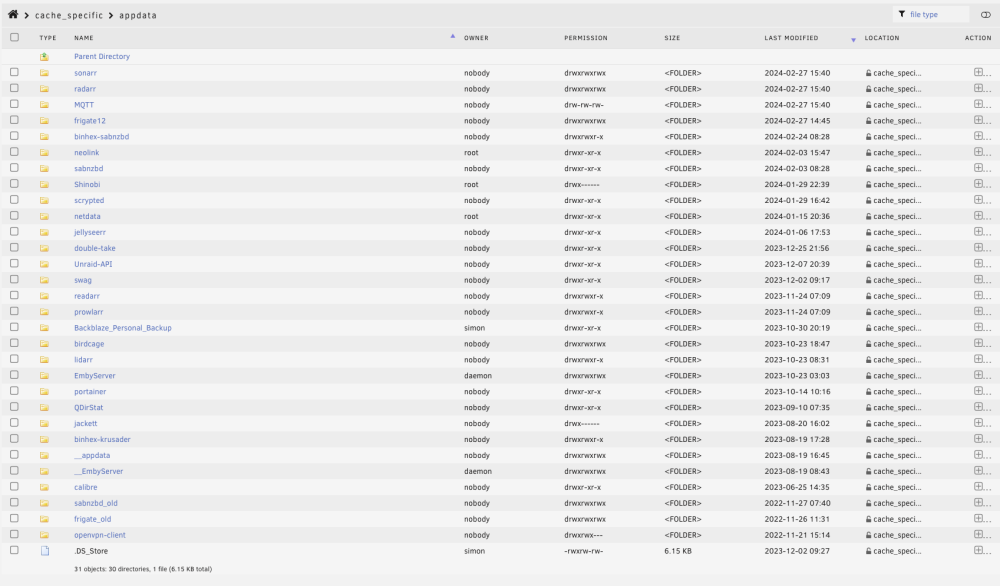
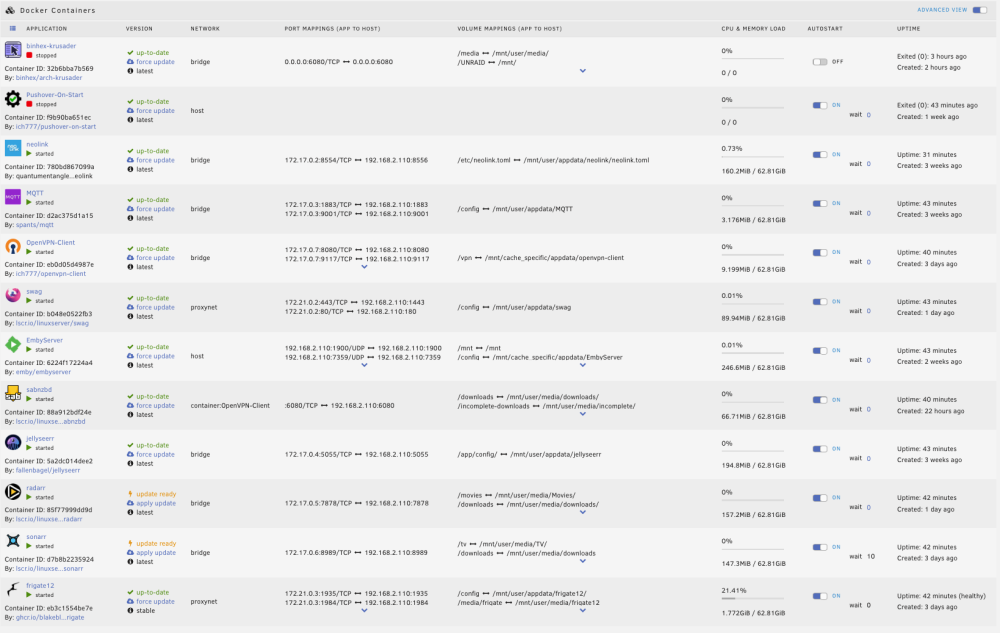
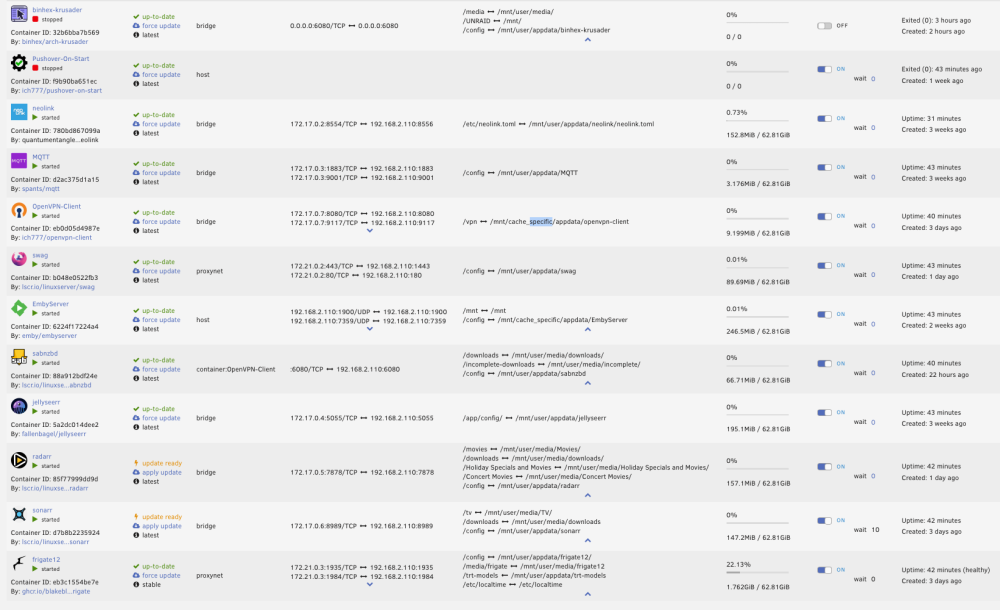
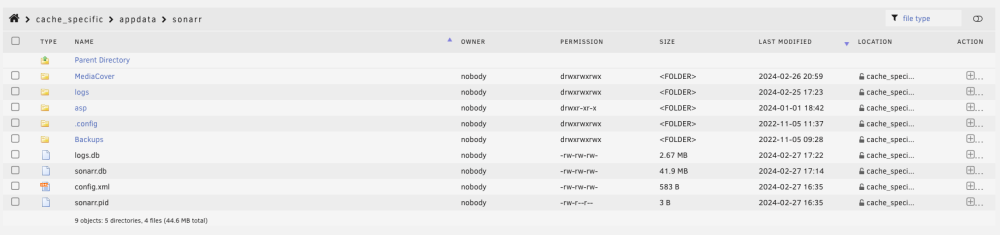
I just added a new cache drive (1TB). My plan is to remove the second drive (240GB) and then replace it with another 1TB drive and then mirror it. I added the new cache and have pointed all shares at it as needed. I have read dozens of posts about doing this but everyone seems to be slightly different - either on an older version of Unraid or not quite my configuration. As a result I will post my details and hope I can get specific information on how to do this in my case as I don't want to be rebuilding my box. I have stopped dockers and VMs and run the mover - twice. It completed. However I am still seeing a bunch of data on the old cache drive. Domains on the old cache has a folder for an old VM and nothing in it. System contains libvirt.img and docker.img. Presumably these need to be moved to the new cache but can't figure out how to do that. The appdata folder on the old cache contains a lot of old stuff This is my docker list now I see a few dockers that have references to the old cache. Is it as simple as stopping these, updating the location, and copying the folder from cache_specific to cache? And when I look at other docker folders in the old cache that have been updated recently I see files being written to as I look at them So clearly not everything has been moved. All of this leaves me with a distinct lack of confidence on how to pull this drive right now. So hoping to get some pointers. Diagnostics attached. Thanks. odin-diagnostics-20240227-1707.zip





-
Thanks @ghost82 - I did manage to restore the older file and get it running. But I had made some changes and want to get the newer image restored so will work through your suggestions above. The backup script I am using just seems to make a copy of the .img, xml, and .fd file. It did take me a while to realize that it was appending dates to the front of these files - so you could maintain multiple backups. This feels like something that should be native in the GUI for both dockers and VMs. Since I had not been through a crash like this it took me down for a number of days while I learned how to restore. A simple create new VM and click on restore and select the backup would have been nice, and from a software standpoint is remarkably simple to add? I appreciate the help!
-
@ghost82 Following on this thread I am now in the process of restoring a VM. I am running the backup plugin and have some questions before I do this: I notice in the backup directory that I have several copies by date of the img, xml and fd file. But the newest img file does not have an xml or an fd file associated with it. Should I revert back to the next newest file set where all three exist? Or can I use the xml and fd files from an older backup set? My fd file is not named ovmf_vars.fd but 20240206_0300_5ab648ed-0c63-aa51-400c-277ece7bd277_VARS-pure-efi.fd. I assume that doesn't matter? Looking at the xml I see a few corrections I might need to make: /mnt/user/domains/Outlook/vdisk1.img - the image is currently in a backups folder - so I will move it to the corresponding folder in domains and leave this as is. Should I do anything with the 20240206_0300_5ab648ed-0c63-aa51-400c-277ece7bd277_VARS-pure-efi.fd file that is currently in the backups folder? Thanks!
-
So I found the problem. My cache SSD was failing and did fail. I am sure there is some way for me to have seen this coming. But I didn't see any errors and I didn't see anything connecting the speed of the VM with an imminent failure on the cache drive.
-
Which is essentially what I was doing. But if I implement my approach then I can (I think) prevent downtime from a cache drive failure. Not that my system is mission critical but it did take out my Home Assistant which is a little annoying.
-
To be honest I wasn't aware that my cache drives were a single point of failure. Seems obvious now, but I learn as I go. I had 2 240GB SSDs and had dedicated one to VMs - the one that failed, and one to the other stuff like appdata, system, etc. I had hoped that I could do something with the spare SSD I have but it is too small to accommodate my VMs. So I ordered two 1TB SSDs that are arriving today. Here is my plan: The array is running right now and I have backups of my VMs. Install the first 1TB in place of the failed drive. Restore the VMs to this drive. Move all data from the existing 240GB SSD to this drive. Take our the 240GB and replace it with the second 1TB. Mirror the second 1TB to the first 1TB. Is my plan a good approach? This then should remove my single point of failure? Thanks.
-
I definitely don't do this every day so haven't been able to figure it out yet. My first cache drive failed. It was a 240GB. I had a 180GB SSD on hand so I replaced it. Now I can't bring the array back online so obviously I am missing something? Diagnostics attached. Thanks. odin-diagnostics-20240224-1106.zip
-
Any thoughts on this? It could be something really simple and/or stupid that I am doing?
-
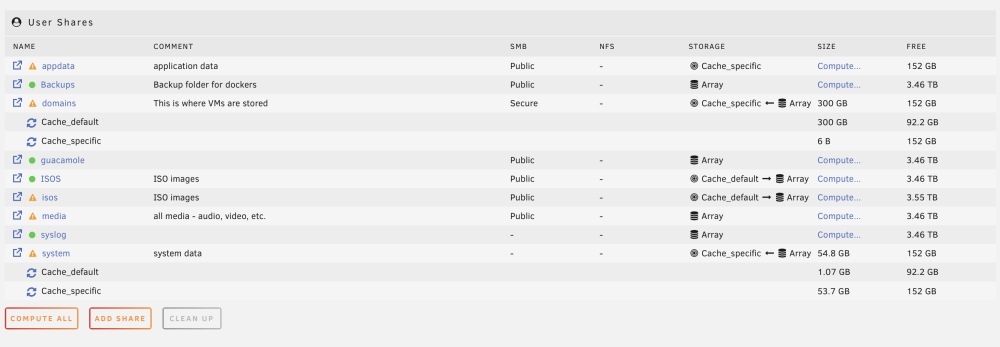
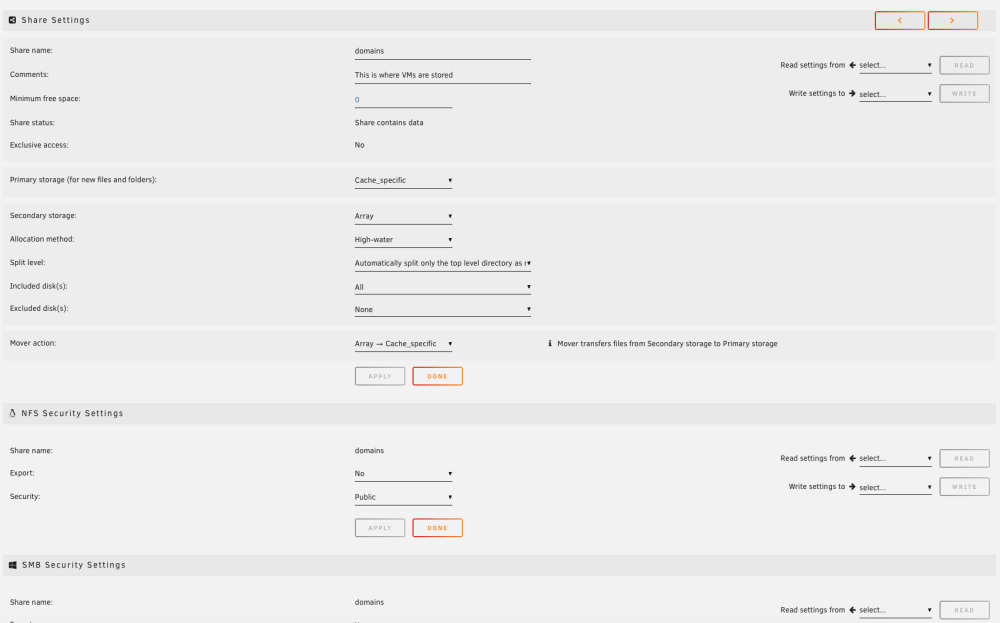
Don't know if this is significant. When I look at the domains and system I see that it is spread across my two SSD cache drives.


-
Diagnostics are attached. odin-diagnostics-20240220-2144.zip
-
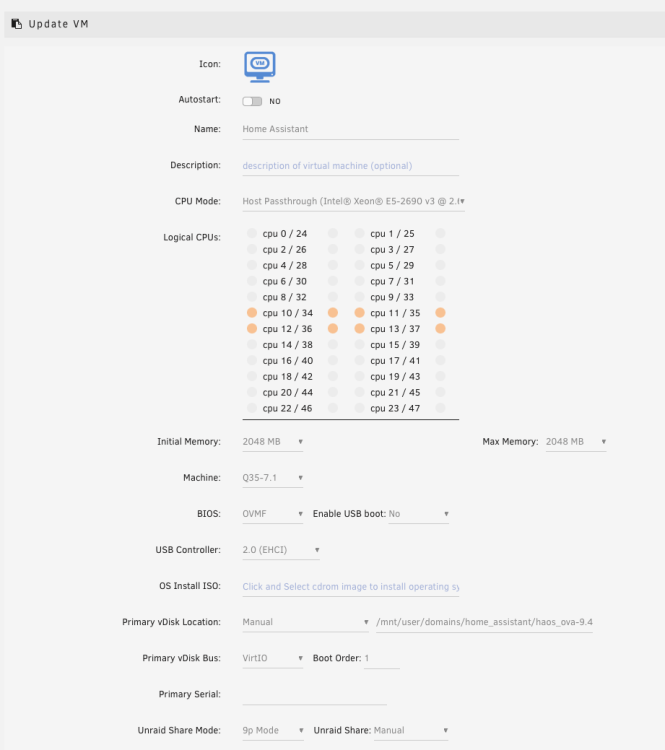
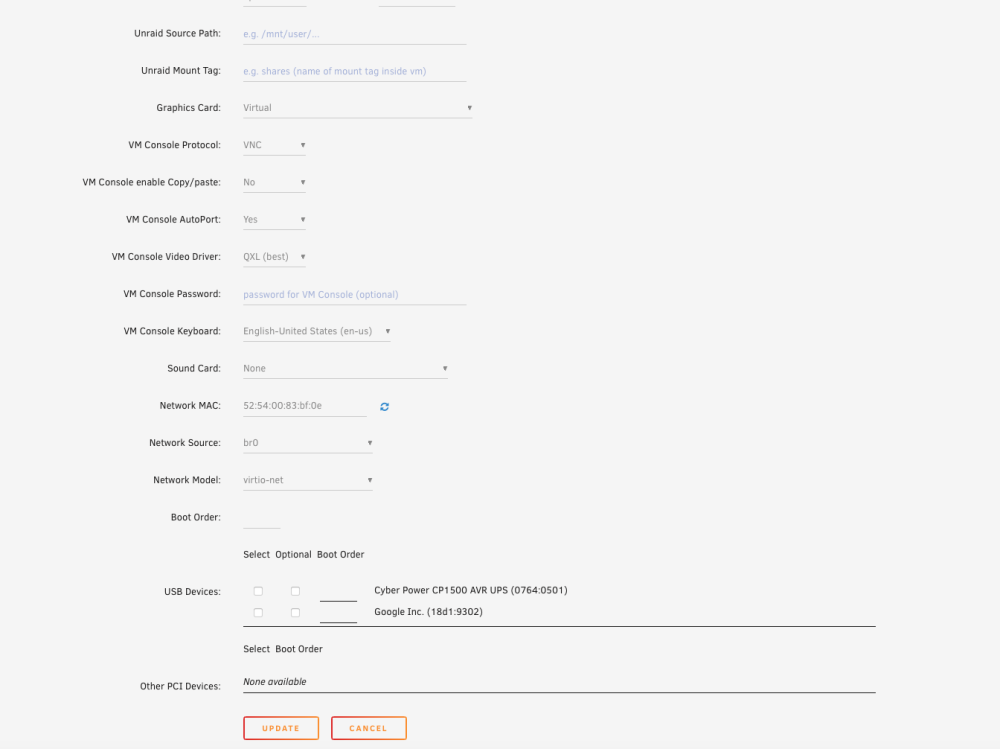
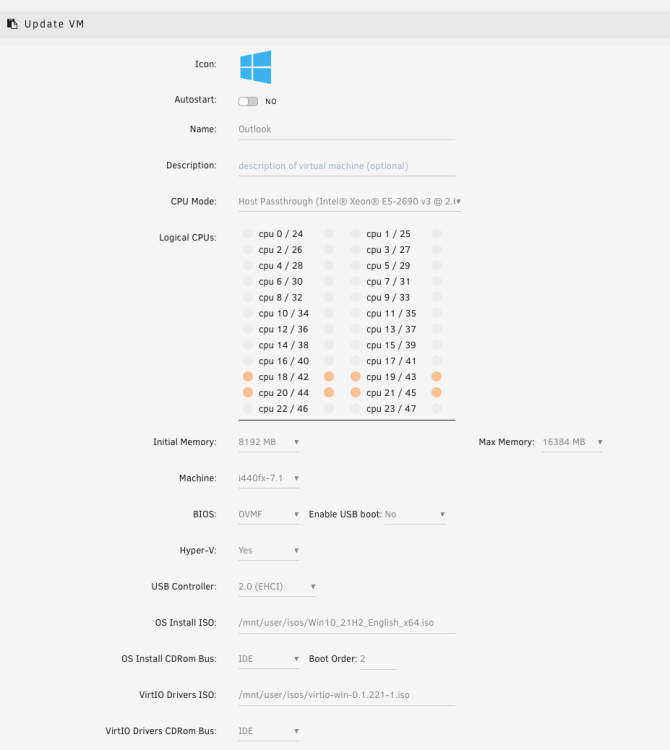
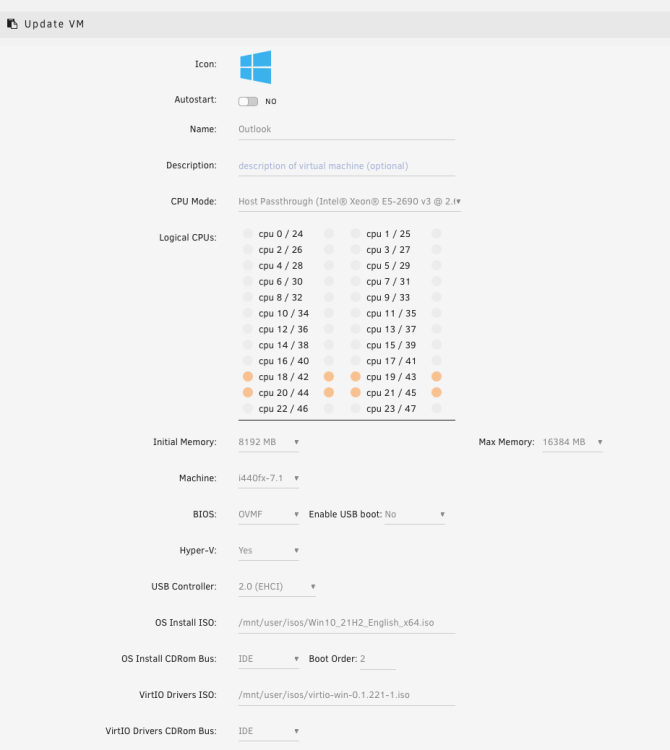
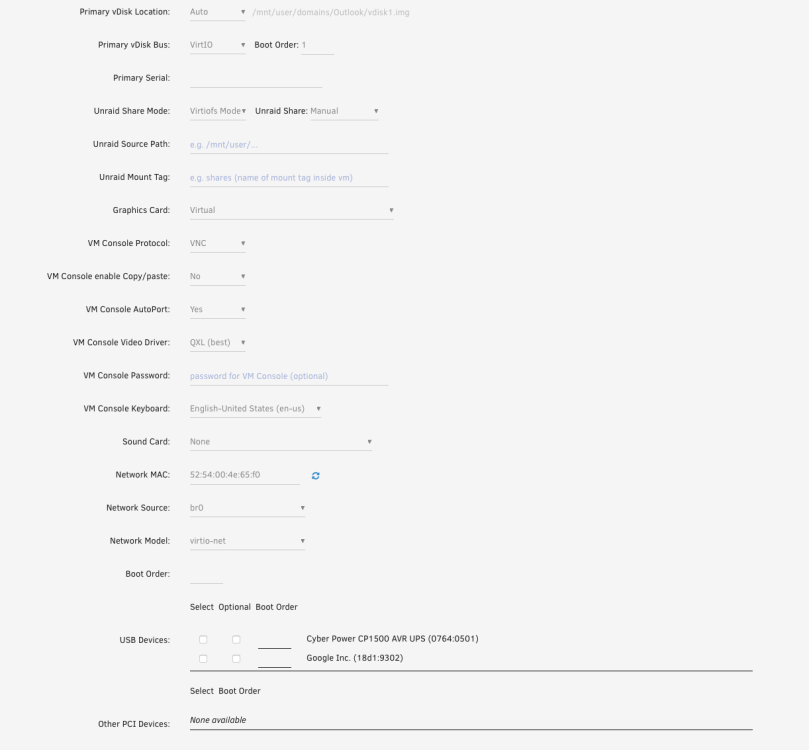
I have two VMs configured - one with Home Assistant and the other with Windows. Everything was running for months and then one morning several weeks ago Home Assistant crashed and I noticed the Windows VM was unresponsive. I tried restarting VMs, rebooting Unraid. Reading threads and started playing around with CPU assignments, etc. Somehow, and I don't think because of anything I did, the VMs started to perform fine and I forgot about it. I have read everything I can on CPU pinning but to be honest the more I read the more I get confused. So perhaps my configuration here is the issue? This morning I woke up and Home Assistant had crashed again and the Windows VM was unresponsive. So I dug in to so some research and so far I can't find out what I am doing wrong. My VMs are running on a separate SSD that is set to cache specific. I have taking screen shots of anything I think can be useful. Dockers seem to be running fine. Parity check did start running on one of my reboots but I paused that and scheduled it at night. Thanks for any help and I am happy to post anything else. Recent logs: Feb 20 17:31:36 Odin avahi-daemon[29221]: Joining mDNS multicast group on interface br0.IPv4 with address 192.168.2.110. Feb 20 17:31:36 Odin avahi-daemon[29221]: New relevant interface br0.IPv4 for mDNS. Feb 20 17:31:36 Odin avahi-daemon[29221]: Network interface enumeration completed. Feb 20 17:31:36 Odin avahi-daemon[29221]: Registering new address record for 192.168.2.110 on br0.IPv4. Feb 20 17:31:36 Odin emhttpd: shcmd (457): /etc/rc.d/rc.avahidnsconfd restart Feb 20 17:31:36 Odin root: Stopping Avahi mDNS/DNS-SD DNS Server Configuration Daemon: stopped Feb 20 17:31:36 Odin root: Starting Avahi mDNS/DNS-SD DNS Server Configuration Daemon: /usr/sbin/avahi-dnsconfd -D Feb 20 17:31:36 Odin avahi-dnsconfd[29230]: Successfully connected to Avahi daemon. Feb 20 17:31:37 Odin emhttpd: shcmd (472): /usr/local/sbin/mount_image '/mnt/user/system/libvirt/libvirt.img' /etc/libvirt 1 Feb 20 17:31:37 Odin kernel: loop2: detected capacity change from 0 to 2097152 Feb 20 17:31:37 Odin avahi-daemon[29221]: Server startup complete. Host name is Odin.local. Local service cookie is 1689060470. Feb 20 17:31:37 Odin kernel: BTRFS: device fsid 7c8582b0-545c-4478-b3a9-c791bdac3979 devid 1 transid 603 /dev/loop2 scanned by mount (29289) Feb 20 17:31:37 Odin kernel: BTRFS info (device loop2): using crc32c (crc32c-intel) checksum algorithm Feb 20 17:31:37 Odin kernel: BTRFS info (device loop2): using free space tree Feb 20 17:31:37 Odin kernel: BTRFS info (device loop2): enabling ssd optimizations Feb 20 17:31:37 Odin root: Resize device id 1 (/dev/loop2) from 1.00GiB to max Feb 20 17:31:37 Odin emhttpd: shcmd (474): /etc/rc.d/rc.libvirt start Feb 20 17:31:37 Odin root: Starting virtlockd... Feb 20 17:31:37 Odin root: Starting virtlogd... Feb 20 17:31:37 Odin root: Starting libvirtd... Feb 20 17:31:38 Odin dnsmasq[29445]: started, version 2.89 cachesize 150 Feb 20 17:31:38 Odin dnsmasq[29445]: compile time options: IPv6 GNU-getopt DBus no-UBus i18n IDN2 DHCP DHCPv6 no-Lua TFTP conntrack ipset no-nftset auth cryptohash DNSSEC loop-detect inotify dumpfile Feb 20 17:31:38 Odin dnsmasq-dhcp[29445]: DHCP, IP range 192.168.122.2 -- 192.168.122.254, lease time 1h Feb 20 17:31:38 Odin dnsmasq-dhcp[29445]: DHCP, sockets bound exclusively to interface virbr0 Feb 20 17:31:38 Odin dnsmasq[29445]: reading /etc/resolv.conf Feb 20 17:31:38 Odin dnsmasq[29445]: using nameserver 192.168.2.1#53 Feb 20 17:31:38 Odin dnsmasq[29445]: read /etc/hosts - 4 names Feb 20 17:31:38 Odin dnsmasq[29445]: read /var/lib/libvirt/dnsmasq/default.addnhosts - 0 names Feb 20 17:31:38 Odin dnsmasq-dhcp[29445]: read /var/lib/libvirt/dnsmasq/default.hostsfile Feb 20 17:31:38 Odin kernel: L1TF CPU bug present and SMT on, data leak possible. See CVE-2018-3646 and https://www.kernel.org/doc/html/latest/admin-guide/hw-vuln/l1tf.html for details. Feb 20 17:31:38 Odin usb_manager: Info: rc.usb_manager Reset Connected Status Feb 20 17:31:38 Odin avahi-daemon[29221]: Service "Odin" (/services/ssh.service) successfully established. Feb 20 17:31:38 Odin avahi-daemon[29221]: Service "Odin" (/services/smb.service) successfully established. Feb 20 17:31:38 Odin avahi-daemon[29221]: Service "Odin" (/services/sftp-ssh.service) successfully established. Feb 20 17:31:55 Odin flash_backup: adding task: /usr/local/emhttp/plugins/dynamix.my.servers/scripts/UpdateFlashBackup update Feb 20 17:32:21 Odin kernel: br0: port 2(vnet0) entered blocking state Feb 20 17:32:21 Odin kernel: br0: port 2(vnet0) entered disabled state Feb 20 17:32:21 Odin kernel: device vnet0 entered promiscuous mode Feb 20 17:32:21 Odin kernel: br0: port 2(vnet0) entered blocking state Feb 20 17:32:21 Odin kernel: br0: port 2(vnet0) entered forwarding state Feb 20 17:32:21 Odin usb_manager: Info: rc.usb_manager vm_action Home Assistant prepare begin - Feb 20 17:45:38 Odin kernel: br0: port 3(vnet1) entered blocking state Feb 20 17:45:38 Odin kernel: br0: port 3(vnet1) entered disabled state Feb 20 17:45:38 Odin kernel: device vnet1 entered promiscuous mode Feb 20 17:45:38 Odin kernel: br0: port 3(vnet1) entered blocking state Feb 20 17:45:38 Odin kernel: br0: port 3(vnet1) entered forwarding state Feb 20 17:45:38 Odin usb_manager: Info: rc.usb_manager vm_action Outlook prepare begin - Feb 20 17:59:16 Odin kernel: br0: port 3(vnet1) entered disabled state Feb 20 17:59:16 Odin kernel: device vnet1 left promiscuous mode Feb 20 17:59:16 Odin kernel: br0: port 3(vnet1) entered disabled state Feb 20 17:59:16 Odin usb_manager: Info: rc.usb_manager vm_action Outlook stopped end - Feb 20 18:01:58 Odin kernel: br0: port 3(vnet2) entered blocking state Feb 20 18:01:58 Odin kernel: br0: port 3(vnet2) entered disabled state Feb 20 18:01:58 Odin kernel: device vnet2 entered promiscuous mode Feb 20 18:01:58 Odin kernel: br0: port 3(vnet2) entered blocking state Feb 20 18:01:58 Odin kernel: br0: port 3(vnet2) entered forwarding state Feb 20 18:01:58 Odin usb_manager: Info: rc.usb_manager vm_action Outlook prepare begin -


-
I would be interested in doing the same thing. There must be an easy way to notify when a VM goes down?
-
That helps. Thanks.
-
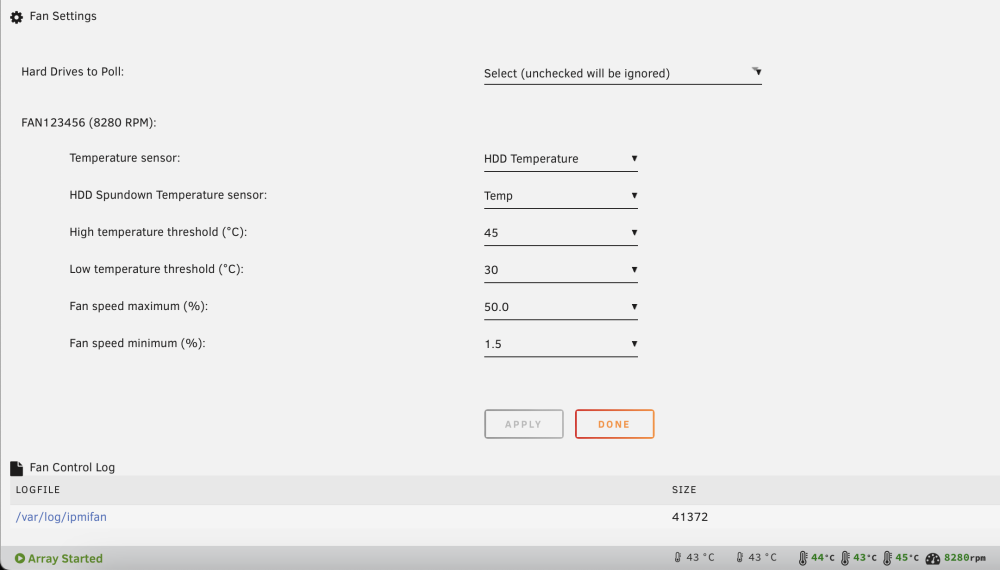
I got the hard drive temp into the green. I am going to try tweaking it a little to see if I can get fan noise down a bit. It is sitting in the back of my office. I don't know actually what the operating temps of my drives are - have to open up the box and check the model numbers - will do that but for now just going with an average range. One question - I have 6 mechanical drives and 2 SSD. If I reduced the number of mechanical drives by using less bigger drives would that have much impact on heat? Thanks. 2024-02-04 19:28:18 Fan:Temp, FAN123456(47%):HDD Temp(44C) 2024-02-04 19:31:19 Fan:Temp, FAN123456(50%):HDD Temp(45C) 2024-02-04 19:58:27 Fan:Temp, FAN123456(47%):HDD Temp(44C) 2024-02-04 20:01:28 Fan:Temp, FAN123456(50%):HDD Temp(45C) 2024-02-04 20:16:32 Fan:Temp, FAN123456(47%):HDD Temp(44C) 2024-02-04 20:19:33 Fan:Temp, FAN123456(50%):HDD Temp(45C) 2024-02-04 20:40:40 Fan:Temp, FAN123456(47%):HDD Temp(44C) 2024-02-04 20:43:41 Fan:Temp, FAN123456(50%):HDD Temp(45C) 2024-02-04 22:44:17 Fan:Temp, FAN123456(47%):HDD Temp(44C) 2024-02-04 22:47:18 Fan:Temp, FAN123456(50%):HDD Temp(45C) 2024-02-04 23:26:29 Fan:Temp, FAN123456(47%):HDD Temp(44C) 2024-02-04 23:29:30 Fan:Temp, FAN123456(50%):HDD Temp(45C) 2024-02-05 00:17:43 Fan:Temp, FAN123456(47%):HDD Temp(44C) 2024-02-05 00:20:44 Fan:Temp, FAN123456(50%):HDD Temp(45C) 2024-02-05 00:32:48 Fan:Temp, FAN123456(47%):HDD Temp(44C) 2024-02-05 00:35:49 Fan:Temp, FAN123456(50%):HDD Temp(45C) 2024-02-05 00:50:53 Fan:Temp, FAN123456(47%):HDD Temp(44C) 2024-02-05 00:53:54 Fan:Temp, FAN123456(50%):HDD Temp(45C) 2024-02-05 01:05:57 Fan:Temp, FAN123456(47%):HDD Temp(44C) 2024-02-05 01:08:58 Fan:Temp, FAN123456(50%):HDD Temp(45C) 2024-02-05 01:21:02 Fan:Temp, FAN123456(47%):HDD Temp(44C) 2024-02-05 01:24:02 Fan:Temp, FAN123456(50%):HDD Temp(45C) 2024-02-05 01:48:09 Fan:Temp, FAN123456(47%):HDD Temp(44C) 2024-02-05 01:51:10 Fan:Temp, FAN123456(50%):HDD Temp(45C) 2024-02-05 01:54:11 Fan:Temp, FAN123456(47%):HDD Temp(44C) 2024-02-05 01:57:12 Fan:Temp, FAN123456(50%):HDD Temp(45C) 2024-02-05 02:06:15 Fan:Temp, FAN123456(47%):HDD Temp(44C) 2024-02-05 02:09:15 Fan:Temp, FAN123456(50%):HDD Temp(45C) 2024-02-05 02:27:21 Fan:Temp, FAN123456(47%):HDD Temp(44C) 2024-02-05 02:30:22 Fan:Temp, FAN123456(50%):HDD Temp(45C) 2024-02-05 02:33:22 Fan:Temp, FAN123456(47%):HDD Temp(44C) 2024-02-05 02:36:23 Fan:Temp, FAN123456(50%):HDD Temp(45C) 2024-02-05 02:45:26 Fan:Temp, FAN123456(47%):HDD Temp(44C) 2024-02-05 02:48:27 Fan:Temp, FAN123456(50%):HDD Temp(45C) 2024-02-05 03:00:30 Fan:Temp, FAN123456(47%):HDD Temp(44C) 2024-02-05 03:03:31 Fan:Temp, FAN123456(50%):HDD Temp(45C) 2024-02-05 03:12:34 Fan:Temp, FAN123456(47%):HDD Temp(44C) 2024-02-05 03:15:34 Fan:Temp, FAN123456(50%):HDD Temp(45C) 2024-02-05 03:18:35 Fan:Temp, FAN123456(47%):HDD Temp(44C) 2024-02-05 03:21:36 Fan:Temp, FAN123456(50%):HDD Temp(45C) 2024-02-05 03:24:37 Fan:Temp, FAN123456(47%):HDD Temp(44C) 2024-02-05 03:30:39 Fan:Temp, FAN123456(50%):HDD Temp(45C) 2024-02-05 03:36:41 Fan:Temp, FAN123456(47%):HDD Temp(44C) 2024-02-05 03:42:43 Fan:Temp, FAN123456(50%):HDD Temp(45C) 2024-02-05 03:51:46 Fan:Temp, FAN123456(47%):HDD Temp(44C) 2024-02-05 03:54:47 Fan:Temp, FAN123456(50%):HDD Temp(45C) 2024-02-05 03:57:48 Fan:Temp, FAN123456(47%):HDD Temp(44C) 2024-02-05 04:03:50 Fan:Temp, FAN123456(50%):HDD Temp(45C) 2024-02-05 04:09:52 Fan:Temp, FAN123456(47%):HDD Temp(44C) 2024-02-05 04:12:53 Fan:Temp, FAN123456(50%):HDD Temp(47C) 2024-02-05 04:15:54 Fan:Temp, FAN123456(47%):HDD Temp(44C) 2024-02-05 04:24:57 Fan:Temp, FAN123456(50%):HDD Temp(47C) 2024-02-05 04:30:59 Fan:Temp, FAN123456(47%):HDD Temp(44C) 2024-02-05 04:37:01 Fan:Temp, FAN123456(50%):HDD Temp(45C) 2024-02-05 04:40:01 Fan:Temp, FAN123456(47%):HDD Temp(44C) 2024-02-05 04:43:02 Fan:Temp, FAN123456(50%):HDD Temp(45C) 2024-02-05 04:49:04 Fan:Temp, FAN123456(47%):HDD Temp(44C) 2024-02-05 04:52:05 Fan:Temp, FAN123456(50%):HDD Temp(45C) 2024-02-05 04:55:06 Fan:Temp, FAN123456(47%):HDD Temp(44C) 2024-02-05 04:58:07 Fan:Temp, FAN123456(50%):HDD Temp(45C) 2024-02-05 05:01:08 Fan:Temp, FAN123456(47%):HDD Temp(44C) 2024-02-05 05:07:10 Fan:Temp, FAN123456(50%):HDD Temp(45C) 2024-02-05 05:13:11 Fan:Temp, FAN123456(47%):HDD Temp(44C) 2024-02-05 05:16:12 Fan:Temp, FAN123456(50%):HDD Temp(45C) 2024-02-05 05:19:13 Fan:Temp, FAN123456(47%):HDD Temp(44C) 2024-02-05 05:22:14 Fan:Temp, FAN123456(50%):HDD Temp(45C) 2024-02-05 05:25:15 Fan:Temp, FAN123456(47%):HDD Temp(44C) 2024-02-05 05:28:15 Fan:Temp, FAN123456(50%):HDD Temp(45C) 2024-02-05 05:31:16 Fan:Temp, FAN123456(47%):HDD Temp(44C) 2024-02-05 05:37:19 Fan:Temp, FAN123456(50%):HDD Temp(45C) 2024-02-05 05:43:20 Fan:Temp, FAN123456(47%):HDD Temp(44C) 2024-02-05 05:46:21 Fan:Temp, FAN123456(50%):HDD Temp(45C) 2024-02-05 05:49:22 Fan:Temp, FAN123456(47%):HDD Temp(44C) 2024-02-05 05:55:24 Fan:Temp, FAN123456(50%):HDD Temp(45C) 2024-02-05 05:58:25 Fan:Temp, FAN123456(47%):HDD Temp(44C) 2024-02-05 06:04:27 Fan:Temp, FAN123456(50%):HDD Temp(45C) 2024-02-05 06:10:28 Fan:Temp, FAN123456(47%):HDD Temp(44C) 2024-02-05 06:13:29 Fan:Temp, FAN123456(50%):HDD Temp(45C) 2024-02-05 06:19:31 Fan:Temp, FAN123456(47%):HDD Temp(44C) 2024-02-05 06:25:33 Fan:Temp, FAN123456(50%):HDD Temp(47C) 2024-02-05 06:37:36 Fan:Temp, FAN123456(47%):HDD Temp(44C) 2024-02-05 06:40:37 Fan:Temp, FAN123456(50%):HDD Temp(45C) 2024-02-05 06:46:39 Fan:Temp, FAN123456(47%):HDD Temp(44C) 2024-02-05 06:49:40 Fan:Temp, FAN123456(50%):HDD Temp(45C) 2024-02-05 06:58:42 Fan:Temp, FAN123456(47%):HDD Temp(44C) 2024-02-05 07:01:43 Fan:Temp, FAN123456(50%):HDD Temp(45C)
-
ok, I got around to doing this. It required a little work as I did have some custom networks, some of which I wasn't using, so this was a good way to clean this out. Things seem to be running a lot smoother now and I am able to load the dockers that were not working before. I wasn't sure if you wanted them after a reboot and before I rebuilt the image, or after I rebuilt the image. But they are attached after everything was rebuilt just in case. Thanks. odin-diagnostics-20240205-0727.zip
-
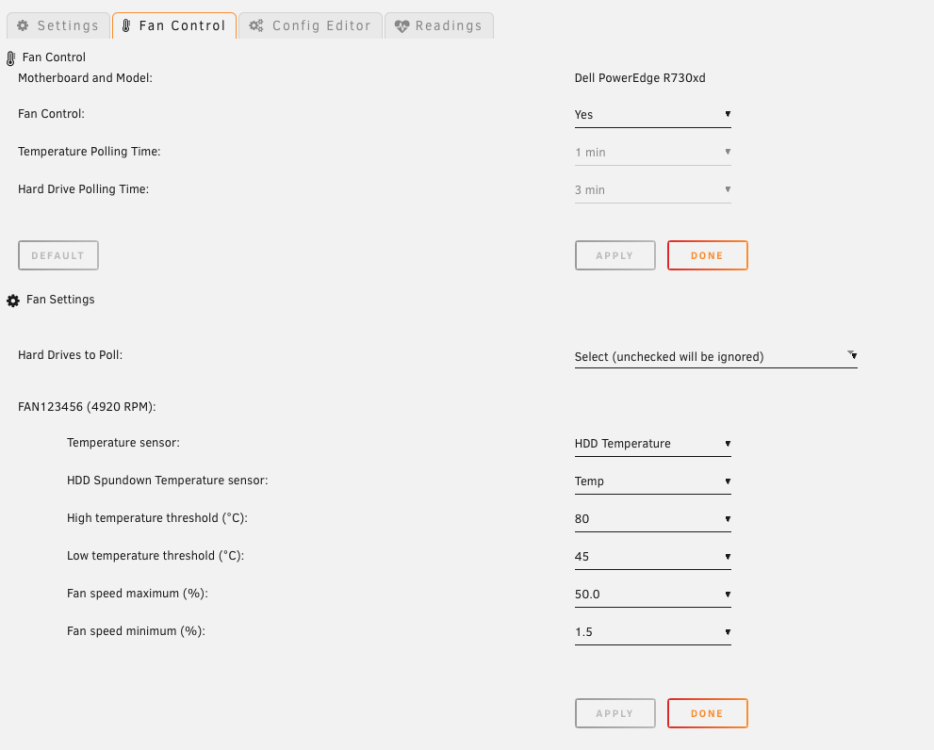
Here you go:
-
I think I am getting the hang of this. I did make some adjustments and I do see the HHD temp going up slightly but the fans are running slower. I guess the question is what is acceptable in terms of temps for the drives? Thanks. 2024-01-31 14:57:31 Fan:Temp, FAN123456(28%):HDD Temp(52C) 2024-01-31 15:03:32 Fan:Temp, FAN123456(27%):HDD Temp(50C) 2024-01-31 15:24:38 Fan:Temp, FAN123456(28%):HDD Temp(52C) 2024-01-31 15:30:40 Fan:Temp, FAN123456(27%):HDD Temp(51C) 2024-01-31 16:00:49 Fan:Temp, FAN123456(28%):HDD Temp(52C) 2024-01-31 16:06:51 Fan:Temp, FAN123456(27%):HDD Temp(51C) 2024-01-31 16:27:57 Fan:Temp, FAN123456(28%):HDD Temp(52C) 2024-01-31 16:33:59 Fan:Temp, FAN123456(27%):HDD Temp(51C) 2024-01-31 17:04:07 Fan:Temp, FAN123456(28%):HDD Temp(52C) 2024-01-31 17:10:09 Fan:Temp, FAN123456(27%):HDD Temp(51C) 2024-01-31 17:40:18 Fan:Temp, FAN123456(28%):HDD Temp(52C) 2024-01-31 17:46:20 Fan:Temp, FAN123456(27%):HDD Temp(51C) 2024-01-31 18:13:27 Fan:Temp, FAN123456(28%):HDD Temp(52C) 2024-01-31 18:16:28 Fan:Temp, FAN123456(27%):HDD Temp(51C) 2024-01-31 19:01:42 Fan:Temp, FAN123456(28%):HDD Temp(52C) 2024-01-31 19:07:44 Fan:Temp, FAN123456(27%):HDD Temp(50C) 2024-01-31 20:32:49 fan control config file updated, reloading settings 2024-02-01 00:00:52 Fan:Temp, FAN123456(29%):HDD Temp(54C) 2024-02-01 00:03:52 Fan:Temp, FAN123456(27%):HDD Temp(52C) 2024-02-01 10:28:45 fan control config file updated, reloading settings 2024-02-01 10:28:45 Fan:Temp, FAN123456(10%):HDD Temp(51C) 2024-02-01 10:37:48 Fan:Temp, FAN123456(17%):HDD Temp(56C) 2024-02-01 10:46:50 Fan:Temp, FAN123456(14%):HDD Temp(54C) 2024-02-01 10:49:51 Fan:Temp, FAN123456(17%):HDD Temp(56C) 2024-02-01 10:53:12 fan control config file updated, reloading settings 2024-02-01 11:04:56 fan control config file updated, reloading settings 2024-02-01 11:04:56 Fan:Temp, FAN123456(14%):HDD Temp(54C) 2024-02-01 11:08:57 Fan:Temp, FAN123456(17%):HDD Temp(56C) 2024-02-01 11:18:00 Fan:Temp, FAN123456(14%):HDD Temp(54C) 2024-02-01 11:21:00 Fan:Temp, FAN123456(17%):HDD Temp(56C)
-
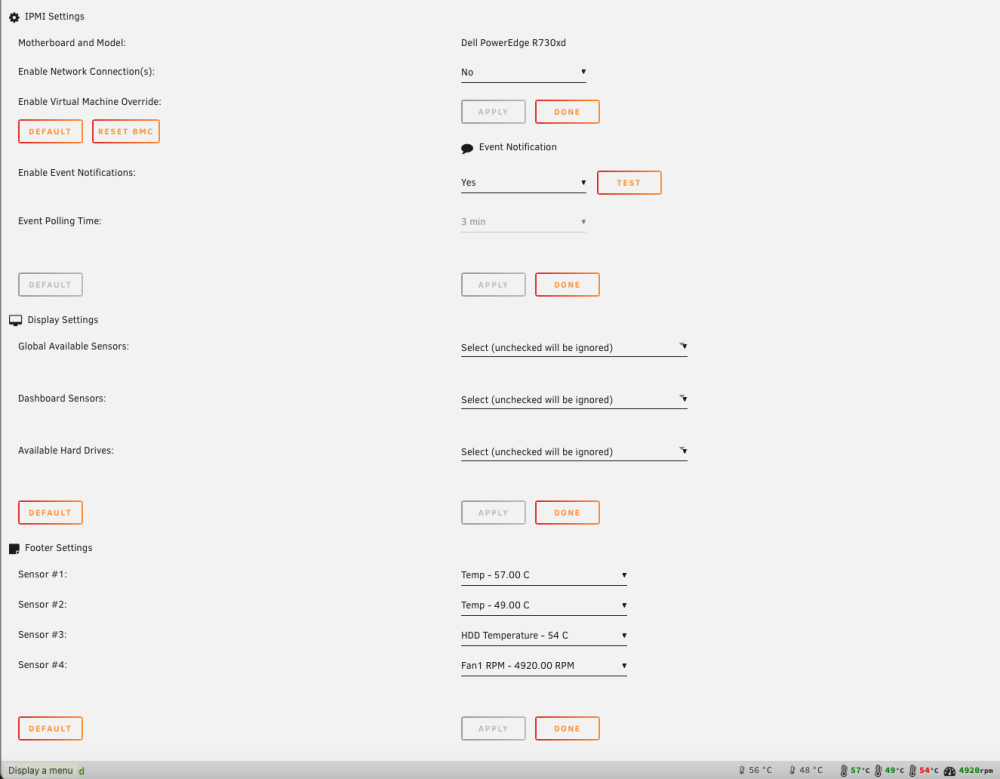
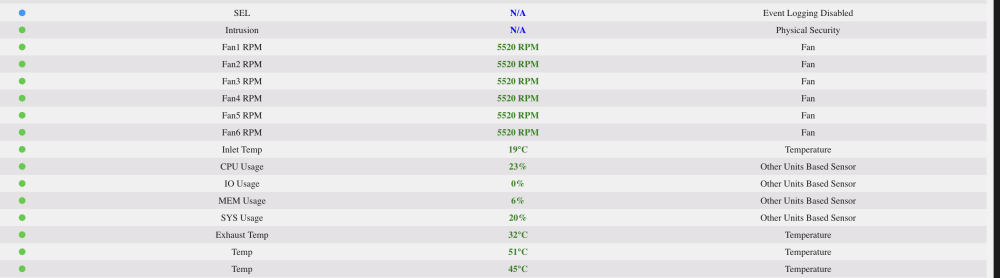
I set my fan minimum % to 1.3 and yet the lowest I ever see the fans go is 5250. Since I am not sure what the ratio between temp and fan speed is, I am curious if this is the lowest they will go? Thanks.
-
Thanks @JorgeB. I have posted the diagnostic download in this message. odin-diagnostics-20240130-1400.zip
-
Something happened last week, perhaps when I ran an update, and SABNZBD and SWAG just stopped working. When I start either of them they spin, I don't see any logs in the console and they stop. No popup to indicate an error. I removed SABNZBD and reinstalled it. Same thing. So I am not sure where to go from here. Here is a snippet of my log when I am trying to start the dockers. Port 2 and 6 I think are the dockers. Any suggestions? Thanks! Jan 30 12:05:57 Odin kernel: BTRFS warning (device loop2): csum failed root 6073 ino 687 off 638976 csum 0x2c38410a expected csum 0x8898c8d9 mirror 1 Jan 30 12:05:57 Odin kernel: BTRFS error (device loop2): bdev /dev/loop2 errs: wr 0, rd 0, flush 0, corrupt 400, gen 0 Jan 30 12:05:57 Odin kernel: BTRFS warning (device loop2): csum failed root 6073 ino 687 off 638976 csum 0x2c38410a expected csum 0x8898c8d9 mirror 1 Jan 30 12:05:57 Odin kernel: BTRFS error (device loop2): bdev /dev/loop2 errs: wr 0, rd 0, flush 0, corrupt 401, gen 0 Jan 30 12:05:57 Odin kernel: BTRFS warning (device loop2): csum failed root 6073 ino 687 off 638976 csum 0x2c38410a expected csum 0x8898c8d9 mirror 1 Jan 30 12:05:57 Odin kernel: BTRFS error (device loop2): bdev /dev/loop2 errs: wr 0, rd 0, flush 0, corrupt 402, gen 0 Jan 30 12:05:57 Odin kernel: docker0: port 6(veth589fad8) entered disabled state Jan 30 12:05:57 Odin kernel: vethde2109e: renamed from eth0 Jan 30 12:05:57 Odin kernel: docker0: port 6(veth589fad8) entered disabled state Jan 30 12:05:57 Odin kernel: device veth589fad8 left promiscuous mode Jan 30 12:05:57 Odin kernel: docker0: port 6(veth589fad8) entered disabled state Jan 30 12:06:12 Odin sshd[37720]: Starting session: command for root from 192.168.2.54 port 62153 id 4 Jan 30 12:06:12 Odin sshd[37720]: Close session: user root from 192.168.2.54 port 62153 id 4 Jan 30 12:06:15 Odin kernel: br-d202c8e962dc: port 2(vetha2fa11f) entered blocking state Jan 30 12:06:15 Odin kernel: br-d202c8e962dc: port 2(vetha2fa11f) entered disabled state Jan 30 12:06:15 Odin kernel: device vetha2fa11f entered promiscuous mode Jan 30 12:06:15 Odin kernel: eth0: renamed from veth6c20db8 Jan 30 12:06:15 Odin kernel: IPv6: ADDRCONF(NETDEV_CHANGE): vetha2fa11f: link becomes ready Jan 30 12:06:15 Odin kernel: br-d202c8e962dc: port 2(vetha2fa11f) entered blocking state Jan 30 12:06:15 Odin kernel: br-d202c8e962dc: port 2(vetha2fa11f) entered forwarding state Jan 30 12:06:15 Odin kernel: BTRFS warning (device loop2): csum failed root 6052 ino 687 off 638976 csum 0x2c38410a expected csum 0x8898c8d9 mirror 1 Jan 30 12:06:15 Odin kernel: BTRFS error (device loop2): bdev /dev/loop2 errs: wr 0, rd 0, flush 0, corrupt 403, gen 0 Jan 30 12:06:15 Odin kernel: BTRFS warning (device loop2): csum failed root 6052 ino 687 off 638976 csum 0x2c38410a expected csum 0x8898c8d9 mirror 1 Jan 30 12:06:15 Odin kernel: BTRFS error (device loop2): bdev /dev/loop2 errs: wr 0, rd 0, flush 0, corrupt 404, gen 0 Jan 30 12:06:15 Odin kernel: BTRFS warning (device loop2): csum failed root 6052 ino 687 off 638976 csum 0x2c38410a expected csum 0x8898c8d9 mirror 1 Jan 30 12:06:15 Odin kernel: BTRFS error (device loop2): bdev /dev/loop2 errs: wr 0, rd 0, flush 0, corrupt 405, gen 0 Jan 30 12:06:16 Odin kernel: veth6c20db8: renamed from eth0 Jan 30 12:06:16 Odin kernel: br-d202c8e962dc: port 2(vetha2fa11f) entered disabled state Jan 30 12:06:16 Odin kernel: br-d202c8e962dc: port 2(vetha2fa11f) entered disabled state Jan 30 12:06:16 Odin kernel: device vetha2fa11f left promiscuous mode Jan 30 12:06:16 Odin kernel: br-d202c8e962dc: port 2(vetha2fa11f) entered disabled state
-
Thanks - got it setup. Appreciate the help. What's the best way to setup warnings if things get too hot? Thanks.
-
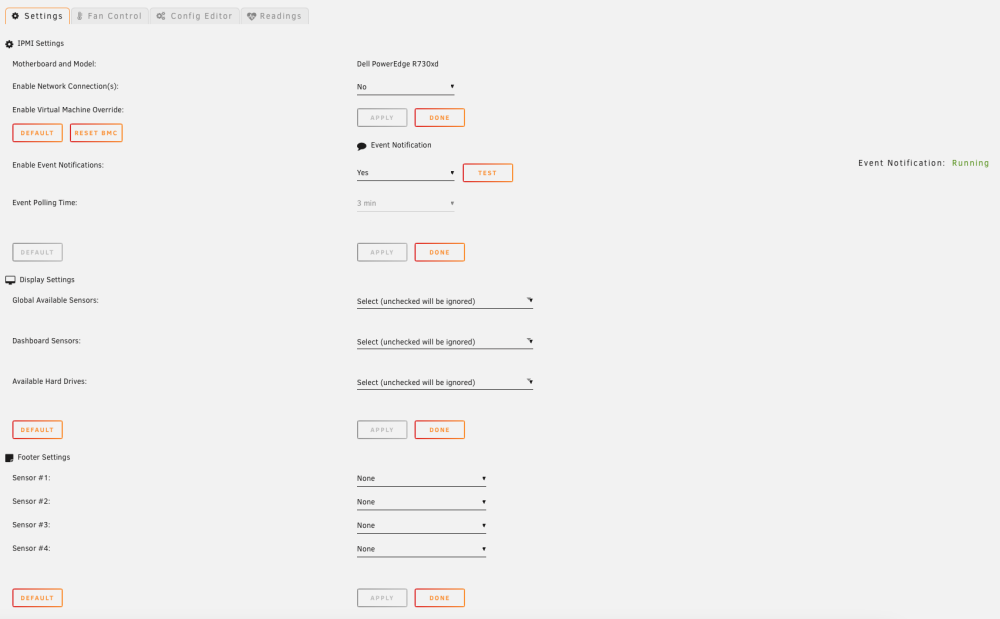
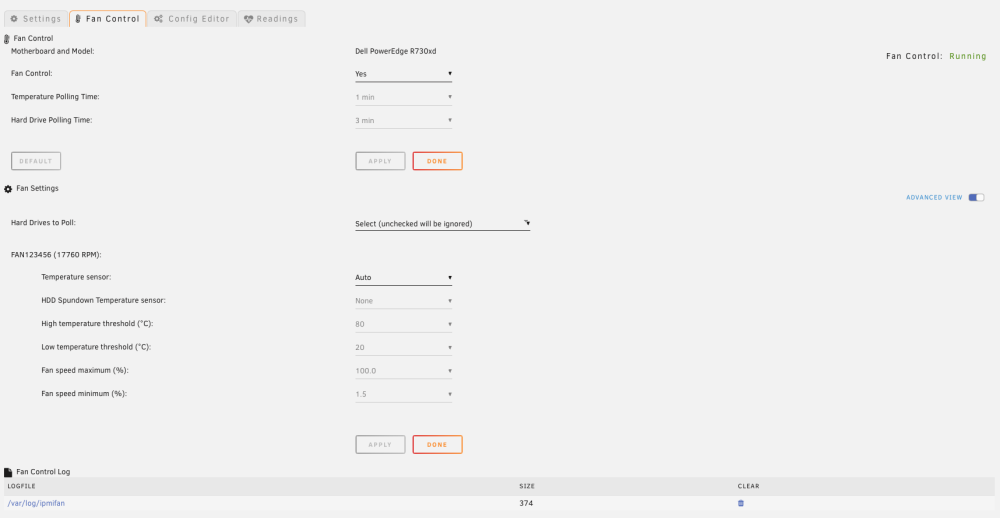
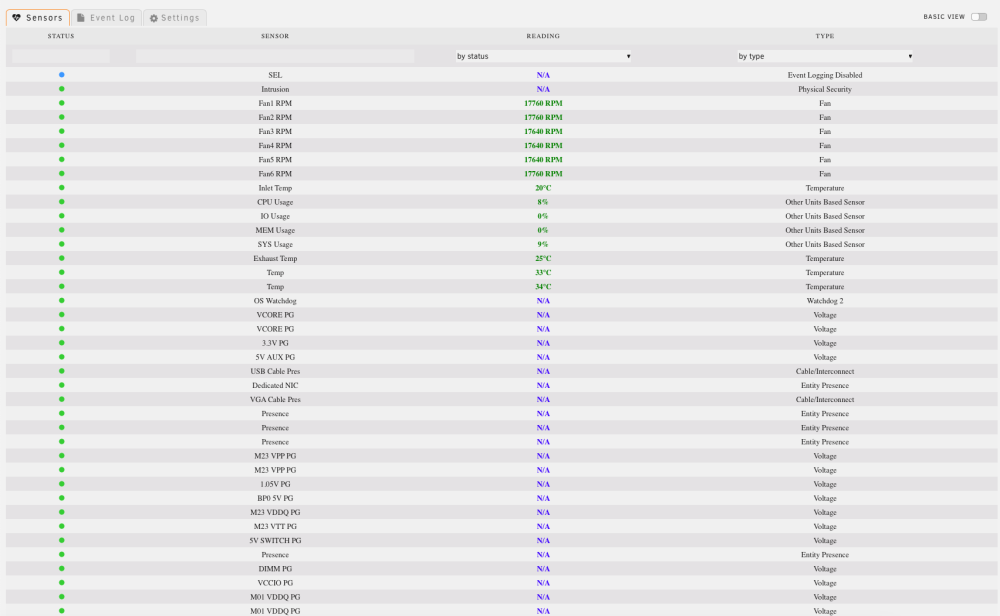
Thanks, I tried that but the fans are still spinning at 17760 RPM. Is there something else I should be doing? Thanks
-
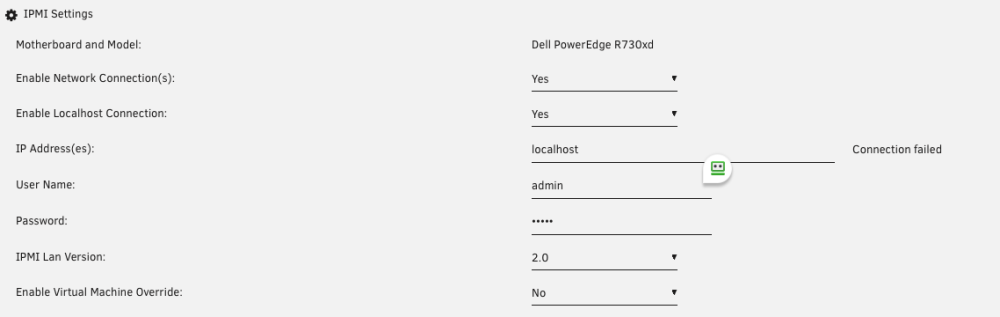
Thanks for your help. I don't understand what that means. I looked up modprobe and I am not making the connection. I could take a few months or years to get to your level, or perhaps you can help me out and give me some pointers on what to put in the fields below. I am sure there are others that would benefit from this. Thanks again.
-
Hi, I just installed this on my Dell R730XD. I cannot seem to get it to connect. I get connection unsuccessful using the IP address, userid and password for IPMI. I am able to run ipmitools from windows using these credentials - can connect, change fan speeds, etc. I tried the /usr/sbin/ipmi-sensors --output-sensor-thresholds --comma-separated-output --output-sensor-state --no-header-output --interpret-oem-data --always-prefix -h "192.168.2.225" -u “root” -p “MYPASSWORD” command and this times out. I have enable IPMI over lan set in iDrac - but windows ipmitools would fail without this. I am sure I am missing something? Thanks.




