





The Transplant
Members
-
Joined
-
Last visited
Everything posted by The Transplant
-
Thanks. @Kilrah Will make those changes.
-
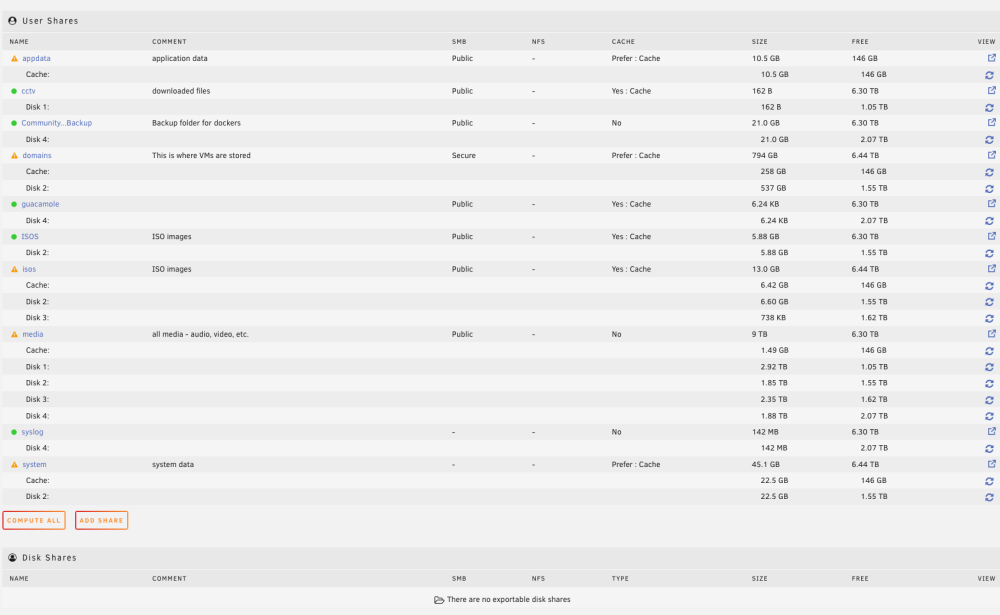
@Kilrah Thanks, I clicked the compute all and the results are attached. Also, don't know if it is useful but I have a spare SSD (249GB) connected but currently unassigned.
-
@Kilrah Thanks, this has to be it. I do have a backup routine running: I think I accepted defaults. Should I be pointing this destination to something that is not running through cache? I don't fully understand (newbie) the relationship between shared and actual folders. Any advice appreciated. Thanks.

-
Every morning I wake up to errors about the cache running out then it resolves itself. Running Version 6.11.5 2022-11-20 Looking at the log I see this: Dec 30 04:54:16 Odin shfs: copy_file: /mnt/disk2/domains/Windows 10/vdisk1.img /mnt/cache/domains/Windows 10/vdisk1.img.partial (28) No space left on device. Here are my cache settings: This is similar to this post but the resolution involves changing cache settings (based on advice in 2018) and I can't find this in my current version settings to see if this is the issue. https://github.com/blakeblackshear/frigate/discussions/4822 Any help appreciated. Happy to post more information as needed. Thanks.

-
After much trial and error I figured out how to get around this issue with the config file. Uninstall neolink if you have it installed. Go into the neolink folder and create the config.toml file. Then install the neolink docker. It will then work.
-
And how would I know this? Does it warn you about this or do you just check it to make sure it is not full all of the time? Thanks.
-
First question - is it worth it? I have 16TB and one 224GB SSD for my cache. I have a couple more SSDs lying around - 240GB, 180GB, and smaller. Is it worth adding them in as additional cache drives? I have other questions related to this process but first thought I would start with the "is it worth it"? Thanks.
-
@Squid Thanks for the reply. So when I update the location to /Downloads/incomplete it gives me the error "Cannot create directory /Downloads/incomplete". I tried doing this with and without the directory already created. So not sure what to do from here? Never mind - I looked through some more posts and realized my docker settings were mixing case and not matching. So I got it working. Thanks for pointing me in the right direction.
-
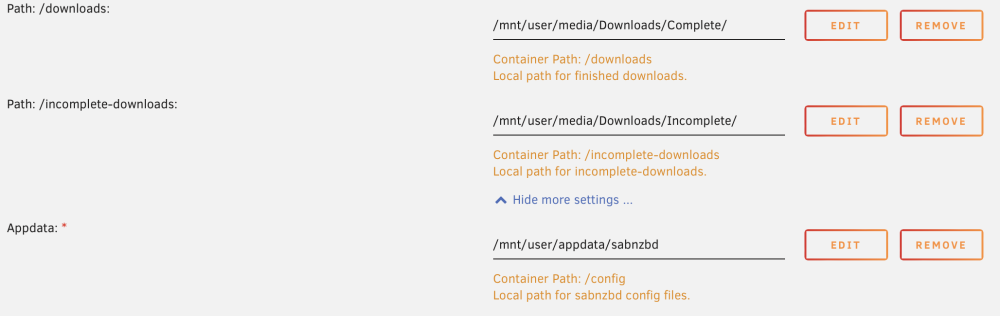
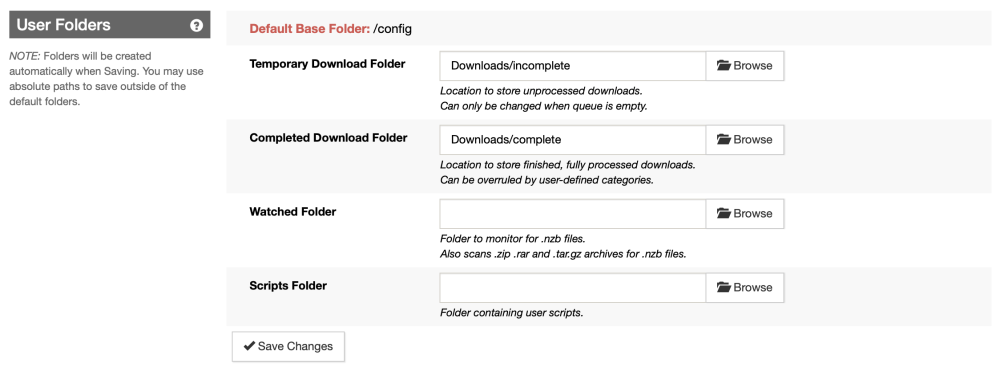
It seems like a lot of people have asked this question. I have read all of the responses and watched the Space Invader videos (which unfortunately are out of date so didn't solve my problem). Still can't figure this out. I am sure when someone points it out it will obvious, but it isn't now. Radarr gives me this error: "You are using docker; download client SABnzbd places downloads in /config/Downloads/complete but this directory does not appear to exist inside the container. Review your remote path mappings and container volume settings." I want to change SABNZBD to point to my share called media that has a Downloads folder and a complete and incomplete folder within it. Can't navigate in the browse in SABNZBD folder configuration - I assumed it would be under MNT/User/ but nothing shows under MNT in browse. Here is what I put in Docker setup for SABNZBD: In SABNZBD I see this - of course it is defaulting /config As noted, when I browse I can't find the mnt/user/media/ folder. What do I do to correct this?
-
Update, it is happening on another Mac - MacBook Air M1 in Safari. However, it seems work on Chrome on the same machine so assuming a Safari issue? Thanks.
-
I recently built and started deploying my first Unraid server. I am running version 6.11.1. It is on an Intel I7-6700 with 32 GB RAM. I installed my first VM. On one computer, when I click on console it gives me the following error: noVNC encountered an error: undefined is not an object (evaluating 'activeTab.id') @webkit-masked-url://hidden/:26:27 asyncFunctionResume@[native code] getCurrentStore@webkit-masked-url://hidden/:14:40 @webkit-masked-url://hidden/:58:54 asyncFunctionResume@[native code] @[native code] promiseReactionJobWithoutPromise@[native code] promiseReactionJob@[native code] Everything seems to be working on the virtual machine and I can't close the red window. However, when I access through other computers I do not get this error. The computer in question is a Mac Studio and I am accessing through Safari. On the same computer it does not happen with Chrome. On another Macbook M2 running same Mac OS I don't get the error in Safari. So obviously this is not life threatening but I would like to figure out what is going on here if anyone has any thoughts? Thanks.


