





Driden
Members
-
Joined
-
Last visited
Everything posted by Driden
-
i have been looking at my electricity usage and i would like to see whats potentially possible to do with my unraid box in terms of spinning down disks. I saw a reddit post where someone had organised files specifically so that their current (past 2 years) files were on a couple of SSD's and then anything older than that was on one of two spinning disks. which then allowed them to spin down when not in use. saving them about 35W ish i have been planning to rebuild my unraid system into a new box and when i do that i would like to try and organise things in some sort of sensible fashion to do the same. i think my main potential issue is i dl quite a few Linux ISO's each month of both types so i continually have new content being added. I guess what im asking is. are there any good maintenance scripts or user scripts that could auto move anything that has not been accessed for X amount of time to some specified hard drives. i know some of you have the "dont do that it wears out the disk" approach which i appreciate. but considering i spend around £10 a day on electric and that is closer to £3 a day when the unraid server isn't on. i could just buy new hard drives if they fail. What is your approach to this? if you do it. or any pointers or further reading on the subject? i know from past support requests that my docker containers are not sitting on a cache drive so thats one step i could amke as currently i think everything is just set as low tide. i never really gave it a thought when setting it all up. but now im at about 90TB with another 14TB disk to go in total of 10 disks currently. and that will be growing at some point soon. enough rambling. Whats the optimal setup for disks and caches for a media server with a pile of docker containers. and some data related to work . power saving first and foremost. performance is fine as is but could always do with more. so whats the optimal setup for performance also? Thanks in advance.
-
final diagnostics after the rebuild has finished. Anything i should be worried about here?nas1-diagnostics-20250404-0602.zip
-
other than the iso folder being cache only the fix appears to have worked well and the data is now rebuilding. so while it is possible that the addition of a fan to the lsi card helped in soem way it appears that the psu was degraded as replacing that has fixed all the connection issues. it must have been just on the edge of capability and then dipped below. Thanks again @JorgeB
-
sorry i just read through the page. its all there. il report back how i get on.
-
ok. do i need to allow it to finish rebuilding first? or should i pause/cancel and fix the filesystem first? or just fix while its rebuilding?
-
power supply... i really hadnt even considered it. swapped for an antec 850W gold and its all back up and running. 9 hrs to rebuild. however i still have the unmountable wrong or no file system. nas1-diagnostics-20250402-1205.zip
-
new diags. im going to swap out the psu in an hour or so as i read somewhere else that it could possibly be psu degredation. im not sure how old the psu is. but it isnt new lets put it that way. nas1-diagnostics-20250402-0930.zip
-
so this started a few weeks back with Jorge helping me recreate with a new config after i had more than one disk go wrong. Seemed to be working ok for a while then back down again with a disk error. I had not fully reinstalled back int he rack in case so i coudl take it back out What i have done in the meantime is add a fan to my raid card in case that was causing any issues. doesnt seem to have helped though. so i lost disk 1 at some point. turned off array restarted with no disk turned it back on then off added the disk etc and its readded each disk each time i have done it. One issue i was not happy about for some time was the 8tb Toshiba drives i have seeming to run very hot. so i decided to get some more 14tb elements and shuck them. same as my other 14tb drives that are in and seem to ahve been working fine for a while. so last week i lost disk 6. tried the normal approach of removing restart stop then add and rebuild. but it still gave me errors. perhaps it was actually a dead disk this time. so i bought the elements drives and added one today. since then i had a few errors show up on disk 9 which has not happened before now. but anyway. i added the new 14tb disk 6 assigned it and waited for it to rebuild. this time its saying unmountable wrong or no file syste,m, while its rebuilding. which from what i can see means the emulated data is bad. so its writing nothing useful to the disk to rebuild so the parity is good. which im not particularly fussed about. The rebuild is also going to take 253 days according to the little info box. so i assume im having another issue again. in the meantime i have the old 8tb disk i removed mounted using linux diskinternals and my disk 6 data all seems to be there. so the disk is not bad. its got to be either an issue with the (now fan driven) lsi card or the icydock thing which seems to be a generally crap piece of kit so i should probably remove that anyway. diags attached if anyone can give me any sort of advice or insight. I would really like to be able to read these myself to self diagnose. but im not sure entirely where to start with it. and im very tired after another day with this thing ill sleep and try again tomorrow. hopefully with some insight from you wonderful people. thanks in advance for the help. again. nas1-diagnostics-20250401-1914.zip
-
Yes. ill be adding a different case with much better airflow soon. ive been using an old 4u rack mount case for quite some time and it just isnt up to the job for airflow i dont think.
-
Sorry to necro this old thread but i have been trying to find other possible reasons on why my drives suddenly started to get issues after having worked for a long time with no issues. I had been having issues with various drives suddenly having CRC issues. that have all worked fine for quite some time without any issue. I cannot recall the upgrade path or timings for when i updated to 6.12.3 but i know the CRC issues seem to have been a thing sice then. recently i added a hard disk into the fron loading icydock thing i had. as i had the left hand most bay empty. So perhaps that affected the airflow in the case more? Either way last time i had an issue a week or two ago. which thankfully Jorge was around to assist with, i moved the raid card from a pcix8 slot to a x16 slot and moved the unused graphics card across. The issue was almost certainly the cable, or so i thought. as there were two ports on the breakout cable that would not connect any drive. so i figured bad cable. must be it. replaced it and been ok for a week. When i picked out the HBA card it was close to being too hot to touch. and i imagine moving to a 16x slot would have only made that worse. however. today after another couple of drives (different ones again) started to give me errors i replaced the drives reseated all cables again. and then tried touching the hba heatsink. its again extremely hot to the touch. After rebooting one drive had an unsupported formatting? (or somethign like that) error but for whatever reason everything was up and running. the data rebuild had started. but due to the issue i have had i decided to stop that and upgrade unraid before doing it. So now i updated to V7 of unraid before rebuilding. and i will bookmark this thread and report back. As pzg above said it could likely just be a coincidence. however my symptoms seem to match the ones you here enough to just make a note that i experienced the same thing.
-
so, as i am just about to remake all of my dockers, i should move the system share to a pool location? the only pool i have at the moment is the cache drive i think.
-
ah ok. so will the rebuild handle that ? it is showing as emulated at the moment.
-
with one potentially minor problem. all of docker containers are currently gone. is reinstalling them via the previous apps option the best option?
-
I think thats done it. Two of the 4 sata cables on one of the mini sas breakout now seem to be either dead or some sort of issue in there. hopefully its not the lsi card. nas1-diagnostics-20250311-0008.zip
-
ok. the parity drive cable is one of the sata x4 to the lsi so ill have to order one. I have unplugged and reseated all of the sata connections from that lsi . ill replace the one on the old disk 1 when i can get someone to help me get it out of the cage later this evening. nas1-diagnostics-20250310-1249.zip
-
sorry my mistake. it is being emulated but has the red x and not the orange triangle as i had seen before. i dont however have any user shares any more. which is fine i can set those up again. the content of the emulated drive appears to be good also. i can see the data that i would have expected to be there when i click through onto the share for disk 1
-
Thanks for the reply. I have followed the instructions. here are the diagnostics. nas1-diagnostics-20250310-1146.zip Disk 1 is not being emulated atm. not sure if that is expected.
-
should i stop the array in the meantime? From what i understand i need to find a way to reenable the parity disk. however i cant rebuild it as disk 1 doesnt have the data on it. Am i able to rebuild the parity then copy the data back over to the new disk 1 ? as i mentioned the old disk 1 can mount and i can see the data. leading me to believe its a communication error. and ill quite likely replace the sata cables shortly. as that is the only thing that seems to make sense in terms of the errors. but in the meantime is there a way to reenable a disabled disk without removing and rebuilding it? I found a reddit post that suggests is that still a valid method?
-
nas1-diagnostics-20250310-1010.zip sorry i knew to do this and totally forgot
-
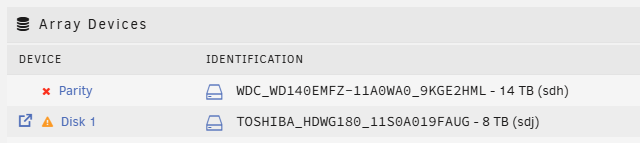
and now i can see why. Could someone advise next steps please
-
I have the old disk plugged in which i can mount and access the files. my main concern is it seems my shares are currently broken so while can see my data on the old disk 1 via mounting it i cant see my network shares that were setup.
-
I had an issue with disk 1 a month or so ago. one day my shares were down and after logging into unraid i saw that disk one was disabled. I went through various guides etc including the stopping docker mount to allow me to shut down the array. i restarted the machine. unassigned the disk started the array to register that it was missing. then stopped the array reassigned the disk at which point it was visible said emulated and said rebuilding at the bottom. a few hours later it was rebuilt and has been working since. Today i have the same issue. However instead of rebuilding onto itself as i did last time i figured this is the second time i have had an issue with this disk so ill replace it. so i unassigned the disk to register it as missing. and then stopped the array assigned the new disk into this spot and bought the array back up. it shows the orange triangle to say that the content is emulated however if i access this emulated folder i get a blank page with Invalid Path from looking at other posts i can see that this might mean that the emulated data is bad and so its going to restore that none existent data onto the disk. What are my next steps?
-
All rebuilt as of this morning with no smart errors. i will keep an eye on the dashboard in case it appears again. I think i may need to replace a few hardware components in this build altogether. the network seems to be trying to run at 100mbps even though its a 1000 nic as is the switch it is wired to. and i know when i first set this all up there are at least 2 sata ports that cant be used if i use the single available m2 slot. its just an old 350 gaming 3 mobo from my old desktop so possibly time for an upgrade of the main hardware anyway. it only has one usable pcie lane other than the gpu which i do use for some transcoding. so i have the sas splitter card in there and thats me done using the onboard nic to communicate. i have 2.5g networking in the opnsense box so should really get a 2.5g nic in this and wire directly to that i suppose. In ref to Docker that file can probably go. I do a lot of experimentation with various AI and image recognition projects. a lot of which have little to no documentation in terms of what could be using a mounted volume. this is probably left over from me trying to get a docker compose to run and get a functioning product so that i can then determine what folders should have a -v to an appdata folder. I very very rarely use a VM to just serve a specific purpose which it then would be turned off after. is the system folder specifically used for all docker images then? and would always benefit from being cache based? ill clean up the old images and assign that to the cache. once i have put a heatsink on the nvme. as it regularly hits 70C, which is partly why i havent pushed the cache assignment any more. the server is nice and responsive for the main things i use it for, but more performance cant hurt can it !! I dont fully understand the caching part in terms of whats best to assign. i will read up more or find a space invader video to go through. And I will assign the system folder in the meantime. nas1-diagnostics-20240207-2101.zip
-
im not messing this up am i?
-
i think those last diagnostics should be from after that disk was added. done again just in case nas1-diagnostics-20240206-1907.zip

