





Driden
Members
-
Joined
-
Last visited
Everything posted by Driden
-
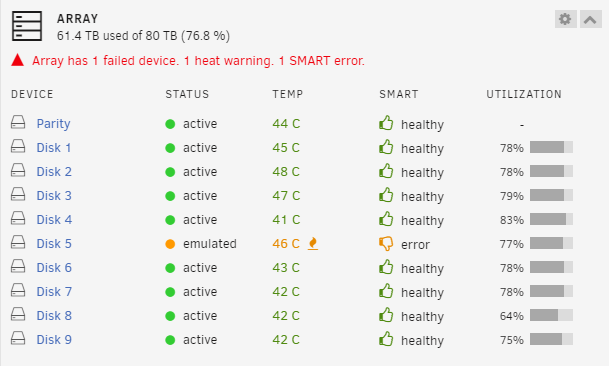
i just meant about rebuilding disk 5 not disk 1. i think the disk 1 errors might have been a bad sata cable. the only one that shows an error is the disk 5. is that the new one? or left over data from the old one?
-
thank you nas1-diagnostics-20240206-1751.zip
-
so before i checked everything the array was saying device disabled contents emulated. now it just says disk empty. Have i lost my data? Edit. nvm i disconnected the disk and stopped the array i can see the error saying content emulated now. I am rebuilding with a new disc. this one seems to be the issue. i may do the same with disk 1 also as you mentioned that was showing disconnection errors.
-
ok, i will need to order a new minisas to sata cable.
-
I have been getting slow response for a while when accessing certain items. but i now have a failed disk apparently. I read some other posts here before doing anything so i have not restarted the machine yet. Diagnostics attached. if it is possible for someone to educate me on how to read these if thats possible. nas1-diagnostics-20240205-1102.zip
-
Some of these cases look great. I was thinking of a second unraid after having helped some people stay away from Qnap this morning. Specifically I was wondering what cases / hardware is available that has the Qnap / premium Nas look to it? I know i can just use a qnap machine with unraid on it. but i was hoping to create some sort of decently high powered machine which is really expensive from Qnap. Are there any cases out there with good backplanes that have the shiny finished look of the something like the TVS range? I dont care so much about the screen as i do about the really good use of space and hotswap availability.
-
i will have to dedicate some time to learning how the templates work so i can add some of the ones missing into the community apps area. im sure others would find them useful too.
-
Ah ok understood. I am not sure how the update path thing works. I have a few containers that never show an update being available so just assumed they dont publish updates correctly or something like that. some of my containers are not installed from Apps so not sure if that makes a difference. Either way i think the the force rebuild option is useful to know about for people as i assume, like me, some users might not have the advanced option enabled.
-
no idea what this means sorry. The topic was "Should you wish to recreate your Docker virtual disk image from scratch, but retain your application data to avoid requiring reconfiguration for certain apps, the process is simple." but the info was out of date so i added an alternative current available method. What would the Docker update patch from CA do?
-
For those of you finding this (like me) in 2023. Go to your docker tab in unraid. then top right of the page click the slider to change to advanced instead of basic. under each docker listing you should see Force Update which does what it says on the tin. rebuilds from scratch using the latest images etc. Useful if like me you have some containers that dont show updates that are available.
-
got it thank you. totally missed.
-
Hi, Hope this is in the right place im new. I have quite a few docker containers for various purposes that i dont always keep running. I was wondering if there is a plugin or addon of some sort which adds a start stop button to each container. currently it seems i can only start everything or stop everything. not select the ones i want. I assume i am missing something obvious but cant find the answer in the forum
