





Daniel.Heckman
Members
-
Joined
-
Last visited
-
Is there a command in the docker console to update the game files? I was using your satisfactory docker but an update came out and now it will not work, "Version mismatch detected between game and server." The docker says to just restart to update, but that doesn't do anything.
-
Still showing up in 6.12.3 with AMD Epyc 7302.
-
I am onboard a US navy vessel with my unraid server. My only network connection is through a government laptop. I am unable to connect personal devices to this network. I chose unraid due to the ease at which it seemed the data could be accessed as the files are intact (non striped) and don't require any specialized hardware. I moved from Synology to Unraid (+supermicro hw) for this reason. I recently had a power distro board fail in my server. I am months away from the replacement arriving. In the mean time, I hoped to access the array drives using an external adapter connected to my personal laptop running kali. Instead, I was met with errors caused by this bug report from two years ago (issue first reported in 2021). It seems Unraid incorrectly builds XFS in a way that is not correctible unless the fix is performed when the array is created. I now have two servers, a total over 500tb, all configured to XFS through unraid. I tried booting my laptop from a backup of my unraid usb to add a single drive from my array as well as a blank drive to allow me to start the array, transfer files between the two, then shut down and swap the array drive for each of the drives in my original array until I've found and moved all the files i require to the blank drive. I'm unable to do this as the array cannot be started without a license, and a license cannot be added without internet connection available. Are there any avenues to access my data now? It seems silly that the ability to mount Unraid array drives externally on another system is a main attracting point to this software, when it doesn't work correctly.
-
I have a backup flash drive, so i was hoping to create a new array with two drives. Drive 1 from my unraid server, plus a blank drive. Then to start the array and copy files between the two drives. Then bring down the array, swap out drive 1 with each of the 20 drives in my array until I'm able to collect all the individual files I need onto the second drive in this temporary array The problem with this is I am unable to start the array due to the disparity between my backup usb GUID and the one licensed to my array. Without internet access (I'm on a naval ship and can use the provided laptop to access this website (at 60kbps) but I have no way to connect the temporary unraid server (my laptop booting off the backup usb) to the ship network. The only workaround I can see is to open my server and use my actual USB to start the temporary array. But I'd prefer not to do this to avoid changing the config on my server itself. I'm just shocked this is an issue. It's the primary reason I went with unraid vs competitors, the ability to store the files intact (no striping) and to easily access these files externally if my array went down for whatever reason.
-
This is still an issue in 2024. My server recently had a hw failure. While awaiting the replacement power distro board I had hoped to access the files by externally mounting in Kali, only to find this does not work. Now i suppose when I return home I'll be manually rebuilding this 500tb array with the commands listed above to rectify this issue baked into the OS's handling of XFS.
-
HW errors in the syslog. If anyone can help decipher it would be appreciated. Looks to me like RAM had a bit of a hiccup. https://pastebin.com/peJvDPSP Here are the parts I found most concerning. This is a server running on hardware less than 6 months old. AMD EPYC 7302 and ECC RAM on a Supermicro h11ssl-i. Feb 9 21:24:27 unRAID-PLEX kernel: [Hardware Error]: event severity: fatal Feb 9 21:24:27 unRAID-PLEX kernel: [Hardware Error]: Error 0, type: fatal Feb 9 21:24:27 unRAID-PLEX kernel: [Hardware Error]: fru_text: DIMM Locate: P0E0 Feb 9 21:24:27 unRAID-PLEX kernel: [Hardware Error]: section_type: memory error Feb 9 21:24:27 unRAID-PLEX kernel: [Hardware Error]: error_status: Storage error in DRAM memory (0x0000000000040400) Feb 9 21:24:27 unRAID-PLEX kernel: [Hardware Error]: physical_address: 0x0000000489573800 Feb 9 21:24:27 unRAID-PLEX kernel: [Hardware Error]: node:0 card:6 module:0 rank:0 bank:2 row:17301 column:128 Feb 9 21:24:27 unRAID-PLEX kernel: [Hardware Error]: Error 1, type: recoverable Feb 9 21:24:27 unRAID-PLEX kernel: [Hardware Error]: fru_text: ProcessorError Feb 9 21:24:27 unRAID-PLEX kernel: [Hardware Error]: section_type: IA32/X64 processor error Feb 9 21:24:27 unRAID-PLEX kernel: [Hardware Error]: Local APIC_ID: 0x22 Feb 9 21:24:27 unRAID-PLEX kernel: [Hardware Error]: CPUID Info: Feb 9 21:24:27 unRAID-PLEX kernel: [Hardware Error]: 00000000: 00830f10 00000000 22200800 00000000 Feb 9 21:24:27 unRAID-PLEX kernel: [Hardware Error]: 00000010: 76d8320b 00000000 178bfbff 00000000 Feb 9 21:24:27 unRAID-PLEX kernel: [Hardware Error]: 00000020: 00000000 00000000 00000000 00000000 Feb 9 21:24:27 unRAID-PLEX kernel: [Hardware Error]: Error Information Structure 0: Feb 9 21:24:27 unRAID-PLEX kernel: [Hardware Error]: Error Structure Type: cache error Feb 9 21:24:27 unRAID-PLEX kernel: [Hardware Error]: Check Information: 0x000000003c4d00f7 Feb 9 21:24:27 unRAID-PLEX kernel: [Hardware Error]: Transaction Type: 1, Data Access Feb 9 21:24:27 unRAID-PLEX kernel: [Hardware Error]: Operation: 3, data read Feb 9 21:24:27 unRAID-PLEX kernel: [Hardware Error]: Level: 1 Feb 9 21:24:27 unRAID-PLEX kernel: [Hardware Error]: Uncorrected: true Feb 9 21:24:27 unRAID-PLEX kernel: [Hardware Error]: Precise IP: true Feb 9 21:24:27 unRAID-PLEX kernel: usb 9-2: new high-speed USB device number 2 using xhci_hcd Feb 9 21:24:27 unRAID-PLEX kernel: [Hardware Error]: Restartable IP: true Feb 9 21:24:27 unRAID-PLEX kernel: usb 7-1: new full-speed USB device number 2 using xhci_hcd Feb 9 21:24:27 unRAID-PLEX kernel: [Hardware Error]: Overflow: true Feb 9 21:24:27 unRAID-PLEX kernel: [Hardware Error]: Instruction Pointer: 0x0000000000000011 Feb 9 21:24:27 unRAID-PLEX kernel: [Hardware Error]: Context Information Structure 0: Feb 9 21:24:27 unRAID-PLEX kernel: [Hardware Error]: Register Context Type: MSR Registers (Machine Check and other MSRs) Feb 9 21:24:27 unRAID-PLEX kernel: [Hardware Error]: Register Array Size: 0x0050 Feb 9 21:24:27 unRAID-PLEX kernel: [Hardware Error]: MSR Address: 0xc0002001 Feb 9 21:24:27 unRAID-PLEX kernel: BUG: using smp_processor_id() in preemptible [00000000] code: swapper/0/1 Feb 9 21:24:27 unRAID-PLEX kernel: caller is mce_setup+0x29/0xea Feb 9 21:24:27 unRAID-PLEX kernel: CPU: 1 PID: 1 Comm: swapper/0 Not tainted 5.19.17-Unraid #2 Feb 9 21:24:27 unRAID-PLEX kernel: Hardware name: Supermicro Super Server/H11SSL-i, BIOS 2.4 12/27/2021 Feb 9 21:24:27 unRAID-PLEX kernel: Call Trace: Feb 9 21:24:27 unRAID-PLEX kernel: <TASK> Feb 9 21:24:27 unRAID-PLEX kernel: dump_stack_lvl+0x44/0x5c Feb 9 21:24:27 unRAID-PLEX kernel: check_preemption_disabled+0xcb/0xe0 Feb 9 21:24:27 unRAID-PLEX kernel: mce_setup+0x29/0xea Feb 9 21:24:27 unRAID-PLEX kernel: apei_smca_report_x86_error+0x71/0x12e Feb 9 21:24:27 unRAID-PLEX kernel: cper_print_proc_ia+0x560/0x59d Feb 9 21:24:27 unRAID-PLEX kernel: ? vprintk_emit+0x175/0x18a Feb 9 21:24:27 unRAID-PLEX kernel: ? thaw_kernel_threads+0x9b/0xad Feb 9 21:24:27 unRAID-PLEX kernel: cper_estatus_print_section+0x6e1/0x88d Feb 9 21:24:27 unRAID-PLEX kernel: ? snprintf+0x49/0x64 Feb 9 21:24:27 unRAID-PLEX kernel: ? cper_estatus_print+0x9e/0xe0 Feb 9 21:24:27 unRAID-PLEX kernel: cper_estatus_print+0x9e/0xe0 Feb 9 21:24:27 unRAID-PLEX kernel: bert_init+0x1d1/0x25a Feb 9 21:24:27 unRAID-PLEX kernel: ? setup_bert_disable+0x19/0x19 Feb 9 21:24:27 unRAID-PLEX kernel: do_one_initcall+0x85/0x196 Feb 9 21:24:27 unRAID-PLEX kernel: kernel_init_freeable+0x1e1/0x224 Feb 9 21:24:27 unRAID-PLEX kernel: ? rest_init+0xcb/0xcb Feb 9 21:24:27 unRAID-PLEX kernel: kernel_init+0x16/0x123 Feb 9 21:24:27 unRAID-PLEX kernel: ret_from_fork+0x22/0x30 Feb 9 21:24:27 unRAID-PLEX kernel: </TASK> Feb 9 21:24:27 unRAID-PLEX kernel: mce: [Hardware Error]: Machine check events logged Feb 9 21:24:27 unRAID-PLEX kernel: mce: [Hardware Error]: CPU 9: Machine Check: 0 Bank 0: fc002800000c0135 Feb 9 21:24:27 unRAID-PLEX kernel: mce: [Hardware Error]: TSC 0 ADDR 100000489573800 MISC d01c0dff00000000 PPIN 2b4b09634ec8065 IPID b000000000 Feb 9 21:24:27 unRAID-PLEX kernel: mce: [Hardware Error]: PROCESSOR 2:830f10 TIME 1676006579 SOCKET 0 APIC 22 microcode 8301055
-
I'd like to request support for redundant HBA's be added to unraid. IE; Connect a single DAS array to two separate HBA cards inside a single unRaid Server to provide redundancy to the interface.
-
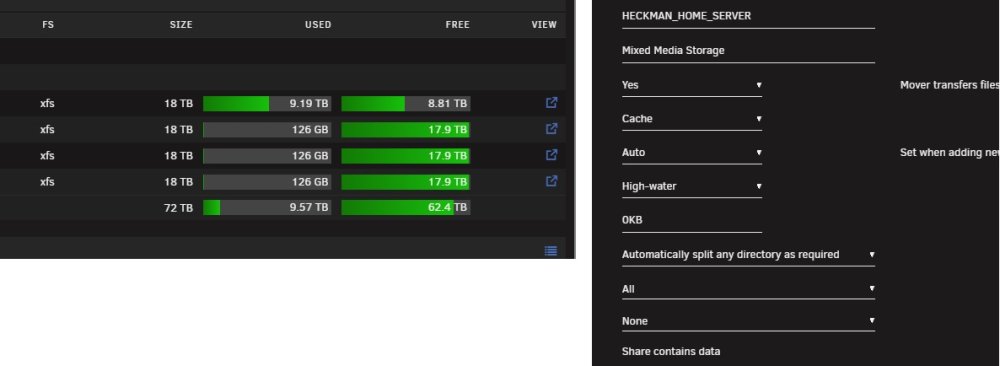
Same issue for me. I have 6 identical 18tb drives. Copying 75tb to the array, I'm 9.2tb in and it still hasn't switched from disk 1. Any ideas how to force it to move to the next disk?
-
I'm having the same issue currently. When on automatic IP, server is accessible over LAN, and connects to internet just fine. Automatic IP is 192.168.0.98. Router is 192.168.0.1. DNS is 192.168.0.1. If i change to static IP, but still set the same values. 192.168.0.98 for server, 192.168.0.1 for router, 192.168.0.1 for dns The server is still accessible through the LAN, but shows "Network is Unreachable" if i try to ping anything on the internet. The server is still able to ping my router, 192.168.0.1 without issue.
-
Hey all! I'm pretty new here. Finally got Unraid installed, set up my array, and a few containers for Pihole and a VPN. I set up my 2 1gig eth ports as a failover bond, and every since I've been having issues. Everytime I change any of my network settings, the server becomes unresponsive until I reboot. The server is unavailable over the network but still accessible directly from its monitor. I set all the settings back to what they were previously, but no connection to the app store. I had the DNS set to my primary and secondary Pihole, but set them back to 8.8.8.8 and 8.8.4.4 after I started having issues.
