





Mrtj18
Members
-
Joined
-
Last visited
Everything posted by Mrtj18
-
By the way I figured out my issue, If anyone reads this, there is a required port section in the docker container setup. I had to open port 67 on my router for the DCHP server to work correctly, and assign it to my lan ip for my unraid server. I have never seen this mentioned anywhere. Hope this helps someone, that maybe stuck like I was.
-
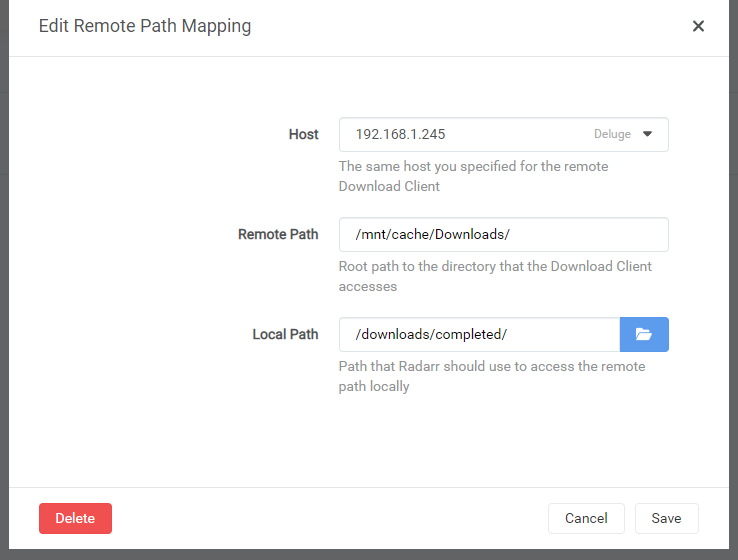
Hello I am new to unraid and docker in general... And Im sorry I have read a few pages up, and I still dont understand... I know sonarr/radarr are looking in two different places than the torrent client, but I dont get where they are looking. I keep getting the same error as everyone else that the "Import failed, path does not exist or is not accessible by Radarr: /data/completed/movie_title" I attempted to change things according to what another user posted above and its still wrong. I need someone to walk me through exactly what to change. Because the file locations are not mapping correctly in Sonarr, I still get the same error. Plus maybe it would help us newbies if we had pictures. Because I would assume its correct, but obviously its not, because of the errors I am getting. Thanks!

-
Never mind, found a solution to just run the host unraid system on the dual monitor setup with windows VM auto starting 😁
-
Hello new unraid user here, I love the software and the potential benefits it has, but my past two weekends have been filled with constant build ups, and tear downs due to unsatisfactory windows vm performance. Heres my issue: Is it possible with all the hardware I have to have a unraid gaming rig to have output of my current gaming rig consisting of a two monitor setup with my main monitor being a 1440p 144hrz high frame rate machine? Currently i have my ryzen 3600x, rtx 3080 high frame rate pc. The hardware I have is below: i5 - 3570k with a z77 asrock motherboard-16gb of ram ryzen 5 3600x asrock x570m motherbaord -16gb of ram 1- RTX 3080 Gigabyte card 1- GTX 1080 Gigabyte card 1- GTX 480 card 2- 2tb hardrives 1- nvme 500GB 1- 750GB drive 1-250GB solid state drive I placed the i5 and gtx 1080 in one pc running ubuntu hooked up to my 2 gaming monitors since the i5 is not capable of virtualization. And then I placed the RTX 3080 and ryzen 5 3600x in the other running unriad, with the windows VM, after I dumpted the v-bios. After finally getting the windows VM running I ran into issue after issue such as: 1. Only one screen being used in the windows VM. when I have 2 monitors 2. Low resolution in the windows VM 1080p was my max ( I had my 2nd pc hooked up to a cheap tv that only outputs 1080p 60hrz with mono sound) 3. Mono sound through passthrough 4. Games like CS:GO ran at a lower frame rate than usual ( like 45fps) 5. Devil sound, even after applying the MSI interrupts 6. My windows backup to move over to my unraid windows VM kept failing, so I could not move programs over like MS office 2003 from my main rig, to my winds VM. Is it possible with all the hardware I have to setup a windows VM in unraid with close to actual bare metal setup, that Im currently running? If so how should I set up my 2 rigs, with the combination of hardware I already have?
-
I still can't get this to work..... I may just have to stick with the rpi zero config i have. After correcting my settings in the network panel of unraid. I still have the issue after every reboot, the system still does not have Internet connection, even though I set the IP address to static.😞
-
Figured it out!!!! If anyone is having trouble pulling in TV guide info from they iptv provider try the following method... 1. Grab the simple file grabber from this site if it's already not on your system. https://github.com/b-jesch/tv_grab_file follow the steps listed. So in summary you will need to cd into your unraid system's /usr/bin directory, wget the file, then make the file executable. 2. I created a data folder in the TV headend directory. /mnt/user/appdata/tvheadend/data/ 3. Place your xmltv guide in the data folder I renamed mine guide.xml 4.sudo nano into the TV_grab_file that's in the /user/bin directory 5. Close to the top of the file you should see something that looks like this flag= if (( $# < 1 )) then exit 0 Go to the "then" line hit enter to create a gap between the then and exit 0 line. Then type cat your/directory/to/xml file. So in my example it looks like this after the edit. flag= if (( $# < 1 )) then cat /mnt/user/appdata/tvheadend/data/guide.xml exit 0 Save and exit. 6. Go back to tvheadend go to the epg grabber modules, make sure you have enable the XMLTV: XML file grabber. 7. leave the extra parameters blank. 8. rerun the internal EPG grabbers 9. Then you should see at the bottom of TVheadend if you expand the log in the bottom right hand corner something like this: 24-01-27 12:58:37.503 xmltv: /usr/bin/tv_grab_file: channels tot= 2936 new= 1 mod= 1423 2024-01-27 12:58:37.503 xmltv: /usr/bin/tv_grab_file: brands tot= 0 new= 0 mod= 0 2024-01-27 12:58:37.503 xmltv: /usr/bin/tv_grab_file: seasons tot= 0 new= 0 mod= 0 2024-01-27 12:58:37.503 xmltv: /usr/bin/tv_grab_file: episodes tot= 0 new= 0 mod= 0 2024-01-27 12:58:37.503 xmltv: /usr/bin/tv_grab_file: broadcasts tot=129368 new=119540 mod= 9532 This info should be filled with your epg data. your channels and such should should vary. 10. Profit! Lol Extra: you will have to create a script to auto pull down the xml file from your iptv provider somewhere on your system. I had to use a url shortner from bitly because the iptv xml url was too long for my system. and place that file after you download it each day with step 5 location.
-
What's odd, is the same xmltv file will work with the snap version of tvheadend through Ubuntu and also the through RPI is version as well. I'm sure I'm missing something simple here, I'm just not sure what it maybe. But I will give your link and screenshots some research.
-
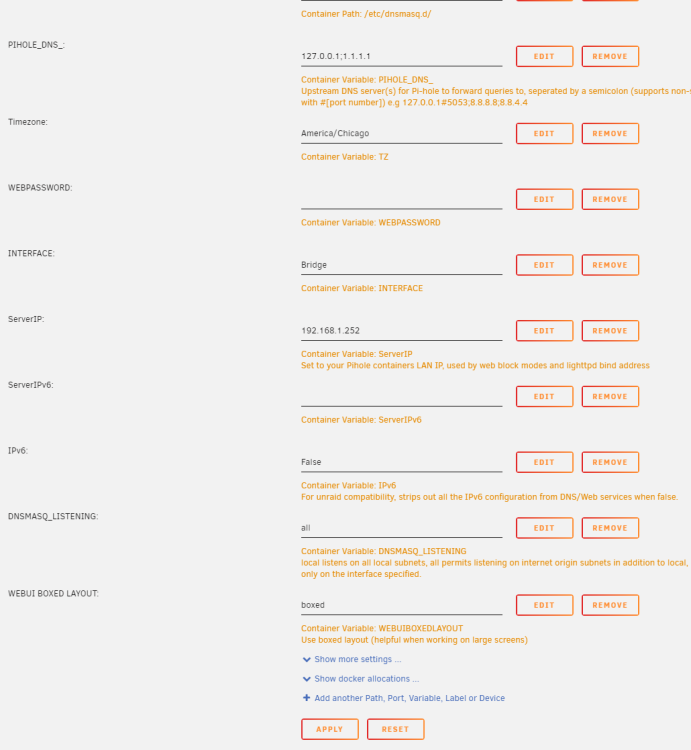
Oh okay gotcha, thanks for the help. I found my static IP for my unraid server and plugged it in to the server IP option towards the bottom, and the docker image built correctly... Thank you for the direction!
-
Is there a way to double check, what I may have set the static IP to be? When I did the initial setup?
-
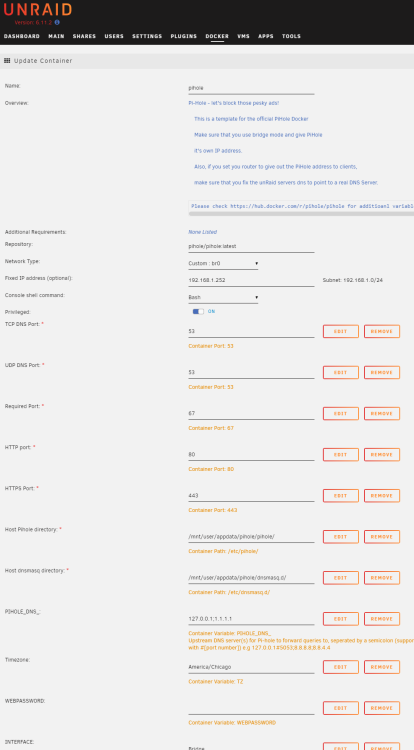
what should i change? If I change the fixed IP to (192.168.1.250 the address I have for my Unraid server) I get the following error: Command executiondocker run -d --name='pihole' --net='br0' --ip='192.168.1.250' --privileged=true -e TZ="America/Los_Angeles" -e HOST_OS="Unraid" -e HOST_HOSTNAME="Tower" -e HOST_CONTAINERNAME="pihole" -e 'TCP_PORT_53'='53' -e 'UDP_PORT_53'='53' -e 'UDP_PORT_67'='67' -e 'TCP_PORT_80'='80' -e 'TCP_PORT_443'='443' -e 'PIHOLE_DNS_'='127.0.0.1;1.1.1.1' -e 'TZ'='America/Chicago' -e 'WEBPASSWORD'='admin' -e 'INTERFACE'='Bridge' -e 'ServerIP'='192.168.1.252' -e 'ServerIPv6'='' -e 'IPv6'='False' -e 'DNSMASQ_LISTENING'='all' -e 'WEBUIBOXEDLAYOUT'='boxed' -l net.unraid.docker.managed=dockerman -l net.unraid.docker.webui='http://[IP]:[PORT:80]/admin' -l net.unraid.docker.icon='https://i.imgur.com/OWkNcEn.png' -v '/mnt/user/appdata/pihole/pihole/':'/etc/pihole/':'rw' -v '/mnt/user/appdata/pihole/dnsmasq.d/':'/etc/dnsmasq.d/':'rw' --cap-add=NET_ADMIN --restart=unless-stopped 'pihole/pihole:latest' a1a3163844bc0f0d2b57b02e9c42af8c5f0601f04bb229e81c82c60450c28167 docker: Error response from daemon: Address already in use. Im lost here....
-
Good Afternoon, First time Unraid user here... I am having the issue of I can only setup pihole to work DHCP mode, due to my router. Which once enabled in Pihole it works like it should. ( pihole DHCP on, router DHCP off). My issue is anytime I have to reset my host Unraid machine, my Unraid machine cannot get a local ip address so the unraid web ui never starts. I have to turn my DCHP server off again , enable through my router, then everything goes back to working properly. Is there an option im missing here to prevent this from happening on the next reboot? Thanks
-
Hello all first time Unraid user, trying my best to figure this out before my trail to determine if I want to buy or not. But I am having an issue of pulling in the xmltv.xml from my iptv provider file into tvheadend. I have attempted the following things to get this to work: 1.I have attempted to run the xmltv.sock method but the sock method does not work in Unraid with the socat command.... 2.I have attempted to run the "docker exec -it -u abc tvheadend /usr/bin/tv_grab_file --configure" command from the official documentation in terminal, before i enable the tv_grab_file moduel in the web UI but i get the following error: /usr/bin/tv_grab_file: illegal option -- - unknown option: - Usage: tv_grab_file: [--description] [--version] [--capabilities] 3. I downloaded configured and made excutable the simple file grabber from here: https://github.com/b-jesch/tv_grab_file then adjusted the xmltv.xml file to found in the following locations: /mnt/disk1/Xbox_stuff/xmltv.xml= (xbox_stuff is just a radom file location in my raid disk) /config/xmltv.xml config/data/xmltv.xml /mnt/user/appdata/tvheadend/xmltv.xml mnt/user/appdata/tvheadend/data/xmltv.xml Does not matter where i put the file .xml or name it to guide.xml, i get the following error below, in the tvheadendlog 2022-11-06 13:13:58.087 xmltv: /usr/bin/tv_grab_file: grab /usr/bin/tv_grab_file 2022-11-06 13:13:58.091 spawn: Executing "/usr/bin/tv_grab_file" 2022-11-06 13:13:58.110 xmltv: /usr/bin/tv_grab_file: no output detected 2022-11-06 13:13:58.110 xmltv: /usr/bin/tv_grab_file: grab returned no data I have access to all my channels and can watch live tv with no problems, but i cant view the epg guide no matter what i try. I have spent hours googling around, but with unraid and docker, the documentation is sparse. With the .sock method and the simple grab method not working. I dont know how to pull in the info. any help or point to a newbie guide for this would be much helpful, im stuck.



