





Cobstar
Members
-
Joined
-
Last visited
Everything posted by Cobstar
-
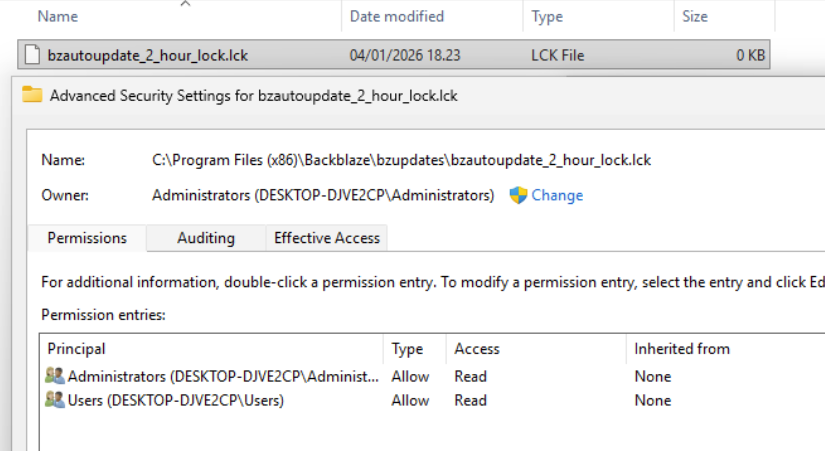
Well a real fix a havent found, but a work around that stops auto update is working for me, there is a file called bzautoupdate_2_hour_lock.lck if you change permission on that file to Read (remember to remove Inheritance) then Backblace service cant dele the file when its 2 hours old and the auto update will never run
-
Hi just some quick thoughts you probably already have checked have you public IP changed, my ISP sometimes screw up and i get behind their CG NAT. next is some appdata with cache experience i have from other (Plex) docker where i have cache drive enable/prefer sometimes could corrupt plex database, when i set cache to Only or none i havent seen the problem since
-
Thanks ill try downgrading 1 step coz the one im on now have this in description: “Before BIOS update, please download Intel ME update tool from ASUS support site, and update ME firmware to Version 16.1.25.1885v2 to ensure optimized system settings.”" and i dont know how to do that step Thanks for pointing me in direction
-
Hi Im getting an error about /var/log is full, currently at 100%, and restart only helps a couple of days i was then looking a bit around and found: Fatal error: Allowed memory size of 134217728 bytes exhausted (tried to allocate 4096 bytes) in /usr/local/emhttp/plugins/dynamix/include/Syslog.php on line 18 Please help im a bit lost here unraid-diagnostics-20221123-1503.zip
