headtrip0
Members
-
Joined
-
Last visited
-
@dkeners , Thanks for the assist. I spent some time looking through the logs and triple checking my configuration of each container and found 2 errors. I had an incorrect hostname in a Maybe-Worker setting and another in a Maybe-Web setting. After correcting those everything is working really well now. I will spend some time exploring the interface and begin entering my details. Any tips/trick for using Maybe especially in a self hosted environment? Have you tried adding tailscale to Maybe yet?
-
Update: It randomly worked but I had to refresh the pages a few times and even received a few timeouts (unable to connect) which is not something I have encountered from the webui for any of my other docker containers. I am having this problem frequently as I attempt to navigate around the UI so something seems to be wrong. I was able to find one issue. It looks at though the Maybe-Web container is disconnecting over and over frequently. This is a small example from my unraid logs. When the Maybe-Web container is turned off these messages stop completely unless I start/stop a container so this is ALL from that one container. Jun 4 14:51:16 Unraid kernel: eth0: renamed from vethd4ff049 Jun 4 14:51:16 Unraid kernel: br-4a4a323fda54: port 4(vethb269508) entered blocking state Jun 4 14:51:16 Unraid kernel: br-4a4a323fda54: port 4(vethb269508) entered forwarding state Jun 4 14:51:44 Unraid kernel: br-4a4a323fda54: port 4(vethb269508) entered disabled state Jun 4 14:51:44 Unraid kernel: vethd4ff049: renamed from eth0 Jun 4 14:51:45 Unraid kernel: br-4a4a323fda54: port 4(vethb269508) entered disabled state Jun 4 14:51:45 Unraid kernel: vethb269508 (unregistering): left allmulticast mode Jun 4 14:51:45 Unraid kernel: vethb269508 (unregistering): left promiscuous mode Jun 4 14:51:45 Unraid kernel: br-4a4a323fda54: port 4(vethb269508) entered disabled state Jun 4 14:51:46 Unraid kernel: br-4a4a323fda54: port 4(veth99ee0be) entered blocking state Jun 4 14:51:46 Unraid kernel: br-4a4a323fda54: port 4(veth99ee0be) entered disabled state Jun 4 14:51:46 Unraid kernel: veth99ee0be: entered allmulticast mode Jun 4 14:51:46 Unraid kernel: veth99ee0be: entered promiscuous mode Jun 4 14:51:48 Unraid kernel: eth0: renamed from veth70fbfbc Jun 4 14:51:48 Unraid kernel: br-4a4a323fda54: port 4(veth99ee0be) entered blocking state Jun 4 14:51:48 Unraid kernel: br-4a4a323fda54: port 4(veth99ee0be) entered forwarding state Jun 4 14:51:56 Unraid kernel: br-4a4a323fda54: port 4(veth99ee0be) entered disabled state Jun 4 14:51:56 Unraid kernel: veth70fbfbc: renamed from eth0 Jun 4 14:51:57 Unraid kernel: br-4a4a323fda54: port 4(veth99ee0be) entered disabled state Jun 4 14:51:57 Unraid kernel: veth99ee0be (unregistering): left allmulticast mode Jun 4 14:51:57 Unraid kernel: veth99ee0be (unregistering): left promiscuous mode Jun 4 14:51:57 Unraid kernel: br-4a4a323fda54: port 4(veth99ee0be) entered disabled state Jun 4 14:51:58 Unraid kernel: br-4a4a323fda54: port 4(vethb50d1af) entered blocking state Jun 4 14:51:58 Unraid kernel: br-4a4a323fda54: port 4(vethb50d1af) entered disabled state Jun 4 14:51:58 Unraid kernel: vethb50d1af: entered allmulticast mode Jun 4 14:51:58 Unraid kernel: vethb50d1af: entered promiscuous mode Jun 4 14:52:01 Unraid kernel: eth0: renamed from veth1f5edad Jun 4 14:52:01 Unraid kernel: br-4a4a323fda54: port 4(vethb50d1af) entered blocking state Jun 4 14:52:01 Unraid kernel: br-4a4a323fda54: port 4(vethb50d1af) entered forwarding state Jun 4 14:52:05 Unraid kernel: br-4a4a323fda54: port 4(vethb50d1af) entered disabled state Jun 4 14:52:05 Unraid kernel: veth1f5edad: renamed from eth0 Jun 4 14:52:06 Unraid kernel: br-4a4a323fda54: port 4(vethb50d1af) entered disabled state Jun 4 14:52:06 Unraid kernel: vethb50d1af (unregistering): left allmulticast mode Jun 4 14:52:06 Unraid kernel: vethb50d1af (unregistering): left promiscuous mode Jun 4 14:52:06 Unraid kernel: br-4a4a323fda54: port 4(vethb50d1af) entered disabled state Jun 4 14:52:07 Unraid kernel: br-4a4a323fda54: port 4(vethed2487d) entered blocking state Jun 4 14:52:07 Unraid kernel: br-4a4a323fda54: port 4(vethed2487d) entered disabled state Jun 4 14:52:07 Unraid kernel: vethed2487d: entered allmulticast mode Jun 4 14:52:07 Unraid kernel: vethed2487d: entered promiscuous mode Jun 4 14:52:10 Unraid kernel: eth0: renamed from veth416ec6e Jun 4 14:52:10 Unraid kernel: br-4a4a323fda54: port 4(vethed2487d) entered blocking state Jun 4 14:52:10 Unraid kernel: br-4a4a323fda54: port 4(vethed2487d) entered forwarding state
-
Hi, I set up Maybe following your guide, thanks for providing such detailed instructions BTW, however I can not get onboarding to advance past preferences. A blue progress bar appears at the top of the screen after clicking submit but nothing happens after that. Any ideas? One question I did have about the install process is regarding the Redis data path. The container template did not include a path initially so I added it but wasn't sure if /data was the correct container path. Thanks!
-
I am struggling to give my kobo reader acces via usb. Is there an easier way to load the library onto an e-reader?
-
[2023-01-09 10:06:47] frigate.mqtt INFO : Turning on snapshots for Doorbell via mqtt [2023-01-09 10:06:47] ws4py INFO : Using epoll [2023-01-09 10:07:06] ws4py INFO : Managing websocket [Local => 127.0.0.1:5002 | Remote => 127.0.0.1:57006] [2023-01-09 10:07:08] ws4py INFO : Terminating websocket [Local => 127.0.0.1:5002 | Remote => 127.0.0.1:57006] [2023-01-09 10:07:08] ws4py INFO : Managing websocket [Local => 127.0.0.1:5002 | Remote => 127.0.0.1:57018] [2023-01-09 10:07:15] ws4py INFO : Managing websocket [Local => 127.0.0.1:8082 | Remote => 127.0.0.1:47726] [2023-01-09 10:07:19] ws4py INFO : Terminating websocket [Local => 127.0.0.1:8082 | Remote => 127.0.0.1:47726] [2023-01-09 10:07:22] frigate.http ERROR : No recordings found for the requested time range [2023-01-09 10:07:32] ws4py INFO : Managing websocket [Local => 127.0.0.1:5002 | Remote => 127.0.0.1:36742] [2023-01-09 10:07:35] ws4py INFO : Managing websocket [Local => 127.0.0.1:8082 | Remote => 127.0.0.1:51734] [2023-01-09 10:07:38] ws4py INFO : Terminating websocket [Local => 127.0.0.1:8082 | Remote => 127.0.0.1:51734] [2023-01-09 10:13:52] frigate.http ERROR : No recordings found for the requested time range [2023-01-09 10:16:57] ws4py INFO : Terminating websocket [Local => 127.0.0.1:5002 | Remote => 127.0.0.1:57018] [2023-01-09 10:16:57] ws4py INFO : Terminating websocket [Local => 127.0.0.1:5002 | Remote => 127.0.0.1:36742] [2023-01-09 10:17:17] ws4py INFO : Managing websocket [Local => 127.0.0.1:5002 | Remote => 127.0.0.1:43654] [2023-01-09 10:18:57] ws4py INFO : Terminating websocket [Local => 127.0.0.1:5002 | Remote => 127.0.0.1:43654] [2023-01-09 10:30:47] frigate.video ERROR : Doorbell: Unable to read frames from ffmpeg process. [2023-01-09 10:30:47] frigate.video ERROR : Doorbell: ffmpeg process is not running. exiting capture thread... [2023-01-09 10:30:47] watchdog.Doorbell ERROR : Ffmpeg process crashed unexpectedly for Doorbell. [2023-01-09 10:30:47] watchdog.Doorbell ERROR : The following ffmpeg logs include the last 100 lines prior to exit. [2023-01-09 10:30:47] ffmpeg.Doorbell.detect ERROR : [flv @ 0x55c13f5665c0] Timestamps are unset in a packet for stream 0. This is deprecated and will stop working in the future. Fix your code to set the timestamps properly [2023-01-09 10:30:47] ffmpeg.Doorbell.detect ERROR : [rtsp @ 0x55c13f549bc0] CSeq 21 expected, 0 received. [2023-01-09 10:30:47] ffmpeg.Doorbell.detect ERROR : [h264 @ 0x55c1402a8a00] cabac decode of qscale diff failed at 148 94 [2023-01-09 10:30:47] ffmpeg.Doorbell.detect ERROR : [h264 @ 0x55c1402a8a00] error while decoding MB 148 94, bytestream 5410 [2023-01-09 10:30:47] ffmpeg.Doorbell.detect ERROR : [h264 @ 0x55c140377c40] Increasing reorder buffer to 1 [2023-01-09 10:30:47] ffmpeg.Doorbell.detect ERROR : rtsp://admin:[email protected]:554/h264Preview_01_main: corrupt decoded frame in stream 0 [2023-01-09 10:30:47] ffmpeg.Doorbell.detect ERROR : [h264 @ 0x55c1401d9700] error while decoding MB 132 119, bytestream 350 [2023-01-09 10:30:47] ffmpeg.Doorbell.detect ERROR : rtsp://admin:[email protected]:554/h264Preview_01_main: Connection timed out [2023-01-09 10:30:47] ffmpeg.Doorbell.detect ERROR : Last message repeated 15 times [2023-01-09 10:30:47] ffmpeg.Doorbell.detect ERROR : rtsp://admin:[email protected]:554/h264Preview_01_main: corrupt decoded frame in stream 0 [2023-01-09 10:30:47] ffmpeg.Doorbell.detect ERROR : rtsp://admin:[email protected]:554/h264Preview_01_main: Connection timed out [2023-01-09 10:30:47] ffmpeg.Doorbell.detect ERROR : [flv @ 0x55c13f5665c0] Failed to update header with correct duration. [2023-01-09 10:30:47] ffmpeg.Doorbell.detect ERROR : [flv @ 0x55c13f5665c0] Failed to update header with correct filesize. [2023-01-09 10:35:38] ws4py INFO : Managing websocket [Local => 127.0.0.1:5002 | Remote => 127.0.0.1:59668] [2023-01-09 10:35:39] ws4py INFO : Managing websocket [Local => 127.0.0.1:8082 | Remote => 127.0.0.1:35400] [2023-01-09 10:35:42] ws4py INFO : Terminating websocket [Local => 127.0.0.1:8082 | Remote => 127.0.0.1:35400] [2023-01-09 10:35:57] ws4py INFO : Managing websocket [Local => 127.0.0.1:8082 | Remote => 127.0.0.1:39446] [2023-01-09 10:36:06] ws4py INFO : Terminating websocket [Local => 127.0.0.1:8082 | Remote => 127.0.0.1:39446] [2023-01-09 10:36:58] ws4py INFO : Terminating websocket [Local => 127.0.0.1:5002 | Remote => 127.0.0.1:59668] [cont-finish.d] executing container finish scripts... [cont-finish.d] done. [s6-finish] waiting for services. [s6-finish] sending all processes the TERM signal. [s6-finish] sending all processes the KILL signal and exiting. [s6-init] making user provided files available at /var/run/s6/etc...exited 0. [s6-init] ensuring user provided files have correct perms...exited 0. [fix-attrs.d] applying ownership & permissions fixes... [fix-attrs.d] done. [cont-init.d] executing container initialization scripts... [cont-init.d] done. [services.d] starting services [services.d] done. I do seem to be having ffmpeg errors... any advice? I am not seeing the same errors in newer log entries. The previous entries looked to be using the non-reolink settings. [2023-01-09 10:58:17] frigate.app INFO : Starting Frigate (0.11.1-2eada21) Starting migrations [2023-01-09 10:58:17] peewee_migrate INFO : Starting migrations There is nothing to migrate [2023-01-09 10:58:17] peewee_migrate INFO : There is nothing to migrate [2023-01-09 10:58:17] frigate.mqtt INFO : Turning on recordings for Doorbell via mqtt [2023-01-09 10:58:17] frigate.mqtt INFO : Turning on snapshots for Doorbell via mqtt [2023-01-09 10:58:17] detector.cpu INFO : Starting detection process: 239 [2023-01-09 10:58:17] frigate.app INFO : Output process started: 240 [2023-01-09 10:58:17] ws4py INFO : Using epoll [2023-01-09 10:58:17] frigate.app INFO : Camera processor started for Doorbell: 245 [2023-01-09 10:58:17] frigate.app INFO : Capture process started for Doorbell: 246 [2023-01-09 10:58:17] frigate.edgetpu WARNING : CPU detectors are not recommended and should only be used for testing or for trial purposes. [2023-01-09 10:58:17] ws4py INFO : Using epoll [s6-init] making user provided files available at /var/run/s6/etc...exited 0. [s6-init] ensuring user provided files have correct perms...exited 0. [fix-attrs.d] applying ownership & permissions fixes... [fix-attrs.d] done. [cont-init.d] executing container initialization scripts... [cont-init.d] done. [services.d] starting services [services.d] done. [2023-01-09 10:59:07] ws4py INFO : Managing websocket [Local => 127.0.0.1:5002 | Remote => 127.0.0.1:60240] [2023-01-09 10:59:13] ws4py INFO : Managing websocket [Local => 127.0.0.1:8082 | Remote => 127.0.0.1:46344] [2023-01-09 10:59:21] ws4py INFO : Terminating websocket [Local => 127.0.0.1:8082 | Remote => 127.0.0.1:46344] [2023-01-09 11:00:27] ws4py INFO : Terminating websocket [Local => 127.0.0.1:5002 | Remote => 127.0.0.1:60240] [2023-01-09 11:01:26] frigate.http ERROR : No recordings found for the requested time range [2023-01-09 11:04:42] ws4py INFO : Managing websocket [Local => 127.0.0.1:8082 | Remote => 127.0.0.1:53340] [2023-01-09 11:07:57] ws4py INFO : Managing websocket [Local => 127.0.0.1:5002 | Remote => 127.0.0.1:42318] [2023-01-09 11:08:00] ws4py INFO : Managing websocket [Local => 127.0.0.1:8082 | Remote => 127.0.0.1:54438] [2023-01-09 11:08:33] ws4py INFO : Terminating websocket [Local => 127.0.0.1:8082 | Remote => 127.0.0.1:54438] [2023-01-09 11:08:33] ws4py INFO : Terminating websocket [Local => 127.0.0.1:5002 | Remote => 127.0.0.1:42318] [2023-01-09 11:08:33] ws4py INFO : Managing websocket [Local => 127.0.0.1:5002 | Remote => 127.0.0.1:46640] [2023-01-09 11:08:34] ws4py INFO : Managing websocket [Local => 127.0.0.1:8082 | Remote => 127.0.0.1:53040] [2023-01-09 11:08:35] ws4py INFO : Terminating websocket [Local => 127.0.0.1:8082 | Remote => 127.0.0.1:53040] [2023-01-09 11:08:36] frigate.http ERROR : No recordings found for the requested time range
-
That makes sense, thanks. I changed the retention to 14 days and still no recording. I am OK with 24/7 recordings or a very long retention period actually (that is how I had blue iris set up) and I have 4 TB of storage dedicated to security footage. Do you see anything wrong with my config that would prevent ANY recordings from working? I have never had a single recording from an event or otherwise. Thanks
-
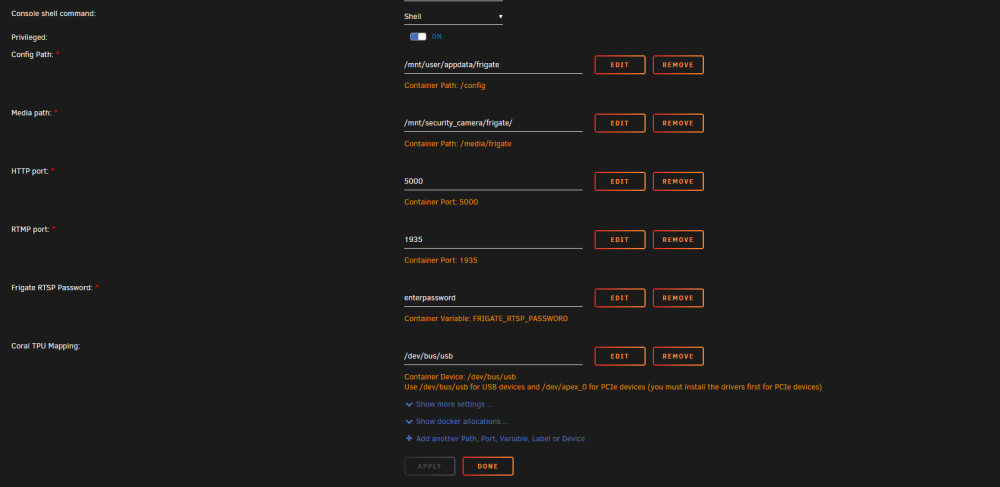
I have been unable to get recordings to work at all. Detection, events and clips are working fine. I have reduced my config to minimal settings in an attempt to find the issue but no luck so far. I have also tried normal rtsp streams and the reolink specific configuration. Any help would be greatly appreciated. Thanks! Unraid version 6.11.3 mqtt: host: 192.168.X.X topic_prefix: frigate client_id: frigate user: mosquito password: **** rtmp: # Optional: Enable the RTMP stream (default: True) enabled: True detectors: cpu1: type: cpu num_threads: 2 cpu2: type: cpu num_threads: 2 cpu3: type: cpu num_threads: 2 cameras: reolink: ffmpeg: input_args: - -avoid_negative_ts - make_zero - -fflags - +genpts+discardcorrupt - -flags - low_delay - -strict - experimental - -analyzeduration - 1000M - -probesize - 1000M - -rw_timeout - "5000000" inputs: - path: http://192.168.X.X/flv?port=1935&app=bcs&stream=channel0_main.bcs&user=user&password=xxxx roles: - record - clips - rtmp - path: http://192.168.X.X/flv?port=1935&app=bcs&stream=channel0_ext.bcs&user=user&password=xxxx roles: - detect detect: width: 640 height: 480 fps: 7 record: enabled: True retain: days: 0 mode: all events: retain: default: 15 mode: active_objects