





wizkid941
Members
-
Joined
-
Last visited
Everything posted by wizkid941
-
Okay thank you, i would like to delete the docker img actually because its currently at 75gb, just need to figure out how to start the docker from scratch
-
Oh ill definitely have a look at that, will it clear my docker img etc as well?. will i loose any data etc? If i use that plugin does it matter that the drives are encrypted?
-
Hey so i'm planning to refresh my Unraid server and from my research the best way to go about doing that is to just install a trial on my current usb stick and then copy my licence over, is that the best way? I currently have around 17tb of data that i DO NOT wanna loose, i just want to start fresh as the server seems to be very slow lately and id like to re do my docker apps and settings etc. Ive had this server on and of for the last few years with different configs which probably doesn't help. Server spec 12600k, 32gb ddr4, rtx 2060s when needed, 1tb nvme ssd cache, 3x 4tb iron wolf, 1x3tb wd red, 1x 2tb Seagate and a 4tb iron wolf pro parity. Boot drive is a Samsung bar plus 64gb recommended by Spaceinvader. Question 1 do i just install a trial on the same USB stick and my licence will copy over? Question 2 all drives plus cache are encrypted does that matter?, i should also take note of what drives are in which slot right? Question 3 I've already had my licence transferred a few times this year as I've had failed USB sticks etc etc, does that matter since ill reinstall on the same USB? Appreciate all the help, i've already lost data this year as i messed up so i don't wanna repeat that and you experts might see something i don't see. Thanks again! zeus-diagnostics-20240520-1512.zip
-
little bump, hope thats okay
-
Hey hoping one of you genius's can help, sever seems very slow since i swapped a failed usb stick. Had this server for the last couple years and since i swapped my usb stick its very slow, i used one spaceinvaders recommend usb sticks, swapped from a sandisk ultra fit to a Samsung bar plus. Server specs, 12600k ,32gb ddr4 ram, 1tb nvme cache and sometimes have my 2060s in server, ive also attached the diags. Thanks zeus-diagnostics-20240501-2228.zip
-
This has been fixed now, thanks for the help!. I do need to do another post though as the server seems very slow at the moment for some reason.
-
Okay thanks, can you dumb it down for me as I seem to mess even that up. There is also seems to be .pluskey .basickey etc on my previous usb. I don't have another "backup" available, so I transfer everything in config other than those right? There also seems to be a new issue, if I try to log in on my normal browser that has been working with root the password is correct but it will just refresh the page but not load me in, if I use edge its fine. Is that a browser issue? thanks
-
hey so support have replaced the key and the usb is now working correctly, however all my dockers/app etc are missing. What do I need to transfer to get those dockers and plugins etc back? Thanks again!
-
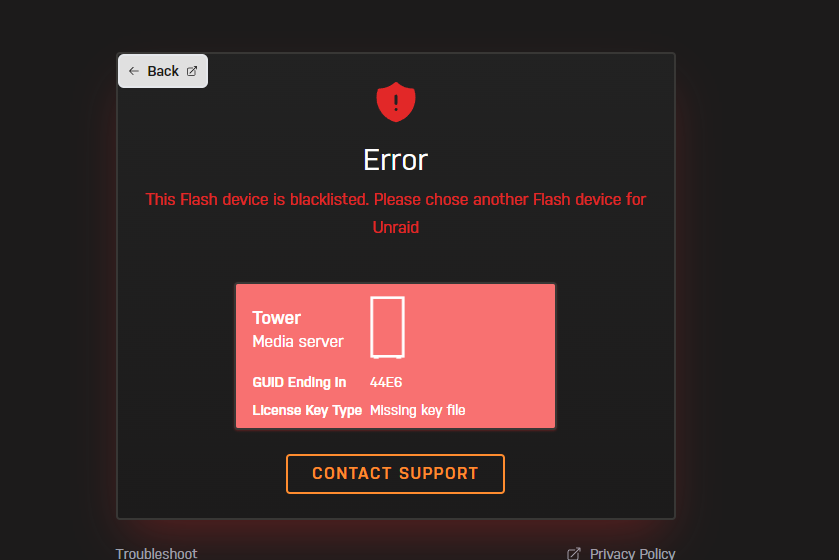
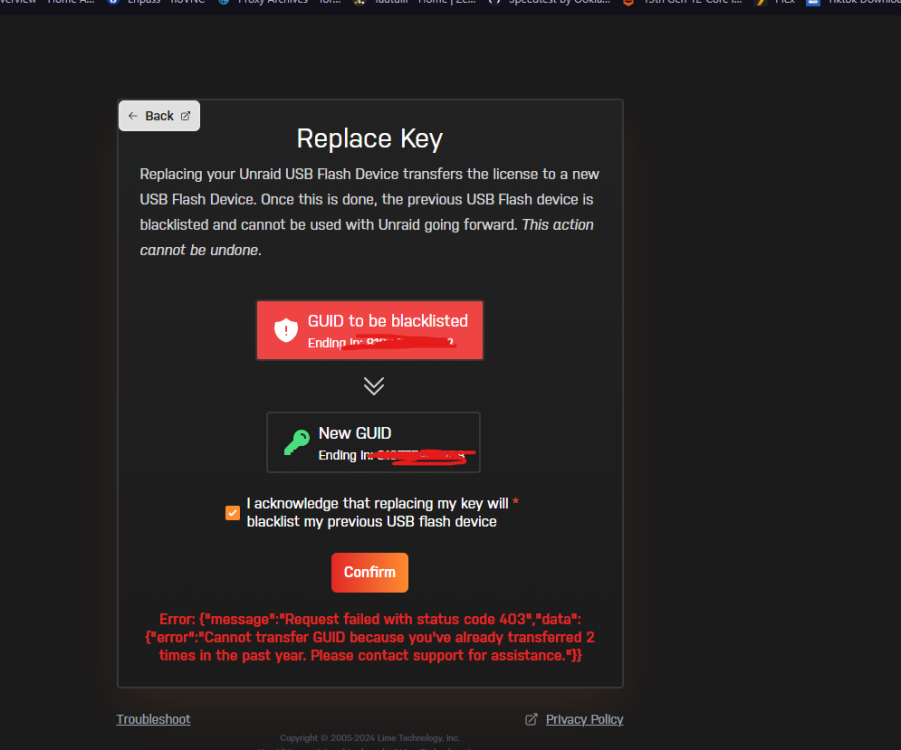
Doesn't matter what way I try it it fails to either replace the key or recover it, the current usb was blacklisted before all this happened as I noticed it last night whilst trying to connect to unraid connect. I have also emailed support. Its all a bit confusing because at the start of the month the usb failed so I changed it etc, I ended up getting confused with what one was which as all my unraid usbs are exactly the same. Then the server was fine though so I just left it, It was only last night that I had this problem with it refusing to connect and then remembered the old usb was blacklisted etc. Hopefully support can help even though I've had more than two keys this year unfortunately. Defo need to get ssh and/or telnet set up but that's its own problem lol. I appreciate the help though guys. Thanks
-
Tried as suggested my Trurl but the original usb is blacklisted so that's now not going to work work
-
ah yea that might be a good idea, ill try that now, i should have it backed up.
-
Hey so the server is up but obviously ill have to redo my apps etc right? I cant currently start the server as there is now a key mismatch, I thought I transferred the key correctly but maybe not. All hard drives are there and in correct locations etc. I tried to use the key i was provided at the start of the month when my usb stick died but I didn't need it in the end because the drive was okay. I tried to use that key now but its not working. thanks!
-
Here are the attached diagnostics, I have one from 1am this morning I've provided just in case as I don't know where it came from. thanks zeus-diagnostics-20240326-0103.zip zeus-diagnostics-20240326-1804.zip
-
Hey all, hoping someone can help, server has been working fine but now I'm unable to connect to the gui at all as i get error connection refused. All that I think might be related is that I was trying to connect to unraid connect last night and couldn't because the usb was blacklisted. I have a new key ready to go but obviously I cant access the gui to update it. I also don't have ssh or telnet etc enabled, I have cleared the network config from the usb, put a new install on a replacement usb, cleared my port forwarding, tried safe mode and it even shows the ip when I connect a monitor like normal yet it wont connect. I'm not smart enough in all honestly to figure it out, hopefully one of you genius's can help!? ive attached the syslog from the usb if that helps? thanks syslog
-
Bump, any help for a newbie?..
-
Wondering if anyone can help me though I'm not super great with unraid or lancache.i installed lancache on a fresh unraid install using this video https://www.youtube.com/watch?v=_whEitUy0mQ&t=2s however i keep encountering problems, lancache will cache so to speak for a few seconds maybe even a few minutes and then fail due to chunk time out and i just dont know how to fix it if im honest. Any help appreciated, also i know its not in the main docker container section but it woundnt let me post there. kind regards Ps i have added steams content log content_log.txt
