





wizkid941
Members
-
Joined
-
Last visited
Everything posted by wizkid941
-
Okay thanks, I’ve just used the same usb stick, i have a spare of the same drive if it becomes an issue. The usb stick im using was on an “approved” list i saw a few moons ago and tbh it’s the only one that’s constant long term basis. All the other sticks I’ve used over the years have failed in not long.
-
I’ve done as you suggest, server seems to be back up a functional. Is there anything i need to look out for or would have changed since i done this? Or should the server be just how it was but on an updated version?
-
Here’s the pic as requested IMG_5399.dng
-
As the title says. system will no longer boot, im unsure on how i can provide the diagnostics? i have backed up the usb stick and as far as i can tell it cannot enumerate the usb stick? ive tried different ports etc to no avail. i don't wanna touch anything until and expert can advise, ive had so many issues with usb sticks over the last few years that im scared lol Thankssyslog
-
ST4000VN006-3CW104_ZW60YYBE-20250721-0056.txt done a long test, no errors, completed parity check with no issue. Think I'm safe to follow your instructions right??
-
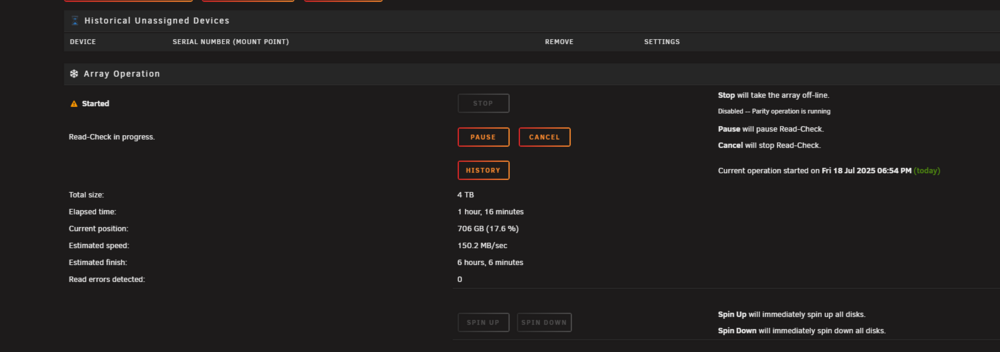
okay, think its all good now. pushover is also saying that the array turned good so how can i re enable disk 6? zeus-diagnostics-20250718-2014.zip
-
okay will try that, what should i do about disk 6? and when you say both cables do you mean power to? or just sata
-
i was just adding them as you posted lol
-
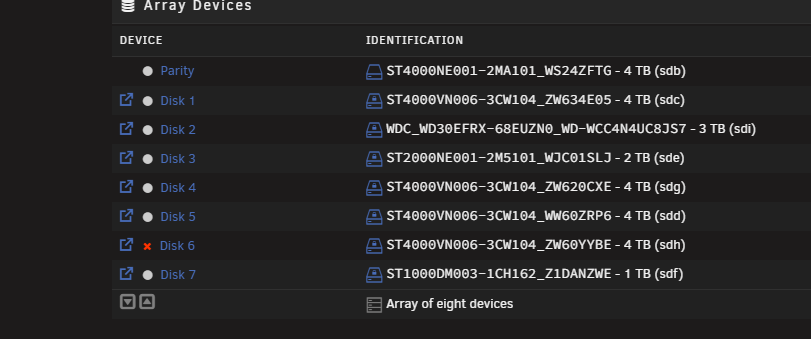
no, no power splitters in use, disk 6 is now being emulated and showing 1151 errors, am i potentially going to loose data as i don't have a current up to date parity check zeus-diagnostics-20250718-1145.zip
-
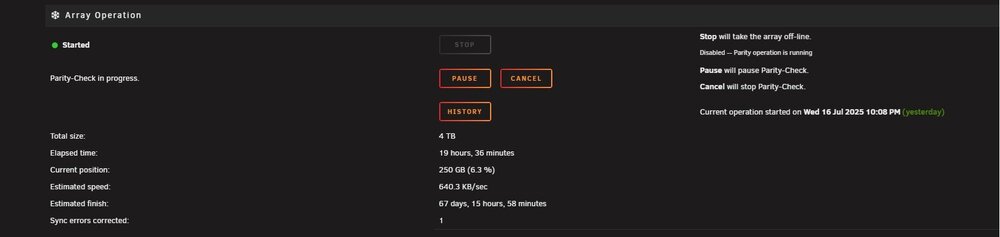
Unfortunately its not fixed the issue as i first thought it did after changing both sata cables. Both of the hdd mentioned are not connected to the hba, and its still just as slow and now my hba/hdd is making a strange noise, ONLY when running this parity check which is weird and is a new issue, i guess the drive is failing? here is a link to the clip of said sound. www.youtube.com/shorts/F2JIHr8i1F4?si=jHXf-PZuTrM1jFNN thanks again. zeus-diagnostics-20250717-1745.zip
-
That appears to have fixed the issue, thanks alot! will report back if it goes down the drain again
-
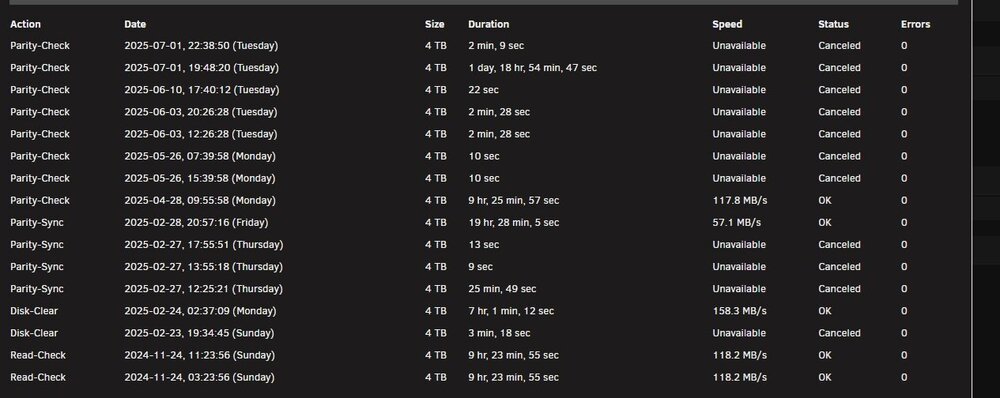
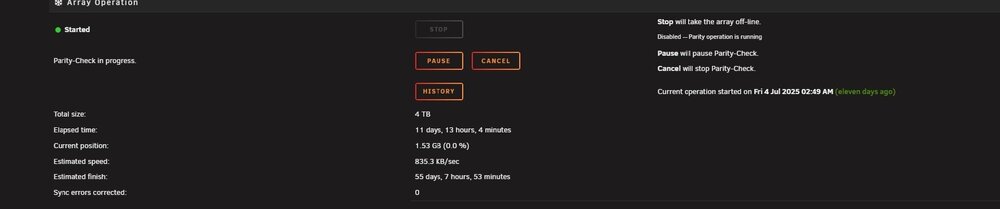
Hey guys and girls, so ive been trying to do my bi monthly parity check and its now expected to take 55 days to complete a 4tb check. I cant figure out why its now expected to take so long and why its so slow, it used to average around 110/130mbps and around 12-16 hours to complete but at this rate im effectively unable to run parity check, any ideas on why, randomly, its so slow?? some drives are connected to a HBA, some to motherboard but again, its been fine for the last year or so like that, ive checked cables, changed sata cables etc and its made no difference so I'm stuck. thanks again for any advice . zeus-diagnostics-20250715-1546.zip
-
Updated to 7.0.1, still running into the same issue is there really no other option other than to roll back like it has to be something stupid surely?
-
Okay thank you, will take a look now I’ve got it all set up. Just need more storage, as always! thanks
-
Don’t worry I’ve now solved the issue. Thanks!
-
Oh, that’s interesting, I wasn’t aware that it would delete data if i delete it on device. Is there a way that i can back up the data on my iPhone etc and then remove it from the device storage and just keep the data in Nextcloud rather than iCloud?
-
Yea trying to get that to work myself, followed space invaders guide, added another account, backed up and now im running into The www-data user doesn't seem to have access rights in the datadir. 2025-02-27T20:42:53.208353317Z Most likely are the files located on a drive that does not follow linux permissions. 2025-02-27T20:42:53.208356622Z Please adjust the permissions like mentioned below. 2025-02-27T20:42:53.208359006Z The found permissions are: 2025-02-27T20:42:53.208361219Z 33:0 750 2025-02-27T20:42:53.208363239Z (userID:groupID permissions) 2025-02-27T20:42:53.208365273Z but they should be: 2025-02-27T20:42:53.208367286Z 33:0 750 2025-02-27T20:42:53.208369230Z (userID:groupID permissions) with no idea how to fix it, what exactly does the trash bin retention do? and why would you want to disable it? (Never used nextcloud) thanks
-
unsure if this is correct place to post this?. So i just followed space invaders guide on installing the aio, done one backup as suggested and added the main user and now nextcloud is stuck in a boot loop. I am pretty basic when it comes to this so any advice would be helpful. This is what the logs are saying, I basically don't know what this means or how to fix it lol The www-data user doesn't seem to have access rights in the datadir. 2025-02-27T20:42:53.208353317Z Most likely are the files located on a drive that does not follow linux permissions. 2025-02-27T20:42:53.208356622Z Please adjust the permissions like mentioned below. 2025-02-27T20:42:53.208359006Z The found permissions are: 2025-02-27T20:42:53.208361219Z 33:0 750 2025-02-27T20:42:53.208363239Z (userID:groupID permissions) 2025-02-27T20:42:53.208365273Z but they should be: 2025-02-27T20:42:53.208367286Z 33:0 750 2025-02-27T20:42:53.208369230Z (userID:groupID permissions) The www-data user doesn't seem to have access rights in the datadir. 2025-02-27T20:42:53.208353317Z Most likely are the files located on a drive that does not follow linux permissions. 2025-02-27T20:42:53.208356622Z Please adjust the permissions like mentioned below. 2025-02-27T20:42:53.208359006Z The found permissions are: 2025-02-27T20:42:53.208361219Z 33:0 750 2025-02-27T20:42:53.208363239Z (userID:groupID permissions) 2025-02-27T20:42:53.208365273Z but they should be: 2025-02-27T20:42:53.208367286Z 33:0 750 2025-02-27T20:42:53.208369230Z (userID:groupID permissions)
-
I'm actually going to try the new update 7.0.1 since it does contain some vm fix's etc even thought they don't seem to be directly related to my issue, failing that I'll have to either downgrade as you say or live with it. Its annoying that i like the improvements/fix's of 7.0 😂
-
What exactly do you mean it’s not posting? What are you expecting to happen? Sorry for the obvious questions but Do you have igpu set in bios or a pcie gpu set or auto set? I’m also on 14th gen so i may be able to replicate some issues if needed. i take it your trying to just get into bios? Does it post when you have the hdmi plugged into either gpu? Has it ever posted?
-
So basically Since apple is now disabling advanced data protection for uk users what other options are there for similar iCloud like “backup” solutions on Unraid? I had thought about immich but that uses iCloud, Plex has pictures and video back up but I’m unsure if its secure and good enough in itself? I’m mainly after a good, secure picture and video backup solution for my iOS and iPadOS devices. Any ideas? thanks
-
Ive done as suggested and for a moment I genuinely thought it was fixed, it is not unfortunately. However, it’s more usable than how it was on the old drive and can go quite a lot further without hanging. It is still relatively unusable and unreliable though and seems to hang 75% percent of the time in one way or another. Is there anything else i can do without going back to 6.12?(not that 7.0 should affect my vms right?) Do you have any idea what the “vm is tainted“ means? thanks
-
Data as requested, checked the logs, apparently the vm is tainted? unsure what that's referring to?. Thanks zeus-diagnostics-20250220-2055.zip
-
Small bump (unsure if that’s allowed)
-
So basically as the titles says, since I upgraded to 7.0 my windows vms now are unusable, I get roughly 30 seconds of use before I get a yellow/orange wheel (like the blue one that happens in windows normally by the mouse) and then the system hangs. The vms were working fine on 6.12, I have reinstalled the vms since the update and tried to troubleshoot, no cores are pegged (cpu shows very little cpu usage) or anything like that, ive tried more cores, more ram, ssd looks fine etc but I'm unable to solve the problem. The server is a 14600k, 32gb ddr5, the vms are on there own ssd a wd black sn770 2tb. not sure what other info you guys need kind regards





