





mattalat
Members
-
Joined
-
Last visited
Everything posted by mattalat
-
Right, but for a new drive is it wise to perform an extended smart test before bringing into the array?
-
Existing array is one 4 tb hard drive, no parity. I'm adding two factory recertified seagate 16tb drives (one as a second array disk, one as parity). My understanding is that Preclear/Clear is no longer necessary before adding the disks, but should I do an extended smart test before adding them? Or does the process of building parity on one of the new drives essentially act like an extended smart test? Appreciate your thoughts, thx!
-
Hi - anyone know if there are still issues in Unraid 7.0 with the i915 IGPU driver and 12th gen intel chips? Since migrating to my new server I've been getting random crashes every 24-48 hours (everything dead, monitor output shows boot screen glitching/flashing test) and only pulling the power cord resets the server. Sounds very similar to folks that had issues in the past, but I'm not sure if this is really an issue anymore. Thanks. green-diagnostics-20250119-0008.zip
-
Ok thanks I'll try that. Is the i915 iGPU issue still relevant? I've seen old threads talking about that causing crashes, but has it since been fixed?
-
I moved to a new server a couple weeks ago (UGreen DXP4800 Plus) and upgraded to Unraid 7.0. System was crashing every 24-48 hours with nothing suspicious in the local syslogs. This progressed to crashing every few hours, despite running in safe mode with everything disabled. I ran an extended memtest86+ (10 passes) so I think that rules out bad ram. Then I suspected failing USB drive so I replaced that. Still crashing. Finally I returned the UGreen system and replaced it with a fresh one assuming it was some unknown hardware issue. With the new system it ran fine for 24 hours but then crashed AGAIN, and nothing logged at all in the logs for the hour leading up to the crash. At this point I don't know what to do. I've essentially replaced all hardware, and it's still crashing. I have a monitor hooked up to it but when it crashes just showing a flashing/glitched version of the original boot sequence. Is there a way to have the monitor display the logs, to maybe catch something that's not being saved to the local syslogs? Or does anyone have any ideas of how to proceed? Thank you. green-diagnostics-20250119-0008.zip
-
So I recently tried migrating to a new server (UGreen DXP4800 Plus). Old server was stable for months although had a random crash ~2 weeks prior to migrating. Two days before migrating I upgraded to Unraid 7.0, no issues for 2 days. After migrating crashes were happening every 24-48 hours. They have seemed to increase in frequency over the last few days in as few as 1-2 hours. Local syslogs have been enabled and logging to another server I have and nothing suspicious is logged. Things I've done: 1) Run memtest86+ for 12+ hours for 10 successful passes. Also all drives pass extended SMART tests multiple times. 2) Reboot in safe mode with only one docker container (scrypted) and no plugins running, which crashed after 2 hours 3) Fresh install on a new USB flash drive which ran fine for 24 hours, so I felt safe to reload from backup, which promptly led to a crash within 2 hours. 4) I ran the dynamix factory reset plugin to reset everything to default and rebuild from scratch. This ran fine for 8 hours. I was planning on letting it run for 24 hours before making any changes, but to save time I wanted to load up the XML templates from my backup to the flash drive so that I could quickly install my docker containers tomorrow. Upon clicking "upload" to the "templates-user" folder on the flash drive via the GUI, the server crashed again. It happened literally within seconds of hitting the upload button. Is my new flash drive coinidentally bad too? WTF is going on? Does this seem like a hardware issue? Should I return the system and get a replacement? Thank you I appreciate your advice. green-diagnostics-20250119-0008.zip syslog-192.168.0.79.log
-
I'm experiencing frequent crashes with nothing indicated in the local syslogs. How do I enable VGA Console in Unraid? Thanks.
-
Nope, it's a full on crash with all containers no longer functioning. Requires pulling the power plug to reboot. There's a thread on the "bug reports" forum that sounds like what you're experiencing though.
-
Ok I just reset everything and now running only scrypted as a test. I wonder if somehow my docker img file was corrupted and was causing the crash. We’ll see how it goes.
-
UGHH. Ok so this is weird. It ran for 24 hours with no crashing on the new flash drive. Then I restored from backup my regular server build and it crashed within an hour. Nothing is recorded in the logs. Does this mean it's some sort of setting in my saved build that is causing the crash?
-
Well it had gone from crashing every 24-48 hours to 3-4 hours and then to less than an hour when I finally read your message. Now it's been up for 4 hours with the new flash drive, fingers crossed. I thought for sure it had something to do with switching to a new server but maybe my damn drive decided to fail at the same time. Thanks for your advice, I'll update again tomorrow if server stays up.
-
Thanks I'll give that a shot now
-
Oh like restore from backup onto a new USB? I haven't tried that. I did a chkdsk on my usb drive and it all came back ok. The reason I don't think it's the USB is that this all started when I updated to Unraid 7.0 and moved to a new server simultaneously. Dumb to do both at once I know.
-
Update: server is crashing more frequently now. Last night after about 3 hours with only plugins + plex running. Then again today after 2 hours while in safe mode with only Scrypted running. Local syslog captured this: Jan 17 13:30:01 Green crond[1701]: exit status 127 from user root /usr/sbin/nutstats > /dev/null 2>&1 Jan 17 14:00:01 Green crond[1701]: exit status 127 from user root /usr/sbin/nutstats > /dev/null 2>&1 I assume this is just a byproduct of my NUT plugin not being loaded but a configured script still running? Does this mean anything or nothing? My next step will be to boot into a UGreen OS and see if it still crashes, and if so, proceed down the route of warranty replacement.
-
Nevermind I think I figured it out - I ran "zpool import" and it says: This pool uses the following feature(s) not supported by this system: com.klarasystems:vdev_zaps_v2 I assume this means I can't run this older version of unraid without reformatting the drives? Instead I guess I'll go back to 7.0 and start in safe mode and see if the crashes stop.
-
Moved to a new server and upgraded to 7.0, but was plagued by frequent crashes for reasons I couldn't diagnose. As a test I downgraded to 6.12.14, but now it's saying my mirrored ZFS cache pool drives are "unmountable: unsupported or no file system". Is there a way I can get these working again without going back to version 7.0? Thanks. wyse-diagnostics-20250116-1352.zip
-
Ok thanks I'll try that. If it is hardware then I'm not sure really what else to do. RAM is brand new and tests fine. PSU is also brand new, I'm not sure how to test that. The only other thing I can think of is the USB boot drive - is there a way to test that?
-
I got a new server and upgraded to 7.0 at basically the same time (pretty dumb I know), and have since been having random crashes every 24-48 hours. The logs saved to my cache drive don't point to anything, there's nothing written for about 4 hours prior to the crash which occurred at 6:40 AM. See here: Jan 14 17:26:01 Wyse unassigned.devices: Share settings updated. Jan 14 17:26:01 Wyse plugin-manager: unassigned.devices.plg updated Jan 14 17:39:46 Wyse flash_backup: adding task: /usr/local/emhttp/plugins/dynamix.my.servers/scripts/UpdateFlashBackup update Jan 14 23:00:01 Wyse Plugin Auto Update: Checking for available plugin updates Jan 14 23:00:04 Wyse Plugin Auto Update: Community Applications Plugin Auto Update finished Jan 15 02:00:01 Wyse shfs: /usr/sbin/zfs unmount 'cache/media' 2>&1 Jan 15 02:00:01 Wyse shfs: /usr/sbin/zfs destroy 'cache/media' 2>&1 Jan 15 02:00:01 Wyse shfs: /usr/sbin/zfs mount 'cache/media' 2>&1 Jan 15 02:15:47 Wyse monitor_nchan: Stop running nchan processes Looking at the monitor after the crash - it's basically a black screen with every few seconds a flicker of text that's really hard to make out. It says something about VGA and DRM? Not sure if there's any relevance to that. What else can I do to troubleshoot this? If I mirror the logs to my flash instead of my cache drive will it catch anything extra? I'm currently running an extended memtest. I ran it for 3 successful passes after I assembled the system, but I'm going to run it for longer this time. If that doesn't show anything I guess the next step is to downgrade to 6.12.14 and see if the problem goes away. Any advice? Thanks. wyse-diagnostics-20250113-2102.zip
-
Thank you both for the clarification!
-
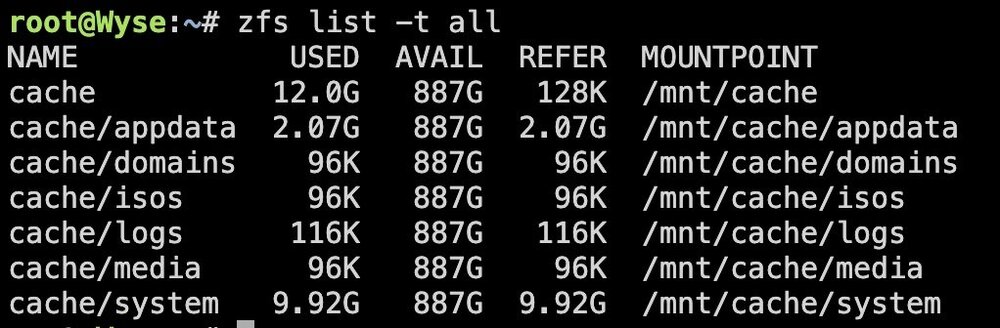
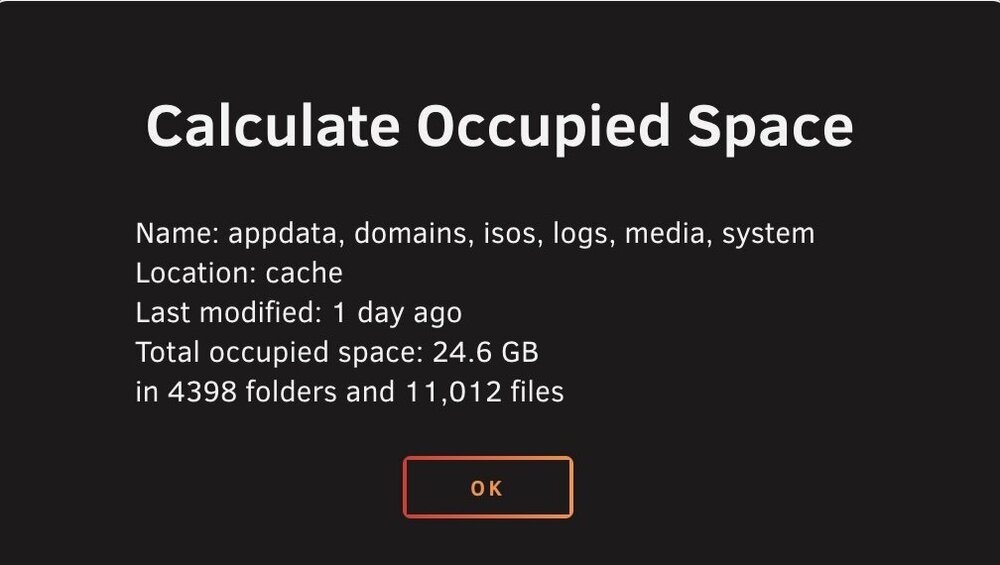
Is this normal behavior? The GUI reports 12gb of used space on my ZFS mirror pool, while the file explorer reports 24gb. It appears the discrepancy is in the docker.img file, where the GUI thinks it's 9gb while the file explorer thinks its 21.5 gb. I've also included the output of "zfs list -t all", which matches the GUI.


-
So my unraid server consumes a small fraction of the power used by other devices on the UPS, maybe 10 percent, so I don’t think 60 minutes to shutdown is from power savings. My UPS displayed “3 minutes of runtime” remaining while simultaneously showing 60 minutes until shutdown. The 3 minutes seems more likely accurate given the power draw and capacity of my UPS. It’s almost as if the shutdown command being sent to the UPS has an hour delay for some reason. The reason why I want my UPS to shut down is to 1) prevent draining the battery and shortening its lifespan and 2) prevent some other devices (router, switches, NVR) from constantly turning back on and off again in the event of many power loss events in a short period of time, as is common during storms in my region.
-
Hello, I’m running version 6.12.10 and have a cyberpower CP1500PFCRM2U UPS. I use the baked in apcupsd client and have my unraid server set to shutdown at 30 percent battery life or 15 minutes of runtime, and then my UPS to shutdown after that. This worked flawlessly at some point in the past (unsure what version), but now during two recent outages the server successfully shut down, but the UPS did not. During the first outage the UPS LCD screen it said “59 minutes to shutdown” and at the same time it said “5 minutes of runtime remaining”. During the second outage I was actually watching the UPS as the unraid shutdown command was sent, and immediately the LCD changed to “60 minutes to shutdown” despite only a few minutes of runtime remaining on the UPS. Does anyone have any idea what is going on here? I haven’t changed the firmware or anything on the UPS, and it used to work in the past. Thanks
-
I know this is a very old thread - but let's say I want to use a USB drive solely as a TimeMachine backup disk. It would stay connected to the server. Would unassigned devices make more sense?
-
I attempted to update the plugin, and it showed a line or two in the update window before stalling for several minutes so I closed the window. Now there's a bar at the top of the screen saying "Attention - operation continues in background [00023828]" and the plugin status says "pending". It's been this way for 15 minutes now. Should I click the "bomb" icon to kill the process? Or keep waiting longer? Thanks.
-
Totally agree - even the "Unraid Installation" instructions on the developer's website doesn't say anything about installing and setting up a database. Seems that the documentation is lacking.


