





mattalat
Members
-
Joined
-
Last visited
Everything posted by mattalat
-
Checking in 4 months later - I'm still having this issue. Any update? Thanks!
-
That fixed it! Thx!
-
Just updated! Everything still working, except PWM% on dashboard is blank, see pic. I can attach diagnostics if necessary.
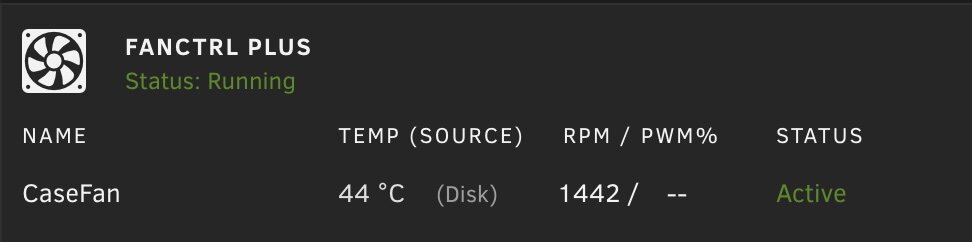
-
Oh interesting - yes I have Dynamix System Temp installed, not sure why the % went away when I deleted autofan. Anyways it's not a big deal, much happier with this plugin. Being able to disable syslog for the fan changes is fantastic.
-
Finally got a chance to try it out, works great! One thing I noticed is that with Dynamix Autofan the fan speed indicator on the little bar on the bottom of the screen would read: Fan RPM (%). As soon as I deleted the autofan plugin the (%) went away, and it just shows the RPM. Small nitpick, but it was nice knowing what percent the fan was running at. At this point I can't remember if that little indicator is default unraid behavior or from some other plugin I have installed.

-
Try installing the IT87 plugin from the community apps store. It's needed to recognize the PWM fans on my DXP4800 plus
-
I haven't even tried this plugin yet but I was so excited when I learned about it. Dynamix Autofan is woefully out of date and I've been thinking forever that there needs to be a modern replacement. I'm out of town now but will be installing when I get home. I currently use the IT87 driver plugin to expose the PWM fans for my ugreen case, I assume this will still be necessary?
-
Just chiming in that mine do this as well. One server shows nothing for the version, while the other shows "2023.09.08.0637". Both are up to date.
-
I consider the dynamix autofan plugin to be essential - controlling array drive temp is very important for drive longevity and nearly all users would benefit from the feature. Unfortunately the current dev has stated that he/she does not have the time to continue updates. Currently there is a bug where the plugin will not start upon reboot. This is solved by manually restarting the plugin, but this is a problem when the server crashes or there is a power outage. I would gladly pay for this updated functionality, or would update the plugin myself if I had the expertise. Any chance of making this plugin a core feature? Does anyone else agree?
-
I would recommend goharddrive.com (check their ebay store as well, sometimes has different stuff / better prices) or serverpartdeals.com. Focus on "factory recertified" drives, not "factory refurbished". Recertified means that they were malfunctioning and fixed, or returned. Refurbished means they may have been used for years. Goharddrive offers 5 year warranty on their recertified models, while serverpartdeals offers 2 year warranty. You'll save a ton of money in the long run and both companies have great reputations about honoring their warranty and replacing drives quickly.
-
Does disabling fan control and re-enabling make it work again? This was a known issue 7.0.1 and earlier. Or is it broken completely now?
-
No, it should be started. On 7.0.1 this is accomplished by disabling and then enabling the fan control function again. Some people reported it might be broken completely on 7.1.2. Can you confirm? I'm on 7.0.1 and afraid to upgrade now haha
-
Is there any hope for this bug being patched anytime soon? Or is adding a script to the go file the only solution? Same issue where I have to manually start auto fan whenever the system reboots.
-
Go to appdata/plex/Library/Application Support/Plex Media Server/Logs and look for Plex Media Server.log. Scroll down to find the approximate time of the crash and look for a gap in the logs (when the server was down).
-
Interesting - what do the plex logs say before it crashes?
-
I know this is a super old post - but I was trying to search for discussion of this specific feature and this is the only thing I found. Has anyone suggested a way of making a second pass parity check w/ correction not repeat all of the work of the initial parity test? Like if I have an unclean shutdown and it finds a handful of errors, currently I have to do the whole thing over again with "write errors to disk" right?
-
I ended up getting so fed up after replacing almost everything that I just returned the box (UGreen 4800 plus) and got another one. The new has been fine, no crashes in around 5 weeks. I'm not sure in the end what the culprit was, but seems like it must have been hardware - either the CPU, power supply or bad ram (despite many flawless memtests).
-
In case anyone finds this later: in the end it seems to have been a hardware issue. I returned my server and obtained a new one, and the crashes stopped. Not sure what the specific hardware issue was, but it's been going strong for about 3 weeks now with no crashes.
-
I know it's annoying, but I'd try swapping the USB drive to rule that out. Failing USB drives can cause weird crashing issues
-
Hello - I've been reading a bunch of old threads about some of the tunable settings, specifically lots of recommendations for Tunable (md_num_stripes) to be set to 4096 for systems with sufficient ram. I can't find anything recent on the topic, and the default value is 1280 on my system. I have plenty of ram (currently use around 10gb of my 32gb). Should I increase this? Is there any documentation around this Tunable setting or the others listed? I can't find it in the manual. Screenshot attached. Thanks.

-
Does anyone know if these plugins are under active development? I see that @bonienl hasn't posted since May of last year. Is he/she ok?
-
Curious to hear what people are using and why
-
I have tried switching from a USB 3.0 to USB 2.0 port with no improvement. In the meantime I've set my NUT server to run on my old (now backup) server and all seems to be working fine. Debug package attached. nut-debug-20250127235828.zip
-
Hello, I have a Cyberpower UPS and it works fine with NUT. However after migrating to a new server and upgrading to Unraid 7.0 my syslog is filling up with this message: Jan 26 13:22:09 Green usbhid-ups[713416]: nut_libusb_get_report: Input/Output Error Jan 26 13:22:11 Green usbhid-ups[713416]: #012Reconnecting. If you saw "nut_libusb_get_interrupt: Input/Output Error" or similar message in the log above, try setting "pollonly" flag in "ups.conf" options section for this driver! Jan 26 13:22:11 Green usbhid-ups[713416]: nut_libusb_get_string: Input/Output Error Jan 26 13:25:36 Green usbhid-ups[713416]: nut_libusb_get_report: Input/Output Error Jan 26 13:25:38 Green usbhid-ups[713416]: #012Reconnecting. If you saw "nut_libusb_get_interrupt: Input/Output Error" or similar message in the log above, try setting "pollonly" flag in "ups.conf" options section for this driver! Jan 26 13:32:53 Green monitor_nchan: Stop running nchan processes Jan 26 13:36:52 Green usbhid-ups[713416]: nut_libusb_get_string: Input/Output Error Jan 26 13:39:32 Green usbhid-ups[713416]: nut_libusb_get_report: Input/Output Error Jan 26 13:39:34 Green usbhid-ups[713416]: #012Reconnecting. If you saw "nut_libusb_get_interrupt: Input/Output Error" or similar message in the log above, try setting "pollonly" flag in "ups.conf" options section for this driver! Jan 26 13:39:34 Green usbhid-ups[713416]: nut_libusb_get_string: Pipe error Jan 26 13:40:38 Green usbhid-ups[713416]: nut_libusb_get_report: Input/Output Error Jan 26 13:40:40 Green usbhid-ups[713416]: #012Reconnecting. If you saw "nut_libusb_get_interrupt: Input/Output Error" or similar message in the log above, try setting "pollonly" flag in "ups.conf" options section for this driver! Jan 26 13:45:27 Green usbhid-ups[713416]: nut_libusb_get_report: Input/Output Error Jan 26 13:45:29 Green usbhid-ups[713416]: #012Reconnecting. If you saw "nut_libusb_get_interrupt: Input/Output Error" or similar message in the log above, try setting "pollonly" flag in "ups.conf" options section for this driver! This never used to happen with my old server. I found some old advice of adding "pollonly" to line 8 of the ups.conf, but when I did that NUT refused to start stating that: Jan 26 13:18:01 Green rc.nut: Can't open /var/run/nut/usbhid-ups-ups.pid: No such file or directory Jan 26 13:18:01 Green rc.nut: Can't open /var/run/nut/usbhid-ups-auto.pid either: No such file or directory So I reset the config and restarted it, and now it's working again, albeit with the above Input/Output errors. This never used to happen on my old server, and I'm using the same USB cable as before. Any ideas?
-
That was my thinking, I'll do that. Thank you!




