PeterB
Community Developer
-
Joined
-
Last visited
Everything posted by PeterB
-
Not directly related to DelugeVPN, but I've been experimenting with with IPTV streaming, via PIA VPN, and find that I experience a lot of rebuffering on the stream. The rebuffering occurs whether I use PriVoxy from DelugeVPN, or I set up a dedicated VPN connection on my router, solely for use by Kodi. If I stream direct, not via VPN, rebuffering very seldom occurs, so I presume that the problem is due either to PIA, or general VPN overheads. The rebuffering seems to be most prevalent from about 1400 UTC (10pm here in Philippines). I'm thinking of changing VPN provider - Ivacy and Mullvad both claim to have fast connections and support port forwarding. Does anyone have relevant experience of these providers, either in terms of configuration/use with DelugeVPN, or streaming performance? Mullvad have the disadvantage that they don't support PPTP/L2TP connections, so wouldn't allow a connection direct from my router. Does anyone have suggestions for other VPN providers to be considered? I have a 100Mbps fibre connection.
-
I know what you mean - I only remember one power outage in the last seven years before I left UK.
-
If you're really worried about power outages, I suggest that you invest in a small UPS and use APCUPSD (built in to unRAID) to perform the safe shutdown. Here in Philippines, we can have several unscheduled power outages in one day. I used an APC BK650 UPS (since upgraded) and have set the configuration to power down five minutes after the power goes off. It works perfectly.
-
I first encountered this behaviour some months ago and cannot identify which build it started with. The issue cannot be produced at will and seems to occur only after many days running. What is certain is that the issue goes away after restarting the container. With unreliability of electrical supply here in Philippines, it's not often that there is sufficient time of continuous running for the issue to raise its head.
-
I've seen this happen on my set up - a four core/eight thread E3-1230v2 and a 50Mb fibre connection (since upgraded to 100Mb).
-
No 1 I've noticed recently, but not a problem for me - my PWMs don't shutdown, but run about 30% when 0 is sent. No 2 doesn't seem to be happening here - my log shows autofan switching between 39C and 40C, while the Unraid main tab is showing that the highest temp is currently 40C.
-
I was playing with autofan only last week, and thought, like you, that it was erroneously reverting to PWM 1 everytime I tried to configure PWM 2. I discovered that autofan is actually more functional than I first thought, but that isn't clear from the user interface. It seems that autofan discovers all the PWM controllers and allows you to enable/disable/configure each of them independently. It actually keeps separate .cfg files for each PWM controller. However, it still doesn't appear to get everything correct and the integration with System Temperature is a little suspect. I'm currently on 2020.06.21 version - I'm not sure which update you're referring to.
-
Okay, not as serious as I first thought. I believe that it's not Autofan which is misbehaving, but System Temp reports the same pwm percentage against all fan speeds, even for a fan which is not controlled by that pwm value (pwm2 in this case). I wonder whether System Temp and Autofan need some knowledge of which pwm value controls which fan? It's not clear, to me, how System Temp decides which pwm percentage to display - is there some information shared between the two plugins?
-
How are you loading the sensor modules? Be aware that, depending on what modules are loaded, the directory path to the sense and control values can change. I find that the 'Detect' options on the Autofan configuration are not very helpful. I make all my settings manually, even if one gets overwritten!. Autofan appears to start okay on boot, for me. My problem is that it sets my cpu fan to the same control value as the case fans!
-
I believe that autofan only takes account of drive temperatures. I'm not sure what happens when there are no drives reporting temperatures (eg all drives spun down).
-
I have a, what I believe to be serious, problem with the autofan plugin. I don't understand what the significance/purpose of the 'PWM Controller' field is. I'm offered options of 'nct6776 - pmw1', 'nct6776 - pmw2' & 'nct6776 - pmw3'. However, whichever option I select it always gets forced back to pwm1. My case fans are controlled by '/sys/class/hwmon/hwmon2/pwm2' but with this setting, I find that autofan always sets pwm1 to the same value as pwm2. This might not be so serious if pwm1 wasn't the controller for my CPU fan! Why is this happening and how can I stop pwm1 being adjusted? Is it because of the PWM Controller setting, or is it another issue?
-
I find that the system temp plugin seems reluctant to load all modules, even if listed correctly (I think that the first listed is ignored). My solution is to modprobe the missing module in the go file.
-
Indeed, the inability to use NFS v4 is still an annoyance. I don't have any machines running Microsoft - all my desktop m/cs run Linux Mint, my KODI/LibreElec boxes run a Linux kernel, my Squeezeplayer boxes run a Linux kernel, my homebrew domestic lighting control system runs on Linux, even Android phones run a Linux kernel. Why would I want to run a microsoft network filing technology. T0rqueWr3nch has highlighted some advantages of using the latest version of NFS in such an environment. Please, if it's simply a matter of turning on a kernel option, and it has no adverse effect on any other functionality, can this be implemented in the next release?
-
I've seen this as well, but I only have eight cores. I see the CPU usage rise to near 100% and it's difficult to gain control. However, restarting the container restores sanity.
-
Thank you, sir, for the corrections. So containers do behave as though they have disk storage built in - if you modify that disk (image), the modifications will still be there tomorrow, after a reboot. But, if I understand correctly, if you modify a container setting, then the disk image will be reset to the state it was in the original distribution image?
-
I thought that the docker container image is loaded into memory, and that its system disk image is memory resident. If you write anything to that memory-resident disk, all you have to do to clear it is to restart the container. Yes, the docker vDisk image (where all the docker images are stored) can become full or, less likely, get corrupted during some system abberation. The vDisk is unlikely to become corrupted during normal system operation. As I understand it, Noego is concerned because he modified the container's disk image. Therefore, all he needs to do to get back to pristine state is to restart the container.
-
I have my dockers, and their data, on an unassigned drive. I download my torrents (leeching), initially, directly onto a cache-only share. Once the download finishes, and the torrent starts seeding, the torrent is automatically moved to a normal parity -protected share on array disks. I then do some processing, manually, using MKVToolNix, to place the manipulated movie file on to my Movies share. When I've completed that, I use deluge to move the torrent onto a another share on array disks. In this way, I can martial my torrents and know which ones I've created a movie file from. Duluge only ever writes torrents to the cache drive, without use of the parity drives. Once the torrent file is no longer being updated, it is moved to a parity-protected share for greater protection.
-
Strange - I have the problem that I no longer have 'update' options showing on the Dashboard - I have to go to the Docker page in order to invoke the update.
-
AutoRemovePlus: As far as I can tell, the most active/recent development of the AutoRemovePlus plugin is being performed by Spring Jools, here. I've even had correspondence with the maintainer, and had a new feature added. I downloaded the .zip, and built the .egg within the docker container (Latest). I installed it, taking note of the advice at the bottom of the README.md, to delete existing versions and .conf files. It appears to work perfectly well, but can only be configured from the Deluge WebGui. I have built, and installed, it on my desktop computer for the Thin Client but, while it appears to install, and can be enabled in the plugin preferences, I cannot get the actual AutoRemove settings to show up there. So, although the plugin can only be configured through the WebGui, it does work.
-
These ar e the type of problems I was experiencing a couple of weeks ago. I tried several of the European servers - in the end, I discovered servers in Canada appeared to be working correctly. When my year subscription is up, I will look at moving to Mullvad.
-
After three years of using PIA, I had a problem last week, getting a decent connection. I tried several servers and experienced different symptoms with the various ones I tried. In the end, I discovered a Canadian server which was, and still is, working okay.
-
Ah, that was just off the bottom of my browser window. Okay, that has done the trick - thanks.
-
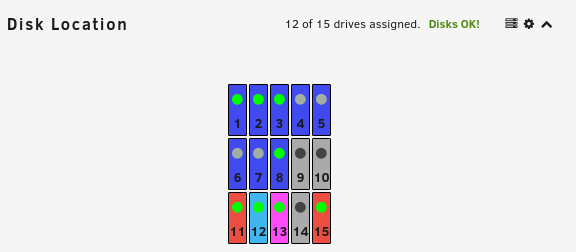
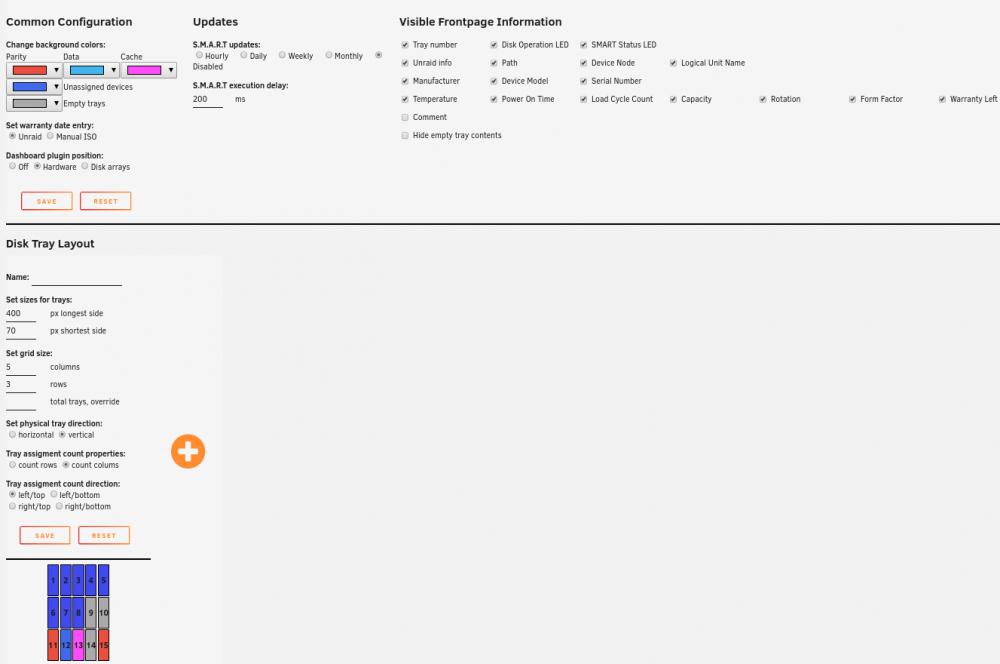
I have been selecting default colours, I have clicked the reset button, and the machine has been rebooted. What else can I do to gain control over the colours? See attached screenshot. Disks 1-8 are data drives, Drive 12 is unassigned (used for docker).
-
What do you call "full speeds"? My connection is, at best 100Mbps (nominally 50Mbps), and I am still seeing downloads at up to 8MBps and uploads running at the full limited rate of 6MBps, with v2.0.4.
-
But my Data drives are shown in a darker blue, and this colour doesn't appear in the picker.