





timocapa
Members
-
Joined
-
Last visited
Everything posted by timocapa
-
VM creation wizard seems to default to q35-9.2 (good) on all Linux templates, however also still sets IDE (bad) as default CDRom Bus, which will result in a creation error msedge_aDIPS8vAbI.mp4 Windows templates still seem to default to i440fx-9.2, which I guess is fine for older than Windows 8? edit: Bug: Cdrom bus IDE for Q35 is invalid set to SATA by SimonFair · Pull Request #2439 · unraid/webgui · GitHub
-
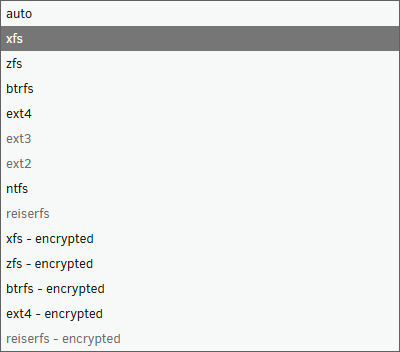
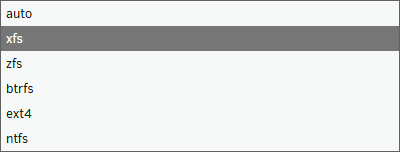
With unRAID 7.2 adding more filesystem support, the dropdown for selecting a filesystem, especially in the single-disk config, feels like it’s getting a bit crowded. Few suggestions I thought about: Only keep the EXT4 entry and add a tooltip that mentions it also supports EXT2/3 partitions Remove "(encrypted)" entries and add a "Encrypted: X" checkbox below With ReiserFS support having been removed in Linux 6.13, the entry should be removed in a future unRAID update once it migrated past Linux 6.12.x (unless a forward port is planned) To me, this seems to simplify the setup a little, or at least gives less of a chance to confuse users. Thoughts? I attached 2 screenshots as a before/after of the dropdown
-
As of unRAID 7.1 it seems we can modify the network's DNS settings while containers and VMs are running. Doing this however seems to break network connectivity. I just very quickly dug into the logs and config, and it seems after applying, unRAID wipes /boot/config/network.cfg clean. The only entries in it after are the following: # Generated settings: IFNAME[0]="eth0" SYSNICS="1" If I remove the network config, and reboot the system, unRAID automatically repopulates the network.cfg file, and connectivity works again. These are the default values for me: # Generated settings: IFNAME[0]="br0" DHCP_KEEPRESOLV="no" DHCP6_KEEPRESOLV="yes" BONDNAME[0]="bond0" BONDNICS[0]="eth0 eth1 eth2 eth3" BONDING_MODE[0]="1" BONDING_MIIMON[0]="100" BRNAME[0]="br0" BRNICS[0]="bond0" BRSTP[0]="no" BRFD[0]="0" PROTOCOL[0]="ipv4" USE_DHCP[0]="yes" USE_DHCP6[0]="" SYSNICS="1" I will attach a syslog file from a session where the DNS is changed with active containers/vms, and where network connectivity breaks. I think me applying the DNS change starts at line 2015, though otherwise doesn't seem to helpful (at least to me). I'm happy to provide more info if necessary. E: Sorry for it not being proper diagnostics. I didn't know or find the command at the time, but I did just find it after syslog-broken
-
Improved WebUI, but even more so I'd like to see proper Docker Compose support, not via a plugin. Would make container / stack management so much easier.
-
Earlier today I started migrating from a BTRFS-based docker.img to an XFS-based docker.img. When I finished setting up the XFS based image, I went to delete the BTRFS image via unRAID's WebGUI in `Settings -> Docker` I attached a video where I reproduced the wrong image being removed. I'm assuming it saved the last used image, so changing the vDisk didn't take unless you save it prior. Desktop 2023.09.14 - 14.41.16.08.mp4
-
unRAID currently ships `bzmodules` and `bzfirmware` as SquashFS, however another read-only filesystem exists called EROFS, which should only be slightly bigger in image size than SquashFS, however it should be much faster, potentially translating to faster boot times. Everyone should gain from this, so I think it might be worth looking into. References: https://www.kernel.org/doc/html/v5.8/filesystems/erofs.html https://www.usenix.org/system/files/atc19-gao.pdf https://blog.sigma-star.at/post/2022/07/squashfs-erofs/ Command example: `mkfs.erofs -zlzma -C 65536 -Eztailpacking *image* *folder*` Changes needed (as far as I can tell): - Enable EROFS support in the kernel (with lzma support, as per example above, if wanted) - Edit fstab to use `erofs` instead `squashfs` with only `ro` as mount option
-
See: https://docs.kernel.org/admin-guide/pm/amd-pstate.html This may or may not provide better performance, however it should help with power usage due to being able to clock much lower. If I recall correctly, my 5600x on my Arch Linux install with acpi-cpufreq can clock around 2.2 GHz and its turbo of 4.85 Ghz, while with amd-pstate it's: hardware limits: 550 MHz - 4.88 GHz
