





custom90gt
Members
-
Joined
-
Last visited
-
You are spot on. I had set it up this way with the previous Xeon setup I had and totally spaced it out.
-
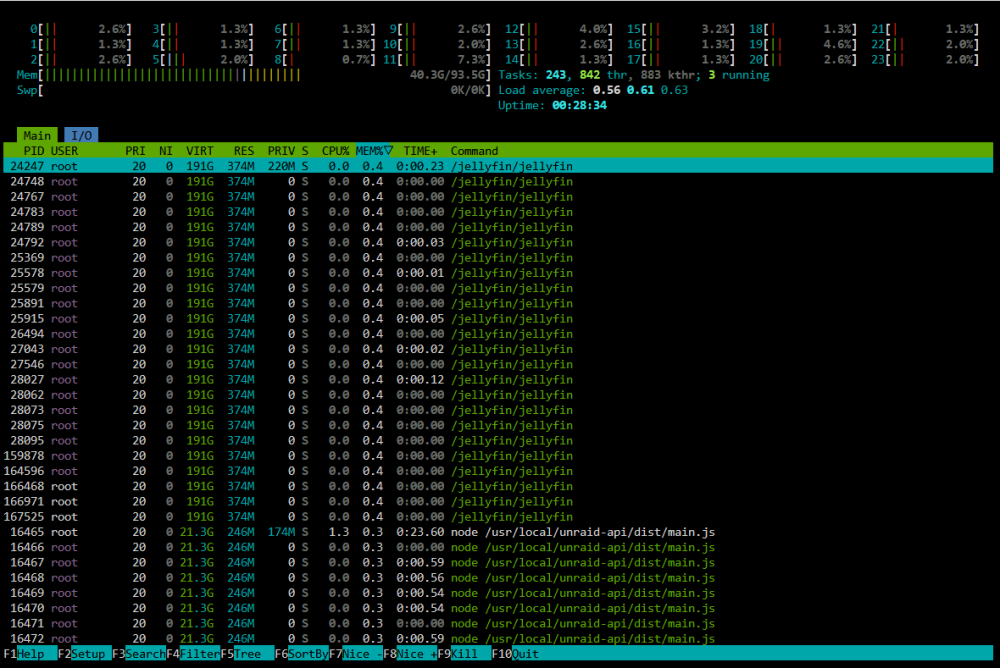
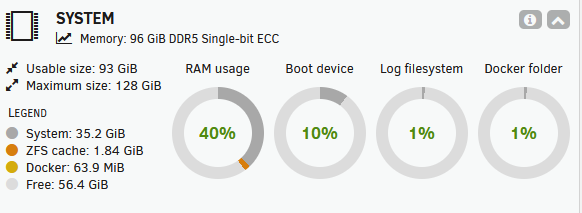
I recently downgraded my server to save power and make a little money so I went from 256GB of ram to 96GB. I noticed that the system is always using 35+GB of memory even on boot. I thought it wasn't an issue but when I transcode to ram, it never frees up any of that system space and my transcode will fail. I've tried everything I can think of to find out what is using the system ram but have not been able to do so. I don't have Unraid Connect installed, but I still see lots of instances of /usr/local/unraid-api/dist/main.js for unknown reasons... harley-diagnostics-20260930-0646.zip
-
So walking through chatGPT, it had me make a variety of changes, but ultimately switching from passthrough to host-model seems to have made a big difference without having to go down the emulated route. Here is my xml with all of the changes in case it helps anyone: <?xml version='1.0' encoding='UTF-8'?> <domain type='kvm' id='9'> <name>Windows 10</name> <uuid>b04ff250-e07a-2ba1-c15b-bb6384b438c1</uuid> <metadata> <vmtemplate xmlns="unraid" name="Windows 10" iconold="windows.png" icon="windows.png" os="windows10" webui="" storage="default"/> </metadata> <memory unit='KiB'>16777216</memory> <currentMemory unit='KiB'>16777216</currentMemory> <memoryBacking> <hugepages/> <locked/> <source type='memfd'/> <access mode='shared'/> </memoryBacking> <vcpu placement='static'>24</vcpu> <cputune> <vcpupin vcpu='0' cpuset='20'/> <vcpupin vcpu='1' cpuset='21'/> <vcpupin vcpu='2' cpuset='22'/> <vcpupin vcpu='3' cpuset='23'/> <vcpupin vcpu='4' cpuset='24'/> <vcpupin vcpu='5' cpuset='25'/> <vcpupin vcpu='6' cpuset='26'/> <vcpupin vcpu='7' cpuset='27'/> <vcpupin vcpu='8' cpuset='28'/> <vcpupin vcpu='9' cpuset='29'/> <vcpupin vcpu='10' cpuset='30'/> <vcpupin vcpu='11' cpuset='31'/> <vcpupin vcpu='12' cpuset='52'/> <vcpupin vcpu='13' cpuset='53'/> <vcpupin vcpu='14' cpuset='54'/> <vcpupin vcpu='15' cpuset='55'/> <vcpupin vcpu='16' cpuset='56'/> <vcpupin vcpu='17' cpuset='57'/> <vcpupin vcpu='18' cpuset='58'/> <vcpupin vcpu='19' cpuset='59'/> <vcpupin vcpu='20' cpuset='60'/> <vcpupin vcpu='21' cpuset='61'/> <vcpupin vcpu='22' cpuset='62'/> <vcpupin vcpu='23' cpuset='63'/> <emulatorpin cpuset='16-17'/> </cputune> <numatune> <memory mode='strict' nodeset='1'/> </numatune> <resource> <partition>/machine</partition> </resource> <os> <type arch='x86_64' machine='pc-i440fx-9.2'>hvm</type> <loader readonly='yes' type='pflash' format='raw'>/usr/share/qemu/ovmf-x64/OVMF_CODE-pure-efi.fd</loader> <nvram format='raw'>/etc/libvirt/qemu/nvram/b04ff250-e07a-2ba1-c15b-bb6384b438c1_VARS-pure-efi.fd</nvram> </os> <features> <acpi/> <apic/> <hyperv mode='custom'> <relaxed state='on'/> <vapic state='on'/> <spinlocks state='on' retries='8191'/> <vpindex state='on'/> <synic state='on'/> <frequencies state='on'/> <tlbflush state='on'/> </hyperv> </features> <cpu mode='custom' match='exact' check='full'> <model fallback='forbid'>GraniteRapids</model> <vendor>Intel</vendor> <topology sockets='1' dies='1' clusters='1' cores='12' threads='2'/> <feature policy='require' name='dtes64'/> <feature policy='require' name='vmx'/> <feature policy='require' name='pdcm'/> <feature policy='require' name='hypervisor'/> <feature policy='require' name='ds'/> <feature policy='require' name='ss'/> <feature policy='require' name='tsc_adjust'/> <feature policy='require' name='fdp-excptn-only'/> <feature policy='require' name='zero-fcs-fds'/> <feature policy='require' name='waitpkg'/> <feature policy='require' name='cldemote'/> <feature policy='require' name='movdiri'/> <feature policy='require' name='movdir64b'/> <feature policy='require' name='md-clear'/> <feature policy='require' name='stibp'/> <feature policy='require' name='flush-l1d'/> <feature policy='require' name='intel-psfd'/> <feature policy='require' name='ipred-ctrl'/> <feature policy='require' name='rrsba-ctrl'/> <feature policy='require' name='ddpd-u'/> <feature policy='require' name='bhi-ctrl'/> <feature policy='require' name='ibpb'/> <feature policy='require' name='ibrs'/> <feature policy='require' name='amd-stibp'/> <feature policy='require' name='amd-ssbd'/> <feature policy='require' name='tsx-ctrl'/> <feature policy='require' name='gds-no'/> <feature policy='require' name='rfds-no'/> <feature policy='require' name='vmx-activity-wait-sipi'/> <feature policy='require' name='vmx-tsc-scaling'/> <feature policy='require' name='vmx-enable-user-wait-pause'/> <feature policy='disable' name='hle'/> <feature policy='disable' name='rtm'/> <feature policy='disable' name='amx-fp16'/> <feature policy='disable' name='prefetchiti'/> <feature policy='disable' name='mcdt-no'/> <feature policy='disable' name='taa-no'/> <feature policy='disable' name='pbrsb-no'/> </cpu> <clock offset='localtime'> <timer name='tsc' present='yes' mode='native'/> <timer name='hpet' present='no'/> </clock> <on_poweroff>destroy</on_poweroff> <on_reboot>restart</on_reboot> <on_crash>restart</on_crash> <devices> <emulator>/usr/local/sbin/qemu</emulator> <disk type='file' device='disk'> <driver name='qemu' type='raw' cache='writeback' discard='unmap'/> <source file='/mnt/cache/domains/Windows 10/vdisk1.img' index='2'/> <backingStore/> <target dev='hdc' bus='virtio'/> <serial>vdisk1</serial> <boot order='1'/> <alias name='virtio-disk2'/> <address type='pci' domain='0x0000' bus='0x00' slot='0x0d' function='0x0'/> </disk> <disk type='file' device='cdrom'> <driver name='qemu' type='raw'/> <source file='/mnt/cache/isos/virtio-win-0.1.271-1.iso' index='1'/> <backingStore/> <target dev='hdb' bus='ide'/> <readonly/> <alias name='ide0-0-1'/> <address type='drive' controller='0' bus='0' target='0' unit='1'/> </disk> <controller type='usb' index='0' model='ich9-ehci1'> <alias name='usb'/> <address type='pci' domain='0x0000' bus='0x00' slot='0x07' function='0x7'/> </controller> <controller type='usb' index='0' model='ich9-uhci1'> <alias name='usb'/> <master startport='0'/> <address type='pci' domain='0x0000' bus='0x00' slot='0x07' function='0x0' multifunction='on'/> </controller> <controller type='usb' index='0' model='ich9-uhci2'> <alias name='usb'/> <master startport='2'/> <address type='pci' domain='0x0000' bus='0x00' slot='0x07' function='0x1'/> </controller> <controller type='usb' index='0' model='ich9-uhci3'> <alias name='usb'/> <master startport='4'/> <address type='pci' domain='0x0000' bus='0x00' slot='0x07' function='0x2'/> </controller> <controller type='pci' index='0' model='pci-root'> <alias name='pci.0'/> </controller> <controller type='pci' index='1' model='pci-bridge'> <model name='pci-bridge'/> <target chassisNr='1'/> <alias name='pci.1'/> <address type='pci' domain='0x0000' bus='0x00' slot='0x02' function='0x0'/> </controller> <controller type='pci' index='2' model='pci-bridge'> <model name='pci-bridge'/> <target chassisNr='2'/> <alias name='pci.2'/> <address type='pci' domain='0x0000' bus='0x00' slot='0x03' function='0x0'/> </controller> <controller type='pci' index='3' model='pci-bridge'> <model name='pci-bridge'/> <target chassisNr='3'/> <alias name='pci.3'/> <address type='pci' domain='0x0000' bus='0x00' slot='0x04' function='0x0'/> </controller> <controller type='pci' index='4' model='pci-bridge'> <model name='pci-bridge'/> <target chassisNr='4'/> <alias name='pci.4'/> <address type='pci' domain='0x0000' bus='0x00' slot='0x06' function='0x0'/> </controller> <controller type='pci' index='5' model='pci-bridge'> <model name='pci-bridge'/> <target chassisNr='5'/> <alias name='pci.5'/> <address type='pci' domain='0x0000' bus='0x00' slot='0x08' function='0x0'/> </controller> <controller type='pci' index='6' model='pci-bridge'> <model name='pci-bridge'/> <target chassisNr='6'/> <alias name='pci.6'/> <address type='pci' domain='0x0000' bus='0x00' slot='0x09' function='0x0'/> </controller> <controller type='pci' index='7' model='pci-bridge'> <model name='pci-bridge'/> <target chassisNr='7'/> <alias name='pci.7'/> <address type='pci' domain='0x0000' bus='0x00' slot='0x0a' function='0x0'/> </controller> <controller type='ide' index='0'> <alias name='ide'/> <address type='pci' domain='0x0000' bus='0x00' slot='0x01' function='0x1'/> </controller> <controller type='virtio-serial' index='0'> <alias name='virtio-serial0'/> <address type='pci' domain='0x0000' bus='0x00' slot='0x05' function='0x0'/> </controller> <filesystem type='mount' accessmode='passthrough'> <driver type='virtiofs' queue='1024'/> <binary path='/usr/libexec/virtiofsd' xattr='on'> <cache mode='always'/> <sandbox mode='chroot'/> </binary> <source dir='/mnt/ssd/games/'/> <target dir='games'/> <alias name='fs0'/> <address type='pci' domain='0x0000' bus='0x00' slot='0x0b' function='0x0'/> </filesystem> <interface type='bridge'> <mac address='52:54:00:cf:56:2d'/> <source bridge='br0'/> <target dev='vnet8'/> <model type='virtio-net'/> <alias name='net0'/> <address type='pci' domain='0x0000' bus='0x00' slot='0x0c' function='0x0'/> </interface> <serial type='pty'> <source path='/dev/pts/1'/> <target type='isa-serial' port='0'> <model name='isa-serial'/> </target> <alias name='serial0'/> </serial> <console type='pty' tty='/dev/pts/1'> <source path='/dev/pts/1'/> <target type='serial' port='0'/> <alias name='serial0'/> </console> <channel type='unix'> <source mode='bind' path='/run/libvirt/qemu/channel/9-Windows 10/org.qemu.guest_agent.0'/> <target type='virtio' name='org.qemu.guest_agent.0' state='connected'/> <alias name='channel0'/> <address type='virtio-serial' controller='0' bus='0' port='1'/> </channel> <input type='tablet' bus='usb'> <alias name='input0'/> <address type='usb' bus='0' port='2'/> </input> <input type='mouse' bus='ps2'> <alias name='input1'/> </input> <input type='keyboard' bus='ps2'> <alias name='input2'/> </input> <graphics type='vnc' port='5900' autoport='yes' websocket='5700' listen='0.0.0.0' sharePolicy='ignore'> <listen type='address' address='0.0.0.0'/> </graphics> <audio id='1' type='none'/> <video> <model type='qxl' ram='65536' vram='16384' vgamem='16384' heads='1' primary='yes'/> <alias name='video0'/> <address type='pci' domain='0x0000' bus='0x00' slot='0x1e' function='0x0'/> </video> <hostdev mode='subsystem' type='pci' managed='yes'> <driver name='vfio'/> <source> <address domain='0x0000' bus='0xbe' slot='0x00' function='0x0'/> </source> <alias name='hostdev0'/> <address type='pci' domain='0x0000' bus='0x00' slot='0x0e' function='0x0'/> </hostdev> <hostdev mode='subsystem' type='pci' managed='yes'> <driver name='vfio'/> <source> <address domain='0x0000' bus='0xbe' slot='0x00' function='0x1'/> </source> <alias name='hostdev1'/> <address type='pci' domain='0x0000' bus='0x00' slot='0x0f' function='0x0'/> </hostdev> <hostdev mode='subsystem' type='usb' managed='no'> <source> <vendor id='0x1b1c'/> <product id='0x0c2a'/> <address bus='1' device='3'/> </source> <alias name='hostdev2'/> <address type='usb' bus='0' port='1'/> </hostdev> <memballoon model='none'/> </devices> <seclabel type='dynamic' model='dac' relabel='yes'> <label>+0:+100</label> <imagelabel>+0:+100</imagelabel> </seclabel> </domain>
-
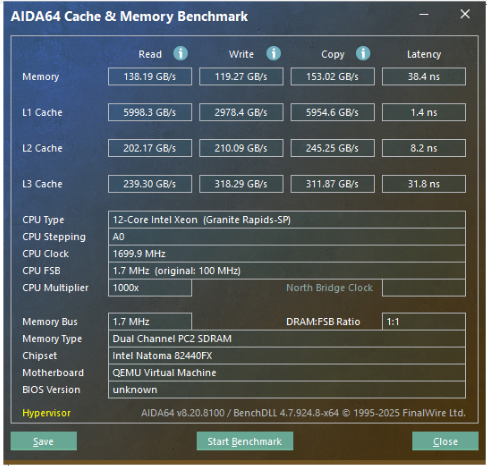
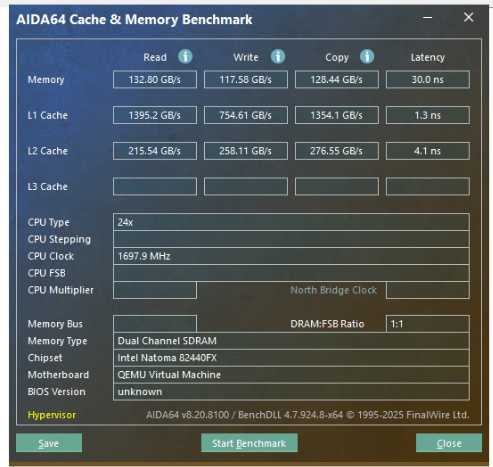
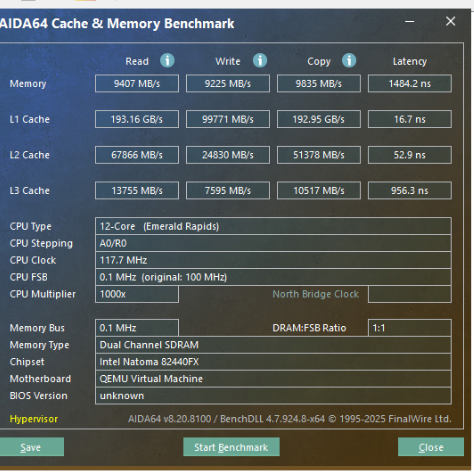
I've been playing around with a Windows 10 VM for steam stream and it's pretty laggy. I decided to test the memory with AIDA64 and I'm quite surprised with the results. With the CPU in passthrough mode the latency and memory read speeds are terrible (and it feels that way when clicking on things). In emulated mode, it's better but not amazing. I'm confused as to why emulated mode would run better than passthrough. I have 12 cores (24 threads) pinned and also isolated. I've tried a few things and I'm out of ideas on how to make this a more responsive/enjoyable solution. AIDA64 in passthrough: AIDA64 in emulated: System specs: Gigabyte MS03-CE0 motherboard Intel Q2SR (QS version of the Intel Xeon Platinum 8592+ 64 core cpu) with 32 cores disable for higher turbo speeds 256GB DDR5 4800mhz ECC memory Nvidia 3060 12GB passed through to the VM The domain is hosted on a SSD VM config <?xml version='1.0' encoding='UTF-8'?> <domain type='kvm' id='2'> <name>Windows 10</name> <uuid>b04ff250-e07a-2ba1-c15b-bb6384b438c1</uuid> <metadata> <vmtemplate xmlns="http://unraid" name="Windows 10" iconold="windows.png" icon="windows.png" os="windows10" webui="" storage="default"/> </metadata> <memory unit='KiB'>17301504</memory> <currentMemory unit='KiB'>17301504</currentMemory> <memoryBacking> <source type='memfd'/> <access mode='shared'/> </memoryBacking> <vcpu placement='static'>24</vcpu> <cputune> <vcpupin vcpu='0' cpuset='20'/> <vcpupin vcpu='1' cpuset='52'/> <vcpupin vcpu='2' cpuset='21'/> <vcpupin vcpu='3' cpuset='53'/> <vcpupin vcpu='4' cpuset='22'/> <vcpupin vcpu='5' cpuset='54'/> <vcpupin vcpu='6' cpuset='23'/> <vcpupin vcpu='7' cpuset='55'/> <vcpupin vcpu='8' cpuset='24'/> <vcpupin vcpu='9' cpuset='56'/> <vcpupin vcpu='10' cpuset='25'/> <vcpupin vcpu='11' cpuset='57'/> <vcpupin vcpu='12' cpuset='26'/> <vcpupin vcpu='13' cpuset='58'/> <vcpupin vcpu='14' cpuset='27'/> <vcpupin vcpu='15' cpuset='59'/> <vcpupin vcpu='16' cpuset='28'/> <vcpupin vcpu='17' cpuset='60'/> <vcpupin vcpu='18' cpuset='29'/> <vcpupin vcpu='19' cpuset='61'/> <vcpupin vcpu='20' cpuset='30'/> <vcpupin vcpu='21' cpuset='62'/> <vcpupin vcpu='22' cpuset='31'/> <vcpupin vcpu='23' cpuset='63'/> <emulatorpin cpuset='0-14,32-47'/> </cputune> <resource> <partition>/machine</partition> </resource> <os> <type arch='x86_64' machine='pc-i440fx-9.2'>hvm</type> <loader readonly='yes' type='pflash' format='raw'>/usr/share/qemu/ovmf-x64/OVMF_CODE-pure-efi.fd</loader> <nvram format='raw'>/etc/libvirt/qemu/nvram/b04ff250-e07a-2ba1-c15b-bb6384b438c1_VARS-pure-efi.fd</nvram> </os> <features> <acpi/> <apic/> <hyperv mode='custom'> <relaxed state='on'/> <vapic state='on'/> <spinlocks state='on' retries='8191'/> <vpindex state='on'/> <synic state='on'/> <stimer state='on'/> <vendor_id state='on' value='none'/> </hyperv> </features> <cpu mode='host-passthrough' check='none' migratable='off'> <topology sockets='1' dies='1' clusters='1' cores='12' threads='2'/> <cache mode='passthrough'/> </cpu> <clock offset='localtime'> <timer name='hpet' present='no'/> <timer name='hypervclock' present='yes'/> </clock> <on_poweroff>destroy</on_poweroff> <on_reboot>restart</on_reboot> <on_crash>restart</on_crash> <devices> <emulator>/usr/local/sbin/qemu</emulator> <disk type='file' device='disk'> <driver name='qemu' type='raw' cache='writeback' discard='unmap'/> <source file='/mnt/cache/domains/Windows 10/vdisk1.img' index='2'/> <backingStore/> <target dev='hdc' bus='virtio'/> <serial>vdisk1</serial> <boot order='1'/> <alias name='virtio-disk2'/> <address type='pci' domain='0x0000' bus='0x00' slot='0x0d' function='0x0'/> </disk> <disk type='file' device='cdrom'> <driver name='qemu' type='raw'/> <source file='/mnt/cache/isos/virtio-win-0.1.271-1.iso' index='1'/> <backingStore/> <target dev='hdb' bus='ide'/> <readonly/> <alias name='ide0-0-1'/> <address type='drive' controller='0' bus='0' target='0' unit='1'/> </disk> <controller type='usb' index='0' model='ich9-ehci1'> <alias name='usb'/> <address type='pci' domain='0x0000' bus='0x00' slot='0x07' function='0x7'/> </controller> <controller type='usb' index='0' model='ich9-uhci1'> <alias name='usb'/> <master startport='0'/> <address type='pci' domain='0x0000' bus='0x00' slot='0x07' function='0x0' multifunction='on'/> </controller> <controller type='usb' index='0' model='ich9-uhci2'> <alias name='usb'/> <master startport='2'/> <address type='pci' domain='0x0000' bus='0x00' slot='0x07' function='0x1'/> </controller> <controller type='usb' index='0' model='ich9-uhci3'> <alias name='usb'/> <master startport='4'/> <address type='pci' domain='0x0000' bus='0x00' slot='0x07' function='0x2'/> </controller> <controller type='pci' index='0' model='pci-root'> <alias name='pci.0'/> </controller> <controller type='pci' index='1' model='pci-bridge'> <model name='pci-bridge'/> <target chassisNr='1'/> <alias name='pci.1'/> <address type='pci' domain='0x0000' bus='0x00' slot='0x02' function='0x0'/> </controller> <controller type='pci' index='2' model='pci-bridge'> <model name='pci-bridge'/> <target chassisNr='2'/> <alias name='pci.2'/> <address type='pci' domain='0x0000' bus='0x00' slot='0x03' function='0x0'/> </controller> <controller type='pci' index='3' model='pci-bridge'> <model name='pci-bridge'/> <target chassisNr='3'/> <alias name='pci.3'/> <address type='pci' domain='0x0000' bus='0x00' slot='0x04' function='0x0'/> </controller> <controller type='pci' index='4' model='pci-bridge'> <model name='pci-bridge'/> <target chassisNr='4'/> <alias name='pci.4'/> <address type='pci' domain='0x0000' bus='0x00' slot='0x06' function='0x0'/> </controller> <controller type='pci' index='5' model='pci-bridge'> <model name='pci-bridge'/> <target chassisNr='5'/> <alias name='pci.5'/> <address type='pci' domain='0x0000' bus='0x00' slot='0x08' function='0x0'/> </controller> <controller type='pci' index='6' model='pci-bridge'> <model name='pci-bridge'/> <target chassisNr='6'/> <alias name='pci.6'/> <address type='pci' domain='0x0000' bus='0x00' slot='0x09' function='0x0'/> </controller> <controller type='pci' index='7' model='pci-bridge'> <model name='pci-bridge'/> <target chassisNr='7'/> <alias name='pci.7'/> <address type='pci' domain='0x0000' bus='0x00' slot='0x0a' function='0x0'/> </controller> <controller type='ide' index='0'> <alias name='ide'/> <address type='pci' domain='0x0000' bus='0x00' slot='0x01' function='0x1'/> </controller> <controller type='virtio-serial' index='0'> <alias name='virtio-serial0'/> <address type='pci' domain='0x0000' bus='0x00' slot='0x05' function='0x0'/> </controller> <filesystem type='mount' accessmode='passthrough'> <driver type='virtiofs' queue='1024'/> <binary path='/usr/libexec/virtiofsd' xattr='on'> <cache mode='always'/> <sandbox mode='chroot'/> </binary> <source dir='/mnt/ssd/games/'/> <target dir='games'/> <alias name='fs0'/> <address type='pci' domain='0x0000' bus='0x00' slot='0x0b' function='0x0'/> </filesystem> <interface type='bridge'> <mac address='52:54:00:cf:56:2d'/> <source bridge='br0'/> <target dev='vnet1'/> <model type='virtio-net'/> <alias name='net0'/> <address type='pci' domain='0x0000' bus='0x00' slot='0x0c' function='0x0'/> </interface> <serial type='pty'> <source path='/dev/pts/0'/> <target type='isa-serial' port='0'> <model name='isa-serial'/> </target> <alias name='serial0'/> </serial> <console type='pty' tty='/dev/pts/0'> <source path='/dev/pts/0'/> <target type='serial' port='0'/> <alias name='serial0'/> </console> <channel type='unix'> <source mode='bind' path='/run/libvirt/qemu/channel/2-Windows 10/org.qemu.guest_agent.0'/> <target type='virtio' name='org.qemu.guest_agent.0' state='connected'/> <alias name='channel0'/> <address type='virtio-serial' controller='0' bus='0' port='1'/> </channel> <input type='tablet' bus='usb'> <alias name='input0'/> <address type='usb' bus='0' port='2'/> </input> <input type='mouse' bus='ps2'> <alias name='input1'/> </input> <input type='keyboard' bus='ps2'> <alias name='input2'/> </input> <graphics type='vnc' port='5900' autoport='yes' websocket='5700' listen='0.0.0.0' sharePolicy='ignore'> <listen type='address' address='0.0.0.0'/> </graphics> <audio id='1' type='none'/> <video> <model type='qxl' ram='65536' vram='16384' vgamem='16384' heads='1' primary='yes'/> <alias name='video0'/> <address type='pci' domain='0x0000' bus='0x00' slot='0x1e' function='0x0'/> </video> <hostdev mode='subsystem' type='pci' managed='yes'> <driver name='vfio'/> <source> <address domain='0x0000' bus='0xbe' slot='0x00' function='0x0'/> </source> <alias name='hostdev0'/> <address type='pci' domain='0x0000' bus='0x00' slot='0x0e' function='0x0'/> </hostdev> <hostdev mode='subsystem' type='pci' managed='yes'> <driver name='vfio'/> <source> <address domain='0x0000' bus='0xbe' slot='0x00' function='0x1'/> </source> <alias name='hostdev1'/> <address type='pci' domain='0x0000' bus='0x00' slot='0x0f' function='0x0'/> </hostdev> <hostdev mode='subsystem' type='usb' managed='no'> <source> <vendor id='0x1b1c'/> <product id='0x0c2a'/> <address bus='1' device='3'/> </source> <alias name='hostdev2'/> <address type='usb' bus='0' port='1'/> </hostdev> <memballoon model='none'/> </devices> <seclabel type='dynamic' model='dac' relabel='yes'> <label>+0:+100</label> <imagelabel>+0:+100</imagelabel> </seclabel> </domain>
-
That was it, I was thinking I would have to add the cache to the sub pool later on, but adding all 9 disks solved the issue. Thanks
-
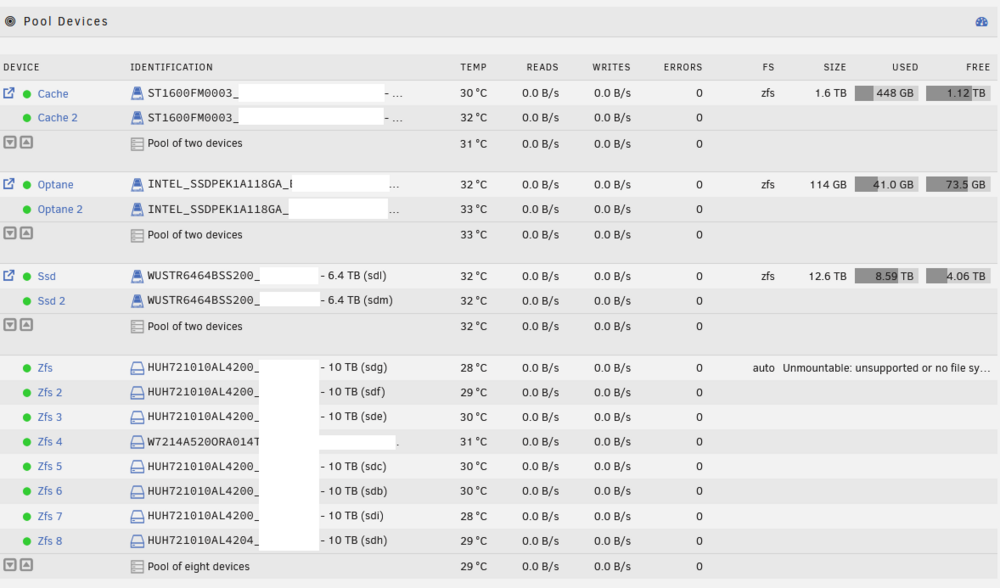
Good morning, I have been running ZFS on my unraid server for some time without issue until I managed to mess it up. One of my drives was throwing errors so I replaced the 10TB with a 14TB drive without issue. A couple of months later I noticed that the formatting of the 14TB drive was a 512b vs the others at 4k. I forced a format to 4k and then replaced the "old" drive with the "new" drive. Now the GUI shows Unmountable: unsupported or no file system. I've tried doing a new config and slotting all of the zfs drives and leaving the file system on auto as well as specifying zfs raidz2 without luck. I was playing with a L2ARC special drive, adding it back manually does not fix the issue. Sorry for the long winded explanation, here is my diagnostic log, the zfs pool is "zfs" and my other pools are running fine. Of note, I can import the zfs pool without issue, the GUI just doesn't seem to like it. I am running the ZFS master program. Thanks so much for the help. harley-diagnostics-20250924-0634.zip
-
I had a disk failure on my ZFS array and tried to do the following to replace it: Procedure if you can have both the old and new devices connected at the same time: stop the array on the main page click on the pool device you want to replace/upgrade and select the new one from the drop down list (any data on the new device will be deleted) start the array a 'zpool replace' will begin and the new device will be resilvered progress can be seen by clicking on the first pool device and scrolling down to “pool status” when done again check "pool status" page to confirm everything looks good Unfortunately when I try to select the new drive the gui switches back to the failed drive and I am unable to re-open the select down menu. I figure it was just a visual bug but when I try to click start array nothing happens. Same if I select no device. I ended up having to shut down the array and physically removed the drive in order for the GUI to allow for a replacement of the drive. I know there was a visual bug when selecting the type of parity for a ZFS array and I wonder if this is somehow related.
-
Is anyone running any ZFS vdevs? I am wanting to setup a ZFS Metadata special device with unraid but not sure if it's supported or not? I had tried SLOG devices for fun in the past but the array wouldn't start up properly (but that's likely my own fault). Is anyone out there running anything "non GUI supported?" Any hints on how to set this up? Thanks!
-
Maybe something is going on with my USB drive, but I just updated to RC4.1 and now my docker containers are missing as are my VMs. harley-diagnostics-20230428-0710.zip
-
Just upgraded from RC3 to RC4 and my 3 separate zfs pools are missing (cache, optane, and zfs). Thankfully I was able to just re-add them and the associated drives without losing anything, but it also means my share settings disappeared. Attaching my diagnostics if that's helpful. harley-diagnostics-20230427-1645.zip
-
Sorry this may be a difficult thing to explain. I have multiple zfs pools and a USB drive as my "array." After upgrading to R4 I have to reset settings for all of my shares. If I select one of my zfs pools labeled "zfs" and apply the settings and then click write settings to the other shares it applies another zfs pool "cache" to the selected pools. I tried it a couple of times but it does the same thing. I can attach pictures if that helps explain things.
-
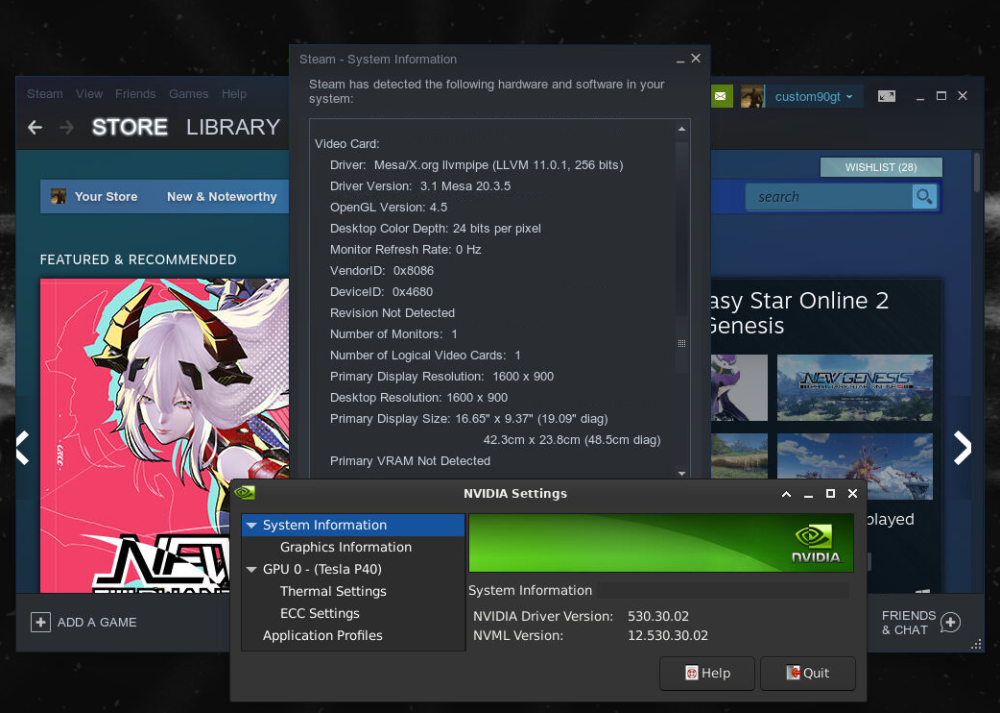
I have a similar issue to others here where games will not launch. One odd thing I've noticed is that my nvidia card shows up in Nvidia settings but is not found under steam, is that common?
-
That's exactly it, I haven't upgraded my main server yet, still testing 6.12rc on my test server first. Thanks for the help @ptichalouf Thanks for the awesome app @SimonF
-
Yeah that's the one I have installed. Sadly it doesn't seem to have any way to add my second GPU, is that just in the config screen?
-
How did you get the second GPU stat window to show up? Is it a second instance? Thanks



