





grupoleon
Members
-
Joined
-
Last visited
-
Where can I buy you coffee my dude. got a link? thanks for your help.
-
dude you have be awesome. but it is now throwing this error and "system" tab won't render. have tried to uninstall and re-install. [28-May-2025 10:23:58 America/Chicago] PHP Fatal error: Cannot use isset() on the result of an expression (you can use "null !== expression" instead) in /usr/local/emhttp/plugins/disklocation/pages/page_system.php on line 357
-
smartctl 7.4 2023-08-01 r5530 [x86_64-linux-6.12.24-Unraid] (local build) Copyright (C) 2002-23, Bruce Allen, Christian Franke, www.smartmontools.org Device is in ACTIVE mode SCSI device successfully opened Use 'smartctl -a' (or '-x') to print SMART (and more) information
-
I shouuld've said that it's been this way. I can assign drives, create groups and see table layout and locate the drives but the dashboard view will not change from from the "...force smart+db" message.
-
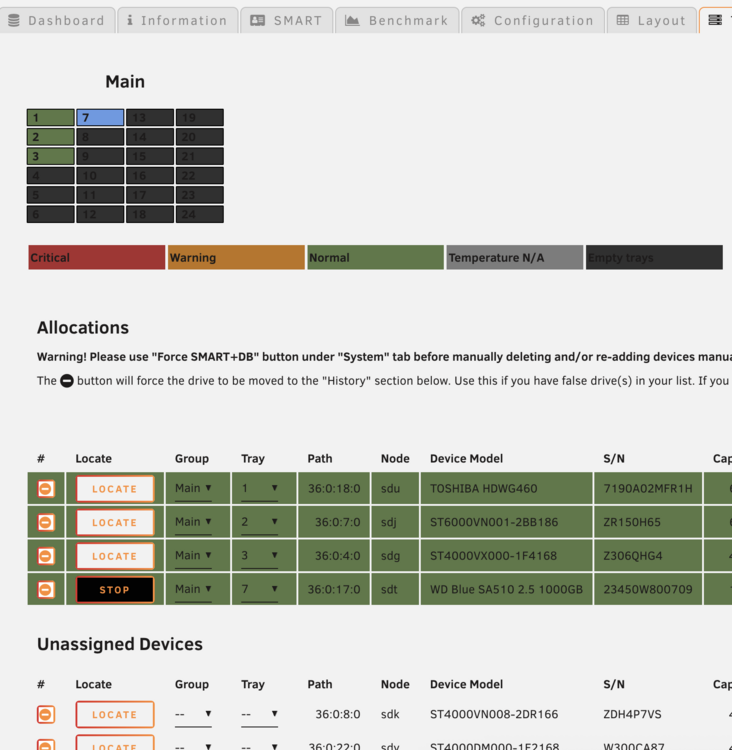
what is interesting int he tray allocation screen it finds them all, and displays them in the tray layout. also if it's the SSD, then it's the cache drive and in the tray layout it finds it well enough.
-
lsscsi -bg | grep "16:0:0:0" [16:0:0:0] /dev/sdb /dev/sg1 Insert /dev/sdX from above, eg.: smartctl -x --all /dev/sdb bash: Insert: command not found smartctl 7.4 2023-08-01 r5530 [x86_64-linux-6.12.24-Unraid] (local build) Copyright (C) 2002-23, Bruce Allen, Christian Franke, www.smartmontools.org === START OF INFORMATION SECTION === Vendor: VMware Product: Virtual disk Revision: 2.0 Compliance: SPC-4 User Capacity: 33,554,432 bytes [33.5 MB] Logical block size: 512 bytes LU is thin provisioned, LBPRZ=1 Rotation Rate: Solid State Device Device type: disk Local Time is: Tue May 27 08:45:36 2025 CDT SMART support is: Unavailable - device lacks SMART capability. Read Cache is: Unavailable Writeback Cache is: Unavailable === START OF READ SMART DATA SECTION === Current Drive Temperature: 0 C Drive Trip Temperature: 0 C Error Counter logging not supported Device does not support Self Test logging Device does not support Background scan results logging Device does not support General statistics and performance logging
-
ls /tmp/disklocation/smart/ ST3000VN000-1HJ166_W6A145X3.json ST4000VN008-2DR166_ZDH5QQ0L.json ST6000VN001-2BB186_ZR15J46R.json ST4000DM000-1F2168_W300CA87.json ST4000VN008-2DR166_ZGY3R3TK.json ST6000VN001-2BB186_ZSC0529F.json ST4000VN000-2AH166_WDH0XAGB.json ST4000VN008-2DR166_ZGY3Y5BC.json ST6000VN0033-2EE110_ZAD9CMHG.json ST4000VN008-2DR166_ZDH467P3.json ST4000VN008-2DR166_ZM404FQ1.json ST6000VN0033-2EE110_ZAD9CV9S.json ST4000VN008-2DR166_ZDH490PY.json ST4000VX000-1F4168_Z306QHG4.json ST6000VN0033-2EE110_ZADABWH9.json ST4000VN008-2DR166_ZDH4A71P.json ST6000VN001-2BB186_ZR10EE6B.json ST6000VN006-2ZM186_ZPV02C47.json ST4000VN008-2DR166_ZDH4P7VS.json ST6000VN001-2BB186_ZR14NF8B.json TOSHIBA_HDWG460_7190A02MFR1H.json ST4000VN008-2DR166_ZDH5QLYQ.json ST6000VN001-2BB186_ZR150H65.json WD_Blue_SA510_2.5_1000GB_23450W800709.json cat /tmp/disklocation/powermode.json { "0:0:0:0": "UNKNOWN", "16:0:0:0": "ACTIVE", "36:0:0:0": "ACTIVE", "36:0:1:0": "ACTIVE", "36:0:2:0": "ACTIVE", "36:0:3:0": "ACTIVE", "36:0:4:0": "IDLE", "36:0:5:0": "IDLE", "36:0:6:0": "ACTIVE", "36:0:7:0": "ACTIVE", "36:0:8:0": "ACTIVE", "36:0:9:0": "ACTIVE", "36:0:10:0": "ACTIVE", "36:0:11:0": "IDLE", "36:0:12:0": "ACTIVE", "36:0:13:0": "IDLE", "36:0:14:0": "ACTIVE", "36:0:15:0": "ACTIVE", "36:0:16:0": "ACTIVE", "36:0:17:0": "ACTIVE", "36:0:18:0": "IDLE", "36:0:19:0": "ACTIVE", "36:0:20:0": "ACTIVE", "36:0:21:0": "ACTIVE", "36:0:22:0": "ACTIVE", "36:0:23:0": "ACTIVE" }
-
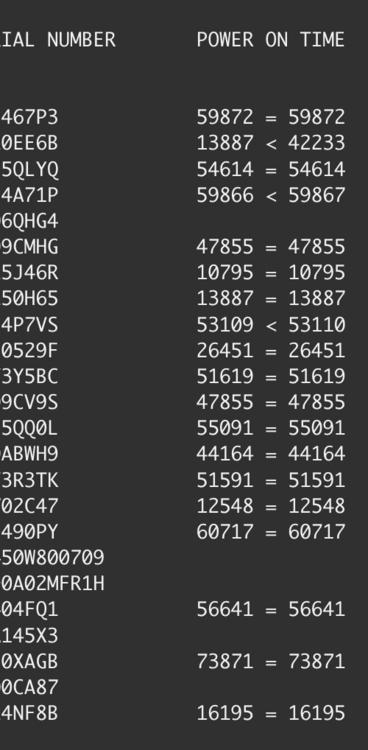
Thank you for such attention. unfortunately it still has not removed the alert on the dashboard. I updated the app. wiped all data. went through set up process with no success. PHP error log [27-May-2025 07:42:52 America/Chicago] PHP Warning: Undefined array key "backup_file_list" in /usr/local/emhttp/plugins/disklocation/pages/page_system.php on line 354 [27-May-2025 07:42:52 America/Chicago] PHP Deprecated: file_exists(): Passing null to parameter #1 ($filename) of type string is deprecated in /usr/local/emhttp/plugins/disklocation/pages/page_system.php on line 259 Not sure if this helps but when I run a check on the seagate HDDs several don't have poweron time. would this cause the issue (see image) Attached is also the latest log file Thank you again! disklocation-2025-05-27(1).log
-
This is what the PHP log is throwing. [27-May-2025 06:42:26 America/Chicago] PHP Fatal error: Uncaught TypeError: array_search(): Argument #2 ($haystack) must be of type array, null given in /usr/local/emhttp/plugins/disklocation/pages/system.php:280 Stack trace: #0 /usr/local/emhttp/plugins/disklocation/pages/system.php(280): array_search('1', NULL) #1 /usr/local/emhttp/plugins/dynamix/include/DefaultPageLayout.php(863) : eval()'d code(11): require_once('/usr/local/emht...') #2 /usr/local/emhttp/plugins/dynamix/include/DefaultPageLayout.php(863): eval() #3 /usr/local/emhttp/plugins/dynamix/template.php(94): require_once('/usr/local/emht...') #4 {main} thrown in /usr/local/emhttp/plugins/disklocation/pages/system.php on line 280 [27-May-2025 06:42:36 America/Chicago] PHP Fatal error: Uncaught TypeError: array_search(): Argument #2 ($haystack) must be of type array, null given in /usr/local/emhttp/plugins/disklocation/pages/system.php:280 Stack trace: #0 /usr/local/emhttp/plugins/disklocation/pages/system.php(280): array_search('1', NULL) #1 /usr/local/emhttp/plugins/dynamix/include/DefaultPageLayout.php(863) : eval()'d code(11): require_once('/usr/local/emht...') #2 /usr/local/emhttp/plugins/dynamix/include/DefaultPageLayout.php(863): eval() #3 /usr/local/emhttp/plugins/dynamix/template.php(94): require_once('/usr/local/emht...') #4 {main} thrown in /usr/local/emhttp/plugins/disklocation/pages/system.php on line 280 [27-May-2025 06:43:02 America/Chicago] PHP Fatal error: Uncaught TypeError: array_search(): Argument #2 ($haystack) must be of type array, null given in /usr/local/emhttp/plugins/disklocation/pages/system.php:280 Stack trace: #0 /usr/local/emhttp/plugins/disklocation/pages/system.php(280): array_search('1', NULL) #1 /usr/local/emhttp/plugins/dynamix/include/DefaultPageLayout.php(863) : eval()'d code(11): require_once('/usr/local/emht...') #2 /usr/local/emhttp/plugins/dynamix/include/DefaultPageLayout.php(863): eval() #3 /usr/local/emhttp/plugins/dynamix/template.php(94): require_once('/usr/local/emht...') #4 {main} thrown in /usr/local/emhttp/plugins/disklocation/pages/system.php on line 280 [27-May-2025 06:48:03 America/Chicago] PHP Warning: Undefined array key "Description" in /usr/local/emhttp/plugins/community.applications/include/helpers.php on line 267 [27-May-2025 06:48:03 America/Chicago] PHP Deprecated: preg_match(): Passing null to parameter #2 ($subject) of type string is deprecated in /usr/local/emhttp/plugins/community.applications/include/helpers.php on line 267
-
tried rebooting unraid, deleting and wiping all data, re-installing app. Nothing clears that dashboard error. disklocation-2025-05-26(1).log
-
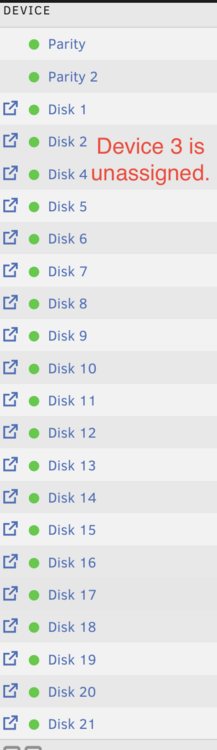
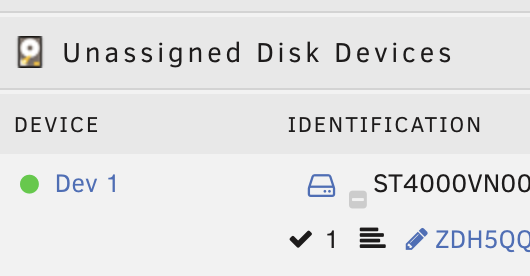
This is making some sense. I recently reduced the size of the array. this could've caused the issue. I don't have CDs. My array has 2 parity, 1 cache, 21 HDDs. However as stated I reduced the array and so disk3 is the one currently unassigned (see images.) As it happens I am now re-adding the drive and i'll report back.
-
@FlamongOle I hope you dont mind my @ you. I am having this issue. the plugin and dashboard was working and then at an unknown time the dashboard failed and now always presents this message - Go to Disk Location -> System and initialize a "Force SMART+DB" I have tried to follow the instructions you suggested in this post and i see content in the temp dir. I have tried to restart, re-install, delete all backups. Nothing seems to fix it. I have attached the debug file and devices.json to see if you can help me troubleshoot it. disklocation-2025-05-26.log devices.json
-
Thank you all in advance for your time reading this post. The short version of the story is that I have had this sever configuration since 2012. I have updated a component here and there but it was a straight swap looking for the cheapest upgrade. I am now looking to update/upgrade to something more current. What I have: • 24 bay Server case • 3 pci sata expansion (LSI SAS 2008) • CPU (Intel® Xeon® CPU E31225 @ 3.10GHz) • RAM 32GB DDR3 • Board (X9SCL-II/X9SCM-II) • Unraid is unning on top of ESXI (why? because this was the setup I followed when I initially created so long ago) ○ 1 Cache ○ 2 Parity (6TB each) ○ Mix of 3-6TB XFS formatted drives all filled to the brim Nothing has to stay if it is a blocker to what I want. What I want: • get rid of ESXI Upgrade to 2x 10TB+ parity drives to shrink array (straight forward enough) • If possible, dump the 3 PCI cards to connect all drives ○ Recommend any boards? • Speed up transcoding for 4k videos ○ CPU? GPU? RAM? • Utilize high speed transfer (set up for 2GB ethernet) • Run gaming servers for my nephew (plays a lot of minecraft) • Virtual machines, ○ I have a few on ESXI (windows and linux). Want to migrate them over to unraid • Configured for power efficiency (idling drives as much as possible to save power) would like the community's recommendation on hardware options so I can rebuild for long term. My Budget is something reasonable, middle of the road, to achieve what I want.
-
@JonathanM To close out this thread. I was able to mount it without adding it to the array via unassigned devices and I can see the files. I can copy the files over with cp -r (from old disk to new disk). This should not create any permissions issues yes? thank you again!
-
Ohh no! OK, I'll see what I can do. Thanks!




