st34m
Members
-
Joined
-
Last visited
Everything posted by st34m
-
OK this is indeed a strange problem. Both Win and MacOS computers are on the same network, Win can access all containers as expected while MacOS can only access Plex and Chromium (it can't access a 2nd Chromium instance and binhex's qbittorrent containers). Google searches showed others also experienced a similar issue after updating MacOS to Sequoia (v15) and the possible solution did not work for me - as I am already able to access some of my local ips. I am still on it, will update if I find a solution, but at the moment it's not related to binhex and his repo.
-
About the issue I reported earlier regarding inaccessible WebUI, I created several new containers from scratch, with new wireguard *.confs from ProtonVPN everytime. Some failed in the same way but somehow the last one started working, I guess it has something to do with ProtonVPN. Aside from that being resolved, I realized I cannot access the qBittorrent WebUI from my macbook anymore.
-
I downgraded back to 6.12.15, deleted template xml files and appdata folders. Still cannot access WebUI.
-
how was the issue regarding inaccessible WebUI resolved? I have recently upgraded to Unraid v7, it was working at first and then I have the same problem now. As soon as I set VPN_ENABLED to no I can access the WebUI. I am using ProtonVPN with Wireguard.
-
it worked indeed after shutting down, changing USB port and starting again. thanks!
-
Hello, my server seems to have crashed with this error: Cannot access your USB Flash boot device. It's a mini PC with AMD Ryzen™ 9 6900HX processor and 2x HDD connected over USB. Before I saw it crashed, I started copying files (> 1TB) onto it about 6 hours ago, could be related to this. I attached the diagnostics as well. Thanks for support. turret-diagnostics-20250203-0710.zip
-
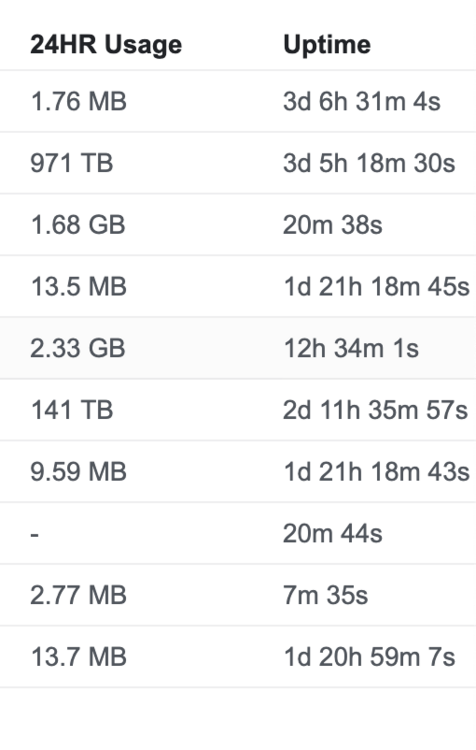
hi @PeteAsking, thanks for the great work. I have just started using it, so far so good. But there is one thing that caught my attention. The traffic data seem to be off for some of my devices. 971 TB is my Unraid home server and 141 TB is my Apple TV. There is no way these devices consumed this much data. Is it a known issue?
-
I restart the container, it's fixed but after awhile it happens again, always. But I can't say exactly how long it takes to become broken, or what triggers it.
-
greetings ich777, thanks a lot for the great work. I have been using the Chromium template of yours for awhile now, but from time to time I see a strange issue. When I try to right click on a page, the menu doesn't appear. It's also the same for dropdowns on a page. Do you know anything about it? Thanks!
-
Thanks a lot @binhex Not much but I've bought you a few beers
-
Yes, I created the wg conf file on a server with port forwarding support.
-
I tried it again and worked like a charm. I probably made a typo in the first try. Thank you both @binhex @thatsthefrickenlightning By the way I receive the same error even though the config is fine on ProtonVPN side. initnatpmp() returned (SUCCESS) using gateway: 172.17.0.1 sendpublicaddressrequest returned 2 (SUCCESS) readnatpmpresponseorretry returned -7 (FAILED) readnatpmpresponseorretry() failed: the gateway does not support nat-pmp errno-111 'Connection refused'
-
I have been following the topic and nice to see it in the right direction. When I tried to install natpmpc via pacman, I get the “pacman not found” error. How were you able to install it? Thanks!
-
Hi, I have just switched from Mullvad to ProtonVPN on WG protocol. But I am having issues with port forwarding. Can you please help how I can find the active port and check regularly if it's still alive? I followed the guide below but natpmpc is not in the container. https://protonvpn.com/support/port-forwarding-manual-setup/
-
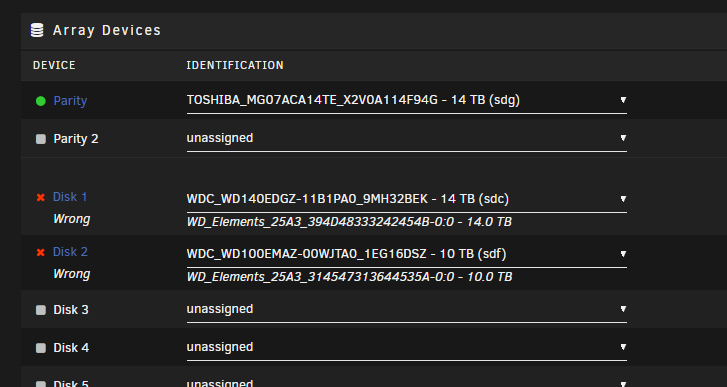
Hello everyone, This is my first home server, so I am a very unexperienced user. I started with a small HTPC then ugpraded to a better mATX PC. The problem is, I was using HDDs in their enclosures on HTPC then I upgraded to mATX PC and shucked all drives. Now my unraid doesn't recognize the drives except the parity HDD, because I think the ID numbers with and without enclosures are different. To summarize: 1st config: HTPC with all drives connected at USB ports Final config: mATX PC with all drives shucked (using SATA3 ports) Is there a way to fix this easily? Without putting Disk 1 or 2 in the enclosure and building the other from parity? Thanks!