





donuts13
Members
-
Joined
-
Last visited
-
before reboot and making this post i did run this : ip route add default via 192.168.200.1 Im not 100% sure if this persists after reboot or not output: root@Prime:~# ip route show default via 192.168.200.1 dev eth0 metric 1 192.168.200.0/24 dev eth0 proto kernel scope link src 192.168.200.5 metric 1 also ping 8.8.8.8 works. prime-safemode-diagnostics-20260504-0916.zip
-
After updating to the latest version 7.2.5 the gateway not working even with a correct network.conf. i could not ping 8.8.8.8 nor update dockers / access community apps and could not connect to Unraid Connect. i had to add via cli ip route add default via 192.x.x.x my gateway. see diag file. I think this is a bug. how do i make this persist without adding a script on boot. Thanks Unraid your are the best!! prime-diagnostics-20260504-0820.zip
-
I used both tools to correct permissions for the appdata and disks but still with Nobody and user they will not start or have read write access. root@Prime:~# ls -la /mnt/ total 16 drwxr-xr-x 24 root root 480 Dec 31 19:31 ./ drwxr-xr-x 21 root root 460 Dec 31 19:31 ../ drwxrwxrwt 2 nobody users 40 Dec 31 19:30 addons/ drwxrwxrwx 1 nobody users 146 Dec 31 19:41 cache/ drwxrwxrwx 9 nobody users 146 Dec 31 19:41 disk1/ drwxrwxrwx 5 nobody users 67 Dec 31 19:41 disk10/ drwxrwxrwx 6 nobody users 88 Dec 31 19:41 disk11/ drwxrwxrwx 7 nobody users 111 Dec 31 19:41 disk12/ drwxrwxrwx 7 nobody users 111 Dec 31 19:41 disk13/ drwxrwxrwx 8 nobody users 130 Dec 31 19:41 disk14/ drwxrwxrwx 8 nobody users 130 Dec 31 19:41 disk15/ drwxrwxrwx 4 nobody users 36 Dec 31 19:41 disk2/ drwxrwxrwx 8 nobody users 130 Dec 31 19:41 disk3/ drwxrwxrwx 8 nobody users 130 Dec 31 19:41 disk4/ drwxrwxrwx 7 nobody users 109 Dec 31 19:41 disk5/ drwxrwxrwx 5 nobody users 69 Dec 31 19:41 disk6/ drwxrwxrwx 8 nobody users 127 Dec 31 19:41 disk7/ drwxrwxrwx 8 nobody users 127 Dec 31 19:41 disk8/ drwxrwxrwx 7 nobody users 106 Dec 31 19:41 disk9/ drwxrwxrwt 2 nobody users 40 Dec 31 19:30 disks/ drwxrwxrwt 2 nobody users 40 Dec 31 19:30 remotes/ drwxrwxrwt 2 nobody users 40 Dec 31 19:30 rootshare/ drwxrwxrwx 1 nobody users 146 Dec 31 19:41 user/ drwxrwxrwx 1 nobody users 146 Dec 31 19:41 user0/ root@Prime:~# ls -la /mnt/ total 16 drwxr-xr-x 24 root root 480 Dec 31 19:31 ./ drwxr-xr-x 21 root root 460 Dec 31 19:31 ../ drwxrwxrwt 2 nobody users 40 Dec 31 19:30 addons/ drwxrwxrwx 1 nobody users 146 Dec 31 19:41 cache/ drwxrwxrwx 9 nobody users 146 Dec 31 19:41 disk1/ drwxrwxrwx 5 nobody users 67 Dec 31 19:41 disk10/ drwxrwxrwx 6 nobody users 88 Dec 31 19:41 disk11/ drwxrwxrwx 7 nobody users 111 Dec 31 19:41 disk12/ drwxrwxrwx 7 nobody users 111 Dec 31 19:41 disk13/ drwxrwxrwx 8 nobody users 130 Dec 31 19:41 disk14/ drwxrwxrwx 8 nobody users 130 Dec 31 19:41 disk15/ drwxrwxrwx 4 nobody users 36 Dec 31 19:41 disk2/ drwxrwxrwx 8 nobody users 130 Dec 31 19:41 disk3/ drwxrwxrwx 8 nobody users 130 Dec 31 19:41 disk4/ drwxrwxrwx 7 nobody users 109 Dec 31 19:41 disk5/ drwxrwxrwx 5 nobody users 69 Dec 31 19:41 disk6/ drwxrwxrwx 8 nobody users 127 Dec 31 19:41 disk7/ drwxrwxrwx 8 nobody users 127 Dec 31 19:41 disk8/ drwxrwxrwx 7 nobody users 106 Dec 31 19:41 disk9/ drwxrwxrwt 2 nobody users 40 Dec 31 19:30 disks/ drwxrwxrwt 2 nobody users 40 Dec 31 19:30 remotes/ drwxrwxrwt 2 nobody users 40 Dec 31 19:30 rootshare/ drwxrwxrwx 1 nobody users 146 Dec 31 19:41 user/ drwxrwxrwx 1 nobody users 146 Dec 31 19:41 user0/ prime-diagnostics-20241231_1216.zip
-
Found the issue... For some Unknown Reason the VPN im using on my Desktop was porting through to the Unraid webUI causing it to think its on that 204xxx address. Once i turned off my desktop VPN and refreshed the page i got my 7xxxx ip address and confirmed port forwarding and connectivity.
-
I can port fwd other devices without issue. Its not 100% static. but they only change my IP address once every 3-4 years. Ill check with the ISP. would that not be CGnat?
-
Hello In the Remarks the WAIN IP shows 204.x.x.x. This is not my WAN IP address. I used the :~# curl https://wanip.unraid.net/ 73.x.x.x :~# . This confirmed my WAN IP to be "Seen" correctly. 73.x.x.x is the correct address. But Unraid seems to think the WAN address is 204.x.x.x for some odd reason. this must be a setting of some kind. NO VPNs enabled at this time. How can i fix the Connect feature to show the Correct IP address. Thanks.
-
Gotcha Thank you!
-
they both mount now. What is recommended to move the Lost and found data back to the correct share folders.
-
on drive 2 i got this message at the end: disconnected dir inode 17179869343, moving to lost+found Phase 7 - verify and correct link counts... resetting inode 134 nlinks from 2 to 5 Note - stripe unit (0) and width (0) were copied from a backup superblock. Please reset with mount -o sunit=,swidth= if necessary done Do i run this agin with -o ?
-
latest diag. prime-diagnostics-20240308-0705.zip
-
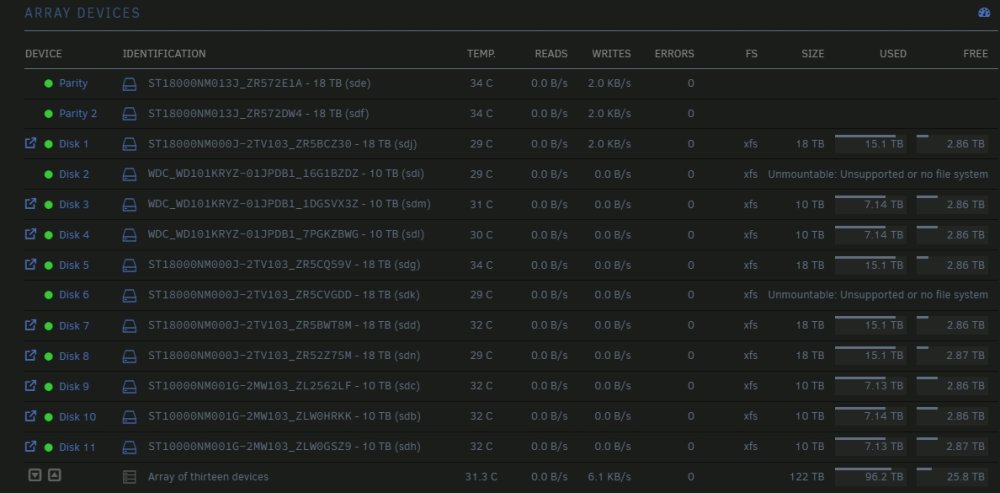
I had a disk fall off Power issue or something like that when i went to remove and replace the disk as you do following the directions in the forums. I ended up with two dries that did not want to play nicely. I eventually got the rebuild working after a few try (disk errors), the rebuild finished 100% no errors on the array. but instead of showing the emulated drives it show unmount able with a green dot. what should i do next? Diag from post good rebuild but unmountable drives. 3/5 prime-diagnostics-20240305-1122.zip
-
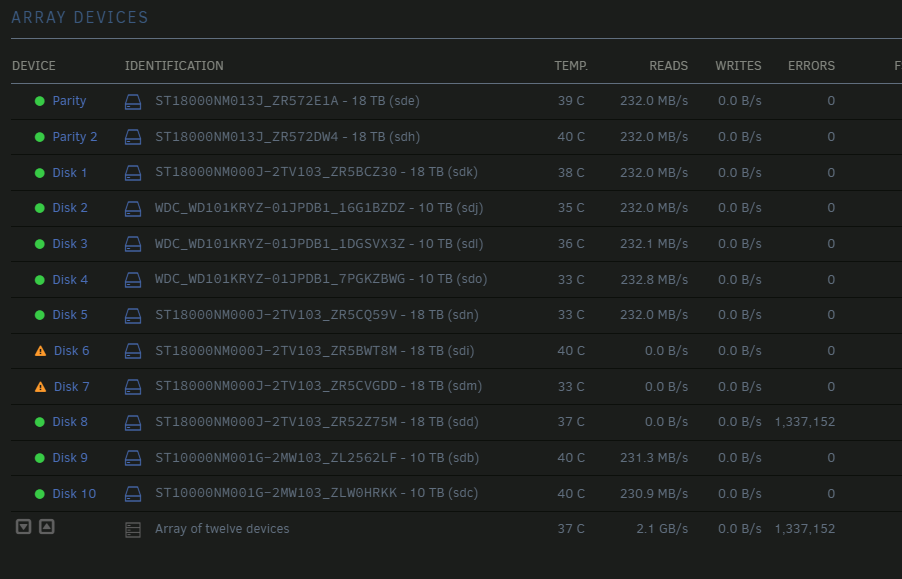
Well 6 Min into rebuild in maintenance mode now another drive has errors stacking and no data writes to the rebuilding drives. What is your recommendation? prime-diagnostics-20230830-0512.zip
-
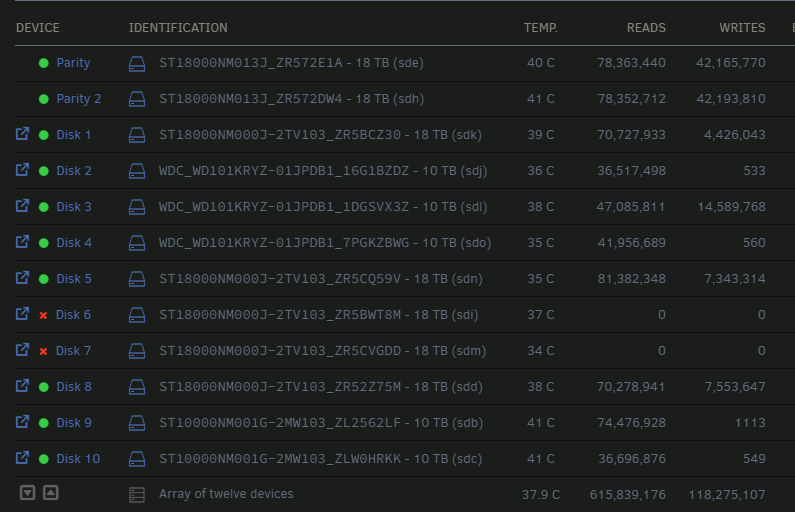
Two drives fell offline at the same time more or less. Smart test = no issues. Just offline. I moved them to another drive bay during a reboot but still will not come up. diagnostics added. prime-diagnostics-20230829-1911.zip
-
Copy that Rebuilding in progress. ~26hrs. will mark as solution once completed. Thanks !!
-
Ok they are in new position. How do i go about the rebuild?


