donuts13
Members
-
Joined
-
Last visited
Everything posted by donuts13
-
before reboot and making this post i did run this : ip route add default via 192.168.200.1 Im not 100% sure if this persists after reboot or not output: root@Prime:~# ip route show default via 192.168.200.1 dev eth0 metric 1 192.168.200.0/24 dev eth0 proto kernel scope link src 192.168.200.5 metric 1 also ping 8.8.8.8 works. prime-safemode-diagnostics-20260504-0916.zip
-
After updating to the latest version 7.2.5 the gateway not working even with a correct network.conf. i could not ping 8.8.8.8 nor update dockers / access community apps and could not connect to Unraid Connect. i had to add via cli ip route add default via 192.x.x.x my gateway. see diag file. I think this is a bug. how do i make this persist without adding a script on boot. Thanks Unraid your are the best!! prime-diagnostics-20260504-0820.zip
-
I used both tools to correct permissions for the appdata and disks but still with Nobody and user they will not start or have read write access. root@Prime:~# ls -la /mnt/ total 16 drwxr-xr-x 24 root root 480 Dec 31 19:31 ./ drwxr-xr-x 21 root root 460 Dec 31 19:31 ../ drwxrwxrwt 2 nobody users 40 Dec 31 19:30 addons/ drwxrwxrwx 1 nobody users 146 Dec 31 19:41 cache/ drwxrwxrwx 9 nobody users 146 Dec 31 19:41 disk1/ drwxrwxrwx 5 nobody users 67 Dec 31 19:41 disk10/ drwxrwxrwx 6 nobody users 88 Dec 31 19:41 disk11/ drwxrwxrwx 7 nobody users 111 Dec 31 19:41 disk12/ drwxrwxrwx 7 nobody users 111 Dec 31 19:41 disk13/ drwxrwxrwx 8 nobody users 130 Dec 31 19:41 disk14/ drwxrwxrwx 8 nobody users 130 Dec 31 19:41 disk15/ drwxrwxrwx 4 nobody users 36 Dec 31 19:41 disk2/ drwxrwxrwx 8 nobody users 130 Dec 31 19:41 disk3/ drwxrwxrwx 8 nobody users 130 Dec 31 19:41 disk4/ drwxrwxrwx 7 nobody users 109 Dec 31 19:41 disk5/ drwxrwxrwx 5 nobody users 69 Dec 31 19:41 disk6/ drwxrwxrwx 8 nobody users 127 Dec 31 19:41 disk7/ drwxrwxrwx 8 nobody users 127 Dec 31 19:41 disk8/ drwxrwxrwx 7 nobody users 106 Dec 31 19:41 disk9/ drwxrwxrwt 2 nobody users 40 Dec 31 19:30 disks/ drwxrwxrwt 2 nobody users 40 Dec 31 19:30 remotes/ drwxrwxrwt 2 nobody users 40 Dec 31 19:30 rootshare/ drwxrwxrwx 1 nobody users 146 Dec 31 19:41 user/ drwxrwxrwx 1 nobody users 146 Dec 31 19:41 user0/ root@Prime:~# ls -la /mnt/ total 16 drwxr-xr-x 24 root root 480 Dec 31 19:31 ./ drwxr-xr-x 21 root root 460 Dec 31 19:31 ../ drwxrwxrwt 2 nobody users 40 Dec 31 19:30 addons/ drwxrwxrwx 1 nobody users 146 Dec 31 19:41 cache/ drwxrwxrwx 9 nobody users 146 Dec 31 19:41 disk1/ drwxrwxrwx 5 nobody users 67 Dec 31 19:41 disk10/ drwxrwxrwx 6 nobody users 88 Dec 31 19:41 disk11/ drwxrwxrwx 7 nobody users 111 Dec 31 19:41 disk12/ drwxrwxrwx 7 nobody users 111 Dec 31 19:41 disk13/ drwxrwxrwx 8 nobody users 130 Dec 31 19:41 disk14/ drwxrwxrwx 8 nobody users 130 Dec 31 19:41 disk15/ drwxrwxrwx 4 nobody users 36 Dec 31 19:41 disk2/ drwxrwxrwx 8 nobody users 130 Dec 31 19:41 disk3/ drwxrwxrwx 8 nobody users 130 Dec 31 19:41 disk4/ drwxrwxrwx 7 nobody users 109 Dec 31 19:41 disk5/ drwxrwxrwx 5 nobody users 69 Dec 31 19:41 disk6/ drwxrwxrwx 8 nobody users 127 Dec 31 19:41 disk7/ drwxrwxrwx 8 nobody users 127 Dec 31 19:41 disk8/ drwxrwxrwx 7 nobody users 106 Dec 31 19:41 disk9/ drwxrwxrwt 2 nobody users 40 Dec 31 19:30 disks/ drwxrwxrwt 2 nobody users 40 Dec 31 19:30 remotes/ drwxrwxrwt 2 nobody users 40 Dec 31 19:30 rootshare/ drwxrwxrwx 1 nobody users 146 Dec 31 19:41 user/ drwxrwxrwx 1 nobody users 146 Dec 31 19:41 user0/ prime-diagnostics-20241231_1216.zip
-
Found the issue... For some Unknown Reason the VPN im using on my Desktop was porting through to the Unraid webUI causing it to think its on that 204xxx address. Once i turned off my desktop VPN and refreshed the page i got my 7xxxx ip address and confirmed port forwarding and connectivity.
-
I can port fwd other devices without issue. Its not 100% static. but they only change my IP address once every 3-4 years. Ill check with the ISP. would that not be CGnat?
-
Hello In the Remarks the WAIN IP shows 204.x.x.x. This is not my WAN IP address. I used the :~# curl https://wanip.unraid.net/ 73.x.x.x :~# . This confirmed my WAN IP to be "Seen" correctly. 73.x.x.x is the correct address. But Unraid seems to think the WAN address is 204.x.x.x for some odd reason. this must be a setting of some kind. NO VPNs enabled at this time. How can i fix the Connect feature to show the Correct IP address. Thanks.
-
Gotcha Thank you!
-
they both mount now. What is recommended to move the Lost and found data back to the correct share folders.
-
on drive 2 i got this message at the end: disconnected dir inode 17179869343, moving to lost+found Phase 7 - verify and correct link counts... resetting inode 134 nlinks from 2 to 5 Note - stripe unit (0) and width (0) were copied from a backup superblock. Please reset with mount -o sunit=,swidth= if necessary done Do i run this agin with -o ?
-
latest diag. prime-diagnostics-20240308-0705.zip
-
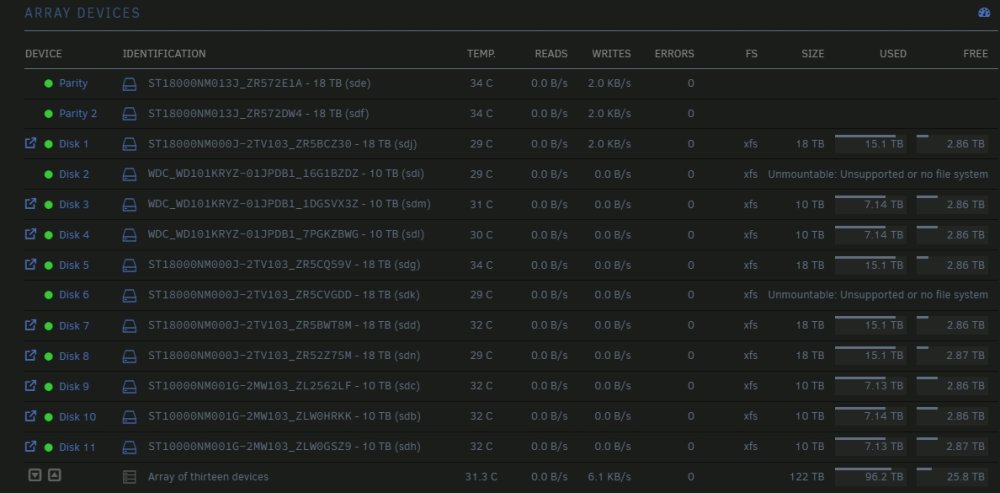
I had a disk fall off Power issue or something like that when i went to remove and replace the disk as you do following the directions in the forums. I ended up with two dries that did not want to play nicely. I eventually got the rebuild working after a few try (disk errors), the rebuild finished 100% no errors on the array. but instead of showing the emulated drives it show unmount able with a green dot. what should i do next? Diag from post good rebuild but unmountable drives. 3/5 prime-diagnostics-20240305-1122.zip
-
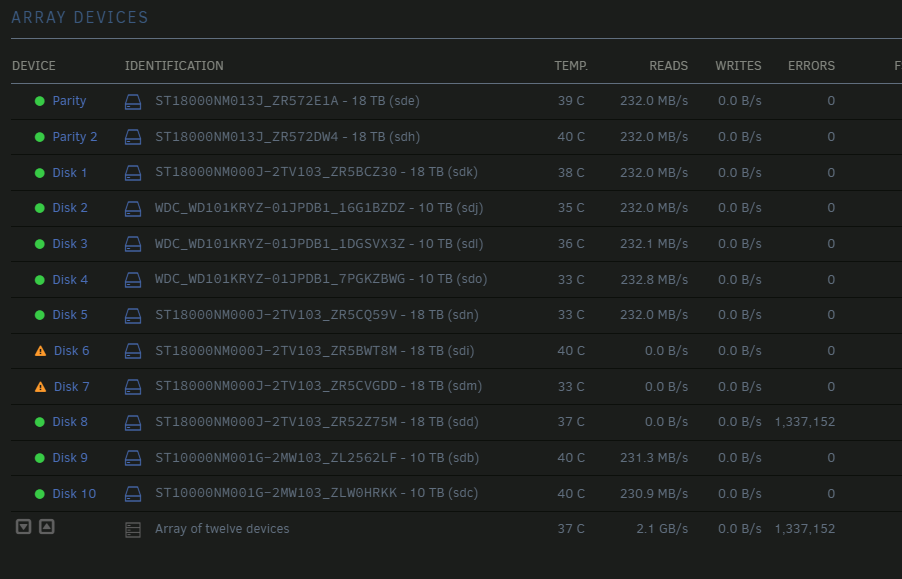
Well 6 Min into rebuild in maintenance mode now another drive has errors stacking and no data writes to the rebuilding drives. What is your recommendation? prime-diagnostics-20230830-0512.zip
-
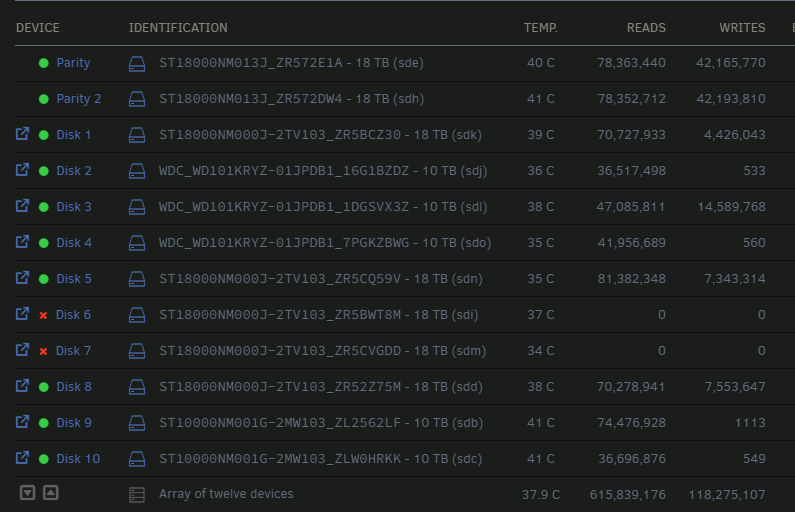
Two drives fell offline at the same time more or less. Smart test = no issues. Just offline. I moved them to another drive bay during a reboot but still will not come up. diagnostics added. prime-diagnostics-20230829-1911.zip
-
Copy that Rebuilding in progress. ~26hrs. will mark as solution once completed. Thanks !!
-
Ok they are in new position. How do i go about the rebuild?
-
I posted Diagnostics, Here is a new set with the array started. the last time this happened i lost ~80TB. Rebuild has never worked. prime-diagnostics-20230228-0705.zip
-
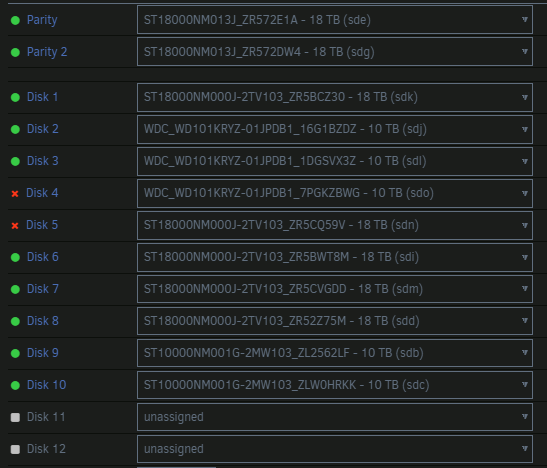
I have two drive that are disabled. I have moved them to Know good drive bays. even to location on another controller card. with known good drives. First it was only one but in the process of troubleshooting bad drive bay, the second came up. Smart checks are ok but this dam error will not go away after power cycles etc. Now there are No UDMA CRC error counts but still Unraid will not give it a green dot. Pls help! prime-diagnostics-20230228-0636.zip
-
No they were never part of a HW RAID via a controller. Those drives sat on my array for over 2 years. The 16 drive controller (Microsemi Adaptec HBA 1000-16i 12Gbps PCIe Gen3 SAS/SATA) right now is supporting everything within the array currently, plus a few "unassigned drives" i would have to power down the box and catalog each position to match them up vis SN. When I first started this build I did a FW mod on the two 8 drive controllers so that unraid would even detect drives attached to it. I have since exceeded 16 drive and upgraded to a larger Case to support more drive. One of the original controllers is still there and i added this new 16 drive controller about 6 months ago. I do know that im pushing the limits of PCI lanes for this build (assuming i fill all drive bays) and would not be able to add any further devices.
-
they are all xfs formatted drive as unraid does. I have two controllers one i did a special FW mod per the Unraid forums to allow for SW RAID. It supports 8 drives. The other card was needed for the expansion and it loaded the drives with no issues. It supports 16 drives. In general i can Physicaly move a HDD between the Drive bays of the two cards and it will detect and mount with no issues.
-
These are the 3 drive that started this mess... Should I click the run with correct flags? In the past the xfs repair has not worked but this seems different. Outputs: Dev 2: smart check attached FS: xfs Executing file system check: /sbin/xfs_repair -n /dev/sdk1 2>&1 Phase 1 - find and verify superblock... xfs_repair: read failed: Invalid argument xfs_repair: data size check failed xfs_repair: cannot repair this filesystem. Sorry. File system corruption detected! Dev 3: the checkmark is greyed out and you can see the FS column shows nothing. smart check attached Dev:5 smart check attached FS: xfs Executing file system check: /sbin/xfs_repair -n /dev/sds1 2>&1 Phase 1 - find and verify superblock... xfs_repair: read failed: Invalid argument xfs_repair: data size check failed xfs_repair: cannot repair this filesystem. Sorry. File system corruption detected! prime-smart-20230114-1634_DEV3.zip prime-smart-20230114-1637_Dev2.zip prime-smart-20230114-1637_Dev5.zip

-
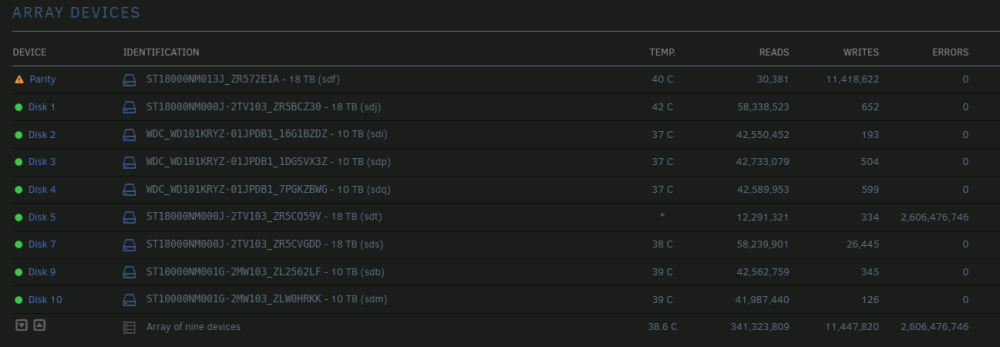
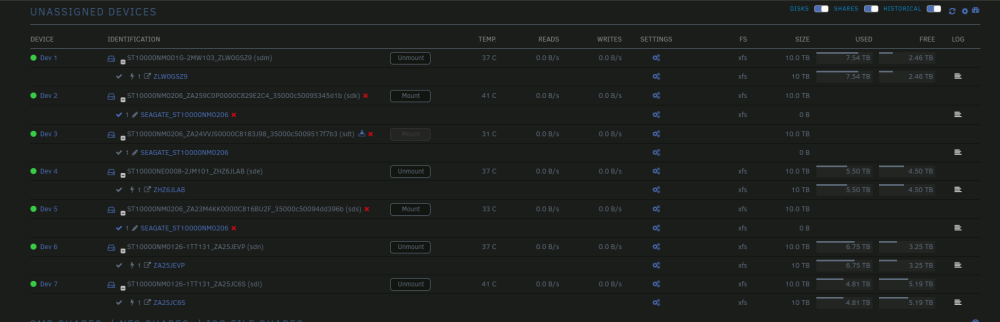
the array as it is, is put together with what drive that are ok. Th below image is where most of my files are. Dev 2,3,5,7 have errors. Dev 2,3,5 will not mount. Dev7 i still functional and im copying to the array right now what i have on this drive. The Fix permision tool worked and im able to write to the normal share folders from these unassigned drive. At this point i think im mostly ok... with the exception of the 3 disks that either don't have a file system or will not mount. I have zero hope of getting the data off those drive unless you have any ideas. It will take two or three weeks copying at ~60MB/s to the array from all of these unassigned drive.
-
My array is rather large so Sync takes about 1 day... well at this size it does. I still have ~50TB to add back. This time sync looks good. I also ran New Permissions with appdata, excluded. Diag attached. Now i just need a clan way to Mount the unassigned drive and merge back the folders to the correct array shares. prime-diagnostics-20230114-0315.zip
-
I double checked the one from 1 week ago only has a smart log in it.
-
odd mb it did not extract correctly here is a new file the smart folder contains 23 disk report. Hope this helps. prime-diagnostics-20230112-1347.zip
-
Diag's from 1 week ago and today. I know some disks are bad due to SMART checks calling out failures. At lest 2 of the lot are unmountable in unassigned slots, both of which contain Smart Errors. Either i have the worst luck or its something else. I have swapped Cards and cables and even whole back plains prior to this latest failure. when i was getting other comms issues. I tried to repair the missing superblock via your forums but it would not fix the drives. so i pulled them out of the array config and started a new parity. Im concerned that parity will not work thought its at 75% now rebuild. Disk 5 was reading for the first few hours but has posted errors. It would be great to determine how to get my files to merge back into the folders. I have had some luck but for some reason part of my media folder user group is root and not nobody. prime-smart-20230102-16001.12.23.zip prime-smart-20230102-16001.2.23.zip