





Ritzer
Members
-
Joined
-
Last visited
Everything posted by Ritzer
-
Thanks, I was just wondering if I got exposed to some XSS attacks. I'm behind an external firewall but can't 100% trust the local network.
-
Guys please, can someone check if they get the same logs in /Apps? Thanks
-
Maybe give this one a try: https://hub.docker.com/r/bitnami/wordpress/ I'll test it out soon.
-
Unfortunately I've tried but the Docker image is crap, it always forces port 80 no matter what, so it will force all your resources over port 80 even if you are browsing with HTTPs (upgrade from Caddy or Cloudflare Tunnels etc).
-
I just installed this one and seems to work so far:

-
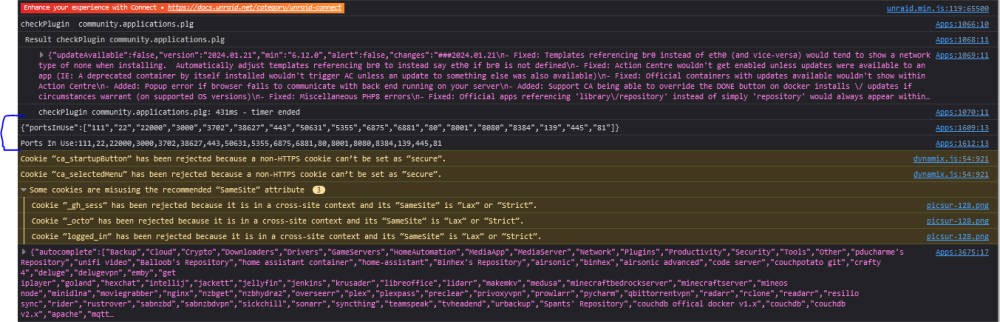
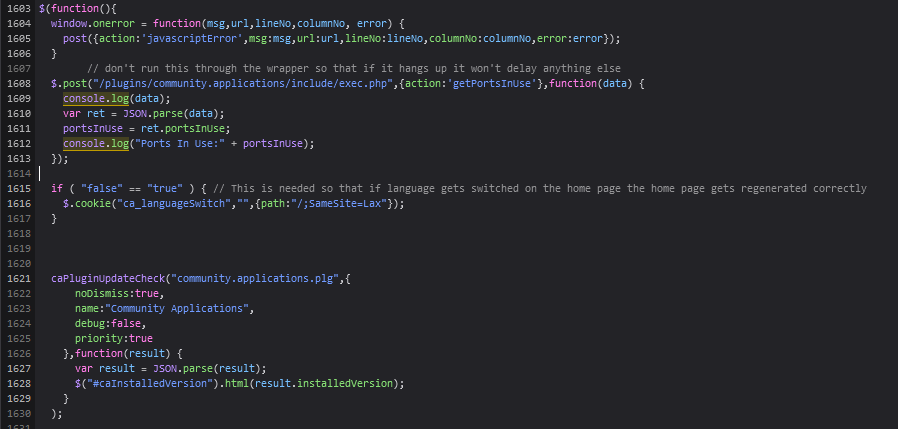
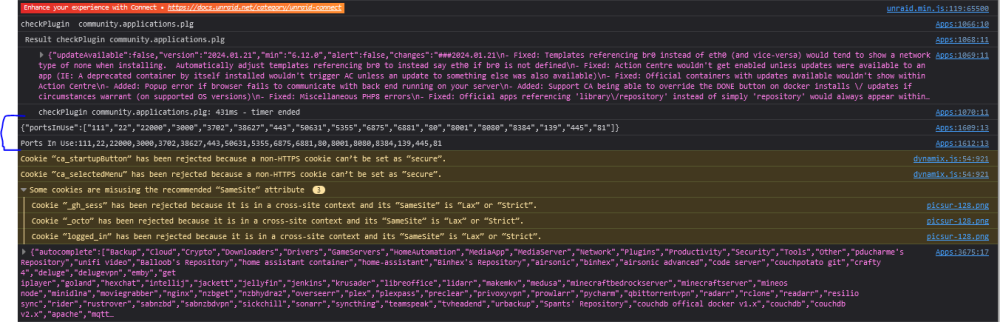
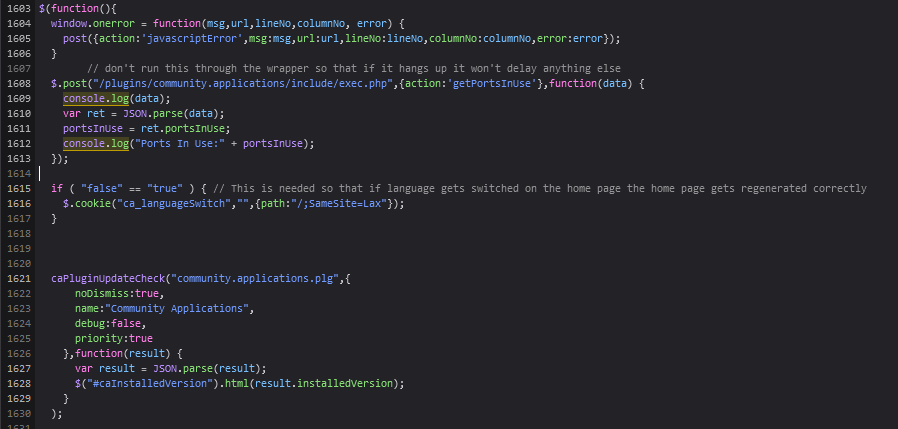
Every time I go to /Apps I can see few console log messages: The origin of the logs seems to be this one: Why are these logs showing up? Have they been forgotten by the developer, is it a plugin or is the system compromised? Diagnostics here.
-
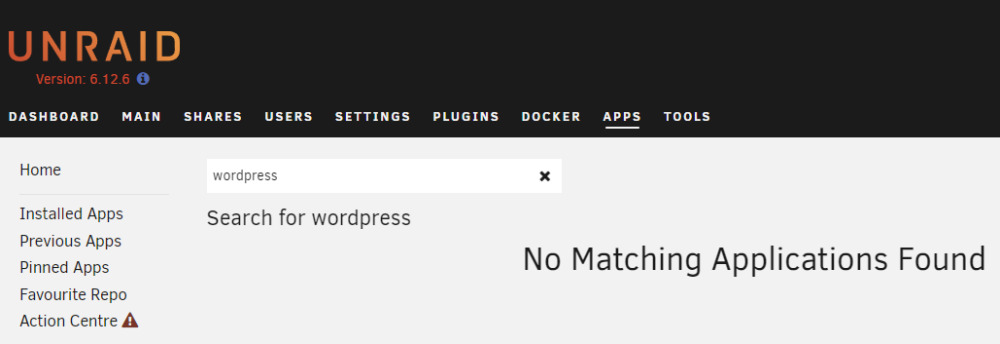
@Kru-x Recently, for some reason Wordpress does not show anymore for me when searching for apps, already posted it here. It was showing a few days ago. Were there any changes recently that make it incompatible or something? Kinda desperate...
-
Diagnostics unraid-diagnostics-20240130-0009.zip
-
Diagnostics unraid-diagnostics-20240130-0009.zip
-
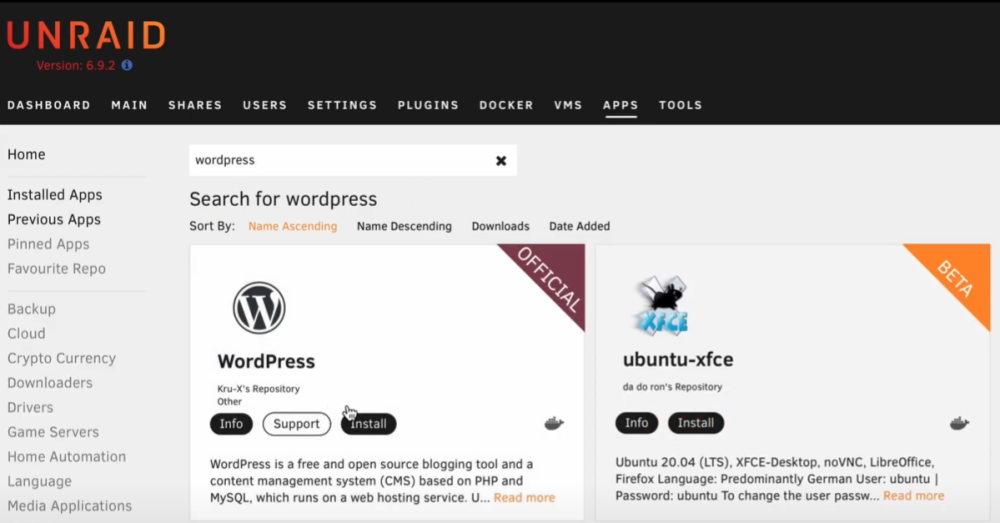
Looking at this video (minute 1:33) there's a search for Wordpress, and this is the result: However... in my Unraid instance I cannot find it, why? I was able to see it few days ago.
-
Every time I go to /Apps I can see few console log messages: The origin of the logs seems to be this one: Why are these logs showing up? Have they been forgotten by the developer, is it a plugin or is the system compromised?
-
Did anyone check it?
-
Attached the log with today's logs. unraid-diagnostics-20230410-2242.zip
-
I also have to mention that during the time Unraid was exposed to the internet, the router had IP-V6 DHCP enabled and if I reckon correctly I seen IP-V6 in both Unraid and all dockers. Currently routers IP-V6 DHCP is turned off and firewall blocking incoming connections. I've also seen a lot of these errors in syslog.txt, are these normal? Apr 9 05:00:01 UNRAID move: move_object: //..c/... No such file or directory Apr 9 05:00:01 UNRAID root: Specified filename //..r/... does not exist. Apr 9 05:00:01 UNRAID move: file: //..r/... Apr 9 05:00:01 UNRAID move: move_object: //..r/... No such file or directory Apr 9 05:00:01 UNRAID root: Specified filename //..f/... does not exist. Apr 9 05:00:01 UNRAID move: file: //..f/... Apr 9 05:00:01 UNRAID move: move_object: //..f/... No such file or directory Apr 9 05:00:01 UNRAID root: Specified filename //..f/... does not exist. Apr 9 05:00:01 UNRAID move: file: //..f/... Apr 9 05:00:01 UNRAID move: move_object: //..f/... No such file or directory Apr 9 05:00:01 UNRAID root: Specified filename //..h/... does not exist. Apr 9 05:00:01 UNRAID move: file: //..h/... Apr 9 05:00:01 UNRAID move: move_object: //..h/... No such file or directory Apr 9 05:00:01 UNRAID root: Specified filename //..h/... does not exist. Apr 9 05:00:01 UNRAID move: file: //..h/... Apr 9 05:00:01 UNRAID move: move_object: //..h/... No such file or directory Apr 9 05:00:01 UNRAID root: Specified filename //..4/... does not exist. Apr 9 05:00:01 UNRAID move: file: //..4/... Apr 9 05:00:01 UNRAID move: move_object: //..4/... No such file or directory Apr 9 05:00:01 UNRAID root: Specified filename //..g/... does not exist. Apr 9 05:00:01 UNRAID move: file: //..g/... Apr 9 05:00:01 UNRAID move: move_object: //..g/... No such file or directory Apr 9 05:00:01 UNRAID root: Specified filename //..t/... does not exist. Apr 9 05:00:01 UNRAID move: file: //..t/... Apr 9 05:00:01 UNRAID move: move_object: //..t/... No such file or directory Apr 9 05:00:01 UNRAID root: Specified filename //..r/... does not exist. Apr 9 05:00:01 UNRAID move: file: //..r/... Apr 9 05:00:01 UNRAID move: move_object: //..r/... No such file or directory Apr 9 05:00:01 UNRAID root: Specified filename //..p/... does not exist. Apr 9 05:00:01 UNRAID move: file: //..p/... Apr 9 05:00:01 UNRAID move: move_object: //..p/... No such file or directory Apr 9 05:00:01 UNRAID root: Specified filename //..d/... does not exist. Apr 9 05:00:01 UNRAID move: file: //..d/... Apr 9 05:00:01 UNRAID move: move_object: //..d/... No such file or directory Apr 9 05:00:01 UNRAID root: Specified filename //..n/... does not exist. Apr 9 05:00:01 UNRAID move: file: //..n/... Apr 9 05:00:01 UNRAID move: move_object: //..n/... No such file or directory Apr 9 05:00:01 UNRAID root: Specified filename //..p/... does not exist. Apr 9 05:00:01 UNRAID move: file: //..p/...
-
Due to a firewall misconfiguration unraid System was exposed to the internet for few weeks, meaning no port was filtered/blocked so everything was open wide. This caused one of my Docker images (qBittorrent) to get a crypto miner (xmrig). I've found it out just because half of my cpu cores were running at 100%. Killed the xmrig process, it lived inside the qBittorrent's docker. Deleted qBittorrent's docker completely and set it up again together with the firewall. Attached the logs as I cannot find how did the attacker do this. Another question is... what else could have been compromised? unraid-diagnostics-20230409-1648.7z
-
+1 Can you relate the problems you had with btrfs please?
-
Oh ok, so the very first parity check is just to start the wheel. After that its live updated. So the following parity checks would in fact only identify the failures. Got it, many thanks
-
Hey, I have 4 identical disks and 2 set for parity. I've been looking around and documenting myself about parity but there's something I wasn't able to find... maybe its too obvious but I need to get my mind around it. So the questions are: 1. If you do a parity check today and lose a drive a month later, then the drive restored will have today's data, so you can only "restore" to the last time you did the parity check, is this correct? 2. As I've seen, parity must be always build from start to beginning, with my setup this can take around 20 hours. Can't parity be updated on write? Thanks




