





Krakout
Members
-
Joined
-
Last visited
Everything posted by Krakout
-
Ok, so I managed to solve it - Zoneminder, which I installed yesterday, filled my cache drive and everything locked up; and cache stayed full even after removing Zoneminder. By the way, appdata is set to cache only, is this a good practice? I don't remember how and why I set it up when I first installed unRAID...
-
Oops, forgot about that. Apologies... (facepalm). Attached. diagnostics-20240410-1600.zip
-
So today I found out that my containers have stopped working. Each gives different errors, like Sonarr, Radarr, qBT, Jellyfin, UptimeKuma, Prowlarr Others, however, do work, for instance Scrutiny, Homarr, ShareX. Since every one gives different errors in the log I have no idea where to start... Could anyone help? Running 6.12.10, all apps are on latest version. Thanks! diagnostics-20240410-1600.zip
-
Hello! Recently I had an infection on one of my machines which tried to brute-force into my Unraid box. I only got wind of it through Fix Common Problems, which though alerted me a full day later during its normal routine. Is there a simple way to get notifications about login attempts? I don't need a full syslog service, just this one functionality... I was tempted to go with Graylog but it's much more complicated than my needs, plus I'd need Elasticsearch and Mongodb to be installed too, so I thought I'd ask here Thanks! PS No, my box is not accessible from outside my network, before you ask; this was a local event. PS2 I do have alerts enabled for all levels and they work, but it seems the system doesn't give any importance to successful/failed logging in attempts, even for an obvious brute force attack!
-
Today I'm getting photos pf people instead of the apps icons. April Fools?
-
Is this stalled?
-
Any chances of Reactive Resume getting updated? It's now up to v4...
-
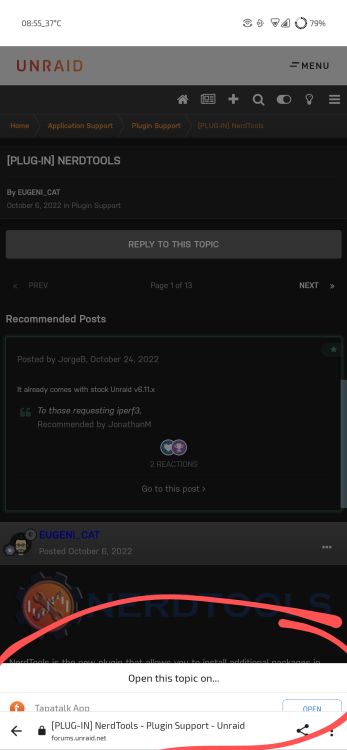
Thanks for your reply. Actually I've used Tapatalk on my forum in the past and could either remove or fix how it appears (basically the banner breaks the page, not allowing to scroll or click on the continue button) by modifying the relevant template. That said... It's gone now?
-
Every time I open a thread from an email notification I get this (attached)... Really bad usability.
-
So I went ahead and briefly pressed the power button. Box shut down immediately, which is also strange. Started it up again, and this time it booted fine. Could it be it was stuck at a point just before booting up again?
-
Hello everyone! So, I updated my server, all seemed fine according to the process window. then rebooted. It's been 15 minutes now and it's still not up. Should I hard reset the machine? Give it more time? Usually it's up within 3-4 minutes I think... Hm, interestingly, I can't see it on my router. That's weird. Ethernet port lights are off.
-
Hehehe I was having lunch and was going to post about it, you beat me by a couple of minutes! I went over all the settings in detail today and found that it installs with Network set to none, so it was indeed a simple fix from there. Thanks for the help!!
-
Hello! This looks like just what I need However I'd need a bit of help with installing; no matter what settings I enter, the port mappings that read ":1111/TCP:1111". All I want to do it have it access my apps on the same box where this resides, from within my home network. Could anyone help? Thanks!!

-
Indeed I didn't reboot, but I did close tmux. If you need it I'll reboot and try to let you know!
-
For me .tmux.conf did not exist for some reason, created it, echo'ed the definition and it worked fine. Thanks!
-
Same here, reported it some posts before...
-
-
Ah ok, thanks for confirming.
-
This is not a tmux issue, I am facing the same problem myself... I could really use the bookmarks facility, but no soap. But, how did you run it under tmux? You didn't get the error I described above?
-
Any ideas about my tmux issue?
-
Oh yes, I understand why you asked it, no problem with that. But up until a few minutes ago I didn't even know I could actually go into the cache fs and manipulate it, I was under the assumption that cache is pretty opaque to the user (no reason for that assumption, probably a leftover from other systems). So I'm pretty sure I didn't actually do it manually!
-
Actually, I just saw the files a few minutes ago; some media files that I just deleted from cache and made sure they were on the array. Indeed that seems to have been the culprit, but no, I certainly didn't do such a thing - it was my first time going into the cache drive to see what's there. Weird? Any other reason this could happen? Thanks for the help!
-
So, I have a grand total of two days of experience with unRAID, coming from TrueNAS, and one of the first things that happened to me was that my cache drive got filled up to 100% when migrating my data. I read all relevant threads but I still can't flush my cache. Setup: 2x4TB array, 1x128GB cache drive. Appdata: Prefer domains: Prefer isos: No Public (my main data share): yes system: Prefer VM/Docker: stopped. No CA mover plugin installed My Public share still shows 86.9GB on the cache drive, and another 22.5GB from System. No files open (no shell connection, no file managers reading folders off the NAS. Diags attached. Any help would be greatly appreciated, as I've said I've been trying out solutions and I could only bring it down from 100% to 93% cpc6128-diagnostics-20230209-0747.zip
-
Hello! Total n00b here (this is actually my very first post), thanks for this awesome plugin - so nice to have tmux for those long operations... So everything appears to run fine, however when I try to run MC from within tmux I get: Unknown terminal: tmux-256color Check the TERM environment variable. Also make sure that the terminal is defined in the terminfo database. Alternatively, set the TERMCAP environment variable to the desired termcap entry. Really not sure if I should be posting here or in some other place, so feel free to shoo me away. I can see a few solutions for this issue online (setting the variables etc), but I don't know where conf files are stored here... Any help? Thanks - and, apologies if I'm off-topic.




