





rescend
Members
-
Joined
-
Last visited
Everything posted by rescend
-
Noted, I'll keep an eye on it until then.
-
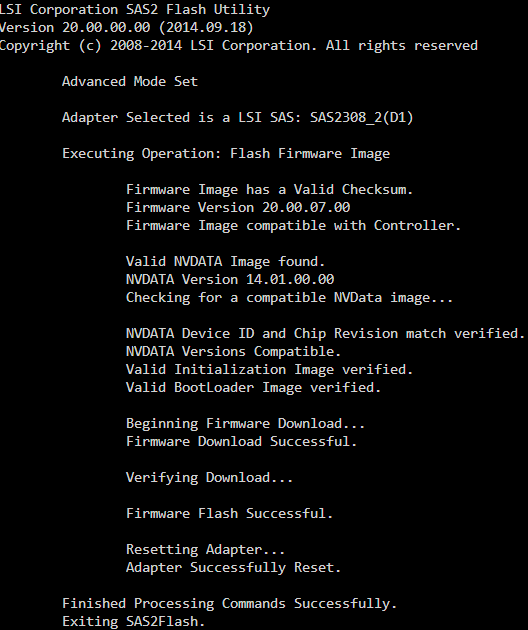
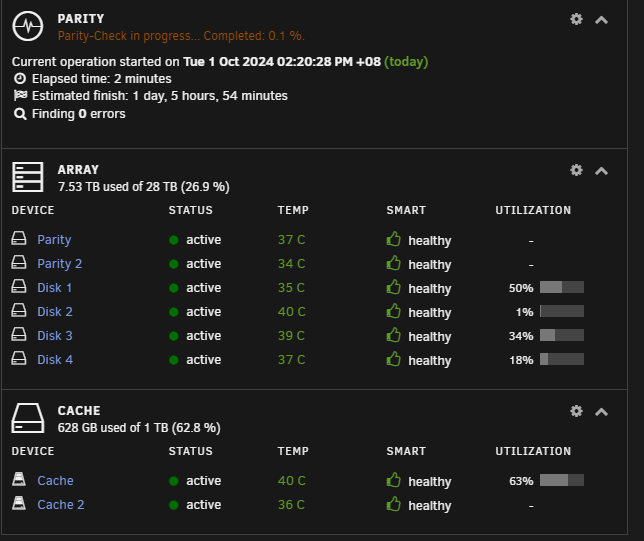
Just finished flashing, into the hands of fate with a reboot! Update: There are no problems so far! It previously couldn't get past 0.1% without throwing thousands of UDMA CRC Check errors! Thank you for everything so far @Faceman I will be updating the top of this post for people to refer to in the future.
-
Yeah, standard sanity check. I'll do just that.
-
I will try this out now! Thanks a lot, keep you updated on whether it works!
-
@Faceman If you could show me (or point me in the right direction) on how to do this, I'd love to learn! I've been using Unraid and I'd like to learn more on how to actually work the console a little to do stuff. Thank you most kindly in advance.
-
Can I just use this guy's way of updating the firmware? Except I won't be using Linux, I'll be using FreeDOS (so I have to use the provided sas2flsh.exe instead of using the Linux sas2flash) but otherwise its the same command I take it?
-
Yeah, its the 9207-8i if thats the model number you're looking for @Faceman
-
I'm sorry for sounding really dumb, how do I find out the model of the card? Edit: Sorry, I think the model is SAS9207-8i?
-
As an update, this is what the BIOS of the LSI card says on boot: Avago Technologies MPT SAS2 BIOS MPT2BIOS-7.39.00.00 (2014.09.18) Copyright 2000-2014 Avago Technologies, All Rights Reserved I'm going to get into the boot screen so that I can see what Firmware I'm on. I'm using MPT Firmware Revision 20.00.00.00-IT @Faceman is that considered new or old?
-
I have a Arctic P12 MAX 120mm fan blowing directly at the card directly since I read that both the LSI Cards and 10GbE NICs run HOT so they get a dedicated fan blowing at it. As for the firmware, is this the correct place to download them?
-
Problem solved! Problem has been solved by @Faceman. Thank you so much. You can scroll down further to see my original post. I'm going to put these in Italic so you know that this is the latest update about what happened if you want a TL:DR. My friend and I bought this LSI 9207-8i HBA card (Based on the SAS 2308 chip) from a reputable source so we were convinced it's not a fake LSI card. I also had a spare set of SAS->SATA connectors on standby and after swapping those, the UDMA CRC Errors still persisted. Therefore, my post below was where I was. To start with, my card were bought as follows: Adapter: LSI 9207-8i (SAS 2308) Firmware: 20.00.00.00-IT BIOS: 7.39.00.00 Chip Revision: (0x05) I eliminated the following: Heat Issue: I had a Arctic P12 Max blowing at both cards at 50% speed and both cards are cool to touch. Cable Issue: I had a spare set from another online provider and they still gave the same problems. Badly Seated Ports: I always did a light tension test and ensured that all the ports were secure. Card: I bought it from a place where most folks bought theirs from as well so while plausible, is more improbable than the above. Faceman made an educated guess that the issue was the firmware (and after doing some research, it seems this was a common culprit) so if this is the firmware your card came in, this is the problem causing those errors to pop out. Scroll down and you'll see that i find out that I found a post on reddit that shows someone who copied two files from two downloads into their Unraid USB Stick and executed the commands. See the solution for Faceman's very detailed instructions on how to do this within Unraid. !!!! ENSURE YOUR ARRAY HAS BEEN STOPPED BEFORE DOING SO !!!! After doing the flash and a reboot later, mpt2sas_cm0: LSISAS2308: FWVersion(20.00.07.00), ChipRevision(0x05), BiosVersion(07.39.00.00) And as you will see in the last post, i started a parity check with no more UDMA CRC Check Errors. Thank you so much once again @Faceman for the help!!! I have learnt a lot and I hope this post will help others who encounter this problem! ________________________________________________________ ORIGINAL POST _________________________________________________________ So I moved my system from an AMD 3950X to a Threadripper 2990WX with 128GB of RAM and shifted from using SATA ports to a LSI card. Booted up Unraid and made sure the drives were in the correct order and was amazed at how easy it was to migrate to another system. I went on with my way and my guys just finshed a Satisfactory game session (hosted on the same server) when I saw my browser window flashing orange at the side, I was being thrown a lot of Notifications from the Dashboard about my drives having SMART problems and upon investigation, my drives were throwing out CRC errors because it was doing a parity check (It's 1 October where I Live now and its set to do once every month on the 1st) I immediately stopped the parity check because it was going into the thousands. I have attached the diagnostics file. From what I see, most people say that it might just go up a few times then stop but mine just keeps going up. I looked into the SMART Error logs and this was what it said (The latest error): Error 2754 occurred at disk power-on lifetime: 47506 hours (1979 days + 10 hours) When the command that caused the error occurred, the device was active or idle. After command completion occurred, registers were: ER ST SC SN CL CH DH -- -- -- -- -- -- -- 84 41 e0 00 00 00 00 Error: ICRC, ABRT at LBA = 0x00000000 = 0 Commands leading to the command that caused the error were: CR FR SC SN CL CH DH DC Powered_Up_Time Command/Feature_Name -- -- -- -- -- -- -- -- ---------------- -------------------- 60 00 30 a8 6f 08 40 00 09:24:39.031 READ FPDMA QUEUED 60 00 38 a8 73 08 40 00 09:24:39.022 READ FPDMA QUEUED 60 00 28 a8 6b 08 40 00 09:24:39.020 READ FPDMA QUEUED 60 00 20 a8 67 08 40 00 09:24:39.020 READ FPDMA QUEUED 60 00 18 a8 63 08 40 00 09:24:39.020 READ FPDMA QUEUED Then I went to the Main page and to my horror, I saw errors on Disk 2 and 3: I am at wit's end on what to do. Please do provide some guidance on how I can help to resolve this! Thanks for taking time off to read this! Edit: I plugged everything out and plugged all the cables back in again. Still the same problem. diagnostics.zip

-
Alright then. Thanks for the responses @JorgeB @trurl. Thank you so very much.
-
Ok, I restarted the system (and remove the two new sticks of RAM I installed since they're the only thing that changed, all these started happening AFTER I installed the sticks) and the 4 disks are back but the two Parity drives are still disabled. Shall I rebuild on top again? I did SMART Short tests to check if they were ok and both were completed without errors. wdnas-diagnostics-20240216-2215.zip

-
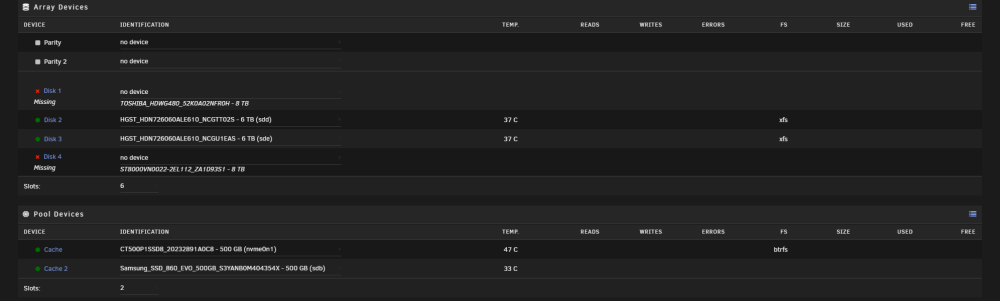
Sorry for necroing this. Now another two disks has failed. I have successfully rebuilt on top once from the previous time, but now both Parity disks have failed. I ran a read check for a abit and its turning up lots of errors. Out of fear i stopped the scan and array and ended up with this I have no idea what is going on. Attached is the diagnostics before i powered down the system as I'm going to check the cables and power. I dont know what to do next for now. Please help wdnas-diagnostics-20240216-2159.zip

-
Yes sir! Just has one directory in it at the moment.
-
Ok, I'll let the SMART test run and finish. If anything weird I'll update here again! Thanks !
-
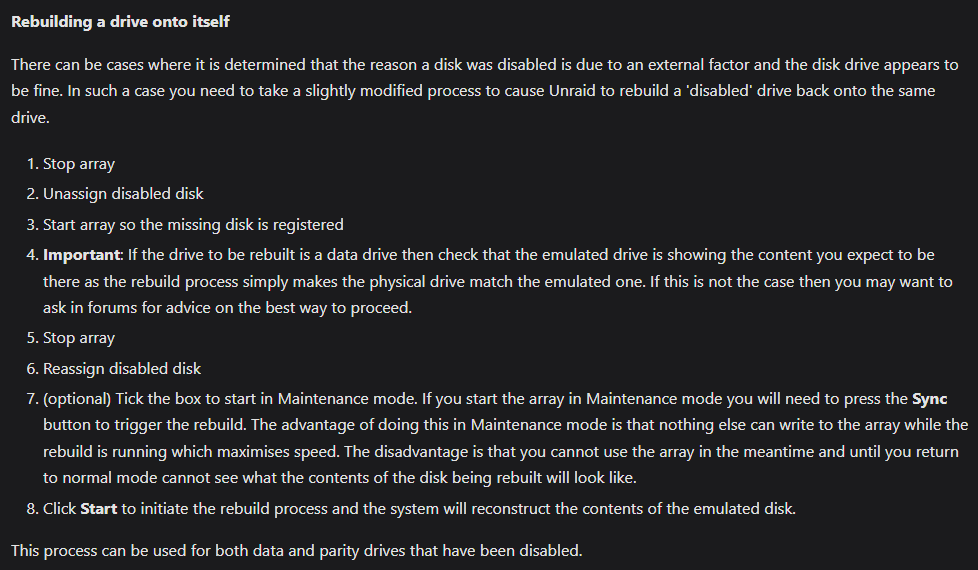
I'll rebuild on top once the scans are done. However, I'm not quite sure how to rebuild on top. is this what you mean?
-
Unraid Version: 6.12.6 System Specs: - AMD Ryzen 9 3950X - ASROCK B550 TAICHI - 64GB ECC RAM - 2 x TOSHIBA_HDWG480 8TB NAS Drives - 2 x SEAGATE ST8000VN 8TB Ironwolf Drives - 2 X HGST_HDN727060 6TB Drives Server has been running fine so far when suddenly this appeared: The disks have always been sufficiently cooled and I don't do THAT much reading and writing on them. I have also attached the Diagnostics. I've checked on BIOS whether the two disks can be detected properly and they are seen in BIOS. I'm currently doing extended SMART self-test on both of them. At wit's end, please help! server-diagnostics-20240205-2324.zip


-
Yeah i had a look at the scripts and being a programmer, I roughly understand the flow but I'm not a native Linux user so it's all "akjsdhajskfhlas" to me. If after trying out and the game is half as good as it claims to be (embargo has been lifted for content creators and it seems to be that good), I will gladly gift one to you so you can play with your pets (while maintaining your now 200+ plus one games 🤣). This game seems like it'll be big and going to be a lot like Ark but actually more fun. We'll see in a few days time! Until you release the docker, VM with Windows it shall be! LOL.
-
Nevermind, I dont think that will work since I'll need to edit the startscript.sh as well. The amount of work you have to do is insane, i don't envy your position at all lol
-
Well, when I have a little more spare cash, I'll be sure to fling a Paypal your way. I'm also wondering if I can just Add a New container using one of your other games thats also UE5 (Satisfactory for eg.) as a template and editing/removing the values to reflect those of Palworld's. In any case, thanks for the tip, I'll try to figure things out!
-
Perfectly fair. 200+ games is not funny to maintain. Much less 20. I don't mind giving it a try if you can point me in the right direction to learn how to make one. Please continue the good work on maintaining the dockers you have! You have no idea how much we owe you.
-
Hey there ich777, I just wanted to say thank you for creating all these dockers, you have made life really easy for me and my friends on our Unraid server! Thank you so much for your hard work so far! Just wanted to also check with you if you have any plans of doing up a Docker for Palworld (That is allegedly launching with Dedicated Servers). We're looking forward to play it this weekend! If it's going to take a while for you to properly test and release it, is there anyway we can just run it on one of your dockers and just changing the game id? Its a Unreal Engine 5 game. Not rushing, just wanted to check if its possible!




