





can4d
Members
-
Joined
-
Last visited
Everything posted by can4d
-
No the Random_II was an external usb (unassigned) Yes. I remember the cache_ssd (not really configuring with purpose)
-
I stopped plex because I didn't want it writing anything.compute all
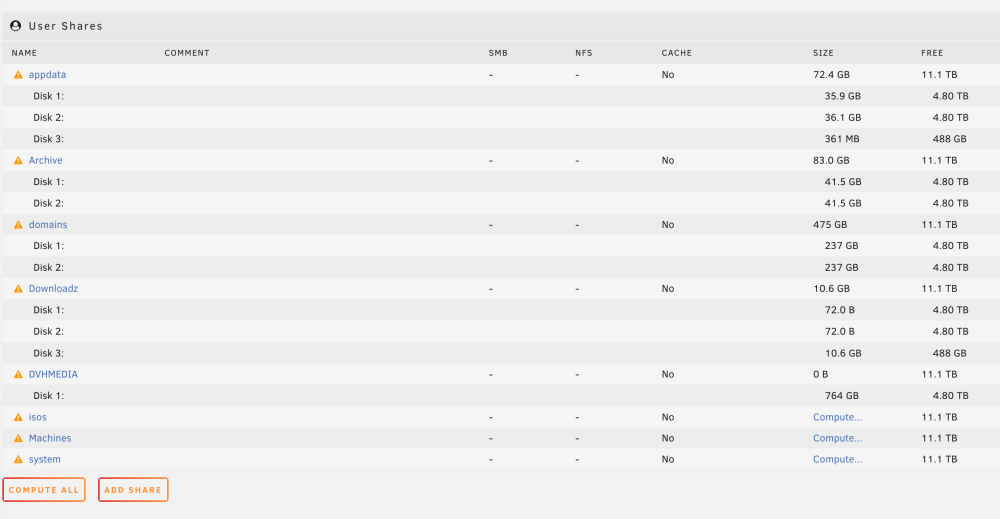 Compute all is still runningthe compute all is still computing. I believe I had a mirror and believe you to be correct (all foggy with all the stress) just not sure as to the specifics on how to best recreate. my array is still running. is this ok?I assure you I had parity, as it would run as scheduled with alert notifications. I am not sure what is going on. you can see both drives are exactly same with data. Should I shut the array off? I am afraid to install community applications and unassigned devices to see if I can get my original /boot/config that I believe I moved to it. Not really sure how to proceed at all.I was able to retrieve some config files from the original usb that I accidentally updated the usb flash with new usb creator.I might have used it as a pool with the other 500. that makes sense to me. Yes I had parity drive for one of the 6TB. diagnostics is attached. tower-diagnostics-20230209-1410.zipif you have time please let me know your thoughts. tower-diagnostics-20230209-1410.zipI figured out that I have to create a new config after I start the array and its wrong. Any thoughts as to how to proceed? I suppose there is no way to understand pools and I will have to recreate shares? If I add one of the Seagates as parity it will erase it but I will keep the data from the other one?I am very worried now as it only shows 1 as parity. The instructions says I was to create a new config but it only shows "preserve current assignments" was I supposed to do that or just assign the all drives as data as I have now done?
 when you say "assign" the devices are you saying to select "All" under the "Preserver Current Assignments"?this is what I see. I now have my license back and can proceed but a little nervous about making a mistake. Following the advice from here: https://wiki.unraid.net/Manual/Changing_The_Flash_Device#What_to_do_if_you_have_no_backup_and_do_not_know_your_disk_assignments: I am stuck as the instructions don't align. Should I select "All" for "Preserve Current Assignments"?
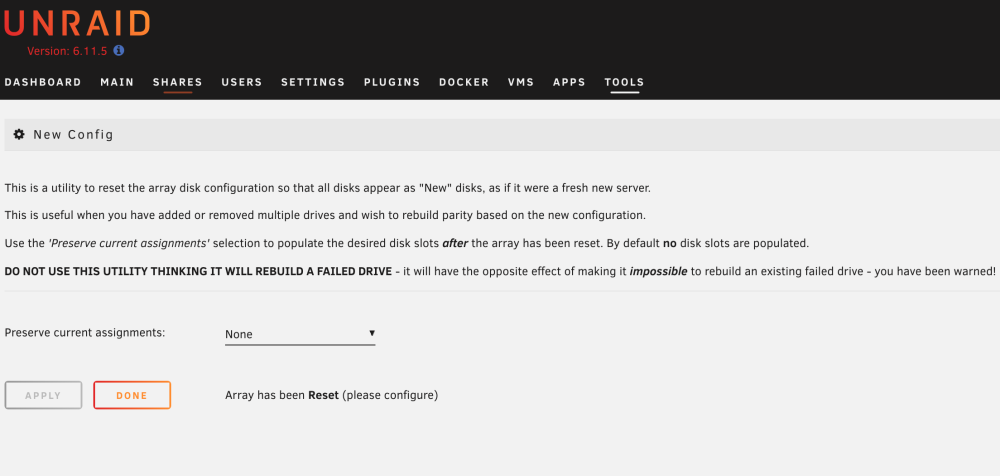 there is no Tools -> New Config "create a new array configuration". Only "Preserve current assignments"I don't have the option to create New ConfigI have nothing any more at the moment. the drive I moved stuff to no longer works. I was not able to get the key file. I had a license for 6 drives. my mess up could have been recovered had I not created a reformatted my flash drive with a new version without copying the /config . I don't know my assignments no. pretty upset at the moment.I am pretty much dead in the water now. that drive I moved shit to now appears to have failed. It doesn't not mount to any of my systems. I don't know how to make it work again.so when I boot from the flash and type "ls /boot" those are the files that I am to put on my flash drive or are you assuming the /boot directory was moved from my f**up command when I moved files to the external drive and it is those set of original files you want me to put on the flash drive? I am still attempting to mount the damn drive to get the files that I moved because I don't have a pc. I use a mac and its giving me issues with mounting so I can't confirm it copied the /boot dir as of right now. if its the first scenario I can copy the files from the /boot on my unraid, I just don't know which /boot I am looking at and how to move to my flash drive since nothing is mounted.I am still very confused. so I should not worry about copying the files that I moved? After booting from the flash drive, I should copy files from the /boot to the flash drive? (what is this command: mv /boot/* to-where) When I type "ls /mnt" there is nothing there but you say nothing got moved. If I don't see anything there what does it mean "nothing got moved"?I guess my point of confusion is I can place the files on the flash drive, but how do I get them to the unraid in the place they were before? Once I copy the removed files to the usb, I put them at the top level of the usb and then what command (path) would I use to place them?


Account
Navigation
Search
Configure browser push notifications
Chrome (Android)
- Tap the lock icon next to the address bar.
- Tap Permissions → Notifications.
- Adjust your preference.
Chrome (Desktop)
- Click the padlock icon in the address bar.
- Select Site settings.
- Find Notifications and adjust your preference.
Safari (iOS 16.4+)
- Ensure the site is installed via Add to Home Screen.
- Open Settings App → Notifications.
- Find your app name and adjust your preference.
Safari (macOS)
- Go to Safari → Preferences.
- Click the Websites tab.
- Select Notifications in the sidebar.
- Find this website and adjust your preference.
Edge (Android)
- Tap the lock icon next to the address bar.
- Tap Permissions.
- Find Notifications and adjust your preference.
Edge (Desktop)
- Click the padlock icon in the address bar.
- Click Permissions for this site.
- Find Notifications and adjust your preference.
Firefox (Android)
- Go to Settings → Site permissions.
- Tap Notifications.
- Find this site in the list and adjust your preference.
Firefox (Desktop)
- Open Firefox Settings.
- Search for Notifications.
- Find this site in the list and adjust your preference.