





Just Me
Members
-
Joined
-
Last visited
-
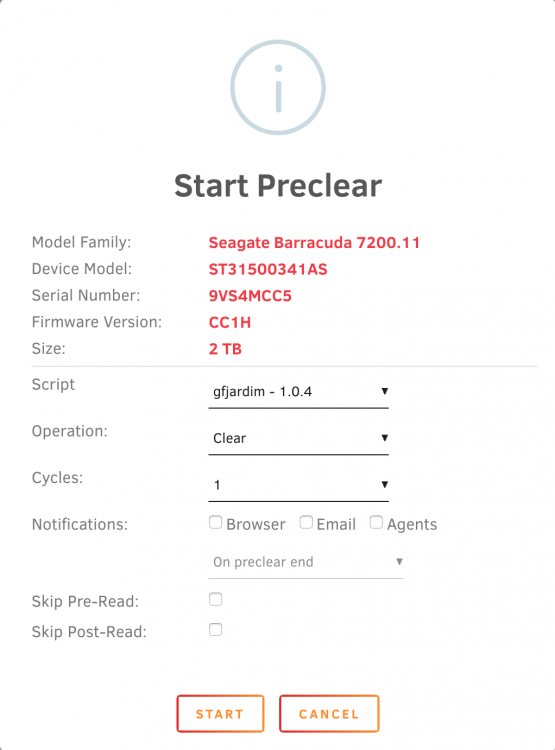
Hey! I've set up a test unraid server with some older disk I want to preclear. Two 1.5 TB disks and two 1 TB disk. The preclear plugin recognizes the two 1.5 TB disks as 2 TB disks Any ideas? It is a bug? Diagnostics attached. tower-diagnostics-20190813-1431.zip

-
Seems I'm pretty outdated with just 2GB of RAM. ?
-
Thank you very much. I'll give it a try as soon as my external drive arrives. Preclear is always a good way to "burn in" new drives, even if I don't plan to use it with unRAID. SATA or eSATA would be better but the device only has USB 3.0 and I don't want to open the external case, nowadays this always results in a destroyed case because of all these plastic clips :-/
-
Sorry, if this has been asked before, but is it also possible to preclear an external drive attached via USB or is preclear only able to use disks attached via SATA?
-
As said before it is a new script written by gfjardim so no need to add the "old" preclear script. (as fas as I unterstand the new beta plugin)
-
So I've tried to use the command line to preclear my USB disk but it seems it is not that easy. If I start the preclear script the following error appears: Of course I could prelcear the disk anyway but the script won't be able to grab the SMART data. I think the issue is the "-d ata" option. The USB device needs a "-d sat" command to read the SMART attributes. Maybe I could modify the preclear script to use the "-d sat" option instead of "-d ata" but the script is very complex and I don't think I'm able to modify it correctly Edit: okay, I confess I'm just stupid and didn't recognize that the script already allows to set a custom device type for SMART. My bad
-
Thanks for the quick reply. It seems the plugin is not able to use USB drives, the attached device is not listet as a valid disk to preclear the plugin just reports: No unassigned disks available. My USB drive seems to report SMART attributes, CrystalDiskInfo is able to deliver the same data as shown on internal disks. So it seems SMART report is not in issue. I'll check if I'm able to start a "manuell" preclear using screen and command line.
-
Is there a way to preclear USB attached drives? I like to "burn in" new disks with preclear even if I don't plan to use them in unRAID. I've got a new external 2 TB 2,5" USB disk and I would like to see if it will survive the first X hours preclearing before I'll put real data on it.
-
There is still a "/" missing: http://lime-technology.com/forum/index.php?topic=37490.msg382778#msg382778 rsync -nrcv /mnt/[source]/ /mnt/[dest]/t >/boot/verify.txt
-
You could but teracopy will already check the checksum and make sure all data are okay. I would trust teracopy and skip step 8.
-
-
How do I use the bjp999 script? In the bjp999 archive are several files: preclear_bjp.sh, readvz and a x64 folder with (I guess) a 64 bit readvz. Do I have to copy the 64bit readvz and the script to /boot/config/plugins/preclear.disk/ ?
-
I was wrong, this works. Rsync just reads the whole source disk first, which takes hours, and then starts to compare the checksum with the destination disk. So it seems everything is fine. Thank you Freddie for your help
-
Okay I've tried rsync -nrcv /mnt/disk1/ /mnt/disk10/t >/boot/verify.txt but rsync still only reads disk1, disk10 ist still spun down. So I guess it is not working either?
-
Hey! Okay, it seems I'm too stupid for this I've tried to copy the content from disk1 to the new disk10. I've used this command to copy all files: cp -rpv /mnt/disk1/* /mnt/disk10/t This seemed to work, all files are in /disk10/t Now I want to check if all files are okay so I type this command in the command line: rsync -nrcv /mnt/disk1 /mnt/disk10/t >/boot/verify.txt But all it does was a lot of reading on disk1, no reading on disk10 so disk10 went to sleep after a while. After the process has finished I have a verify.txt file. It seems to contain a list of all files that are an disk1. e.g. sending incremental file list disk1/ disk1/Dokus/ disk1/Dokus/SDTV/ disk1/Dokus/SDTV/Ice Road Truckers/ disk1/Dokus/SDTV/Ice Road Truckers/Season 1/ disk1/Dokus/SDTV/Ice Road Truckers/Season 1/Ice Road Truckers - Season1 Disc1.dvd disk1/Dokus/SDTV/Ice Road Truckers/Season 1/Ice Road Truckers - Season1 Disc1.iso . . . sent 111,485 bytes received 8,188 bytes 5.49 bytes/sec total size is 2,964,339,119,913 speedup is 24,770,325.14 (DRY RUN) What I'm doing wrong? I thought the verify.txt should only contain files that are not okay but rsync never read any files an disk10. I'm confused, any help?

