4WoofGrrrr
Members
-
Joined
-
Last visited
-
I now know that running BackBlaze in a Docker on a non-Windows, non-MacOS system may be a violation of the Terms of Service and that BackBlaze actively "discourages" this.
-
It takes me to https://forums.unraid.net/topic/87798-support-selfhostersnets-template-repository where I cannot post a new topic, unfortunately
-
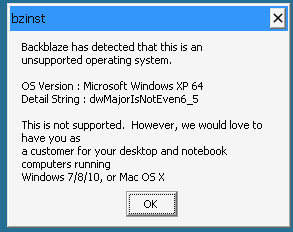
I get this dialog from the Web UI after a clean install: Is anyone else seeing this? I previously had this working for a long time with a much earlier version, but I started having problems with backups not running, so I removed the container and image, deleted the config directory, and used the Unraid Backblaze_Personal_Backup App to install again. I assume this gets me the current version of Backblaze that no longer supports Windows XP, but it seems the WINE version and/or configuration hasn't kept up. I don't have the tools or skills to change things so that WINE will emulate a Windows 7, 8, or 10 environment. If you have a fix for this, could you please share it? Thanks, --- Mark
-
Backblaze_Personal_Backup Web UI after a fresh install displays an error "bzinst: Backblaze has detected that this is an unsupported operating system ..." I apologize is this is the wrong place/way to post. Please correct me if I am wrong. Let me know where I should post this, if you would. I previously had this working for a long time with a much earlier version, but I started having problems with backups not running, so I removed the container and image, deleted the config directory, and used the Unraid Backblaze_Personal_Backup App to install again. I assume this gets me the current version of Backblaze that no longer supports Windows XP, but it seems the WINE version and/or configuration hasn't kept up.
-
I read up on this, and it seems some people have needed to reboot to get FCP working. So I rebooted and re-scanned. Worked great this time. Just a few warnings which I fixed. Thank you so much for helping me with all this. I learned a little and I fixed a lot.
-
I guess I was kinda looking more for a set-it-and-forget-it solution? Anyway, I installed FCP and ran it. The dialog said it may take a minute. It' been more than 10. Am I being impatient? Done. Thanks.
-
Thank you for your help. I'm not sure I entirely understand what all of this means, but I did read the pages you referred me to and (tried to?) followed the recommendations. Firstly, I apologize for bringing up two different topics in the same request. I should have known better. In answer to your question: the share that is giving me the out-of-space error is "data". I have recreated docker.img and have (automatically) re-installed the previous apps. After that, I shut the Array down, changed the Minimum Free Space to 1GB, and restarted the array. I can save files now. The help for Minimum Free Space confuses me. It says: So now, because I have changed the setting to 1GB (it was previously "0", which I thought would mean there was NO minimum) if free space gets BELOW 1GB, new files will fail??? Does that mean that I can save a file now only because I restarted the array and the cache got emptied in the process??? And if free space gets below 1GB in the future, saves will start to fail again? I have also read more about this on the Storage Management page you referred me to. It makes me believe that if the space drops below 1GB, the cache will be bypassed and data will be written directly to the array. I am sure I am fundamentally misunderstanding how the cache works. I had thought it would be simply be used to cache the most-recent and/or most-frequently-used data and anything else would be automatically moved to the array. Could you please refer me to more basic information - an overview, perhaps - of how this all works? Thanks again.
-
There you go. Sorry, my first problem to report. I have rebooted Unraid and I still see the problem. I can't edit the text file and save it. muttraid-diagnostics-20250411-1008.zip
-
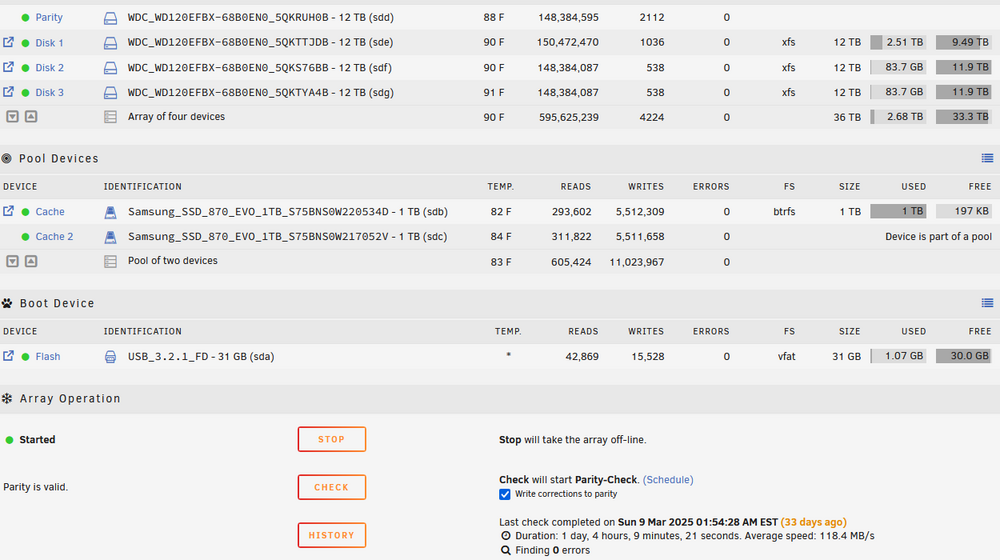
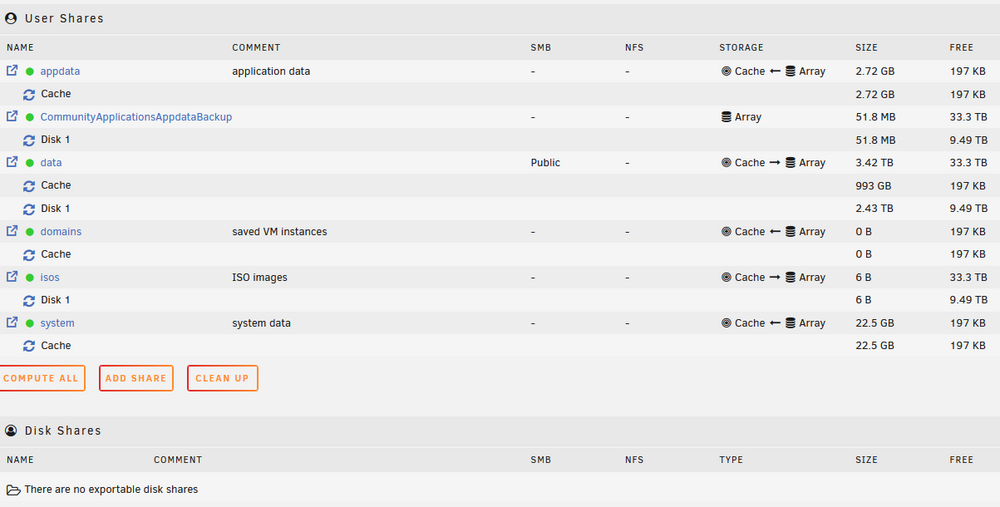
First, I am not an Unraid expert. I'm just trying to use a NAS for lots of storage and redundancy, etc. Please be kind, as if I'm a complete newb, just trying to get things working well. If you could provide easy-to-understand advice, I would really appreciate it. All the many configuration options can get rather daunting. I am using Unraid as a NAS for my Windows 11 desktop. My primary share is mounted as my U: drive. I use it to store media for my Plex server. I know it would be better to run my Plex server on Unraid itself, but instead I am running it on Windows and using the NAS as its storage. Unraid is running on a very old PC with a very old video card. (I should buy it a new card.) I set up my Unraid several years ago, and it has been working well, but today I started getting the "There is not enough space" error message even with minuscule files. For example, I used Windows File Explorer to create a new (empty) Text Document. This worked. The file is empty. Then I used my favorite text editor - vim - to add text to the file. Just a few characters. When I tried to save the changes, I got the "not enough space" error message. I will reboot Unraid to see if that helps, but in the mean time... I first saw the error message today when I tried to download a 2 MB file. So I download onto local disk and tried to copy it to my Unraid share. Same problem. I have three 12 TB hard disks in my one and only array. All three have plenty (gigabytes) of free space. I will provide a screenshot of my Arrays. I also have two 1 TB SSD's in a Pool for cache. My primary share - "data" - seems to have 3.42 TB used and 33.3 TB free. Disk1 has 2.43 TB used and 9.49 TB free. Disk2 and Disk3 aren't listed. I don't understand why. I'll provide a screenshot of my Shares as well. Other than that, I believe I have done minimal configuration other than to add some plug-ins and dockers. I think I have plenty of free space in my share, and I don't understand the problem. I'm sure that the like many newbs, I assumed that a share would just span the the array it is allocated to, and that the data in the share would be distributed - hopefully evenly - amongst the disks in the array. Because the share info is not listing Disk2 and Disk3, I think this is not happening, Right? If it's not, is there a way to make it so? I would prefer not to bang on the same disk all time. Many thanks for any assistance you might give. ---Mark
-
Does the setting in the UI handles this? Sorry. I thought the environment variable would override
-
Thank you for your reply. What I would like is this: I want to use the UI so I can select the titles before ripping (I don't want sub-titles, alternate audio, or CC, for example) therefore, when I insert a disc, I want nothing to happen I click to scan the disc those titles that are shorter than 30 seconds (rather than the 120 seconds now) are automatically skipped I select which titles and audio tracks I want I choose the destination folder if it's not already set I click to rip the disc and store the selected titles into the destination folder when done, the disc ejects automatically (this isn't happening now even with -e 'AUTO_DISC_RIPPER_EJECT'='1') I suspect that these "AUTO" settings only apply if auto-ripping is enabled??? Perhaps auto-ripping with the minimum length skip plus automatic eject is the way to go...
-
Sorry. I figured out my problem with the output destination. You have to manually choose it in the Web UI. For some reason I thought that's what the /output volume was for. But /output is one of the options you can use in the UI. Any idea how I can change the skip length during scan from 120 seconds?
-
Could you please help me to understand why my MakeMKV output is going into the /config volume and how to make it go somewhere else? I apologize if this has been discussed before, but my searches have not found what I'm looking for. I'm new to Unraid. New to Docker. Been using MakeMKV on Windows for quite a while. I just installed this Docker and tried it for the first time. The output is going into the "Videos" directory of the "/config" volume, which is "/mnt/user/appdata/MakeMKV". But I want it to go to "/mnt/user/data/makemkv" ("/mnt/user/data" is one of my Unraid shares.) I used the Unraid Web UI to configure this. I specified "/mnt/user/data/makemkv" both for Storage and for Output. I confirmed this in the docker command that the Web UI displayed when I saved my configuration (the full docker command can be seen in the attached file "makemkv_docker_run_cmd.txt"). I think this might be the relevant part: -v '/mnt/user/data/makemkv':'/storage':'ro' -v '/mnt/user/data/makemkv':'/output':'rw' -v '/mnt/user/appdata/MakeMKV':'/config':'rw' I created "/mnt/user/data/makemkv" from the command line before running MakeMKV just in case MakeMKV would have a problem if it didn't already exist. Also... I specified "Automatic Disc Ripper: Minimum Title Length: 30" (i.e. 'AUTO_DISC_RIPPER_MIN_TITLE_LENGTH'='30') to skip things shorter than 30 seconds, but when MakeMKV scans my DVD it says it's skipping things less than 120 seconds. Am I confused about what this option does? -e 'AUTO_DISC_RIPPER_MIN_TITLE_LENGTH'='30' Thanks in advance for reading this and providing information that might help ---Mark makemkv_docker_run_cmd.txt
-
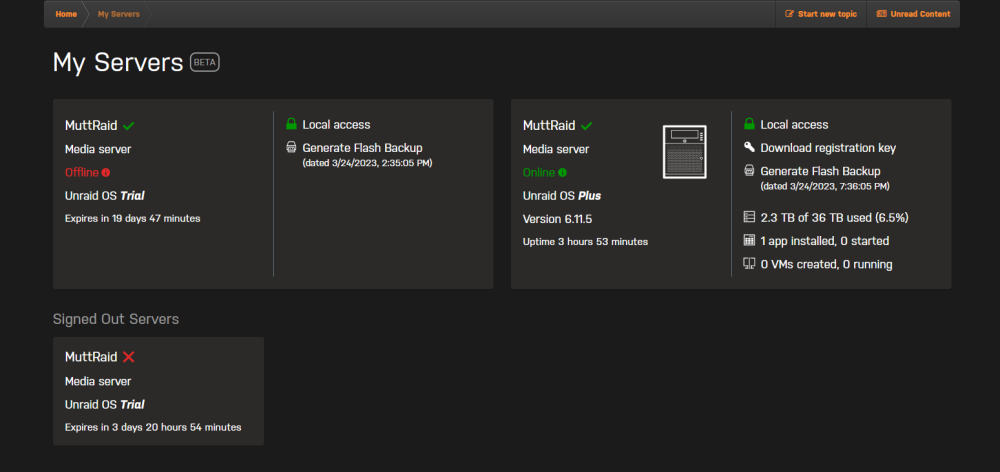
I don't mean to be pain, but it's been over a year. Did you ever get a chance to work on this? Am I perhaps seeing a new issue? Or will Trials always continue to be listed until expiration? Thanks