





pleasehelpmeguys
Members
-
Joined
-
Last visited
-
Forgot to say thank you, you were so so helpful and i appreciate the extra tips! Looks like executive shares was already enabled.
-
Huzzahhhh! Worked perfectly. Now the cache drive just has 154mb taken up which is random. Do i have to change any settings or anything in the system share or do i just leave it as is now? Thanks a ton guys.
-
Genuinely, i’m embarrassed and am sort of concerned about my reading comprehension lol. 🙈 Thank you, i’ll try it and report back. Let’s pretend like this never happened ( please)!
-
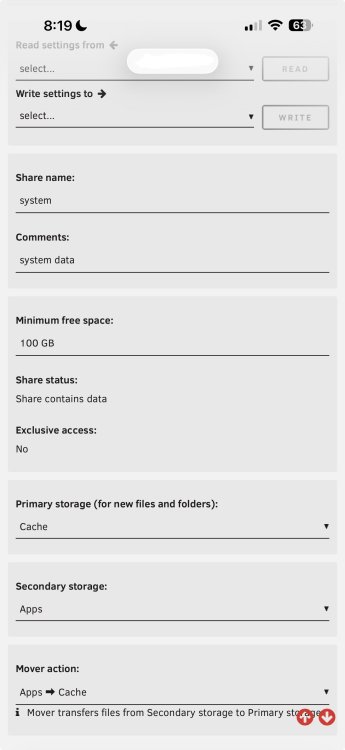
Okay, i really appreciate your instructions but i’m sure i messed something up because im dumb lol. Here is what my system share settings are now, after moving they still exist in the cache not apps drive. Thanks for any help!
-
I’ve had unraid for a year or two and i set up my two nvmes with advice from people at the time as a cache drive for stuff to download to temporarily (usually ends up being there for a month or two til the cache is full (1tb) then i empty it) and move to the hdd and one as a a drive labeled ‘apps’ which was to be any docker app metadata and system stuff. Somehow the system share is on the ‘cache’ drive though and now i wanna move it to the ‘apps’ drive if it’s an easy thing to do. If not, i’ll leave it alone. Not sure if this is the best use of my drives btw. The ‘apps’ drive uses barely any storage at all—78.7gb rn and if i move the system share to it there would be ~100gb space taken up. Thanks guys!
-
Okay, I downloaded the zip file and have the logs but is there a way to post them without exposing my IP address? I feel like that's bad but I dont know any better haha thank you!
-
You’re a great human being to put up with my questions haha. I don’t know how to check my syslogs and i’m not at my computer so i’ll have to get the zip file tomorrow, thank you!!
-
I feel pretty stupid, do you know how i check the logs? I can see they’re located in tmp but don’t actually know how to access them 😢 Thank you!
-
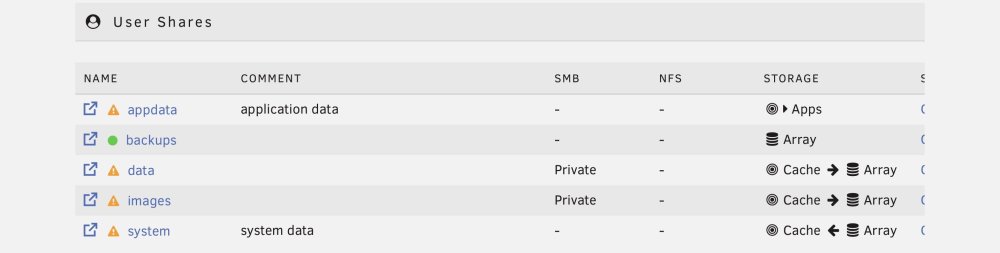
It looks like only the system share is set up that way, data and images are not. I took a picture in case i misunderstood, thank you very much for helping!
-
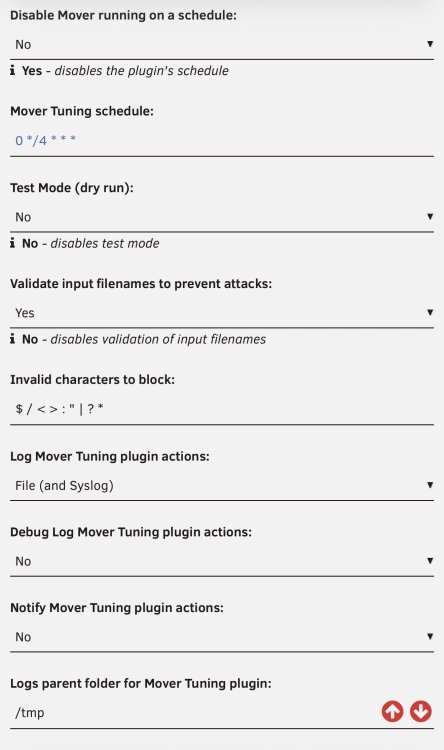
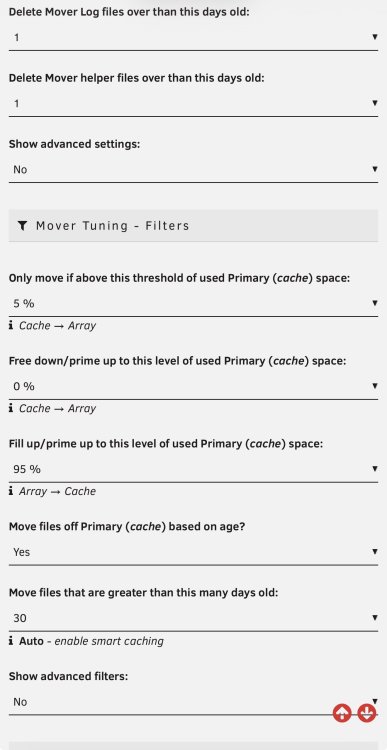
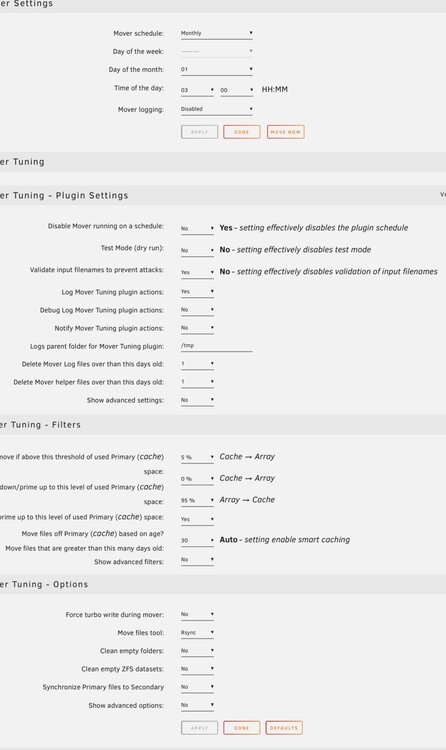
Any idea why mover doesn’t seem to be moving? Linked are my settings. I definitely don’t think all my files are newer than 30 days. Thank you for any help.

-
Wow, after all this time I came back here to try to remove remote path mappings and this seems to work, thanks so much! Question, if (in the download client settings) I add 'tv' as a category to sonarr (as it recommends), for example, I get this error: "You are using docker; download client qBittorrent places downloads in /mnt/user/data/downloads/tv but this directory does not appear to exist inside the container. Review your remote path mappings and container volume settings." The only way to resolve this would be remote path mappings, right? Which im trying to get away from. I guess according to the ai overview on google there's another way but it seems much more confusing and I dont want to do it lol. Thank you!
-
What does 0*/4*** mean in the mover tuning schedule? Do i change that? I actually didn’t even know they changed the behavior til mover moved everything. :/ Thanks!
-
Noticing that suddenly it’s taking forever to connect or just not connecting when i launch the web gui. Ideas? edit: seems fine on my macbook, problem is only on my iphone
-
Why is mover not moving? Is it because it’s on a schedule? I don’t want it to be on one but am confused by the terminology.

-
Ooh thank you! Just to clarify, so that i can make sure i’ve got it right, can you say what the 95% would do in your setup? I set mine to 0, 0, and 95 and set files to be moved based on age (30 days). So for me it would get up to 95% and then move anything 30 days or older. What it would do if all the files are less than 30 days i dont know; there used to be an option for that in the old mover tuning plugin (truthfully that one made a lot more sense to me). Thanks!




