





pidg30n
Members
-
Joined
-
Last visited
-
Hello, I had a linux OS installed before installing unraid. I am trying to passthrough the NVME and GPU to allow it to function like it did before I installed unraid on the system. I've enabled "Both" on the VM manager for PCIE passthru and checked the checkboxes for the NVME passthru underneath the other devices below USB. I've also selected the GPU and GPU sound card to be assigned. I've tried with and without a vbios file. I tried the community script to dump vbios but it dumps a tiny file that is too small.... The NVME is attempted to be passed through as the following device : Phison Electronics E16 PCIe4 NVMe Controller | Non-Volatile memory controller (3d:00.0) When I go to view logs the screen looks funky and I can't read the text, so I have to select all, and copy then paste to a notepad. It looks like this... Here is the recent error I pulled by copying pasting from the obfuscated logs page. -accel kvm \ -cpu host,migratable=on,host-cache-info=on,l3-cache=off \ -m size=16777216k \ -object '{"qom-type":"memory-backend-ram","id":"pc.ram","size":17179869184}' \ -overcommit mem-lock=off \ -smp 8,sockets=1,dies=1,clusters=1,cores=4,threads=2 \ -uuid ca707230-6f2b-014f-e083-651f8ffc44a3 \ -display none \ -no-user-config \ -nodefaults \ -chardev socket,id=charmonitor,fd=41,server=on,wait=off \ -mon chardev=charmonitor,id=monitor,mode=control \ -rtc base=utc,driftfix=slew \ -global kvm-pit.lost_tick_policy=delay \ -no-shutdown \ -boot strict=on \ -device '{"driver":"pcie-root-port","port":8,"chassis":1,"id":"pci.1","bus":"pcie.0","multifunction":true,"addr":"0x1"}' \ -device '{"driver":"pcie-root-port","port":9,"chassis":2,"id":"pci.2","bus":"pcie.0","addr":"0x1.0x1"}' \ -device '{"driver":"pcie-root-port","port":10,"chassis":3,"id":"pci.3","bus":"pcie.0","addr":"0x1.0x2"}' \ -device '{"driver":"pcie-root-port","port":11,"chassis":4,"id":"pci.4","bus":"pcie.0","addr":"0x1.0x3"}' \ -device '{"driver":"pcie-root-port","port":12,"chassis":5,"id":"pci.5","bus":"pcie.0","addr":"0x1.0x4"}' \ -device '{"driver":"pcie-root-port","port":13,"chassis":6,"id":"pci.6","bus":"pcie.0","addr":"0x1.0x5"}' \ -device '{"driver":"pcie-root-port","port":14,"chassis":7,"id":"pci.7","bus":"pcie.0","addr":"0x1.0x6"}' \ -device '{"driver":"qemu-xhci","p2":15,"p3":15,"id":"usb","bus":"pcie.0","addr":"0x7"}' \ -device '{"driver":"virtio-serial-pci","id":"virtio-serial0","bus":"pci.2","addr":"0x0"}' \ -netdev '{"type":"tap","fd":"42","id":"hostnet0"}' \ -device '{"driver":"virtio-net","netdev":"hostnet0","id":"net0","mac":"52:54:00:d7:dc:25","bus":"pci.1","addr":"0x0"}' \ -chardev pty,id=charserial0 \ -device '{"driver":"isa-serial","chardev":"charserial0","id":"serial0","index":0}' \ -chardev socket,id=charchannel0,fd=40,server=on,wait=off \ -device '{"driver":"virtserialport","bus":"virtio-serial0.0","nr":1,"chardev":"charchannel0","id":"channel0","name":"org.qemu.guest_agent.0"}' \ -audiodev '{"id":"audio1","driver":"none"}' \ -global ICH9-LPC.noreboot=off \ -watchdog-action reset \ -device '{"driver":"vfio-pci","host":"0000:01:00.0","id":"hostdev0","bus":"pci.7","multifunction":true,"addr":"0x0","romfile":"/mnt/user/isos/vbios/EVGA.RTX3090Ti.24576.220307_4.rom"}' \ -device '{"driver":"vfio-pci","host":"0000:01:00.1","id":"hostdev1","bus":"pci.7","addr":"0x0.0x1"}' \ -device '{"driver":"vfio-pci","host":"0000:3d:00.0","id":"hostdev2","bus":"pci.3","addr":"0x0"}' \ -device '{"driver":"usb-host","hostdevice":"/dev/bus/usb/001/006","id":"hostdev3","bus":"usb.0","port":"1"}' \ -device '{"driver":"usb-host","hostdevice":"/dev/bus/usb/001/004","id":"hostdev4","bus":"usb.0","port":"2"}' \ -fw_cfg opt/ovmf/X-PciMmio64Mb,string=65536 \ -sandbox on,obsolete=deny,elevateprivileges=deny,spawn=deny,resourcecontrol=deny \ -msg timestamp=on 2026-04-12 16:56:07.658+0000: Domain id=8 is tainted: high-privileges 2026-04-12 16:56:07.658+0000: Domain id=8 is tainted: custom-argv char device redirected to /dev/pts/0 (label charserial0) 2026-04-12T16:56:10.500035Z qemu-system-x86_64: VFIO_MAP_DMA failed: Invalid argument 2026-04-12T16:56:10.500075Z qemu-system-x86_64: vfio_container_dma_map(0x560570a206d0, 0x383000000000, 0x10000000, 0x154a70000000) = -2 (No such file or directory) 2026-04-12T16:56:10.500154Z qemu-system-x86_64: VFIO_MAP_DMA failed: Invalid argument 2026-04-12T16:56:10.500157Z qemu-system-x86_64: vfio_container_dma_map(0x560570a206d0, 0x383010000000, 0x2000000, 0x154a86000000) = -22 (Invalid argument) 2026-04-12T16:56:10.514203Z qemu-system-x86_64: VFIO_MAP_DMA failed: Invalid argument 2026-04-12T16:56:10.514214Z qemu-system-x86_64: vfio_container_dma_map(0x560570a206d0, 0x383000000000, 0x10000000, 0x154a70000000) = -22 (Invalid argument) 2026-04-12T16:56:10.514487Z qemu-system-x86_64: VFIO_MAP_DMA failed: Invalid argument 2026-04-12T16:56:10.514492Z qemu-system-x86_64: vfio_container_dma_map(0x560570a206d0, 0x383010000000, 0x2000000, 0x154a86000000) = -22 (Invalid argument) 2026-04-12T16:56:10.543535Z qemu-system-x86_64: VFIO_MAP_DMA failed: Invalid argument 2026-04-12T16:56:10.543547Z qemu-system-x86_64: vfio_container_dma_map(0x560570a206d0, 0x383000000000, 0x10000000, 0x154a70000000) = -22 (Invalid argument) 2026-04-12T16:56:10.543651Z qemu-system-x86_64: VFIO_MAP_DMA failed: Invalid argument 2026-04-12T16:56:10.543654Z qemu-system-x86_64: vfio_container_dma_map(0x560570a206d0, 0x383010000000, 0x2000000, 0x154a86000000) = -22 (Invalid argument) Here is my XML so far... <?xml version='1.0' encoding='UTF-8'?> <domain type='kvm' xmlns:qemu='http://libvirt.org/schemas/domain/qemu/1.0'> <name>PopOS</name> <uuid>ca707230-6f2b-014f-e083-651f8ffc44a3</uuid> <metadata> <vmtemplate xmlns="unraid" name="Linux" iconold="linux.png" icon="linux.png" os="linux" webui="" storage="default"/> </metadata> <memory unit='KiB'>16777216</memory> <currentMemory unit='KiB'>4194304</currentMemory> <memoryBacking> <nosharepages/> </memoryBacking> <vcpu placement='static'>8</vcpu> <cputune> <vcpupin vcpu='0' cpuset='0'/> <vcpupin vcpu='1' cpuset='1'/> <vcpupin vcpu='2' cpuset='2'/> <vcpupin vcpu='3' cpuset='3'/> <vcpupin vcpu='4' cpuset='4'/> <vcpupin vcpu='5' cpuset='5'/> <vcpupin vcpu='6' cpuset='6'/> <vcpupin vcpu='7' cpuset='7'/> </cputune> <os> <type arch='x86_64' machine='pc-q35-9.2'>hvm</type> <loader readonly='yes' type='pflash' format='raw'>/usr/share/qemu/ovmf-x64/OVMF_CODE-pure-efi.fd</loader> <nvram format='raw'>/etc/libvirt/qemu/nvram/ca707230-6f2b-014f-e083-651f8ffc44a3_VARS-pure-efi.fd</nvram> <boot dev='hd'/> </os> <features> <acpi/> <apic/> </features> <cpu mode='host-passthrough' check='none' migratable='on'> <topology sockets='1' dies='1' clusters='1' cores='4' threads='2'/> <cache mode='passthrough'/> </cpu> <clock offset='utc'> <timer name='hpet' present='no'/> <timer name='hypervclock' present='no'/> <timer name='pit' tickpolicy='delay'/> <timer name='rtc' tickpolicy='catchup'/> </clock> <on_poweroff>destroy</on_poweroff> <on_reboot>restart</on_reboot> <on_crash>restart</on_crash> <devices> <emulator>/usr/local/sbin/qemu</emulator> <controller type='usb' index='0' model='qemu-xhci' ports='15'> <address type='pci' domain='0x0000' bus='0x00' slot='0x07' function='0x0'/> </controller> <controller type='pci' index='0' model='pcie-root'/> <controller type='pci' index='1' model='pcie-root-port'> <model name='pcie-root-port'/> <target chassis='1' port='0x8'/> <address type='pci' domain='0x0000' bus='0x00' slot='0x01' function='0x0' multifunction='on'/> </controller> <controller type='pci' index='2' model='pcie-root-port'> <model name='pcie-root-port'/> <target chassis='2' port='0x9'/> <address type='pci' domain='0x0000' bus='0x00' slot='0x01' function='0x1'/> </controller> <controller type='pci' index='3' model='pcie-root-port'> <model name='pcie-root-port'/> <target chassis='3' port='0xa'/> <address type='pci' domain='0x0000' bus='0x00' slot='0x01' function='0x2'/> </controller> <controller type='pci' index='4' model='pcie-root-port'> <model name='pcie-root-port'/> <target chassis='4' port='0xb'/> <address type='pci' domain='0x0000' bus='0x00' slot='0x01' function='0x3'/> </controller> <controller type='pci' index='5' model='pcie-root-port'> <model name='pcie-root-port'/> <target chassis='5' port='0xc'/> <address type='pci' domain='0x0000' bus='0x00' slot='0x01' function='0x4'/> </controller> <controller type='pci' index='6' model='pcie-root-port'> <model name='pcie-root-port'/> <target chassis='6' port='0xd'/> <address type='pci' domain='0x0000' bus='0x00' slot='0x01' function='0x5'/> </controller> <controller type='virtio-serial' index='0'> <address type='pci' domain='0x0000' bus='0x02' slot='0x00' function='0x0'/> </controller> <controller type='sata' index='0'> <address type='pci' domain='0x0000' bus='0x00' slot='0x1f' function='0x2'/> </controller> <interface type='bridge'> <mac address='52:54:00:d7:dc:25'/> <source bridge='br0'/> <model type='virtio-net'/> <address type='pci' domain='0x0000' bus='0x01' slot='0x00' function='0x0'/> </interface> <serial type='pty'> <target type='isa-serial' port='0'> <model name='isa-serial'/> </target> </serial> <console type='pty'> <target type='serial' port='0'/> </console> <channel type='unix'> <target type='virtio' name='org.qemu.guest_agent.0'/> <address type='virtio-serial' controller='0' bus='0' port='1'/> </channel> <input type='mouse' bus='ps2'/> <input type='keyboard' bus='ps2'/> <audio id='1' type='none'/> <hostdev mode='subsystem' type='pci' managed='yes'> <driver name='vfio'/> <source> <address domain='0x0000' bus='0x01' slot='0x00' function='0x0'/> </source> <rom file='/mnt/user/isos/vbios/EVGA.RTX3090Ti.24576.220308.rom'/> <address type='pci' domain='0x0000' bus='0x03' slot='0x00' function='0x0'/> </hostdev> <hostdev mode='subsystem' type='pci' managed='yes'> <driver name='vfio'/> <source> <address domain='0x0000' bus='0x01' slot='0x00' function='0x1'/> </source> <address type='pci' domain='0x0000' bus='0x04' slot='0x00' function='0x0'/> </hostdev> <hostdev mode='subsystem' type='pci' managed='yes'> <driver name='vfio'/> <source> <address domain='0x0000' bus='0x3d' slot='0x00' function='0x0'/> </source> <address type='pci' domain='0x0000' bus='0x05' slot='0x00' function='0x0'/> </hostdev> <hostdev mode='subsystem' type='usb' managed='no'> <source> <vendor id='0x0b05'/> <product id='0x190e'/> </source> <address type='usb' bus='0' port='1'/> </hostdev> <hostdev mode='subsystem' type='usb' managed='no'> <source> <vendor id='0x1ea7'/> <product id='0x0066'/> </source> <address type='usb' bus='0' port='2'/> </hostdev> <watchdog model='itco' action='reset'/> <memballoon model='none'/> </devices> <qemu:commandline> <qemu:arg value='-fw_cfg'/> <qemu:arg value='opt/ovmf/X-PciMmio64Mb,string=65536'/> </qemu:commandline> </domain>

-
That's the support forum I was trying to get the new address for... I think I figured it out. I have to log on to my server, go to try to recover my license, then click "Get support" and now it takes me to https://support.unraid.net/support/tickets/ where previously I think the url was just /support/ ... Got it.
-
I also can see my invoice on the invoice page, but it fails to load license details. I can download the invoice but I can not view the license key.
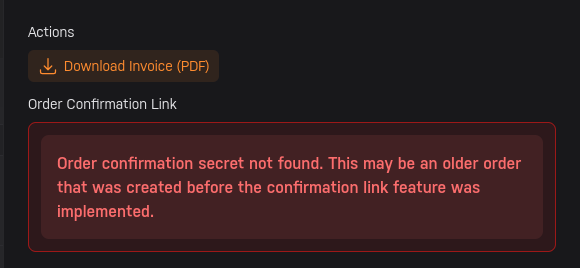
-
The licensing page shows no license on my account. I don't understand, did they take away my license because I hadn't logged in in a while? My original purchase date was 02/26/2023 ... My understanding is I can run one Unraid server with this license.
-
What I get here is "Replace eligibilityCannot replace" I don't see any option to recover my old license. After I sign in I see only this. License stateNo Keyfile GUID••••12E2 Active OS version7.2.4 (stable) Key linked statusLinked Server IP displayed here... Replace eligibilityCannot replace Storage Devices4 device
-
Hello, I haven't used unraid in a while and am setting up my NAS again finally. I need to transfer my license onto a new USB. The last time I did this in 2023, there was a different forum which seems to no longer be available at https://forums.unraid.net/support Since this is no longer there, I'm not sure what the process is now. Can someone point me in the right direction?
-
Ah yes, I did and it is all working just fine now. Thank you. The previous configs were restored... much better than what I expected! This product continues to impress and surprise me.
-
I deleted and recreated. Looks like the service has started and I have no dockers. Well that sucks... Should I plan on periodically backing up my docker image so if it is corrupt in the future I don't lose all my docker containers?
-
Same issue... Here's some more diagnostics. docker.txt looking much more interesting now, but I have no idea what it means. [redacted files]
-
Attempting upgrade from "next" branch to "stable" branch, 6.12.4-rc19 .. maybe that will help?
-
Docker log: time="2023-08-29T08:05:49-07:00" level=warning msg="containerd config version `1` has been deprecated and will be removed in containerd v2.0, please switch to version `2`, see https://github.com/containerd/containerd/blob/main/docs/PLUGINS.md#version-header" failed to start daemon: failed to dial "/var/run/docker/containerd/containerd.sock": unknown service containerd.services.namespaces.v1.Namespaces: not implemented time="2023-08-29T08:22:51-07:00" level=warning msg="containerd config version `1` has been deprecated and will be removed in containerd v2.0, please switch to version `2`, see https://github.com/containerd/containerd/blob/main/docs/PLUGINS.md#version-header" failed to start daemon: failed to dial "/var/run/docker/containerd/containerd.sock": unknown service containerd.services.namespaces.v1.Namespaces: not implemented
-
"Docker Service failed to start." Diagnostics attached. [redacted files]
-
Check on the (managed) switch or gateway side. Look to see if flow control is enabled. The settings for flow control will affect the maximum throughput. If it's on, try disabling it. See what happens. Play with that control, if it's there.
-
Whatever works for you. I know a lot of folks have graphics cards already, for graphics. So for them it's not an extra expense. Although I'm not sure how well it integrates with docker. I'm totally with you on using AI to parse older data in a different way and add value to old collections. Happy to hear about progress as you make it.
-
I'm just gonna reinstall windows on that VM. Idk what happened other than a hard shutdown probably corrupted the VM's boot volume. Even removing the GPU passthrough, it still failed to boot.

