





blacklight
Members
-
Joined
-
Last visited
Everything posted by blacklight
-
I can just tell you from my experience that Unraid is a pain in the *** with virtualization with EXACTLY this card (see my other posts) but that was never the fault of the NAS component of UNRAID itself. It always detected all drives attached to this HBA if I didn't bound it to VFIO and it also detected all other drives attached to the mainboard. Did you figures this out ? Otherwise go through the bios and search for every option you find according the LSI HBA and/or the HDDs attached. A separate Bios entry should be there for the HBA, what information is in there ? Did you flash both Controllers ? This HBA has two 8x SAS controllers ! Did you flash them yourself and how ? Did you validate IT mode (I only did this once successful with a booted efi version of sas3flash) ? Did you check the VFIO is not bound ? Did you check the PCIe slot with another device ? Is it maybe turned of in BIOS or by another BIFUR (Bifurcation) feature ?
-
So I gave it a try and implemented the "<maxphysaddr mode='passthrough'/>" and it WORKED for a few days for the Truenas VM !! So the VM can be started/stopped/restarted from within the VM and also Unraid, is performing under load and it seems like it won't crash after a long time on its own, thank you very much for the help there ! BUT (and that's a big but unfortunately) the LOG is still spammed with VFIO DMA MAP -22 errors AND the error seemed to progress into another VM but with the same symptom: I had a Windows 10 VM running in parallel with a passed through GPU and the same lock up happened: - Windows 10 VM (with GPU) failed, RDP froze (see attached syslog__.txt) - second Windows 10 VM continued running w.o. problems but a file transfer inside stopped, that made me curious -> more fatal the Truenas vm failed but continued running -> more precisely the pool attached to the HBA failed while the other pool that had the two VMs on it was still fine. -> so my guess here is: something inside the virtualization mechanism of Unraid failed and dropped all VFIO maps or attached devices - The Unraid guy continued to work, but VM, Docker & Settings-> VM/Docker froze again ! - I could download the syslog from the GUI - but I couldn't create a diagnostics package - after clicking on VM the GUI froze again I already implemented the "<maxphysaddr mode='passthrough'/>" for the Windows VM with GPU because I wasn't able to restart it. I always had to force shut down it and sometimes it froze randomly and the VM paused (I attached a log of that event). When I tried to use the Unraid shut down/restart one core went to 100% and the other stayed at 0% and the VM got stuck in this crashed state. The maxphysaddr didn't help here .... Is there any solution to avoid that all VFIO devices fail at once ? Do I have to use "VFIO Allow Unsafe Interrupts:" ? I wanted to avoid that because then the log is completely empty and I can't trace the errors. Thanks again @SimonF that helped me a lot, because the main part, the NAS, is working. But the VFIO trouble remains. I posted it here because I didn't want to start a new post because the symptoms of a locked up UI and failed VFIO devices are the same. I also added the two xmls of the VMs, the SOUNDCARD is passed through, so that's not the problem : P I will research more about that, because I found way more input for Windows/GPU/Gaming VMs than for HBA or Truenas problems, but still if some expert from Unraid has any clou of what part is faulty inside that VFIO construct I would be glad about a (technical) answer and a solution. Thanks. syslog__.txt paused vm log.txt xml windows gpu.txt xml truenas.txt
-
Found the solution myself after research and trying some variants of User Scripts (plugin) I settled with this variant: 1. Created two custom scripts, one executed after start of the machine, one executed before stopping the machine 2. Customize scripts with mkdir and mount e.g.: Start Script #!/bin/bash sleep 150 mkdir /mnt/remotes/fastVMs_ext mkdir /mnt/remotes/nextcloud mount -t nfs 192.168.0.116:/mnt/fast_data/fastNAS_Data/fastVMs /mnt/remotes/fastVMs_ext mount -t nfs 192.168.0.116:/mnt/main_data/PC_Data/nextcloud_main /mnt/remotes/nextcloud Stop Script #!/bin/bash umount -t nfs 192.168.0.116:/mnt/fast_data/fastNAS_Data/fastVMs /mnt/remotes/fastVMs_ext --lazy umount -t nfs 192.168.0.116:/mnt/main_data/PC_Data/nextcloud_main /mnt/remotes/nextcloud --lazy rmdir /mnt/remotes/fastVMs_ext rmdir /mnt/remotes/nextcloud The paths of the scripts are located on the flash (mounted it on my Mac after opening the share on the Unraid guy): -> /Volumes/flash/config/plugins/user.scripts/scripts/delayed mount of Icarus TrueNAS share -> /Volumes/flash/config/plugins/user.scripts/scripts/delayed mount of Icarus TrueNAS share - SHUTDOWN The modified file is always the script file. No restart of the machine needed, the script works right away. The scripts, for now, just wait to assume the VM had enough time to start. I will have a look into conditioned startup (check if VM is up before connecting to it's SHARES) and a potential custom shutdown script (first shutdown depended VMs, then UNMOUNT main NAS share, in my case Truenas, then Shutdown VM, then shutdown machine, to ensure no data loss or abrupt share unmount) later. I will update my results here to provide my information ; )

-
ACS Override = Multifunction and VFIO Allow Unsafe Interrupts = Yes, just gets rid of the log entries. Error persists: This is the UI stuck on a loading screen after trying to shut down. Syslinux Conf used:

-
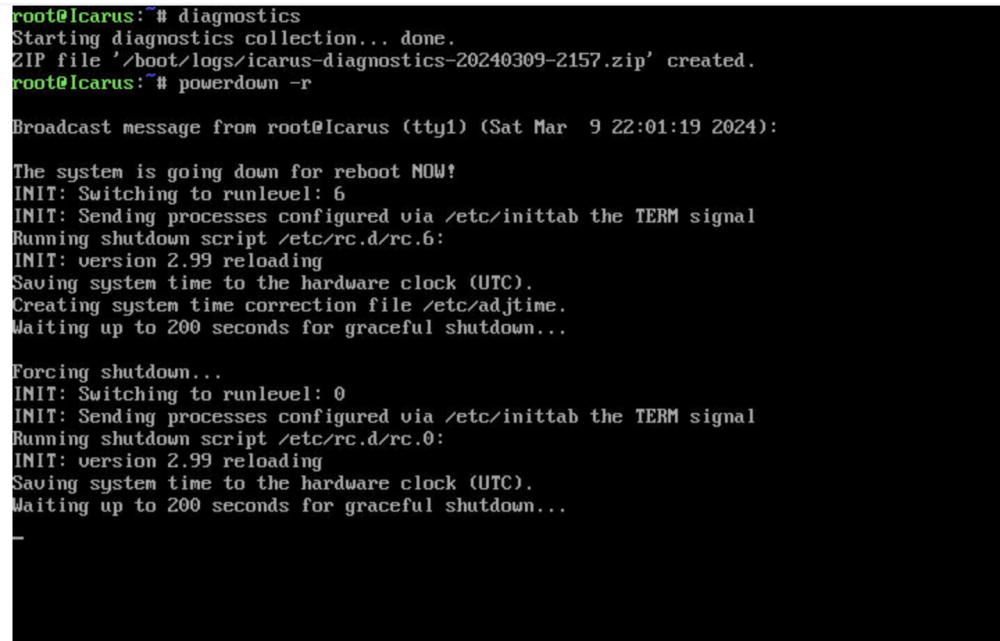
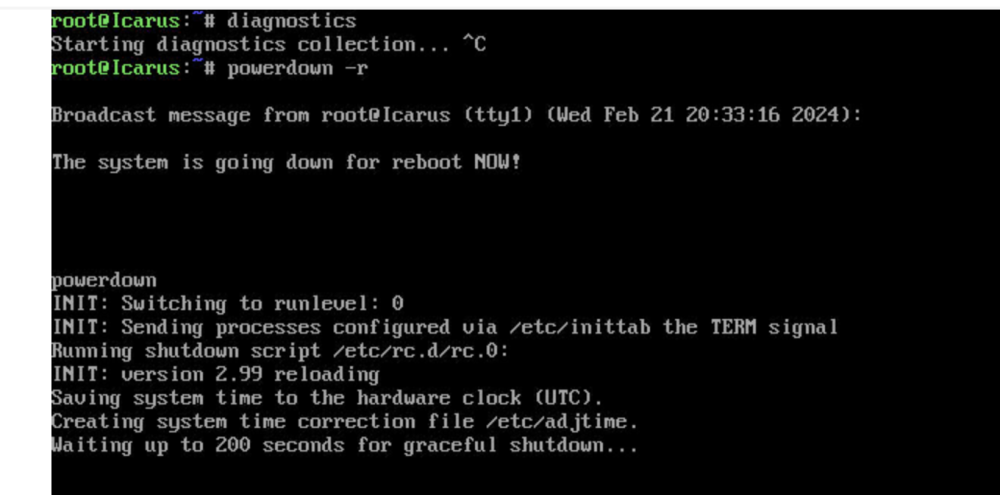
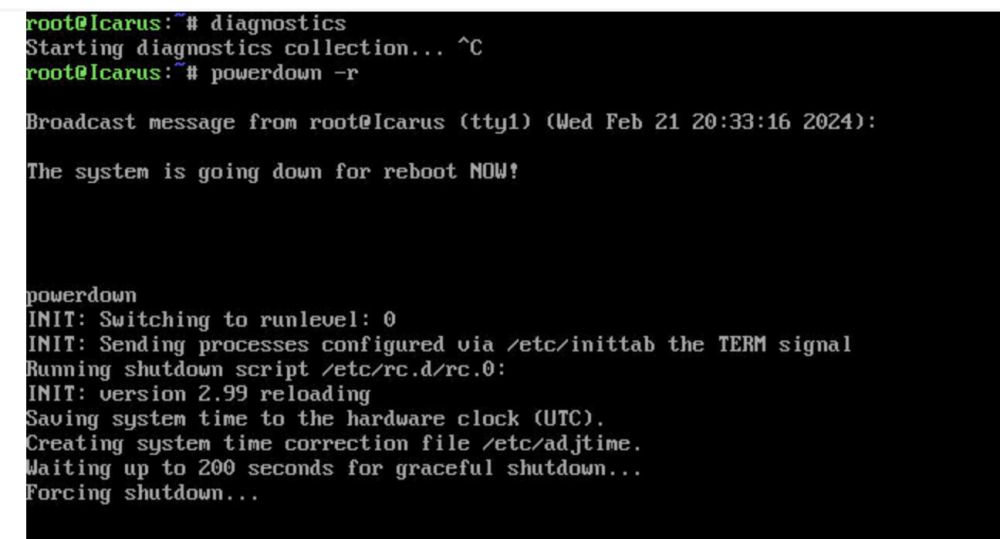
Unfortunately, that doesn't seem to solve it. I configured my Syslinux Conf and restarted the machine: Also attached again: newest diagnostics and syslog of the trueness vm. It always freezes on normal VM shutdown: still the VFIO_DMA_MAP -22 error. Force shutdown works tho. Unraid Shutdown from the IPMI looks like this (see the two "waiting 200 secs ..."), tried it two times, shutdown is not executed even if forced by Unraid, so I have to cut the power via IPMI command): But I solved a PART of the problem: The heavy SMB load to the Truenas vm works perfectly (even with advanced features like Dedup the speeds are pretty good for what I see -> up to 2Gb/s without bigger hickups). Thanks to the QEMU Dev/professional user "jarthur" on the QEMU Matrix channel. He responded immediately and send me this: which solved to problem under heavy load. My guess is that this is a downgrade to a lower QEMU version that didn't have this particular problem, which rendered my truenas vm with a passed through HBA useless. Thank you very much, again! This is the first success after weeks of troubleshooting. The amount of dma map errors (-22) also became less in my opinion buts is still there. The Syslinux Config (above) didn't change that. I would be glad about any new input for the Syslinux file! I turned on ACS OVERRIDE to MULTIFUNCTION, but left VFIO unsafe interrupts OFF (NO). I will try to add all the unsafe interrupts and test again - for now no luck! I feel like this is definitely a problem caused by Unraid, because the UI freezes after trying to access the VM tab and not before that, even if I already tried to shut down the nas vm. So if I go to the dashboard I still can control Unraid, but one click on VM, Docker or Settings->VM/Docker and the machine is unreachable... That must be a BUG, right? How can a failed VM influence the stability of the whole system after a weird sequence of changing tabs back and forth Still fighting to find a fix : ( icarus-diagnostics-20240309-1550.zip icarus-syslog-20240309-2149.zip

-
New error log after restarting. 0ver 6000 lines full with kernel error. No clue what is going on here : ( Also attached a screenshot of my IOMMU groups. Anyone any idea ? I am happy about any input .... syslog.txt Icarus_SysDevs.pdf
-
Attached also results for the "cat /proc/iomem" commond, with the distinct block for the HBA: bc100000-bc5fffff : PCI Bus 0000:0b bc100000-bc4fffff : PCI Bus 0000:0c bc100000-bc2fffff : PCI Bus 0000:0f bc100000-bc1fffff : 0000:0f:00.0 bc200000-bc23ffff : 0000:0f:00.0 bc200000-bc23ffff : vfio-pci bc240000-bc24ffff : 0000:0f:00.0 bc240000-bc24ffff : vfio-pci bc300000-bc4fffff : PCI Bus 0000:0d bc300000-bc3fffff : 0000:0d:00.0 bc400000-bc43ffff : 0000:0d:00.0 bc400000-bc43ffff : mpt3sas bc440000-bc44ffff : 0000:0d:00.0 bc440000-bc44ffff : mpt3sas bc500000-bc53ffff : 0000:0b:00.0 Both controllers seem to be bound correctly. One to the VFIO and one to the SAS module. iomem
-
ok I found something new, for whatever reason the same hiccup with the system happened again. The point where it happened was the start of a SMB transfer from a windows 10 VM (image located on an Unraid NOT Truenas drive) to my Truenas ssd share. I can clearly identify the error: qemu-system-x86_64: vfio_dma_map(0x14a74b57da00, 0x380000060000, 0x2000, 0x14af51e47000) = -22 (Invalid argument) 2024-02-22T06:10:33.177272Z qemu-system-x86_64: VFIO_MAP_DMA failed: Invalid argument There is no GPU handed through for the TrueNAS vm BUT a Broadcom HBA (Broadcom 9300-16i -> capacity for 16 internal drives on two 8 SAS controllers -> one controller bound to VFIO = 8HDDs for TrueNAS & 3x drives for Unraid on the other controller not bound to VFIO). The weird thing is that the SMB transfer was targeted to a RAID10 of 6 Samsung SSDs all of which are connected to the motherboard's SATA connectors. I had problems with the HBA in the past before upgrading to TrueNAS 13 so I am still afraid the HBA could be the failure point, but at this moment the system was accessing the other controller with 2x 500Gb ssds for Unraid directly (virtual image on the Unraid and not the Truenas drives !). And the Truenas vm should have written the data to the ssds attached to the mobo not the HBA. How can I handle this error ? Any ideas ? Why is the Unraid UI affected (freezing tabs)? Unraid is in the RAM it shouldn't be affected by failing connections to any drives ? Only the VM, Docker and certain Setting tabs are resulting in a frozen UI .... it doesn't make sense and still drives me crazy : ( Attached there are to different diagnostics that I was able to create while the UI was acting up and the extracted VM log where the VFIO error can be found. Thanks for any answer ... icarus-diagnostics-20240226-2326.zip icarus-diagnostics-20240228-2358.zip TrueNAS Icarus.txt
-
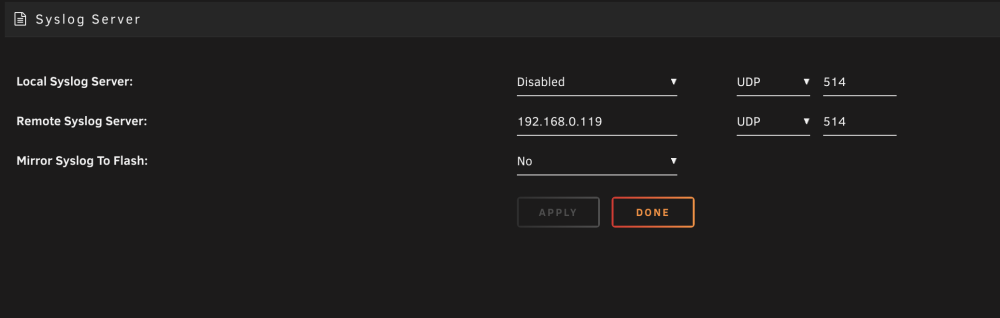
I was trying to get a syslog (graylog) server up and running on my second machine, but as always it's not that easy to get it to run properly. So I radnomly looked into my current log and a lot of errors were popping up over the day. The limiting request errors are actually pointing to the mac I am acessing the server with (via VPN). Is this a big deal ? Can I ignore the error messages ? Also in my syslog server there are 0 messages reported. Can I send a test message to the syslog server to validate it ? Something like "diagnostics *target ip of log server*" ? I will have a second look tommorow if any messages are reported but for now it seems like the syslog server option in Unraid is not working for me (attachted you can find the syslog configuration). icarus-syslog-20240223-0705.zip
-
I have a second server running for future backups, can I also stream the diagnostic log to a share of that machine ? It doesn't have much storage though (just a few gb left and only one HDD), could that result in a problem e.g. bottleneck ? I want to avoid using the same machine or a VM on the same machine, because if the VM fails first I obviously have no log at the failing point to begin with. Can you suggest a syslog server for truenas ? If not I will just try to get it set up with the infos I find and post the log here, as soon as I have one.
-
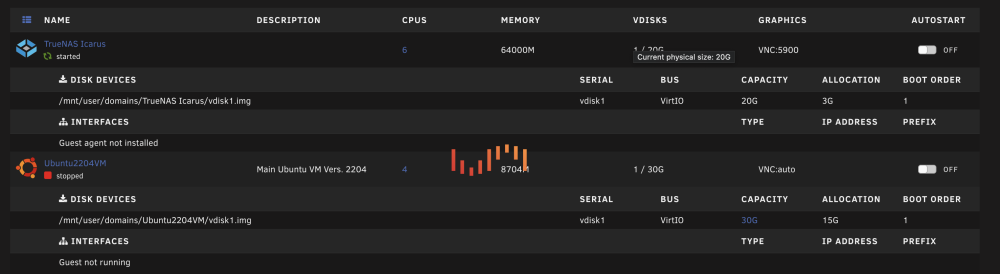
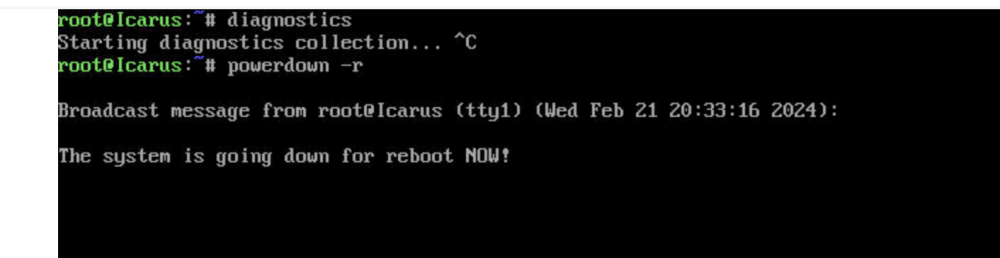
I have a few severe problems with my main Unraid system, that makes the system unuseable after 1-2 days. I have no clue what the reason for that is and a short disclaimer from the beginning: I am not able to get any diagnostics when the problem occures, at least I don't know a way for now that works. My system: - Unraid Version: 6.12.6 - 2x 500gb Samsung SSD (1x data/1x parity) dedicated for Unraid + Docker (but not VMs) over LSI-HBA (x4 -> 2 controllers, this one not STUBBED) - 128gb DDR5 - Docker: activated - nextcloud - swag - MariaDB - DynDNS (x 2) - VMs: - TrueNAS (Main nas system - always active) - 10x 4TB Iron Wolf over LSI-HBA (x4 PCIE -> 2 controllers, one STUBBED) in IT-mode and with dedicated Fimrware for TrueNAS - 6x 2TB Samsungs SSDs over Mainboard controller (STUBBED) - 2x Intel Optane (Stubbed) - Windows 10 VM - Ubuntu VM - Custom User cripts: - used to wait for mount of Shares from VM (until it's booted) and also for shutdown to have enough time to (lazy) unmount Problem: I set up my nextcloud docker and connected my SMB shares from truenas. The truenas Vm is the main part for data storage. The DynDNS and Swag docker instances worked fine, because I could reach my cloud from outside. After a few hours (I checked everything approximetely 12h later) my cloud was unreachable. Unraid GUI was partially reachable -> Settings, VMs & Docker didn't work (the UI just continued loading forever). And more problems: - Main Tab was displaying 100% load on 3 random cores BUT htop didn't - truenas vm could not be reached over the usual IP (ip not reported in either the fritzbox router nor my mikrotik switch -> I have two DHCPs) - truenas couldn't be reached either - nextcloud couldn't be accessed, so my guess is swag did also fail in some way - nexctloud CAN STILL be reached from inside the network -> the docker is still functioning (the only thing I can reach at the moment without restarting) - can not create diagnostic file over IPMI console (stuck forever)! - also system can not be shutdown (powerdown) -> had this problem for a longer time, it's stuck with "The system is going to reboot". After another 2 days (I let the system run to see if diagnostics are created): - UI not reachable at all in two different browsers - IPMI console still reachable - Unraid can still be pinged Orderly shutdown via IPMI leads to: Second orderly shutdown AND --> nothing happend. System doesn't respond... It frustrates me ... I really want to depend on the system. I want to use it as my main storage and Homelab for work, university and private data but at the moment I can't rely at all on Unraid. I put hundreds of hours into setting up the system and fine tuning everything. I had huge problems with the truenas virtualizatrion. It was throwing IOcapability errors on the HBA (iscisTaskFull) for months despite updating the HBA firmare and going through current tutorials step by step + troubleshooting. After a truenas update from version 12 to 13 the unraid VNC didn't print any error messages anymore. Now Unraid is acting up and leads to failing systems all over the place after a few hours and I can't find anything according these errors. Can please someone explain HOW to get diagnostics? I can still access the USB share, but that's it. Of course I can restart the system via force IPMI shutdown, but it will be the same after a few days or just hours. I really want to depend on the system but right now it's pretty much a very expensive pile of electronic scrap.... I really want to stick with Unraid because I love so many features. But if basic virtualization and management features lead to so much troubleshooting work, I really consider switching to another hypervisor. All the knowledge and work would be for nothing though. Looking forward to any help! Please let me know any infromation you need and how to get diagnostics, I will try to provide as much information as possible. Thanks in advance!
-
I am looking for a startup script to mount an NFS share delayed and under the condition that a certain vm is online, like the following: 1. wait 60 secs 2. check vm #.. -> if its online continue 3. wait 180 secs 4. mount share Reason for that: I followed one of Space invader ones tutorials to virtualize TrueNAS. This is going to be my main/central NAS and I am also hosting any futures storages (SMB/ NFS/ AFS shares, scsi's etc.) and disk from it. Unraid itself barely has storage. Just 2x 500gb ssds for plugins, the most important vm's etc. Now I want to use the virtualization power of Unraid and start am Windows 10 VM which is located on a NFS share of the virtualized NAS. So far so good the windows vm works and is tremendously fast (Just changing the windows from my browser to Remote Desktop is enough to boot into windows, I was really surprised to see these speeds). The only problem is that after a reboot of Unraid, it tries to immediately mount the share which I guess fails and Unraid doesn't retry (I disabled the Mount button and it was not mounted after reboot, auto mount was on). The vm obviously doesn't work anymore and just boots into the EFI shell. That's why I am asking for a script like mentioned above. I use Unassigned devices. Would appreciate any answer And please be nice about the virtualization, I know it polarizes
-
Did you wire up the PSU or is there an internal (dedicated) rail plug for the PSU in the rack case ? I don't know the system that's why I ask. But my IPMI is also not showing any PSU information because the headers are not attached to anything. Mainly because I use a commercial Corsair PSU and not an industrial server one The corsair also has a dedicated software to check the wattage etc, for this I have it hooked up to a internal USB (not the IPMI tho), so I could watch the stats in for example a windows vm but the IPMI can't handle the custom sensor data stream. My guess is you need all dedicated server hardware for this. Probably better to open up a new thread
-
Also an interesting setup. Are you going for a media center (Plex etc. )? I am asking because of the many m2/nvmes You definitely don't need a GPU for the IPMI ! As I mentioned it could even make your day worse (in Legacy boot mode). What you could do: you could hook a dedicated ASUS VGA to IPMI cable to the GPU, but depending on the use case that is not necessary (my guess is you would only need it, if you do virtualization -> passing through cards and you want to be able to switch OSs on the fly for testing etc. -> again: as long as you only boot UEFI you can plug in what ever you want and assuming you didn't screw up any settings the IMPI should work with or without a dedicated GPU) Keep in mind that the last two slots are only x4 and ONLY gen3 so you are going to see worse performance with your 3060. Depending on the use case (AI for example, that's what I planned -> stable diffusion etc.) you can maybe ignore the worse performance. Anyway would be nice if you could keep us up to date about your system; would be interested how it is going for your PCIe monster. And one last question, why are you going for 1G LAN only ? with that much storage wouldn't at least 10G be nice Just curious ?
-
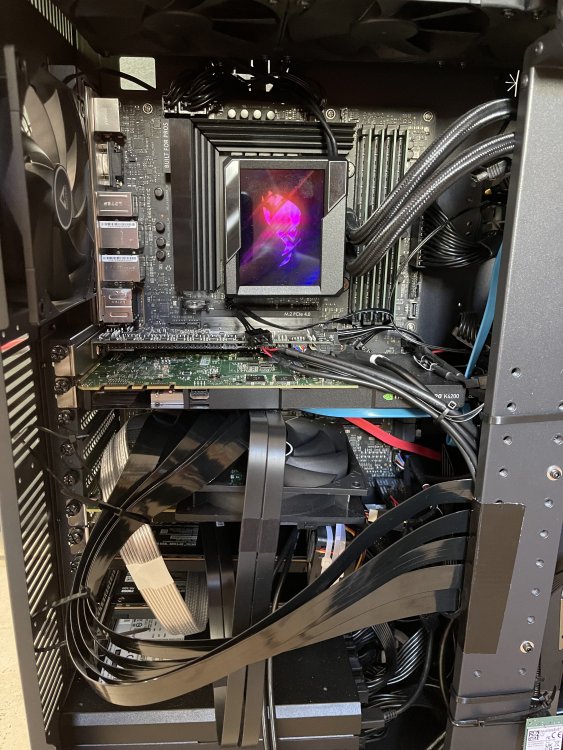
I have a picture of my layout. Definitely would suggest water cooling, that leaves plenty of space around the VRM. This is the mentioned asus ryujin 2. Directly underneath the small IPMI. Cable management is poor, but my goal was just to connect everything and I couldn't bend the riser cable more. So every PCI (including all M2s except the CPU one) are hooked up. I went to full-size PCIe from the m2s with 2 different adapters. If you have space I would suggest using the m2 to miniSAS or U.2, that is more elegant, but if you need to hook up something different than storage this would be the way to go in my opinion. Every card is properly recognized, but I didn't performance test them yet, because I have problems with the LSI HBA, which gets extremely hot btw (that's why I put 3 fans next to it, one big, 2 small switch fans).
-
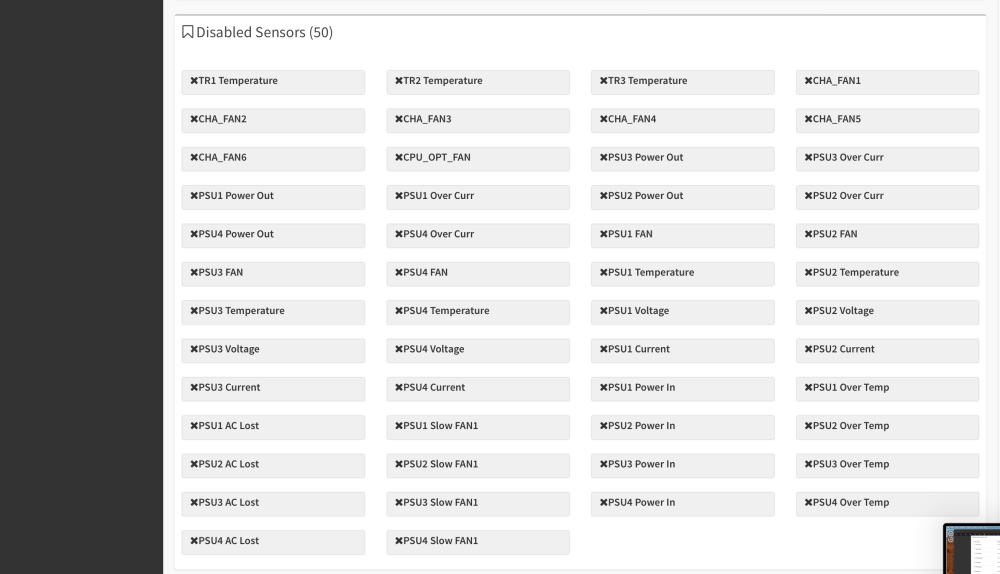
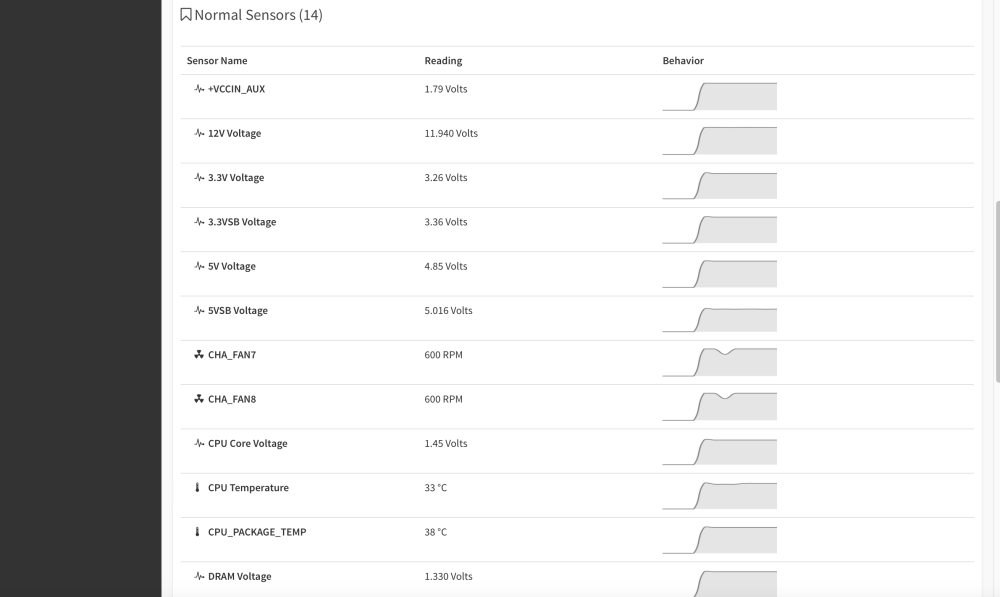
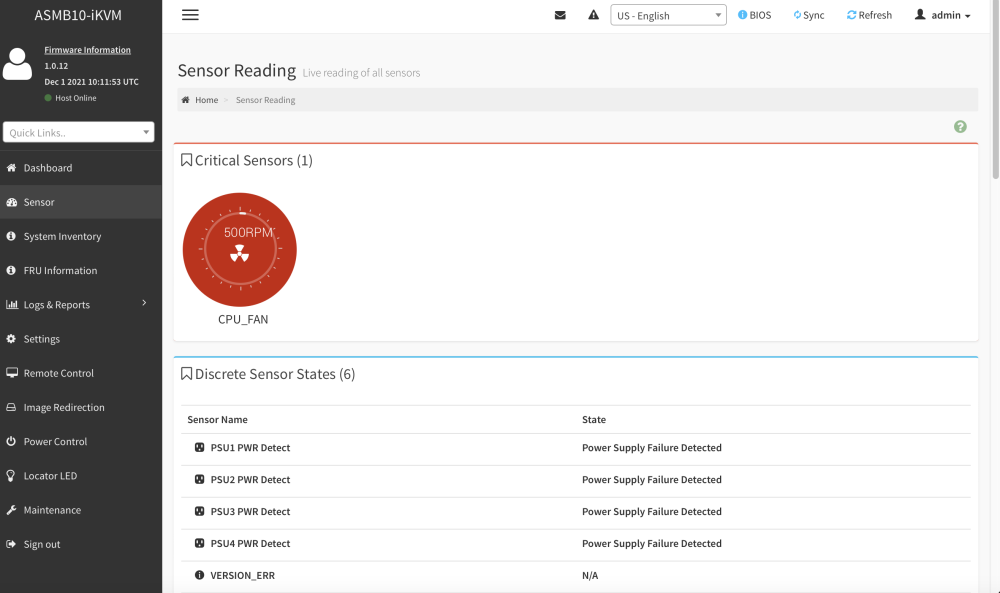
Also sry for the late reply. Here you go. The IPMI card is really nothing special. At the moment it is making me pull out my hair. I have major problems with the video for which I basically need the IPMI card (BIOS control, which is btw better in terms of sensors, Booting alt. OS). Legacy boot is not possible with Graphics card(s) installed -> BIOS will always grab the other card despite any BIOS settings (iGPU etc.). Also Secure boot messed up my setting now I am fighting for a week to get video back even with CSM disabled. CMOS resets sounds like an awesome feature ... NOP it resets the IPMI too !! So someone needs to restart the machine by hand, and I couldn't confirm an actual BIOS reset. So if you need the IPMI just for sensors, or starting/stopping the machine, it is actually pretty cheap. I don't know if the disabled sensors are software side disabled or just not hooked up. A few cables were not shipped with the card :/. If you need to rely on solid controls avoid the 100 bucks and put them into a PI KVM or something similar (Opinion from an engineer, I am not a IT guy but I am working, or trying to, with the IPMI for 3 months now and I hate it more every day ....)
-
Oh man, had a lot of things to do so I wasn't able to visit the forum in the last month, sry. Probably you don't need it anymore but I used the asus ryujin 2 (Display is unfortunately useless in my chassis). I chose this AIO, because it's compact with a big radiator and it cooles the VRM with an additional fan on the head of the cooler. Also I found decent tests and reviews, which was actually not that easy for other AIOs in terms of thermal performance. BTW: the IPMI is designed to be placed in the first slot. My guess is it is going to work in any PCIe, but considering the cable management I don't know if it would fit any layout. It is pretty slim tho.
-
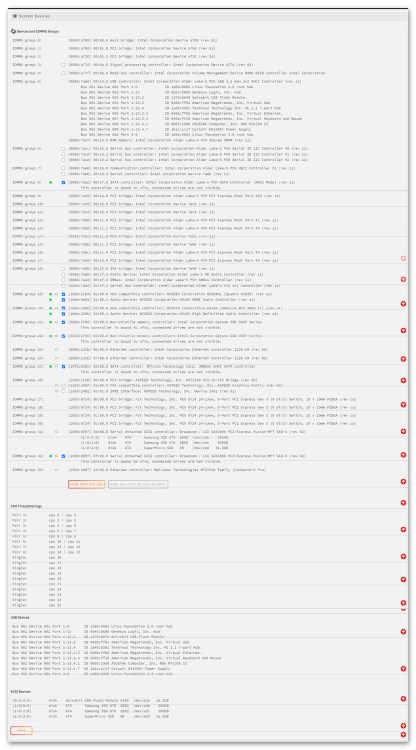
I got the W680-M Ace SE with the IMPI card actually it has a better pcie layout in my opinion. Unraid works without a problem. Specs: i9 - 13900KS 128ECC RAM (have to look up the brand if you need it - was quite a pain to find ECC -> its recognized even in VMs /Singe bit ECC) PCI Layout: - PCI x1: IPMI Card - M2 (CPU): empty for future NVME - PCIe x8 (gen5 - bifur): Quadro K4200 (for VM testing) - PCIe x8 (gen5 - bifur): RTx3060TI (for VM testing) - PCIe x4 (gen3): Broadcom 9300-16i (HBA) with 14 hard drives attached - PCIe x4 (gen3): Mellanox ConnectX-3 Pro for max 20Gbit - 2x M2 (x4 - chipset): optane 900P (for NAS testing, using a adapter M2 to fullsize PCIe) For now everything is recognized and booting Unraid was a charm, unfortunately I have problems with virtualizing a NAS, but for now it seems like a software problem. I will update the post if I find a incompatibility (IOMMU problems or similiar). The IOMMU layout seems solid btw, no suprises there for now, just that the two onboard SATA groups (1: 4x sata, 2: SLIM-SAS which has a PCIe mode) are in the same group, but I already thought that this would be the case. And also the IPMI is a nice bonus in the combo package. Its a little bit expensive compared to a custom one (have no experience there) but it just works. I am currently on another continent for a year and the access and controlling power over VPN with the IPMI card is a real relieve. I attached a screenshot of the IOMMU groups, because I had trouble finding them online. Hope they will be useful. Let me know if you need more information
-
Thanks for the reply. So that’s nice … both mainboards have a detailed documentation, but they still don’t answer the simplest questions why aren’t these workstation mainboards like normal gaming mainboards ? They are extremely simple to understand, why can’t they even communicate the TDP ? That’s the simplest detail to mention in the compatible CPU part of the documentation. Anyway, if someone could explain to me how there are so many people putting the 200watt+ K cpus into the X13SAE that would be nice. Thanks in advance
-
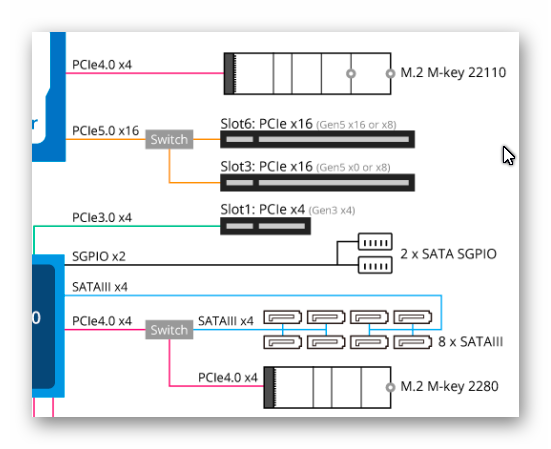
I am sry. It could be the case that I misunderstood the wiring diagram (in the manual and also on the website). It shows a switch for the two PCIe slots (16/0 or 8/8) and the 4x sata slots + the m2. Assuming they both work they same it can either operate in one mode. I assumed this goes for passing through the sata if no m2 is plugged in. Or is it actually splitting the lanes, so that just the badnwith of the m2 decreases if 1 to 4 satas are plugged in ? My assumption was based on the keyword switch that either enables a splitter or disables it and therefore either lets you access the m2 or sata. I also found noting in the documentation about that, I just guessed at this point. Do you use this board ? And if so, can you share some experiences with it (actual TDPs, connections -> what hardware you use)? Thanks in advance !
-
I stumbled upon this post, because I was also planning to use the X13SAE-F with an i9 -13900KS, but a few questions came up: - Isn‘t the 125W TDP of the X13 a problem when using any 13th i9 except the 13900T ? I am planning to use a little bit stronger then the Tray variant, because I also want to run a few VMs in my homelab, but just if it is a good performance gain considering potential boost advantages from the normal 13900 (still 219W ? problematic ?) If the advantage is just minimal I would buy the tray variant for better efficiency. Or maybe undervolt the K/KS - also one idea was to use all PCIe lanes (there are a few nice gaming mainboards for this – BUT no ECC ☹): o SLOT7: first GPU probably RTX3060ti or Quadro K4200 o SLOT5: a SAS, I didn’t make up my mind about one, but I would prefer a x4 to hook up a bunch of HDDs and use the onboard SATA for faster sata ssds| I also wanted to try a riser cable for slot 5 bceause of the GPU. Good/bad idea ? o SLOT4: a second GPU: definitely a Quadro K4200 o SLOT2: possibly a Intel X550-T2 NIC or similar, the idea was to utilize both 10Gb/s ports, which should add up over the PCIe 3 x4 if I calculated this correctly Hopefully I didn’t overlook any potential/initial problems. As you see I want to put the NIC and SAS on x4 lanes, so that I don’t waste the two x8 lanes, where I want to put my GPU -> Why ? Because I have them lying around and I want to utilize them in my home lab (Unraid passtrough -> one for gaming one for CAD). But first I want to ensure if it isn’t a significant disadvantage to put the SAS and NIC on slower PCIe lanes ? Does someone have experience with that ? I am btw fine with two x8 GPUs instead of one x16, the difference is pretty small. I would appreciate any feedback about the CPU and PCIe layout. Thanks in advance. Also I stumbled over the Gigabyte MW34-SP0 rev. 1.1 (as probably most of you guys) and I had quite a few concerns about this mainboard: - “only” DDR4 - I found no max CPU TDP for this board - one less PCIe lane -> ok one more m2 place, but the wifi one is useless + I have to disable four SATA ports for the fourth m2 slot-> (don't know if this is true, see below) together with one less PCIe for a potential SAS this is quite a bummer - one idea would be to use a m2 to sata adapter, but it is a waste of precious NVME speeds and also there could be compatibility/ connector count (there are just a small number of sata ports on it) problems - same goes for m2 to 10gb lan -> also seems a waste Can anybody still recommend this board ? Obviously, I targeted ECC as a K.O. criteria, as you can see through the mb selection (are there any other boards ? didn’t find any ATXs next to the mentioned ones):D, because I want to maximize stability. The planned machine will also run virtualized TrueNAS with 8 drives in Raid6 and will be secured with a APC UPS (planed is 24/7). I need probabbly two small m2s for the LOG cache of TrueNas so the Gigabyte would be better in this case. Or are there any 1x m2 to 2x smaller m2 boards the ssds only need to fit 32gbs thats a huge waste for one slot each :"( (RAID1 is a K.O. criteria for these two NVMEs). I would also appreciate comments on the general setup. And sry for the long post, but I wanted to give the full context 😊





