





Gobblerpl
Members
-
Joined
-
Last visited
-
I have exactly the same problem witch VPN as kolofotias. It was working for months and stoped. Any solution? Edit: Works after server restart
-
Hi, In logs I have a lot of [Info] Radarr.Http.Authentication.BasicAuthenticationHandler: Basic was not authenticated. Failure message: Authorization header missing. Radarr works but I noticed stoped making backups, have some problems with automatic queue refreshing and I can't import any movies. I tried backup but problem still exist. Any ideas? I found solution: I changed authentication required to disabled for local adresses. Is it safe?
-
Hi, For the past two years of my journey with Unraid, Sonarr has been running without any issues. Last week, I updated to version 7.0. Since then, Sonarr has been having problems with the database. Initially, I had no access to the GUI, and the logs showed: [v4.0.12.2823] NzbDrone.Core.Datastore.CorruptDatabaseException: Sonarr failed to start: Database file: /config/sonarr.db is corrupt, restore from backup if available. See: https://wiki.servarr.com/sonarr/faq#i-am-getting-an-error-database-disk-image-is-malformed I restored from a backup. A day passed. I open Sonarr, I have access to the GUI, I can add series, but I can't use interactive search because a message about a database problem appears. Then I did a restore from a Sonarr settings backup. Today, I open the app and again there's no GUI, and again the logs say: Sonarr failed to start: Database file: /config/sonarr.db is corrupt, restore from backup if available. See: https://wiki.servarr.com/sonarr/faq#i-am-getting-an-error-database-disk-image-is-malformed The backup helps but only temporarily. The database issue keeps returning. Now after another backup in GUI there is a text "disk I/O error disk I/O error" Other apps seem to work like always. What should I do? sowia-diagnostics-20250124-1410.zip
-
Every few months, I suddenly lose access to my apps. I check Unraid and container isn't running. I assume it crashes for some reason, but I don't see anything in the logs. Is it possible to write a script that would automatically start it?
-
Hi, After a very long time of seamless usage, I suddenly lost access to the WebUI through Tailscale. Previously, after configuring the VPN, I didn’t have access via local addresses, but it always worked through Tailscale. I’ve tried reboots. Can you help me? Edit1: Also Prowlarr lost conncection with qbit. Solution: I just needed to download new config file from my vpn.
-
Doesn't work.
-
Is it possible to configure the mover to move files based on age and when the cache is over 60% full? Currently, when I set it to move files based on age and Move All from Cache-yes shares pool percentage, it only works based on age.
-
I found serious problem. This plugin cause flash backup every 15 minutes!
-
Ljm42 thank you very much! It was new plugin DriveStandbyMonitor.
-
Yes I have but weekly.
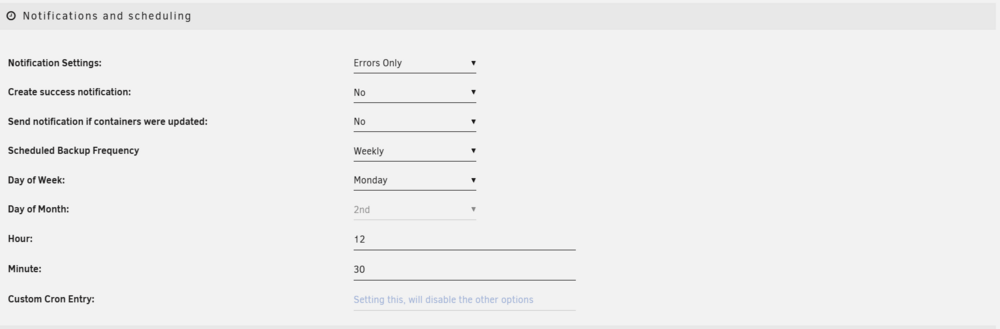
-
Thank you for reply. I checked. No scripts.
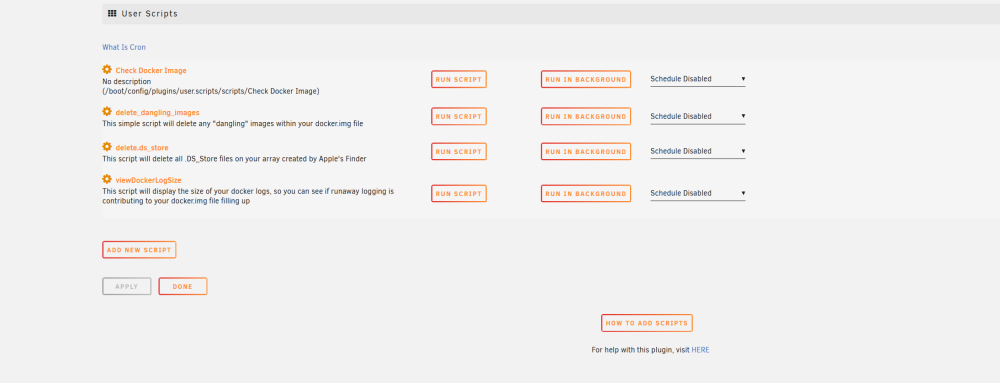
-
I think it's fixed now. Edit: No it's not
-
Hi, in log I see flash backup every 15 miunutes. How to find the cause? I don't know what could be causing changes so often and regularly. I can't see anything in the file activity plugin. I also tried disabling Docker, but the problem still persists. This has been happening for several days. Can you help me please? diagnostics-20240429-0904.zip
-
No, directly connected to router
-
Thank you I will try


